Wrong person reply templates that win the right intro fast
Wrong person reply templates to ask for the right owner politely, get a clean intro, and log the new contact so follow ups go to the right person.
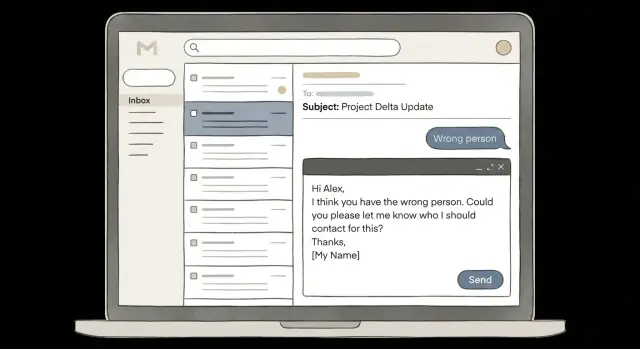
What a "wrong person" reply usually means
A "wrong person" reply is usually a routing signal, not a rejection. They’re saying, "I don’t own this," not, "Never contact this company again."
It can even be a positive sign. Your email hit a real inbox, and someone bothered to answer. That usually means your deliverability is decent and your targeting isn’t wildly off.
Most "wrong person" replies come from a few common situations: your data is outdated, the inbox is shared (info@, sales@, support@), an assistant is screening for an exec, titles don’t match how you named the role (RevOps vs Sales Ops), or you picked the right company but the wrong team (IT vs Security, Marketing vs Growth).
Notice what they didn’t say. Most of the time they’re not judging your offer - they’re correcting your map.
That’s why the next message matters more than the first. The first email earns attention. The reply is your chance to turn that attention into the right name, the right inbox, and a real conversation.
Example: you email a Head of People about onboarding. They reply, "Not me, talk to IT." If you respond with a short, polite request for the right owner, you might get a direct email or a clean redirect. If you push your pitch again, you teach them that replying was a mistake.
Treat the reply as a data update. The company may still fit, but the contact record needs to change. Your "wrong person" templates should aim for one outcome: the correct owner, plus permission to move the conversation to them.
Choose the right goal for your reply
A "wrong person" reply can mean a few things: they’re not the owner, the owner exists but uses an alias inbox, or they want you to stop.
Pick one clear goal for your next message. Most of the time it’s one of these:
- Ask for the right owner (name or title)
- Ask for the right team alias (shared inbox)
- Close the loop politely and stop
Trying to do two at once usually makes the reply feel needy or salesy.
A quick way to choose based on what they wrote:
- Short and neutral ("Not me") -> ask for the correct owner’s name or title.
- Helpful ("Try Finance Ops") -> ask for a specific person or the team alias.
- Annoyed ("Stop emailing me") -> apologize, confirm you’ll stop, and don’t ask for referrals.
- Specific ("We already have a vendor") -> decide if it’s worth one clarifying question; otherwise end it.
- Unclear ("Wrong contact") -> ask one tight question: "Who owns X?"
When should you ask for an intro vs just a name? Ask for an intro only when they sound open, or when they already pointed you to a team. If their reply is cold or irritated, asking "Can you introduce me?" adds pressure. In those cases, asking for a name (or role) is lighter and more likely to get a response.
A simple rule: if they gave you a breadcrumb, you can ask for a handoff. If they gave you nothing, ask for direction, not effort.
Once you pick the goal, keep the reply to one sentence of context and one question.
Sound helpful, not pushy: tone rules that work
A "wrong person" reply still means you reached a real person. Make the next step feel low-effort and low-risk.
Keep your reply tight. One sentence of context is enough, then ask a single question. Long explanations read like pressure, even when you don’t mean them that way.
Use permission language. Phrases like "If you can point me in the right direction" or "If it’s easy to share" give them an exit. A lot of people won’t forward sales emails or share colleague details unless it feels safe.
Avoid guilt and urgency. "Quick favor" and "who should I talk to?" can sound scripted. Nudges like "it takes 10 seconds" turn a simple routing request into an obligation.
Make the answer easy to type in one line. The best responses are just a name, a role, or a team.
A few tone checks that tend to help:
- Lead with a quick thank you, then ask the question.
- Ask for a role/title if they don’t know a name.
- Offer two reasonable options, not a long menu.
- Give a graceful exit ("No worries if you’re not sure").
Also keep your signature light. A big block of titles, slogans, and links makes a simple routing question look like a pitch.
Templates: ask for the right owner (3 short options)
A "wrong person" reply is only useful if the next step is easy. Ask for the right owner by name or role, keep it short, and give them an out.
Template 1: one-line redirect request (name or role)
Use this when you want the simplest possible handoff.
Reply template
Hi [First name] - thanks for letting me know. Who’s the right person for [topic] at [Company]?
If you already know the likely owner, make it even easier:
Hi [First name] - thank you. Should I reach out to [Name] or whoever owns [topic]?
Template 2: ask for the right title plus team name
Use this when ownership depends on how the org is set up.
Reply template
Hi [First name] - appreciate it. What role or team owns [topic] at [Company] (for example Marketing Ops, RevOps, or Sales Ops)?
Optional one-line clarifier to reduce back-and-forth:
If it helps, this is about [one-line outcome]. Which team would you point me to?
Template 3: ask for the shared inbox or alias
Use this when people avoid sharing names, or when the company prefers routing through an inbox.
Reply template
Hi [First name] - thanks. Is there a shared inbox I should use for this (like partnerships@, purchasing@, or marketingops@)?
Low-pressure add-on:
No worries if you can’t share a name - an alias works too.
Simple subject line option for the follow-up reply
If you’re replying in the same thread, you usually don’t need a new subject. If you start a fresh email to the suggested person, keep it plain:
- Subject: Quick question - who owns [topic]?
When they reply with a name, confirm you’ll contact that person and thank them. Then log the new contact right away so your reply handling stays clean.
Templates: ask for an intro without putting them on the spot
When someone replies "wrong person," they might be trying to help, but they also want the thread to end quickly. Keep the next step easy and optional.
A good ask has two parts:
-
One line that shows why it’s relevant
-
A low-pressure way to help (or a lighter fallback)
Template 1 (clear opt-out): quick intro, no pressure
Subject: Re: {original subject}

Thanks, {FirstName} - appreciate it.

I’m reaching out because we’re helping {company type} with {specific outcome}, and I’m trying to find who owns {area} at {Company}.

If you’re comfortable, could you intro me to the right person? If not, no worries at all - a name or title is still helpful.

Best,
{YourName}
Template 2 (forwardable blurb they can paste): make it effortless
Use this when you sense they might forward, but you don’t want to ask them to write anything.
Subject: Re: {original subject}

All good - thanks, {FirstName}.

If it’s easy, could you forward this to the right owner?

---
Hi {Name}, I reached out because {1-line relevance}. If you’re the right person for {area}, would you be open to a quick chat? If not, who should I speak with?
Thanks,
{YourName}
---

Either way, what role/title usually owns {area} on your side?

Thanks,
{YourName}
Template 3 (permission to mention their name, or stay anonymous): reduce social risk
Useful when the responder feels cautious.
Subject: Re: {original subject}

Thanks, {FirstName}.

Would it be okay if I mention you suggested I reach out, or would you prefer I keep it generic?

Context in one line: {1-line relevance tied to their company/industry}.

Who’s the best person for {area}? Even just a name is perfect.

Best,
{YourName}
Keep your relevance line specific and simple. Examples:
- “Noticed you’re hiring SDRs - often that’s when teams tighten outbound deliverability.”
- “Saw you target {ICP} - this is about improving reply rates without hitting spam.”
- “Quick question about who owns {tool/process} on your team.”
Save the real detail for the right owner.
Templates for tricky replies (they don’t know or can’t share)
Some "wrong person" replies are dead ends only if you treat them that way. When they don’t know the owner, can’t share contacts, or push you to a generic channel, your goal changes: get a hint (team, title, process) without adding pressure.
1) "Not sure" / "I don’t know"
Thanks for the quick reply - appreciate it.

No worries if you’re not sure who owns this. In your org, would this typically sit with (a) Sales Ops/RevOps, (b) Demand Gen/Marketing Ops, or (c) IT/Security?

If you can point me to the right team name or job title, I’ll take it from there.
2) "We don’t share contacts" / "I can’t provide names"
Ask for a process, not a person.
Totally understood - thanks for clarifying.

What’s the best way to reach the right owner without putting you in an awkward spot?
- a shared inbox name (e.g., revops@ / marketingops@)
- a web form or intake process
- or the exact job title I should ask for

Happy to follow your process.
3) "Try our website" / "Send to support" redirects
Sometimes "wrong person" really means "wrong channel." Acknowledge it, then ask for one detail that keeps you out of a loop.
Got it - thank you.

Before I go through the generic channel, can you confirm what this would be categorized as internally (support request vs. vendor inquiry vs. partnership)?

If there’s a specific queue name or subject line that helps it land with the right team, I’ll use that.
When to stop (and mark low priority)
Pause and mark the account low priority when you’ve been redirected twice with no new info, they clearly can’t route you, you’re pushed into a generic channel without a strong reason to pursue, or they directly say it’s not relevant.
If you use a platform like LeadTrain, this is a good moment to tag the thread (for example, "No route" or "Policy: no contacts") so it doesn’t cycle back into future follow-ups.
Step-by-step: route the reply, add the contact, and follow up
Speed matters, but hygiene matters more. Treat a "wrong person" reply like a routing task, not a negotiation.
A simple 5-step flow
-
Stop the current send to that person. Pause or remove them from the active sequence so you don’t keep nudging someone who already said "not me." Make sure scheduled follow-ups are halted.
-
Reply in the same thread with one clear question. Ask for one thing (name, role, or team). Keep it easy to answer.
-
When they share a name, confirm the details in one line. Example: "Thanks, just to confirm: is Jamie Lee the Head of RevOps?"
-
Create the new contact and attach them to the same account. Log the new person under the same company, and record the source as "redirect from [original contact name]." Save any useful context from the thread.
-
Restart outreach with a fresh opener that respects the redirect. Don’t forward your whole pitch. Start clean and reference the handoff briefly ("Alex suggested I reach out"), then ask a small next step.
If you’re using a platform like LeadTrain, you can let reply classification label the first message as "wrong person" and keep the new contact’s outreach as its own clean thread.
Example: Pat replies "wrong person, talk to IT." You pause Pat, ask "Who owns email security?" Pat says "Morgan Chen, Security Lead." You confirm the title, add Morgan under the same company with a note "referred by Pat," then email Morgan with a short opener that mentions the redirect and one question.
Common mistakes that make "wrong person" worse
A "wrong person" reply is usually a small gift. They opened, read, and answered. The fastest way to lose that goodwill is to act frustrated or make them do extra work.
Sounding annoyed is an easy misstep. Messages like "Who handles this?" or "Who is responsible?" can feel like you’re scolding them for receiving your email.
Another mistake is piling on questions. If you ask for the owner, budget, timeline, and current provider in the same reply, you’ve turned a redirect into homework.
It also backfires when your reply becomes a pitch. Long paragraphs about features and case studies are harder to forward. Your job is to make the handoff easy.
Finally, teams often forget to stop the sequence, so the same person keeps getting automated steps after they already said "not me." That’s the quickest way to turn neutral into annoyed.
Safer defaults:
- Keep the reply to one clear ask (name or title of the right owner).
- Make it easy to forward (2-3 short lines, no big pitch).
- Thank them and give them an out ("If you’re not sure, no worries").
- Send at most one follow-up if you hear nothing.
- Pause or remove them from future steps immediately.
If you use a tool with reply classification, route "wrong person" responses into a simple workflow: mark the current contact as not the owner, stop their sequence, and create a new contact record for the suggested person. In LeadTrain, for example, classifying the reply and pausing the sequence helps prevent accidental re-sends while you log the new owner and continue in the right place.
Quick checklist before you hit send
Before you send, read your draft once like you’re the recipient. If it feels like work, it’s too long.
The 30-second pre-send check
- One question only: pick the single most useful ask ("Who owns X?").
- 5-second answer: make it easy to reply ("Is it Alex or Priya?" or "Head of RevOps or Sales Ops?").
- Zero pressure: remove guilt. Replace "Can you forward this" with "If you know who owns this, could you point me in the right direction?"
- Stop future sends: make sure they won’t get the next automated step.
- Plan one follow-up, then close: one reminder (often 3 to 5 business days), then move on.
A quick ops check (so you don’t lose the lead)
Right after you send, log what you learned while it’s fresh. If they gave a name, add the new contact and note the source as "referred by wrong recipient." If they only gave a role, log the role and company so the next message matches the right persona.
If you use a platform like LeadTrain, this is also the moment to ensure the reply is classified correctly (for example "not interested" vs "wrong person") so your system doesn’t treat a helpful response like a dead end.
Example: turning a misroute into the right conversation (and next steps)
You email Jordan, a Director of Operations. Ten minutes later you get a reply from Casey (assistant or teammate): "Not me. I don’t handle vendor outreach." It looks like a dead end, but it’s often a shortcut to the real owner if you respond well.
Pick one of these based on what you need most: a name, or a warm handoff.
Reply 1: redirect request (low friction)
Thanks, Casey - appreciate the quick reply.

Who’s the right person for [topic] on your side? Even just a name or title is perfect, and I’ll reach out directly.

If it helps, I’m reaching out about [one-sentence value].
Reply 2: intro request (only if it’s a good fit)
Got it - thanks, Casey.

If you think this is relevant, would you mind pointing me to the right owner (or forwarding this to them)?
I’ll keep it brief and won’t follow up with you after that.

Best,
[Name]
Once you get any signal (a name, a team, "talk to Finance"), log it immediately so you don’t lose the thread later. Capture the new contact details, role/team, when the misroute happened, the exact wording they used, and who you originally emailed.
That wording matters. "Not me" is different from "We already have a vendor" or "Send to security," and it should change your next move.
Adjust your plan, not just your recipient. If the right owner is a different persona (for example, IT owns tooling but Ops feels the pain), rebuild your opener for that persona: tweak the first sentence and the proof point.
If you want less manual work while doing this, a tool like LeadTrain (leadtrain.app) can keep domains, mailboxes, warm-up, sequences, and reply classification in one place, so misroutes don’t turn into messy threads or accidental re-sends.
FAQ
Does “wrong person” mean they’re not interested?
It usually means they’re not the owner of that topic, not that the company is rejecting you. Treat it as a routing update: your message reached a real inbox, and now you need the correct person or team.
What should I reply when someone says “wrong person”?
Reply in the same thread, thank them, then ask one simple question for direction. Keep it easy to answer in one line, like asking for the right name, role, or team alias.
Should I ask for an intro or just ask for the right person’s name?
Start by asking for the owner’s name or title, because it’s the lowest-effort next step. Only ask for an intro when they sound helpful or already pointed you to a team, since an intro request adds pressure.
How long should my follow-up reply be?
Keep it to one sentence of context and one question. Long explanations read like a pitch and make forwarding harder, even if your intention is just to get routed correctly.
What if they reply with “stop emailing me” or sound annoyed?
Apologize briefly, confirm you’ll stop, and don’t ask for referrals or “one last question.” The safest move is to end the thread and make sure they’re removed from any future steps.
What if they say they can’t share names or contacts?
Ask for the best channel or process instead of a person. You can request the correct shared inbox, the exact job title to search for, or how vendor inquiries are routed internally.
When should I ask for a team alias like revops@ or partnerships@?
Ask whether there’s a shared inbox you should use for that topic, since many companies route requests through an alias. This also helps when you’re emailing a generic address or a shared mailbox where no single person “owns” it.
Do I need to stop my sequence after a “wrong person” reply?
Pause or remove the original contact immediately so they don’t get another automated follow-up after saying “not me.” That one step prevents accidental spammy behavior and preserves goodwill for the handoff.
How do I log a “wrong person” reply so I don’t lose the lead?
Log it as a contact correction, not a lost account. Save who redirected you, the suggested name or role, and any key wording, then create the new contact under the same company so the thread stays clean.
How can LeadTrain help with “wrong person” replies?
Use reply classification to tag the response as “wrong person,” auto-pause the current sequence, and prompt a routing follow-up. In LeadTrain, this kind of workflow helps you avoid re-sends while you add the new owner and restart outreach with a fresh opener.