Win-back email for churned customers without discounting
Win-back email for churned customers without discounting by focusing on what changed, what’s new, and a simple evaluation plan they can say yes to.
Why win-back outreach without discounts is worth trying
A win-back email is a simple note to a churned customer that reopens the conversation. It’s not a pressure campaign, and it’s not “please come back” with a coupon attached. The goal is to check whether the reason they left is still true, and whether anything has changed enough to make a second look worthwhile.
Discounts feel like the obvious move, but they can create quiet damage. They train customers to wait for deals, they weaken your pricing story, and they can frustrate loyal customers who never got the same offer. Worst of all, a discount can hide the real issue. If the product didn’t fit, making it cheaper doesn’t make it fit.
A non-discount win-back works when something meaningful changed: a key feature shipped, onboarding got easier, support got faster, pricing got clearer, or there’s a better way to use the product. It also works when churn happened for temporary reasons like timing, a budget freeze, or a paused project.
It’s worth trying when you can point to a specific difference that maps to their old blocker (and not worth trying when you can’t).
Worth trying:
- They liked the product but lacked one key capability.
- They churned due to setup effort, and setup is now simpler.
Not worth trying:
- They had a hard compliance block you still can’t meet.
- They were unhappy with outcomes, and nothing measurable changed.
Set expectations for small wins. A good outcome is a reply, a short call, or permission to send a quick evaluation plan. If someone left because outbound emails were landing in spam, offering a structured re-test based on what improved since then is often more persuasive than cutting the price.
Choose the right churned customers to reach out to
Win-back outreach works best when it goes to people who can realistically succeed with you now. Start by tagging churn into a few simple buckets, because each bucket needs a different angle.
Common buckets:
- Price (budget cut, too expensive for current usage)
- Timing (project paused, team reshuffle)
- Missing features (a must-have wasn’t there)
- No results (they tried, but didn’t see value)
- Switching (moved to a competitor or in-house)
Before you write anything, confirm the real reason. Cancellation dropdowns are often vague. Look at the last few touchpoints: CRM notes, support tickets, onboarding notes, renewal emails, and the final reply they sent (if any). Specifics like “couldn’t connect X,” “legal blocked it,” or “needed approvals” tell you what to acknowledge and what to avoid.
Recency matters. Customers who churned in the last 30 to 90 days often convert better because they remember the context. Older churn can still be worth reaching out to when something truly changed, like a new integration, a simpler workflow, or a major reduction in setup effort.
A practical approach is to start with a small, focused batch, for example 50 accounts that churned for “timing” or “missing features,” where you can clearly explain what’s different now.
Skip outreach when it’s likely to cause harm or waste time:
- They unsubscribed from emails.
- You have hard bounces or repeated delivery failures.
- They left angry (“never contact me again”) or there’s an unresolved dispute.
- The account was never a fit (wrong market, no real use case).
If someone churned saying “no results,” but your notes show they never finished setup, focus first on people who were close to activation. Your message can offer a short evaluation plan instead of arguing about the past.
Start with what changed since they left
A good win-back note starts with a simple truth: they left for a reason. Your job isn’t to argue with that reason. Your job is to show what’s different now, especially in the area that likely caused the churn.
Keep it tight. Pick 2 to 3 changes that matter to them, not a full product tour. If setup used to be painful, lead with setup getting easier. If results were inconsistent, lead with reliability and the specific steps you took.
Product changes that map to their old pain
Look at what they struggled with and match it to the most relevant improvements: new features, bug fixes, clearer onboarding, better defaults, or fewer manual steps. Write changes in plain language and focus on outcomes. “You can do X in one place now” lands better than “We shipped version 3.8.”
A practical approach is to name the old issue without blame: “When you tried us last time, you had to juggle several tools.” Then name what changed: “Now domains, mailboxes, warm-up, and sequences are handled in one place.”
If you’re using LeadTrain, this can be concrete: domain purchase and email authentication (SPF/DKIM/DMARC) are handled for you behind the scenes, which removes a common setup blocker.
Service and operational changes that rebuild trust
Churn is often about confidence, not features. If support was slow, say what changed (response expectations, better docs, short training calls). If deliverability or performance was the issue, describe the operational improvement in one sentence. For cold email, “more consistent inbox placement” is clearer than a paragraph of technical terms.
Use proof points sparingly and only if you can stand behind them. A short release-note style summary, one real metric, or a permissioned quote is usually enough. Avoid piling on screenshots or “big announcements” language.
Close the “what changed” section with a question that invites a reply: “Was the main blocker for you setup, deliverability, or reporting?” It’s easy to answer and tells you what to focus on next.
Explain what’s new in plain language
People ignore win-back notes when they read like a product announcement. “We rebuilt the platform” is vague. “We renamed Feature X” isn’t new. New means the customer gets a clear benefit they didn’t have when they left.
Separate real change from relabeling. A new workflow, fewer steps, fewer failures, less time spent, or a more reliable outcome counts. A new menu name doesn’t. If you can’t explain the change without product jargon, it probably won’t feel meaningful to them.
A simple formula works:
“We added [change], so you can now [result] without [old pain].”
Pick one or two updates that match why they churned. Avoid feature stacking. More bullets rarely feel like more value.
A few plain-language angles (choose one):
- “It now takes about X minutes, not days, to get started.”
- “You no longer need separate tools for [task]. It’s in one place.”
- “It’s easier to see what’s working because [reporting change].”
- “Replies are sorted automatically, so you only open the ones that matter.”
If someone churned because deliverability was unpredictable, you can say you now handle domain setup and authentication automatically, and warm up mailboxes gradually to protect sender reputation. If they churned because good replies got lost, you can point to reply classification that tags responses as interested, not interested, out-of-office, bounce, or unsubscribe.
Also acknowledge reality. A single line reduces pressure and builds trust: “If you’ve already switched, no worries. I only wanted to flag the one change that would’ve saved you time back then.”
Offer an evaluation plan instead of a discount
Discounts can feel like a bribe. An evaluation plan feels like a fair test. You’re lowering the risk of trying again with a clear timeline and a clear definition of success.
Pick a short window. Seven to fourteen days is long enough to see signal and short enough to feel safe. Define one thing they’ll evaluate, not everything your product can do.
A good plan is a small pilot: one segment, one use case, one outcome. If they left because outbound felt messy, propose a pilot for one persona (for example, “IT managers at 50 to 200 person companies”), one sequence, and one goal (book 3 qualified meetings, or cut reply triage time in half).
A simple evaluation plan to include (or send as a separate note) usually covers:
- Goal (7 to 14 days): what you’ll measure (meetings booked, positive replies, time saved)
- Pilot scope: one segment and one use case, with a cap (like 200 to 500 prospects)
- Success criteria: agreed numbers for deliverability, replies, and outcomes
- Ownership: what you handle vs. what they handle (list, copy approval, monitoring replies)
- Decision point: a specific day to review results and decide “continue or stop”
Make criteria shared and concrete. “Better outreach” is vague. If you can defend it, “95%+ inbox placement, 8-12% reply rate, and 2-4 meetings booked from 300 prospects” is clear. If effort is the pain, include a time metric like “under 30 minutes per day managing replies.”
Reduce their work wherever you can. Offer two paths: a 15-minute call to agree on scope, or a written plan they can approve with a simple “yes.” If you’re running the pilot in LeadTrain, it’s easier to keep the test focused because domains, mailboxes, warm-up, sequences, and reply sorting live in one place.
Step-by-step: build a win-back outreach sequence
A good win-back sequence is short, specific, and low pressure. The goal isn’t to “check in.” It’s to earn a quick yes to a small next step.
1) Build a clean, low-risk list
Start by confirming who you should contact and who you must avoid. Remove unsubscribes, complainers, bounces, and anyone who asked not to be contacted. If you have multiple stakeholders per account, pick one primary person so you don’t create internal noise.
Commit to one reason they might reconsider. One sequence should focus on one story: what changed in their situation, what’s new on your side, or a clear evaluation plan.
A practical build order:
- Lock the audience (segment by churn reason, plan level, and time since churn).
- Pick one message angle and keep it consistent.
- Write 3 to 4 emails with one clear ask each.
- Set spacing so it doesn’t feel spammy.
- Decide who owns replies (sales, support, billing) before you send.
Example: if they left because setup felt heavy, your angle is “setup is now simpler.” Your ask is “Want a 14-day evaluation plan with two checkpoints?” Don’t switch to unrelated asks later.
2) Use a calm cadence
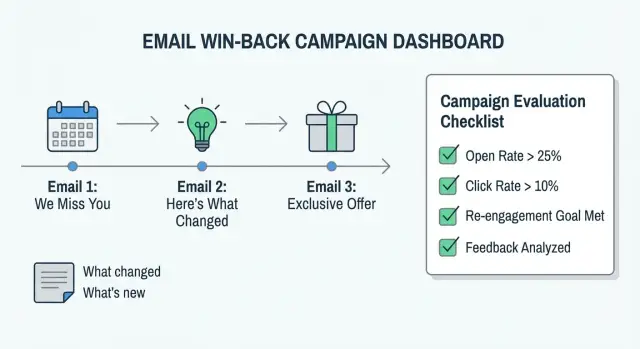
For most B2B lists, 3 to 4 emails over 10 to 14 days is enough:
- Day 1: the change and one question
- Day 4 to 5: one proof point (before/after, metric, or short example)
- Day 9 to 10: the evaluation plan and timeline
- Day 14: optional close-the-loop
3) Prepare reply handling
Decide in advance what happens to each response type so people get a fast, human follow-up. If your tool supports it, create categories like interested, not interested, out-of-office, bounce, and unsubscribe. LeadTrain includes AI-powered reply classification that tags these automatically, which helps when responses start coming in across multiple stakeholders.
Win-back email copy: simple structure and wording
Win-back emails work best when they read like a calm, relevant check-in, not a pitch. Keep it specific: remind them why you’re writing, name what changed, offer a low-effort way to re-evaluate, and end with one clear call to action.
Subject lines should match that tone:
- "Quick question about your [goal]"
- "What changed since you tried [Product]?"
- "Worth a re-check on [specific problem]?"
- "Update: we fixed the [pain point] you hit"
- "Can I send a simple evaluation plan?"
Inside the email, a simple structure is enough: context, change, evaluation offer, and a clear CTA. If you cover everything, it turns into a newsletter and gets skipped.
The most important sentence is the one that shows you understood why they left. You can acknowledge reality without over-apologizing: keep it factual and brief, then show what you did about it.
Here’s a template you can reuse:
Subject: Update: we fixed the [issue] you ran into

Hi [Name],

You tried [Product] back in [month]. If I remember right, you left because [reason in their words]. You were right to pause if that was the experience.

Since then, we’ve changed a few things:
- [one specific improvement tied to their reason]
- [one new capability that saves time]

If it helps, I can send a simple 7-day evaluation plan (what to test, what “good” looks like, and how to compare options) so you can decide quickly.

Would you like me to send that plan?
[Your name]
Keep the “yes” easy:
- “Reply ‘yes’ and I’ll send the plan.”
- “Open to a 10-minute check-in this week?”
- “Should I tailor the plan to [use case A] or [use case B]?”
- “Is deliverability still the main blocker, or something else?”
If someone left because setup felt too technical, name the specific change (for example, automatic SPF/DKIM/DMARC setup and a built-in warm-up process) and offer a short evaluation plan to verify inbox placement and reply handling in a week.
Sending setup: cadence, deliverability, and follow-through
Win-back emails are easy to over-send. The goal is to feel like a helpful check-in, not a chase. A short sequence also makes it easier to read results and decide what to do next.
Plain text is usually best because it looks like a real one-to-one email. Use light formatting only when it helps clarity. Avoid heavy HTML, images, and lots of buttons. They can reduce trust and sometimes hurt deliverability.
Deliverability matters more than people expect, because you’re emailing older contacts who may not have engaged in months. Stick to basics: authenticated sending (SPF, DKIM, DMARC), steady volumes, and no large blasts from a fresh domain. If you’re ramping up, warm up mailboxes first and increase daily sends gradually.
Then make follow-through predictable. Decide what happens to each response type:
- Interested: reply within 1 business day and offer 2 time options.
- Not interested: thank them, ask for one reason if appropriate, then stop.
- Out of office: follow up after they return.
- Bounce: remove and investigate the address or domain.
- Unsubscribe: confirm removal and don’t email again.
When you track these categories consistently (manually or with reply classification), you learn which message brings people back and which one creates noise.
Common mistakes that get win-back emails ignored
Most churned customers don’t ignore you because they’re “anti-you.” They ignore you because the email feels irrelevant, uncomfortable, or hard to act on.
The most common miss is a feature dump. People rarely churn because you lacked features. They churn because the tool didn’t solve the day-to-day problem fast enough, or it created extra work. If your message is a long list of updates, the reader has to map updates to their original pain. Many will stop reading.
Another mistake is pretending the breakup never happened. Avoid vague “checking in” messages with no context. Also avoid blaming them (budget, priorities, lack of time). A simple acknowledgement works better: you understood the reason, you fixed what you could, and you want to confirm if it matters now.
Finally, don’t make the evaluation fuzzy. “Try it again sometime” forces them to plan the trial in their head. Instead, offer a short plan with a timeline, success criteria, and a clear owner.
Patterns that usually get deleted:
- Talking about your product instead of their job-to-be-done.
- Acting like nothing happened or adding guilt (“we noticed you haven’t used it”).
- Offering a vague re-trial with no steps, no owner, and no success metric.
- Following up too fast and too often.
- Using pressure language (“last chance”, “ends tonight”) when they didn’t ask.
If someone churned because setup felt technical, don’t lead with a paragraph of technical upgrades. Lead with the result: “Setup is now handled for you, and we can prove inbox placement in 7 days.” If you run that test in a system like LeadTrain, you can also keep the evaluation tight: one domain, one mailbox, one short sequence, and a clear pass/fail based on inboxing and replies.
Quick checklist and next steps
Before you hit send, do a quick check in three areas: who you’re emailing, what you’re saying, and whether your sending setup can support it. Ten minutes here prevents most “why did this flop?” problems.
Pre-send checklist:
- List quality: remove obvious bad fits, outdated contacts, and people who churned for reasons you can’t fix.
- Permissions: exclude unsubscribes, bounces, and anyone who asked not to be contacted.
- Message focus: one topic, one ask, and clear evaluation steps.
- Sending health: warm-up is active, SPF/DKIM/DMARC are set, and daily sends match mailbox age.
- Follow-up ownership: decide who monitors replies and what happens for “interested”, “not now”, and “wrong person”.
If you only fix one thing, fix the ask. Win-back works when the next step feels easy. For example: “Try the new reporting view for 7 days, reply with one number (1-5) on whether it fixed the issue, and I’ll close the loop.”
After you launch, keep the sequence stable long enough to learn. Review results by segment (replies, positive intent, and recurring objections), then tighten the audience, adjust the evaluation plan, and rewrite the subject line if opens are low.
If you want to keep the operational side simple, LeadTrain (leadtrain.app) combines domains, mailboxes, warm-up, multi-step sequences, and reply classification so you’re not bouncing between tools while you run win-back outreach.
FAQ
When should I try a win-back email without offering a discount?
Start without a discount when you can point to a real change since they left, especially one tied to their original blocker. If nothing meaningful is different, a discount usually just buys you another churn later.
Why avoid discounts in win-back outreach?
Discounts can teach customers to wait for deals, weaken how people perceive your normal pricing, and annoy loyal customers who paid full price. They can also mask the real problem, because cheaper doesn’t fix a mismatch in fit or outcomes.
How do I figure out the real reason someone churned?
Look past the cancellation dropdown and confirm the reason in real context like support tickets, onboarding notes, and the last email thread. Use the exact wording you find so your message feels accurate instead of generic.
How long after churn is the best time to send a win-back email?
Usually, the best batch is people who churned in the last 30 to 90 days because they still remember the situation and you can reference it clearly. Reach further back only when you have a strong “something changed” reason, like a new workflow or a solved setup issue.
Who should I avoid emailing in a win-back campaign?
Skip anyone who unsubscribed, hard bounced, or explicitly asked not to be contacted, and avoid accounts with unresolved disputes or a clearly bad-fit use case. Win-back should feel helpful, so don’t send messages that are likely to create complaints or damage trust.
What should I say first in a win-back email?
Lead with one or two changes that directly map to what went wrong last time, and describe them as outcomes, not release notes. A simple line like “You can now do X without Y” is easier to believe than a broad “we improved the product.”
What’s a good alternative to a discount for win-back?
Offer a short, low-risk pilot with a clear timeline and a clear definition of success, like a 7 to 14 day evaluation. It feels fair because you’re lowering planning effort and making it easy to decide “continue or stop” based on results.
What cadence works best for a win-back sequence?
Keep it calm and brief, typically 3 to 4 emails over about two weeks, so it doesn’t feel like chasing. Each email should have one clear ask, like replying to confirm the blocker or approving a simple evaluation plan.
How do I protect deliverability when emailing older, churned contacts?
Make sure your sending is authenticated with SPF, DKIM, and DMARC, ramp volume steadily, and warm up mailboxes if the domain is new or hasn’t sent in a while. Tools like LeadTrain can simplify this by handling domain setup, warm-up, and sequences in one place so you don’t miss basics.
How should I handle replies to win-back emails?
Decide ahead of time how you’ll handle common replies so people get a fast, human response and you don’t lose good leads in the noise. If you use a system with reply classification, such as LeadTrain, it can automatically tag replies like interested, not interested, out-of-office, bounce, or unsubscribe so follow-up stays consistent.