Who to contact instead of the CEO: outreach personas that reply
Who to contact instead of the CEO: practical personas to start with, how to climb the org chart, and clear examples of when executive outreach is worth it.
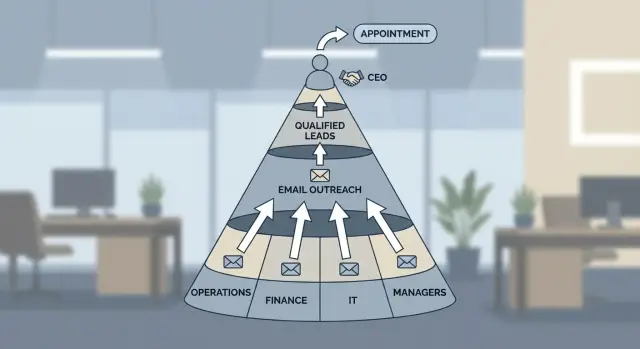
Why CEO-first outreach usually fails
CEOs and founders are easy to aim at and hard to reach. Their inboxes are noisy, their calendars are packed, and most messages aren’t tied to a problem they’re dealing with this week. Even if your offer is strong, it often reads as “nice to know” instead of “need to fix now.”
A big title also means more filters. Many execs have assistants, strict inbox rules, and heavy spam protection. On top of that, they scan for three things: direct revenue impact, urgent risk, or a trusted referral. Cold emails rarely clear those bars on the first try.
Over-targeting execs slows you down in a less obvious way: it breaks your learning loop. If you email only CEOs, you get fewer replies, slower feedback, and less data on what messaging and targeting actually works. Meanwhile, the people who feel the pain day to day (and can confirm if it’s real) never hear from you.
Good targeting in cold email is about relevance, not seniority. Ask one simple question: who owns the problem you solve, and who will feel the improvement first? That person is often a manager or team lead with clear goals, a budget range, and the motivation to test something new.
A practical rule: start lower, earn the right to go higher. Use early conversations to learn the real workflow, the current tools, and the true costs of the problem. “Earning the right” usually looks like confirming the pain with the day-to-day owner, sharing one specific insight (not a generic pitch), asking who else should be involved if it works, and only then pulling in the exec with a short summary and a clear ask.
Example: if you sell cold email infrastructure, a founder may ignore you. But a Head of Sales or SDR Manager might answer because deliverability hits their weekly numbers. Once they confirm the issue, looping in the CEO becomes an approval step, not a cold start. If you run outbound in LeadTrain, it’s easier to test this fast with small, persona-specific sequences and see which roles actually reply.
Start with the problem owner, not the biggest title
If you email the CEO first, you’re guessing who cares. A better bet is the person who feels the problem every week and is measured on fixing it. They’re more likely to reply, share real details, and point you to the right next step.
Before you pick a target, separate three roles:
- User: lives with the pain day to day.
- Buyer: controls budget.
- Approver/blocker: can say no even if everyone else says yes.
Sometimes one person wears two hats. Often they don’t.
Relevance usually comes from a trigger, not a title match. Look for a reason the problem would be top of mind right now: a new hire starting next week, a tool rollout, a growth spurt that broke the old process, or a team suddenly held to a new KPI.
Choose one starting persona based on the fastest path to a real conversation. If the problem is operational (missed follow-ups, messy handoffs, inconsistent outbound), start with the day-to-day owner. If it’s clearly budget-bound (tool consolidation, vendor replacement), start with the budget owner.
Example: you sell help with outbound email performance. At a 40 to 80-person company, the day-to-day owner might be the SDR Manager or Head of Sales Development. They’ll know deliverability issues, reply rates, and what’s already being tried. After a short exchange, ask who owns budget for outbound tooling and whether the VP Sales prefers to approve changes.
If you’re using LeadTrain to run outbound, this approach also helps you multi-thread without forcing it. The owner can confirm the current setup (domains, warm-up, sequences), and you can bring in the budget owner only after you have concrete numbers and a clear next step.
Alternative personas that often reply first
If you’re trying to figure out who to contact instead of the CEO, start with the people who own the workflow, the tools, or the approvals. They’re closer to the daily pain, and they can usually say “yes” to a pilot (or at least tell you what “yes” would take).
Ops roles: the builders of the process
Ops titles are often the fastest path to a real answer because they sit between systems and outcomes. RevOps, Sales Ops, BizOps, and Operations Managers care about repeatable process, clean handoffs, and reporting.
If your offer improves outbound execution (domains, mailboxes, warm-up, sequences, reply sorting), an Ops person can validate whether it fits their stack and what would break if it doesn’t. In LeadTrain, this is also where practical questions show up quickly: how domain setup works, how deliverability is protected, and how reply classification maps to pipeline stages.
Managers and team leads: the people who feel the pain
Managers reply when your message ties to their weekly goals. Think SDR Managers, Support Leads, Engineering Managers, and Customer Success Managers. They may not sign the contract, but they can sponsor it and pull in the right approver.
Common triggers that get a real response include missed targets because the team is stuck doing manual work, messy handoffs between tools, low response rates that need testing (not more volume), or a clear metric they personally own (meetings booked, time to first response, backlog).
Finance, procurement, IT, and the “router” roles
Some deals stall because you emailed only the user and ignored the gatekeepers. Finance and procurement can tell you the real buying path (thresholds, payment terms, required docs). IT and security matter when you need access, new domains, inbox provisioning, or a data handling review.
Also don’t overlook Executive Assistants or a Chief of Staff. They can route you to the correct owner and share context like “this is being evaluated next month” or “talk to RevOps first.”
When you’re reaching out to these roles, lead with routing questions instead of a full pitch:
- “Who owns this process today?”
- “Who evaluates tools like this?”
- “Is security or finance involved for a pilot?”
A step-by-step way to build a contact ladder
A contact ladder keeps you from blasting the CEO and hoping for luck. It also forces you to answer a practical question: who’s most likely to confirm the problem and move it forward.
Build the ladder per account
Use the same workflow for every target company, even if your list is small.
- Pick your accounts first, then write one sentence on why now. Tie it to a trigger you can defend (new hires, a launch, expansion, funding, or a job post that hints at a pain).
- Choose a starting persona who owns the problem day to day.
- Add two backups: one adjacent (Ops, enablement, RevOps, IT) and one above (director or VP).
- Set the ladder order. Manager to director to VP to exec is common, but swap it if the org is tiny or founder-led.
- Decide your switch rules before you send: move up after a set number of touches, switch sideways when you learn new context, or jump when someone forwards you to the right owner.
Example: you’re selling a tool that reduces inbound lead response time. At a 200-person SaaS company, start with the SDR Manager (pain owner), keep RevOps as a backup (process owner), and keep the VP of Sales as the escalation step (priority setter).
Track what works, by persona
The goal isn’t just replies. It’s repeatable angles.
Keep notes on what gets traction: which framing got the fastest response (time saved, risk avoided, revenue gained), what proof mattered (peer examples, numbers, process details), what ask worked best (quick question vs meeting vs intro), and what objections show up by level (managers: time and workload; VPs: priority and budget).
If you’re using LeadTrain, tagging replies by persona and angle makes it easier to spot patterns across accounts instead of guessing.
How to write emails that fit each persona
If you send the same pitch to everyone, you’ll keep getting the same silence. The fastest fix is to match your message to what that person is responsible for right now, not a generic description of your product.
Write one sentence that connects to their job, then ask for one small next step.
What each persona cares about (and what to say)
A manager usually lives in the day to day. They reply when you make their week easier.
A director or VP is measured on outcomes and risk. They reply when you show a low-drama path to results.
Finance wants clarity and control. IT and security want fewer surprises.
You can keep the offer the same and change the angle:
- Managers: time saved, fewer fires, cleaner handoffs, less manual work.
- Directors/VPs: metrics that move, rollout risk, what success looks like in 30 days.
- Finance: total cost, payback, what gets billed and when.
- IT/security: access levels, permissions, data handling, and the decision steps.
Keep it to one clear ask
People ignore emails that ask for five things at once. Pick one ask that matches the persona.
If you sell a cold email platform like LeadTrain, a manager might care about not spending hours sorting replies. A director might care about reply rates and how fast a team can launch. Finance may care about the cost of one platform vs multiple tools. IT may care about domain setup, authentication, and who can access mailboxes.
A few asks that stay light:
- “Are you the right person for outbound email tooling, or is that owned by someone else?”
- “Worth a 10-minute call to see if this fits, or should I close the loop?”
- “If I send a 3-line plan for a 14-day pilot, can you tell me if it matches how you work?”
End with a single choice and a time window. Small asks get more real replies and fewer polite brush-offs.
When executive outreach actually works
Emailing the CEO isn’t always wrong. It’s wrong when it’s your default.
Executive outreach works best when the decision is genuinely top-down: a strategy shift, entering a new market, or replacing a major vendor across the company. In those cases, a director or manager may like your idea but can’t green-light the change.
It also works when you have a strong trigger that makes your timing credible: a funding round, a public launch, a visible hiring push, or a reorg that changes ownership.
It’s usually worth emailing the founder or CEO when:
- The change affects multiple teams and no single manager owns it end to end.
- You can point to a trigger and make a specific hypothesis.
- Your ask is narrow (10 minutes, a yes/no, or a quick intro).
- You already have internal support and need final approval.
- The founder is still the operator (tiny teams where they run the process).
Example: a 12-person startup is hiring its first SDRs and the founder still handles outbound. In that case, “who to contact instead of the CEO” might still be the CEO because there is no outbound manager yet. Keep it short: one observation, one hypothesis, one question.
If you’re multi-threading outbound, exec emails should be the exception at the top of the ladder, not the first rung. LeadTrain’s reply classification can help here by flagging quick exec responses like “talk to Jane” so they don’t get lost.
Example: who to email first at a 50-person company
Picture a 50-person B2B company with a small sales team: 2 SDRs, 3 AEs, and a player-coach manager. They want more meetings, but they don’t want to hire another SDR this quarter. This is a setup where starting with the right persona gets you faster signal.
Start with the person who feels the pain daily and can run a test without a long approval chain.
First email: SDR Manager (the day-to-day owner)
The SDR Manager usually owns activity, sequences, and coaching. They also get blamed when the calendar is light, so they’re motivated to try practical fixes.
Keep the ask specific. Ask what they’re doing today to book meetings (channels, ICP, volume), offer one small experiment (a new segment, a new sequence, or better reply handling), then confirm what “success” means (meetings per week, reply rate, time spent sorting replies).
Second thread: RevOps (tooling, data, and reporting)
RevOps cares about clean tracking and fewer tools to maintain. They can kill a pilot if it creates reporting chaos, so bring them in early.
Focus on measurement (meetings booked, reply categories, bounce rate, unsubscribe rate), deliverability safety (warm-up, authentication, sensible sending limits), and what setup looks like in real life (domains, mailboxes, sequences, A/B tests). If you use LeadTrain, this is where the all-in-one setup matters because it reduces tool sprawl.
Escalation: loop in VP Sales or the CEO with proof, not hype
After a couple of touches with the SDR Manager and RevOps, you can escalate without sounding like you’re skipping the line. Reference what you learned and ask for permission.
Example: “Based on what you shared (current volume, target accounts, and the replies you’re getting), we think we can run a 14-day test aimed at X meetings. Should we loop in your VP Sales to confirm the goal and greenlight the pilot?”
A good two-week outcome isn’t a miracle jump overnight. It’s a clean pilot with stable deliverability, clear reply breakdowns, a small but real lift in booked meetings, and a decision to expand or stop.
Common mistakes and traps to avoid
The fastest way to get ignored is to spray the same CEO email to every company and call it “personalization” because you changed the first name and industry. Senior people can spot a template in two lines, and they’re trained to protect their time.
Another trap is picking titles that sound senior instead of people who actually own the workflow. “Head of” and “VP” can be great, but only if that person feels the pain day to day or is measured on the outcome. If you sell something that affects lead handoff, the Ops Manager or SDR Manager may care more than a high-level growth leader.
Escalating to the exec too early can burn your best account. If your first touch to the founder is vague, you may not get a second chance when you finally have proof. Executive outreach works best as escalation with context, not a lottery ticket.
A few mistakes that show up repeatedly:
- A vague pitch with no clear problem, proof point, or simple next step.
- Asking for a 30-minute call before you’ve earned 10 minutes.
- Treating “no reply” as “not interested” instead of fixing your target or message.
- Ignoring buying signals like forwarded emails, short replies, or “who handles this?”
- Optimizing for title instead of urgency and ownership.
Failing to multi-thread is another quiet killer. If you email one person, get no reply, and assume the whole account is a no, you’re leaving money on the table. A better move is to contact 2 to 4 relevant people over a week, each with a message that fits their view of the problem.
Quick targeting checklist before you send
Do a two-minute pass on targeting before you hit send. It prevents the classic mistake of blasting founders with a problem they only see once a year while the real pain sits with a manager who deals with it every week.
For each account, check:
- Can you name the person who feels the problem weekly?
- Can you name two more roles who touch the same problem from different angles?
- Do you have a clear guess on budget owner vs day-to-day owner, plus one likely blocker?
- Does your first email stay tight: one problem, one believable proof, one simple question?
- Do you know what you’ll do next if you get silence, and when you’ll stop?
Set one escalation rule and one stop rule. For example: “If the manager ignores two touches, send a shorter note to the VP with what you tried and one yes/no question.” Stop rule: “If I get a clear no, or no engagement after four touches across two personas, pause this account for 60 days.”
If you use LeadTrain, make sure tracking and reply categorization are set so you can see which persona actually replies, not just who you emailed.
Next steps: test, measure, and scale without spamming execs
If you keep emailing founders and CEOs, you’ll get more silence than signal. Treat targeting like an experiment: small, measured, and repeatable.
Start with a tight pilot. Pick 20 to 50 accounts and choose 2 to 3 personas per account (problem owner, manager, and a technical reviewer). Keep one message angle for the whole test so you learn what’s working.
Keep the plan simple: build a contact ladder per account, run one short sequence per persona with a couple follow-ups, switch personas when you get no response (not when you get impatient), and pause when you get a clear “not interested” or “unsubscribe.” Keep send volume low until you see consistent positive replies.
Sequencing matters because memory fails. If follow-ups live in your head or a messy spreadsheet, you’ll either over-follow up or forget to follow up at all.
Before you increase volume, protect deliverability. New domains and mailboxes should be warmed up, and sending should ramp gradually. If you scale too fast, messages land in spam and your test results become useless.
Measure outcomes by reply type, not just reply count. A simple bucket system is enough: interested, not interested, out-of-office, bounce, unsubscribe.
If you want fewer moving parts, LeadTrain keeps domains, mailboxes, warm-up, multi-step sequences, and reply classification in one place. That makes it easier to run clean persona tests, compare results fairly, and scale only after you’ve earned the right to go higher.
FAQ
If I shouldn’t email the CEO first, who should I contact?
Start with the person who feels the problem every week and is measured on fixing it. For outbound or deliverability topics, that’s often an SDR Manager, Head of Sales Development, or RevOps rather than the CEO.
How do I tell who the user, buyer, and approver are?
Split the roles into three buckets: the user (day-to-day pain), the buyer (budget), and the approver/blocker (can say no). Your first email should usually go to the user or process owner so you can confirm the pain and learn how decisions really get made.
Why does CEO-first outreach slow down my results?
Emailing only CEOs usually gives you fewer replies, which slows feedback and makes it harder to improve your targeting and message. Reaching managers and ops roles first gives you faster, more detailed responses that help you refine your pitch before you escalate.
When does it make sense to start with RevOps or Sales Ops?
Ops roles are often the fastest path to a real answer because they sit between tools and outcomes. If your offer affects process, tracking, or tooling, RevOps or Sales Ops can quickly tell you whether it fits, what would break, and who needs to be involved.
When is executive outreach actually the right move?
When you have a clear trigger and a top-down decision, like a company-wide vendor replacement or a strategic shift that a manager can’t approve. It also works when you already have internal support and you’re using the exec email as an approval step with a short, specific ask.
What should I say in the first email to a non-exec persona?
Keep it to one observation, one believable hypothesis, and one small question. A good default is a routing question that makes it easy to reply, like asking if they own the process or who the right person is.
What’s a good contact ladder for a mid-sized company?
Start with a manager or team lead who can run a test without a long approval chain, then add an ops or tooling owner as a second thread. After you have proof and specifics, loop in the VP or CEO with a short summary and a clear next step.
How soon should I escalate to a director, VP, or CEO?
Move up after a defined number of touches with no response, and move sideways when you learn new ownership or context. Decide your switch rules before you send so you don’t escalate out of impatience or keep emailing the wrong person.
What metrics should I track to learn which persona works best?
Track outcomes by reply type, not just total replies, so you can see whether your targeting is working. Simple categories like interested, not interested, out-of-office, bounce, and unsubscribe are enough to guide what you change next.
How can LeadTrain help with persona-based outreach tests?
If your stack is split across multiple tools, setup and coordination can slow down testing. A unified platform like LeadTrain can help by keeping domains, mailboxes, warm-up, sequences, and reply classification in one place so you can run small persona-specific tests and see what actually gets replies.