When to stop a cold email sequence without hurting trust
When to stop a cold email sequence: practical stop rules for replies, bounces, engagement, and timing to protect sender reputation and avoid brand damage.
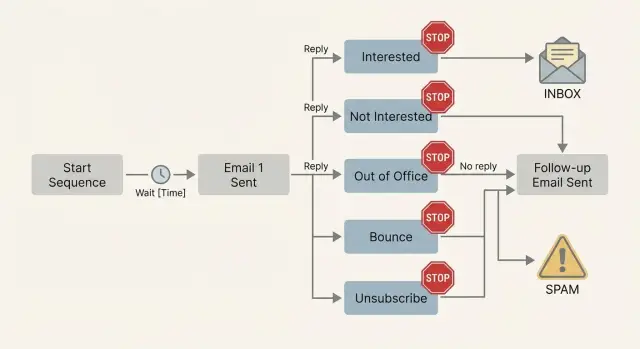
What “stopping a sequence” actually means
Stopping a sequence means your system won’t send any more scheduled emails to that person in that campaign. It sounds simple, but it’s a real decision: you’re choosing to stop contacting someone after they’ve given you a signal.
If you keep sending after the wrong signal, you create two problems at once. You annoy the person on the other end (trust and brand damage), and you teach mailbox providers that your emails lead to complaints, ignores, and blocks. Over time, that hurts deliverability.
The goal isn’t “more steps.” It’s fewer bad touches and more real conversations.
Stop vs pause vs new path
These three actions should mean different things:
- Stop: End outreach to that contact in this campaign (no more sends). Use this for unsubscribes, clear “not interested,” and many delivery failures.
- Pause: Temporarily halt sends because timing is wrong, not because the person is a bad fit (for example, out-of-office).
- New path: Keep the relationship, but change the goal or message (for example, route “interested” replies to booking, or hand off to a rep).
Example: you email a Head of Finance and they reply, “Not the right person, talk to procurement.” Stop the current sequence to that person. Then start a new path: add the procurement contact, adjust the message, and follow up with the right team.
Stop rules based on reply types (the non-negotiables)
The moment a real person replies, automation should get out of the way. Continuing to send steps after a reply is one of the fastest ways to look careless and get reported.
Use these reply types as immediate stop signals, with a clear next move:
- Interested / positive: Stop all future steps and hand the lead to a human follow-up. Reply quickly, reference what they said, and propose a next action.
- Not interested: Stop. Log the reason if they gave one, and suppress them from future outreach. A brief acknowledgement is fine. Don’t argue.
- Unsubscribe: Stop instantly and add them to a do-not-contact list. Don’t re-add them later.
- Complaint / anger: Stop instantly and review what went wrong (targeting, wording, frequency). Even if they don’t say “spam,” treat it as a warning.
- Ambiguous replies: Pause the sequence and ask one short clarification question.
Example: if someone replies, “Not right now, maybe Q2,” don’t keep pushing. Pause and respond with one question, like: “Should I follow up in April, or would you rather I close this out?”
Stop rules for bounces and delivery failures
Bounces aren’t a “clean your list later” problem. They’re a fast signal to mailbox providers that your outreach is sloppy. If delivery starts failing, stop quickly.
Hard bounces: stop immediately
A hard bounce means the address isn’t deliverable (for example: “invalid recipient,” “user unknown,” “domain not found”). Don’t retry and don’t send the next step.
Two practical rules:
- If it’s user unknown, suppress that exact email address.
- If it’s domain not found / no MX, suppress the domain and review your data source.
One strict hard-bounce rule beats any clever copy. Retrying hard bounces is an easy way to damage deliverability.
Soft bounces: allow a small threshold
Soft bounces are temporary, but they can repeat for days. Set a small retry limit, then stop.
A simple approach:
- 1st soft bounce: pause and retry later (not the same day).
- 2nd soft bounce: pause again and wait longer.
- 3rd soft bounce: stop the sequence for that address and suppress it.
Mailbox full, rate limited, and “temporary server error” messages should trigger a pause, not an immediate next step. Rapid retries can turn a temporary issue into a reputation issue.
Keep a suppression list you actually use
Stopping is pointless if you re-import the same contacts next week. Maintain a suppression list and apply it before every send.
At minimum, store the email address, bounce type (hard vs soft), error message/date, retry count, and the source list or campaign.
Auto-replies: out-of-office and system messages
Auto-replies look like progress, but they’re not a real conversation. If you treat them like engagement, you can keep emailing someone who’s unavailable, or trigger a loop that floods an inbox.
Out-of-office replies are the easiest. If there’s a return date, pause until then and send one short check-in. If there’s no date, pause for 7 to 14 days, send one check-in, then stop unless a human replies.
System auto-replies (ticket receipts, “we got your message,” “do not reply”) usually shouldn’t be treated as engagement. In most cases, stop outreach to that address and find another contact or channel.
A simple classification:
- Pause: clear OOO, especially with a return date
- Stop: no-reply notices, ticket receipts, policy mailboxes (like compliance@), repeated system messages
- Manual review: forwarding notifications, vague auto-replies with no context
Forwarding notifications are tricky. If you see more than one automated response from the same address, pause and flag it for review.
Engagement-based stop rules (opens, clicks, and silence)
Engagement is a hint, not proof. Opens can be blocked or inflated by privacy features, and clicks can happen without real intent. Still, patterns across multiple touches help you decide when to stop before you annoy people.
A practical rule: cap your touches. For most offers, 4 to 5 total emails (including the first) is enough. If someone keeps opening but never replies, treat it as polite disinterest and stop.
Silence with zero opens is a different signal. If you get no opens after two sends, stop early and fix deliverability before sending more.
Simple daily rules:
- Opened multiple times but no reply after 4 to 5 touches: stop.
- Zero opens after 2 touches: stop and investigate deliverability.
- Clicked but no reply: send one short clarification email, then stop.
- Any sign of irritation (like “stop” without a formal unsubscribe): stop immediately.
If a batch gets normal opens on email 1, then opens fall sharply on later steps, it often means your follow-ups are too long, too frequent, or sound “mass sent.” More follow-ups won’t fix that.
Timing rules: how long is too long
Time is a stop rule. If you keep emailing after the useful window has passed, you increase complaints and reduce trust.
A practical default: cap the sequence at 14 to 21 days total, with 3 to 6 emails max. Past that, people either decided or forgot who you are.
Also, avoid daily emails. A safer rhythm is 2 to 4 days between touches, longer if your message is heavy or asks for a meeting.
A simple timing baseline:
- Max duration: 14 to 21 days
- Max touches: 3 to 6 emails total
- Spacing: 48 to 96 hours between emails
- Quiet windows: pause on major holidays, avoid weekends for B2B
- Local time: send in the recipient’s morning or early afternoon
If a sequence ends after four emails over about two weeks with no reply, stop and move on.
Restarting later can work, but treat it as a new cycle. Wait 60 to 90 days, change the angle, and only re-contact if you have a real reason.
Campaign-level stop signals (protect your sender reputation)
Sometimes the right move isn’t stopping one lead. It’s pausing the whole campaign. Individual stops protect people. Campaign-level stops protect your sender reputation and your brand.
Watch for changes that show up across many prospects in a short time. A few negatives are normal. A sudden wave is a warning.
Pause the campaign if you see:
- A fast bounce-rate jump (especially early in a send)
- A spike in unsubscribes
- A surge in “not interested” replies compared to your normal baseline
- A sharp open-rate drop compared to your usual sends
- Any increase in complaints or angry replies
If the problem repeats across a batch, pause the batch. Don’t just remove a few “bad” contacts and keep sending. Fix the list and the targeting first.
Step-by-step: build stop rules you can run every day
Good stop rules are written down, simple to audit, and consistent. The point is to stop the moment you get a clear signal, not to keep pushing because “the sequence isn’t finished.”
A practical setup
Define a small set of categories you’ll actually use every day (for example: interested, not interested, out-of-office, bounce, unsubscribe, wrong person). For each one, decide whether the action is stop, pause, or handoff.
Then add two hard caps:
- Max touches (total emails)
- Max days in sequence
Finally, set strict thresholds for delivery issues and silence. Example: any hard bounce stops instantly. If campaign bounce rate crosses a number you choose (often 3% to 5%), pause and fix the list. For silence, decide your cutoff (for example, stop after 4 to 6 touches or after 10 to 14 days, whichever comes first).
Test on a small segment first, review edge cases, then scale.
Common mistakes that cause brand damage
Most cold email mistakes aren’t about copy. They’re about ignoring signals that a person (or their mailbox) is telling you to stop.
A common trap is pushing past a clear “not interested” because it sounds like “maybe later.” If they didn’t ask for a follow-up date, continuing often reads as pressure. A better move is to stop, tag the lead, and only re-approach if something actually changes.
Out-of-office replies cause similar trouble. If you keep firing steps while someone’s away, your emails pile up unread, then get deleted in bulk. That pattern can hurt how mail systems judge you.
Soft bounces are another quiet deliverability killer. They look harmless, so teams keep sending until the address turns into a hard bounce. Set a small retry limit, then stop.
Five patterns that commonly lead to complaints or spam placement:
- Re-emailing after “not interested” without permission or a specific reason
- Continuing a sequence during out-of-office instead of pausing
- Letting repeated soft bounces continue “just in case”
- Restarting the same sequence on the same lead a week later
- Adding too many follow-ups that sound like pressure (“just bumping this again”)
Quick checklist: stop, pause, or continue?
Stop decisions should feel boring and automatic. If you have to debate it every time, you’ll eventually over-send.
Use this check before each next step goes out:
- STOP now for unsubscribe, complaint/anger, or hard bounce.
- PAUSE for out-of-office (resume near the return date).
- STOP when you hit your preset limits (max touches or max days).
- STOP and fix first if opens are near zero across a batch.
- CONTINUE only when delivery is clean, timing makes sense, and there are no negative signals.
Track three numbers weekly: bounce rate, unsubscribe/complaint rate, and your reply mix (interested vs not interested vs auto-replies).
Example: applying stop rules to a real outreach batch
A 100-prospect batch
You send a 4-step sequence to 100 prospects. After 7 days, you see: 6 interested replies, 9 clear “not interested,” 4 out-of-office auto-replies, 3 hard bounces, 2 unsubscribes, and 76 silent.
What happens next:
- The 6 interested replies: remove them from the sequence immediately and hand off to a human follow-up.
- The 9 “not interested” and 2 unsubscribes: stop instantly and add them to your do-not-contact list.
- The 3 hard bounces: stop immediately and treat it as a data quality issue.
- The 4 out-of-office replies: pause, then resume once near the return date. If there’s no date, pause once and send a single check-in.
- The 76 silent prospects: let the sequence end at your planned cap, then mark them as “no response.” If you retry later, use a different angle.
Log what matters: reply type, date, who replied, and the exact stop reason. That’s how you avoid repeating mistakes in the next batch.
Next steps: put the rules into your workflow
Stop rules work when everyone uses the same definitions and the same actions. Put the rules in one place, agree on what “stop,” “pause,” and “handoff” mean, and make sure suppression always overrides segmentation.
If you want fewer moving parts, LeadTrain (leadtrain.app) is built around keeping domains, mailboxes, warm-up, sequences, and reply classification in one place, so stop and pause decisions happen consistently when volume grows.