When to retire a sender: bounce, spam, and history criteria
Learn when to retire a sender using bounce patterns, spam signals, and history, plus clear rehab steps so you stop spending time on a dead setup.
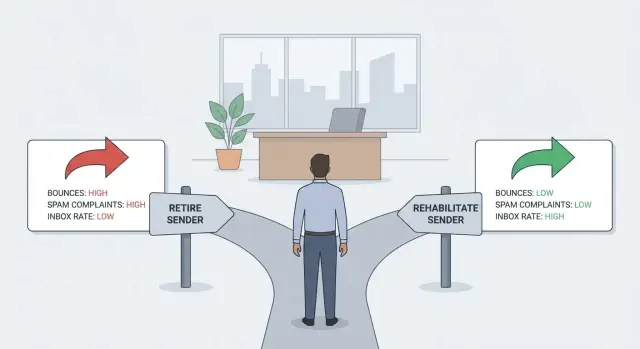
Why this decision matters (and why it feels hard)
Keeping a damaged sender alive quietly taxes everything you do. You spend hours tweaking copy, swapping leads, and warming up again, but replies keep dropping. Worse, you keep touching good prospects from an address that inboxes already distrust. That’s real opportunity cost, not just a metrics problem.
The goal is simple: protect deliverability and avoid sunk cost. If you keep pushing volume through a sender that’s failing, you often create collateral damage (same domains, the same targeting mistakes, the same habits), and the problem spreads.
It feels hard because the signals are noisy. A bad week can come from list quality, a volume spike, or a template that suddenly trips filters. Sometimes you can rehabilitate a sender with a reset and a slower ramp. Other times you can’t, especially after repeated spam placement or chronic bounces.
To decide with confidence, pull evidence from three buckets:
- Bounces: what failed, how often, and whether failures are getting worse
- Spam signals: complaints, spam placement, blocks, unsubscribe spikes
- Historical performance: what “normal” looked like before the drop
Example: a sender that used to get steady replies at 30 to 50 emails per day suddenly starts bouncing and landing in spam, even after you cut volume in half. That’s rarely “bad copy.” It’s usually reputation damage or an authentication/alignment issue.
What counts as retiring vs rehabilitating a sender
A “sender” isn’t one thing. In practice, it’s the combination of:
- your sending domain (the part after @)
- the specific mailbox (like [email protected])
- the sending infrastructure/provider that actually pushes the mail out
Each layer can build (or lose) trust on its own.
Rehabilitating a sender means keeping the same identity and earning trust back. You reduce risk, tighten targeting, and rebuild slowly. This is worth trying when the damage looks recent, explainable, and limited.
Retiring a sender means you stop using that mailbox or domain for outreach and move to a clean setup. It doesn’t mean deleting everything overnight. It means you stop risking results by trying to “push through” with a sender that keeps failing.
One common trap: blasting “just to test” usually digs the hole deeper. Testing should be controlled, low-volume, and tied to clear signals.
Domain reputation and mailbox reputation can diverge. A domain can be fine while one mailbox gets flagged after bad lists or too many follow-ups. The reverse can happen too: a domain issue can pull down multiple mailboxes.
A simple way to choose your direction:
- If only one address struggles while other mailboxes on the same domain are fine, start by rehabilitating the mailbox.
- If multiple mailboxes degrade together after a clear event (bad list import, sudden volume spike), focus on rehabilitating the domain and sending behavior.
- If a mailbox keeps triggering blocks or spam signals even after you cut volume and clean targeting, retire the mailbox.
- If new mailboxes fail quickly and the problem follows the domain, retire the domain.
The data you need before you decide
You don’t need perfect reporting. You need a small set of numbers you trust enough to tell whether you’re looking at a temporary dip or a sender that’s being rejected.
Track these weekly, and also after any major change (new list, new copy, higher volume):
- Hard bounce rate (invalid address, domain doesn’t exist, blocked)
- Soft bounce rate (mailbox full, deferrals, throttling)
- Spam complaint rate (when available)
- Reply outcomes (interested, not interested, out-of-office, unsubscribe)
- Spam placement clues (sudden reply drop, unusual unsubscribe spikes, “I found this in spam” replies)
Know where each signal comes from. Bounce categories should come from SMTP responses/provider logs, not a spreadsheet. Complaints are often limited, so treat them as high-value when you have them.
Also separate hard failures from soft indicators. Opens and clicks are noisy because of privacy features and bots. Replies and bounces are usually more honest.
A practical habit: keep a short “sender health note” per mailbox/domain and update it after each send block. Write down what you sent (volume, audience source, sequence) and the 2 to 3 numbers that changed the most. Over time, that note becomes your quickest way to spot patterns.
Bounce patterns that point to a sender problem
Bounces aren’t all the same. Before you make a retirement call, sort bounces by what they’re telling you:
- Invalid address (user unknown, no such mailbox)
- Blocked (policy block, IP/domain blocked)
- Spam-related (rejected as spam, reputation/content)
- Temporary (rate limited, greylisted, try again later)
Invalid-address bounces usually point to list quality. If they’re high from the first send, the sender is often fine and the data is not. Better sourcing, tighter targeting, and verification typically fix this quickly.
Blocked and spam-related bounces are more often sender trust problems, especially when they show up across many receiving networks (Gmail, Microsoft, corporate mail). If you repeatedly see “blocked,” “policy,” or “reputation” language, assume deliverability is damaged until you prove otherwise.
The trend shape matters:
- A sudden spike right after a change (new list source, higher volume, new copy) often means you triggered a filter or hit a bad segment.
- A slow climb over days often points to reputation decay: too many ignored emails, too many unknown users, or ramping too fast.
Use ranges as investigation triggers, not rigid rules:
- Invalid-address bounces: consistently above ~3% to 5% on cold lists
- Temporary bounces: above ~2% to 4% for several sends in a row
- Blocked/spam-related: above ~0.3% to 1% and rising
- Any bounce type: a 2x jump week over week
If “bad” bounces are mostly invalid addresses, fix the list first. If blocks and spam rejections rise even with clean data and steady volume, that’s a strong sign the sender is the problem.
Spam signals: how to read them without guessing
Spam signals are different from bounces. They’re warnings that mailbox providers are actively distrusting your sender. If you keep sending through those warnings, recovery usually gets harder.
Spam-related rejections often mention spam, policy, reputation, or filtering (for example, “rejected due to sender reputation”). The intent matters: the provider is saying “we don’t like what we’re seeing,” not “we can’t find the address.”
Complaints are their own category. A complaint means a real person clicked “Mark as spam” (or the provider treated the interaction as a complaint). A couple can be noise. A pattern is a clear sign your targeting, copy, or sending behavior is creating negative reactions.
Provider-specific failures are common and easy to misread:
- If Gmail tanks but Microsoft is fine, it often points to a reputation or content issue as seen by Gmail, not a global DNS problem.
- If one provider rejects with spam language while others still deliver, treat that provider as an early warning system.
A simple way to interpret what you’re seeing:
- Mostly “user unknown”: list quality problem, not spam.
- “Blocked,” “reputation,” “policy,” “spam”: sender trust problem. Pause and investigate.
- Complaints and angry replies: audience mismatch or too much volume too soon.
Once spam signals start, sending “to gather more data” usually backfires. Pause or sharply reduce volume, fix the likely cause, then ramp carefully. If blocks and complaints persist after changes, retirement becomes the safer bet.
Historical performance: what “normal” looked like for this sender
Define what “healthy” used to look like for this exact domain and mailbox. Without a baseline, every dip feels like a crisis, and every small improvement feels like proof it can be saved.
Pick a baseline window from a stable period, when volume, targeting, and copy weren’t changing every few days. Two to four weeks is usually enough.
Then compare like-for-like. If the sender used to email mid-market SaaS and now it emails local services, you’re not measuring sender health anymore. Same for offer and cadence: a “free audit” at 40 emails/day isn’t comparable to a “book a demo” pitch at 200/day.
Pay attention to leading indicators that often move before outright blocks:
- Positive replies (questions, interest, meeting requests)
- Negative replies (not interested, stop, angry responses)
- Unsubscribes and complaint-like language
- Out-of-office rate (a quiet confirmation you’re reaching real inboxes)
- Bounce mix (hard vs soft, and whether it shifts suddenly)
Map “good days” and “bad days,” and write down what changed right before the shift. Common triggers are volume jumps, a new list source, a different subject-line style, or removing personalization.
Once you know the old normal, you can judge recovery attempts against reality instead of hope.
Step-by-step: a simple decision process you can repeat
When results drop, protect reputation first. Resist the urge to tweak ten things at once. One clean test beats a week of guesswork.
1) Pause, then make the problem measurable
Stop new volume increases. Avoid changing copy, targeting, or sending times for 24 to 48 hours. You want a stable snapshot of bounces, spam signals, and replies.
2) Confirm the list didn’t change under your feet
Check the last 1 to 2 list pulls. New data sources, different filters, or older leads can spike hard bounces fast. Compare recent segments: same ICP, same region, same verification rules.
3) Verify authentication and alignment
Check for recent edits to SPF, DKIM, and DMARC, and confirm your From domain aligns with your signing domain. A small DNS mistake can look like a reputation collapse.
4) Isolate one variable at a time
Run a small, controlled send from one mailbox to a clean, verified slice of your list using one sequence. Keep the copy simple and consistent. If only one mailbox or one provider performs badly, the issue is narrower than “everything is broken.”
Now use a quick yes/no scorecard:
- Hard bounces stayed high even on verified leads
- Spam complaints or obvious “junk” placement rose across multiple segments
- Performance dropped across providers, not just one
- Fixing authentication didn’t improve results within a few days
- The sender has a history of repeated drops after each ramp-up
If you hit 3 or more, plan retirement and move to a fresh sender. If you hit 0 to 2, rehabilitation is usually worth trying first.
Rehabilitation playbook (what to try and in what order)
Treat rehab like a short, controlled experiment. The goal is to stop new damage, then earn trust back slowly while watching a few key signals.
1) Stop the bleeding
Cut volume hard. Remove extra follow-ups and return to a steady cadence you can keep consistent for 1 to 2 weeks.
Then tighten who you email. Exclude recent bounces, old leads, scraped addresses, and any persona that wasn’t a fit even on your best days.
2) Make emails less complaint-prone
People hit spam when they feel surprised or trapped. Adjust copy so it reads like a normal message:
- Put the reason you’re reaching out in the first sentence, in plain words.
- Keep the ask small (a question beats a big pitch).
- Make expectations match reality (who you are and why it’s relevant).
- Include a simple opt-out line and honor it quickly.
3) Warm up and ramp with rules
Warm-up only helps if it’s gradual and consistent. Increase volume in small steps, and only after a few clean days in a row (low bounces, no complaint spikes). Never raise volume right after a bad day.
4) Time-box the rehab
Set an end date so you don’t spend weeks chasing a sender that won’t recover. A practical window is 7 to 14 days. If you still see repeated blocks, rising bounces, or ongoing spam placement after the steps above, stop and move to a fresh sender.
When retiring is the smarter choice
Sometimes the fastest path to better results is to stop trying to save a sender. If you keep “fixing” and nothing moves, you pay in time, missed pipeline, and extra risk to your other mailboxes.
Repeated spam-related blocks across more than one provider are a strong sign. One bad day happens. A pattern across Gmail and Outlook (or multiple receiving networks) usually means the sender identity is flagged in a way that’s slow to undo.
Bounces can also make the call obvious. If you cleaned the list, reduced volume, and tightened targeting, but bounces stay high or cluster around the same mailbox or domain, the sender is likely the problem.
History matters more than effort. If the sender never performed well even when list quality was strong and copy was careful, you may be starting from a weak foundation (bad domain history, earlier misuse, or a poor early ramp). Rehabilitating a sender with no stable “good period” is often slower than starting clean.
Practical rules for retirement:
- Spam blocks repeat across providers for several sends in a row.
- Bounce rates stay elevated after list cleanup and lower volume.
- Past “good periods” are missing or very short.
- You have a better alternative ready (fresh domain and mailboxes), and time matters.
- You’re only continuing because you invested time setting it up.
That last point is sunk cost. DNS work, warm-up time, and templates are already spent. The better decision is the one that gets you back to consistent inbox placement sooner.
Example scenario: deciding in one week, not one month
A small SDR team has been sending steady cold email for three months from two mailboxes on the same domain. Results are boring in a good way: low bounces, a few replies a day, almost no complaints.
On Monday, they switch to a new list provider. By Tuesday afternoon, replies slow down and dashboards look ugly: hard bounces jump, a few prospects say “stop spamming me,” and opens fall off.
They split the problem into two possibilities: the list is bad, or the sender is burned.
- Day 1 (Mon): Pause new sends. Pull the last 500 addresses and check bounce reasons. Most bounces are “user unknown” and “domain not found.” That points to list quality.
- Day 2 (Tue): Send a small test to a known-good segment (past warm leads or a clean internal seed list). Placement looks normal and bounces are low. Decision: don’t rehab the sender yet. Fix the list.
- Day 3-4 (Wed-Thu): Replace the list, tighten filters, lower daily volume for 48 hours. Bounces normalize and replies return.
- Day 5 (Fri): Compare the second mailbox. Even the known-good segment lands in spam, with more “blocked” and “reputation” responses. Decision: retire that mailbox (and consider whether the domain is also affected) while keeping the healthy sender active.
They also write down guardrails to prevent a repeat: test new data providers on a small sample before scaling, track bounce types (not just total bounces), keep a control segment that never changes, and treat sudden complaint spikes after a list swap as a list issue until proven otherwise.
Quick checks and next steps (so you don’t repeat this)
When things go sideways, speed matters. The goal is to decide based on signals, not hope, so you don’t keep sending from a damaged identity.
A 10-minute checklist:
- Pause new sends for 24 to 48 hours.
- Classify bounces: hard vs soft, and the top reasons.
- Check spam signals: complaint spikes, “this is spam” feedback, unsubscribe jumps, spam-related rejections.
- Compare to history: last 2 to 4 weeks vs the last 48 hours (volume, bounces, replies).
- Choose a path: rehab with a clear deadline, or retire and rebuild.
Before you try “a few more tweaks,” define what success means by a specific date. Rehab is only worth it if key metrics move quickly.
If you want fewer moving parts while you’re making these calls, LeadTrain (leadtrain.app) keeps domains, mailboxes, warm-up, sequences, and reply classification in one place, which makes it easier to see whether you’re dealing with list quality, sending behavior, or a sender that’s truly burned.
FAQ
How do I know if I should retire a sender or try to rehab it?
Retire when spam-related blocks or “reputation/policy” rejections keep happening after you’ve reduced volume, cleaned targeting, and confirmed authentication. If problems follow the same mailbox or domain across multiple sends, continuing usually causes more damage than progress.
What’s the fastest way to tell if it’s the list or the sender?
Look at the bounce reasons, not just the total. If most bounces are “user unknown,” “no such mailbox,” or “domain not found,” that’s usually a list-quality issue. If you see “blocked,” “policy,” “reputation,” or “spam” language, that’s more likely sender trust damage.
Which metrics matter most for sender health?
Start with hard bounce rate, soft bounce rate, and the share of bounces that are blocked/spam-related. Then track replies (including out-of-office), unsubscribes, and any complaint signals you can access. Opens and clicks are often misleading, so don’t use them as your main health check.
What bounce rates are “bad enough” to worry about?
Invalid-address bounces consistently above about 3% to 5% on cold lists should trigger a list audit. Blocked or spam-related bounces above roughly 0.3% to 1% and rising are a serious warning sign. Treat any bounce type doubling week over week as a reason to pause and investigate.
What should I do immediately when results suddenly drop?
Pause volume increases and keep variables steady for a day or two so you can see clear signals. Check whether a recent list pull, volume jump, or copy change happened right before the drop. Then verify SPF, DKIM, and DMARC alignment, because a small DNS mistake can look like sudden reputation collapse.
What if only Gmail (or only Outlook) starts blocking me?
If Gmail performance collapses while Microsoft is fine, it often points to how Gmail is judging your reputation or content rather than a global setup failure. Treat it as an early warning and slow down before the issue spreads. You can test a small, clean segment to confirm whether the problem is provider-specific or broader.
How long should I try rehabilitating a sender before giving up?
A good window is 7 to 14 days with a strict plan and a clear stop date. You’re looking for stable bounces, no ongoing spam-related rejections, and replies returning toward your baseline. If blocks and spam placement persist despite tighter targeting and lower volume, it’s usually time to retire.
If I retire a sender, do I need to delete it or shut everything down?
Stop using the mailbox or domain for cold outreach first, rather than “sending just to see.” Keep it available for low-risk use if needed, but avoid mixing it into sequences that could trigger more complaints or blocks. Save what worked (copy, targeting rules, learnings) and move those to a fresh sender setup.
What’s the safest way to start again with a fresh sender?
Use a clean domain and new mailboxes, set up authentication correctly (SPF, DKIM, DMARC), and ramp slowly instead of jumping to your old volume. Start with a tight, well-matched audience and a simple message to minimize complaints. Don’t reuse the same risky segments that likely caused the problem in the first place.
How can LeadTrain make retirement vs rehab decisions easier?
It helps because it keeps domains, mailboxes, warm-up, sequences, and reply classification in one place, so you can see whether bounces are list-driven or trust-driven. Centralizing bounce reasons and reply categories makes patterns easier to spot and reduces guesswork when deciding to rehab or retire. It also simplifies spinning up a new setup when retirement is the safer choice.