Warm up multiple mailboxes without identical patterns
Warm up multiple mailboxes with staggered timing, varied volumes, and realistic replies so a team avoids identical patterns that trigger spam and automation flags.
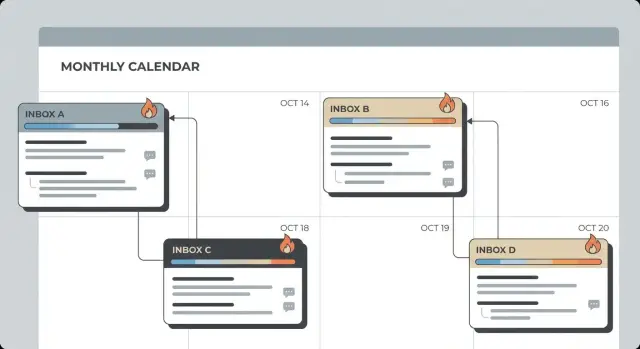
Why identical warm-up patterns get teams flagged
Email filters don't just read your words. They watch behavior. When a team spins up several new inboxes and they all act the same, it looks less like people and more like a script.
Identical patterns are easy to spot because they repeat cleanly across accounts. Common giveaways include:
- Everyone starts sending at the same time each day.
- Volumes rise in perfect steps across the whole team (10, then 20, then 30 on the same days).
- Subject lines and body copy look cloned across mailboxes.
- Opens and replies show up in the same tight time windows.
Teams get hit harder than solo senders because the pattern is multiplied. One new mailbox with predictable behavior might pass as a new employee learning the ropes. Ten new mailboxes doing the exact same thing creates a clear campaign footprint, especially if they share a domain, target similar prospects, or send similar messages.
There's also a practical risk. If one mailbox starts getting bounces, complaints, or "this is spam" signals, the rest of the group can get extra scrutiny. Even with separate infrastructure, synchronized behavior can still raise suspicion.
Good warm-up looks boring. Volumes rise slowly, but not in lockstep. Send times vary within a normal workday. Copy shifts slightly mailbox to mailbox. Replies happen, but not like a metronome. The goal is steady inbox placement with low complaint risk.
Warm-up basics for teams (quick refresher)
Mailbox warm-up is the process of building trust for a new sender. When a mailbox starts from zero and suddenly sends lots of cold emails, providers treat it like a risk. Warm-up works by increasing sending gradually while generating normal-looking activity: sent mail, replies, opens, and routine actions like deleting or moving messages.
For a team, the problem is coordination. If ten mailboxes all start on Monday, send the same counts, and receive the same kind of replies, that pattern can read like automation. Even if each mailbox stays under a "safe" daily limit, identical behavior across accounts is a signal on its own.
Most teams should plan on 2 to 4 weeks before a mailbox is ready for consistent outreach. Fresh domains often take longer. Rushing tends to backfire because early negative signals (bounces, complaints, low engagement) can stick. Building a good sender reputation is easier than repairing a damaged one.
Warm-up can help with pacing, but it won't rescue you from the usual blockers: bad authentication (SPF/DKIM/DMARC), weak lists (bounces, role accounts, stale data), spammy content (too many links or heavy formatting), or targeting people who never engage.
Treat warm-up like training, not a switch you flip. Automation can run the routine, but you still need a plan that avoids sameness across the team.
Get the foundations right before you ramp volume
If you want to warm up multiple mailboxes safely, the biggest wins happen before you send the first extra email. Solid foundations keep each mailbox's reputation clean, so small mistakes don't multiply.
Start with your sending setup. Many teams use separate sending domains or subdomains when multiple people email the same market. That limits the blast radius if one mailbox has a problem, and it makes it easier to isolate reputation by team, region, or offer.
Email authentication needs to be correct before any ramp. If SPF, DKIM, or DMARC are missing or misconfigured, your warm-up results become noisy because delivery can fail for technical reasons, not reputation.
Set a clear identity, without cloning everyone
Your team should feel consistent to recipients, but not identical. Keep the brand basics aligned (title format, phone style, timezone), then allow natural variation (short vs. medium signature, slightly different "From" names).
Decide ownership early. Each mailbox needs a real owner who uses it and handles replies. Avoid a shared habit where anyone can jump in and send from any address.
A simple way to prevent confusion is to document, per mailbox: the exact "From" name, signature, sending domain or subdomain, and who monitors replies and bounces. That one page of clarity saves teams from accidental cloning.
Example: if two SDRs target the same industry, give them separate subdomains and slightly different signatures. They can follow the same brand style, but their sending footprint won't look copy-pasted across the team.
Step-by-step: build a staggered warm-up schedule
If you warm up multiple mailboxes with the same start day, send times, and ramp jumps, the pattern is easy to spot. The goal is simple: make each mailbox look like a different real person with a different routine.
Start by choosing a start window, not a single start date. For example, decide that new senders will begin warm-up sometime between Monday and Friday. That alone removes the "everyone started together" fingerprint.
A stagger plan most teams can run
Add new senders gradually. If you need to warm up a lot of mailboxes, activate 1 to 3 per day until everyone is live. Give each mailbox its own daily send window (some mornings, some afternoons), and keep that window roughly consistent for that mailbox.
Keep the ramp boring and predictable, but not identical. A template that works for many teams:
- Days 1 to 3: 5 to 8 emails/day
- Days 4 to 7: 10 to 15/day
- Week 2: 20 to 30/day
- Week 3: 35 to 50/day, with at least one flat day (no increase)
- Week 4: move toward your real sending level, still offset increases across people
The key is offsetting. Don't let everyone "level up" on Mondays. If one mailbox increases volume on Monday, another should increase on Tuesday or Thursday, and a third should hold steady that week.
Concrete example: you have 12 SDRs. You start 2 mailboxes on Monday, 2 on Tuesday, 3 on Wednesday, and so on. Half send in the morning, half in the afternoon. One group increases volume on Tuesday, another on Thursday. The team follows one plan, but no two inboxes look synchronized.
Vary volume and message shape without getting messy
Sameness is the biggest risk. If every sender ramps from 5 to 10 to 15 on the same days, with the same length and the same template feel, it can look automated.
Vary daily volume inside a small, safe range so growth looks human, not like a staircase. One mailbox might send 8, 9, 8, 10, 9 while another does 6, 7, 7, 8, 7. Both improve, but they don't mirror each other.
Message shape matters as much as volume. During warm-up, keep emails simple and text-heavy. Rotate between shorter and medium-length notes, and change formatting a bit: sometimes one paragraph, sometimes two short ones. Avoid introducing a shared fingerprint across the team.
A few practical guardrails:
- Keep links rare early on, and don't introduce them for every mailbox on the same day.
- Skip attachments unless your real outreach truly depends on them.
- Rotate subject styles so the team doesn't share the same subject "shape" all week.
If your team uses style packs, keep them light: a tone preference, an average length, and a weekly volume range per sender. That provides structure without making everyone look the same.
Make reply behavior look human, not synchronized
Replies matter as much as sends. If ten teammates all reply at the same pace with the same "thanks!" wording, it can look automated.
Aim for real threads, not perfect ones. Healthy warm-up includes short back-and-forths, occasional follow-ups, and plenty of threads that simply end. One mailbox might answer quickly in the morning and go quiet after lunch. Another might respond later in the day. That natural messiness is the point.
Avoid scripted timing like "reply after 17 minutes" across the whole team. Use wide ranges and let some messages sit. Even within one mailbox, vary it: a 2-minute reply, then a 3-hour reply, then no reply at all.
Keep reply content varied too. Rotate believable reply types, such as a quick acknowledgement, a short question, light scheduling, or a polite "not for me". Mix one-line replies with a couple of short sentences. Sometimes include a name. Sometimes don't.
Spread warm-up across recipients and domains
Recipient patterns matter too. If every sender emails the same handful of addresses, filters see a tight, repeating network of interactions. That can look automated even at low volume.
Widen the pool of recipients and domains so no single provider or company gets hit by your whole team at once. If five new mailboxes all send to the same Gmail test inbox every morning, that pattern is easy to spot.
A simple approach is to split recipients into small groups and rotate them across senders with limited overlap. Keep the rotation slow so any single recipient gets only occasional warm-up emails from the same sender.
Two rules that save teams a lot of pain:
- Mix recipient domains (Google Workspace, Microsoft 365, and smaller business domains).
- Remove risky addresses quickly. Don't keep retrying bouncy inboxes.
Warm-up bounces hurt more than normal bounces because they happen early, when reputation is fragile. Review bounce reasons weekly and replace bad addresses instead of forcing volume.
Monitor early signals and adjust per mailbox
A common mistake is treating results as one blended score. Deliverability is personal. One shaky mailbox can turn into a bigger problem if you keep pushing volume.
Watch the signals providers care about: hard bounces, complaints, unsubscribes, and sudden drops in engagement. Track performance by mailbox, not just by campaign.
A simple weekly view per sender is enough for most teams:
- Bounce rate (especially hard bounces)
- Unsubscribes and spam complaints
- Inbox vs. spam placement from seed tests or internal test sends
- Reply rate and out-of-office rate
- Obvious timing spikes (same hour, same days)
If one mailbox looks weak, pause its ramp while others continue. Hold volume steady (or reduce it) for several days. Keep warm-up gentle, and only increase after signals recover.
Also look for pattern clues that trigger automation suspicion: identical copy across the team, the same recipient domains hit at the same time, or multiple mailboxes peaking in the exact same hour. Fix sameness first, then grow volume.
Common mistakes that trigger automation signals
The fastest way to get a team flagged is to make every mailbox behave like a clone.
One frequent error is starting everyone on the same day and following the same ramp curve. If five inboxes go from 5 to 10 to 20 on the same weekdays at the same hours, it reads as coordinated. Stagger start dates and vary the pace per sender.
Another easy tell is reusing the same warm-up templates across the whole team. Even if you swap names, the structure and phrasing stay identical. Change openers, subject styles, and the overall length so the shape of emails isn't uniform.
The "good day" trap is another one. One mailbox has a strong inbox placement day, so volume gets doubled the next day. Sudden jumps are a red flag. Warm-up moves in small steps, and setbacks should pause the ramp, not trigger panic changes.
Finally, don't blame the mailbox for bad data or missing authentication. Outdated lists, role accounts, and misconfigured SPF/DKIM/DMARC create problems no schedule can solve.
Warning signs worth taking seriously:
- Multiple mailboxes send at the same minute each day.
- Repeated subjects and identical paragraphs across accounts.
- Big volume jumps after a single "good" day.
- Bounce spikes from low-quality recipient lists.
- Authentication isn't verified.
Quick checklist before you scale outreach
Before you go from warm-up to real outreach, do a quick pass across the whole team. The goal is simple: warm up multiple mailboxes without creating the same fingerprint on every sender.
Team warm-up sanity check
- Start dates and send windows are offset. New mailboxes shouldn't all begin on Monday morning.
- Daily volume looks organic. Small ups and downs are fine. Avoid perfect stair-step increases across everyone.
- Messages don't share the same shape. Mix lengths and formatting. Don't run one template everywhere.
- Replies aren't synchronized. Avoid identical delays and identical wording patterns.
- Recipient mix is safe and varied. Spread sends across domains and remove bouncy addresses fast.
If your team has six SDRs, don't give all six the same 9-11 send window and the same 15 messages on day one. Stagger by a day or two, vary windows, and let two people stay flat on volume while others increase.
Next steps: turn warm-up into a repeatable team process
Once you can warm up multiple mailboxes without everyone following the same pattern, make it repeatable. Start with one shared goal: the daily send volume you want as a team, and when you need to reach it. Then assign staggered ramps so each mailbox grows on a slightly different curve.
Standardize the rules, not the exact execution. Everyone should follow the same guardrails (small daily increases, no sudden spikes, clean recipient data), but each mailbox should have its own timing, message lengths, and reply behavior.
A simple weekly review keeps you from guessing. Pick one day, look at each mailbox, and decide who can increase next week and who should hold steady.
If you want to manage domains, mailboxes, warm-up, and sequences in one place, LeadTrain (leadtrain.app) is built for that full workflow. It also supports tenant-isolated sending infrastructure, which helps teams keep their deliverability reputation separated while still running one shared playbook.