Time zone send windows that protect cold email deliverability
Learn how to set time zone send windows without hurting deliverability: batch sends by region, throttle smoothly, and avoid volume spikes providers flag.
Why send windows and spikes can hurt deliverability
The same cold email can get replies on Tuesday morning and get ignored on Friday night, even if the copy is identical. Timing changes who is at their desk, how fast they react, and how your message fits into the day’s normal inbox flow. When you hit people while they’re busy, asleep, or catching up on a backlog, you usually get fewer opens and more quick deletes. Those are weak signals for future sends.
The bigger issue is your send pattern. To Gmail and Microsoft, a sudden burst of messages can look like automation gone wrong or a compromised account. A traffic spike is not just “a high day.” It’s a sharp jump in a short window, like 200 emails in 10 minutes and then nothing for hours. Providers pay close attention to uneven patterns, especially on newer domains or mailboxes.
Bad timing also makes negatives worse. If part of your list has old addresses, a blast can produce many bounces at once. If you send outside local business hours, people are more likely to mark you as spam when they finally see it mixed with personal email, or when they’re cleaning an overloaded inbox.
Common causes of trouble include:
- Sending most of the day’s volume in the first hour
- Mixing regions in one blast (US, UK, APAC all at once)
- Jumping from low volume to high volume overnight
- Letting multiple sequence steps fire at the same time
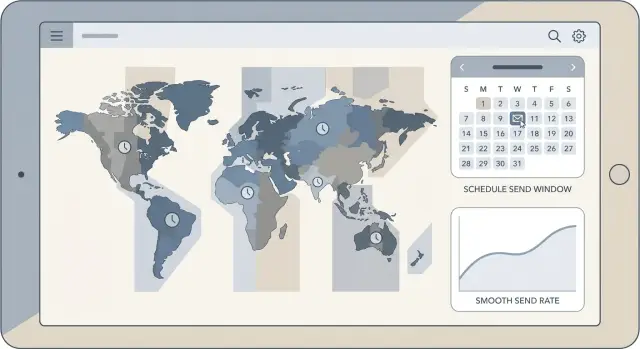
The fix is simple in concept: use time zone send windows and keep pacing smooth. Set daily windows by region, split sends into smaller batches, and throttle so each mailbox looks consistent.
What email providers pay attention to
Email providers are constantly trying to tell the difference between “a real person sending normal email” and “automated bulk sending.” Your schedule is one of the easiest signals to measure, and spikes are the fastest way to look suspicious.
A steady pattern tends to look normal: similar volume each hour, predictable daily totals, and gradual growth over time. A sudden burst, like sending 200 emails in five minutes after being quiet all morning, can look like a tool blasting a list. Even if your copy is fine, that traffic shape alone can increase filtering.
Providers also judge you at multiple levels:
- Mailbox reputation: how one sender address behaves (volume, bounces, complaint signals).
- Domain reputation: how the whole domain performs across all mailboxes.
One mailbox that sends too fast can drag down the domain, especially if it triggers bounces or complaints.
Engagement matters, but it’s easy to misunderstand. Opens are unreliable because tracking is often blocked or inflated by privacy features. Replies are harder to fake and usually stronger “this is wanted” signals. Even negative replies (like “not interested”) can be healthier than silence because they show a real interaction.
The warning signs providers react to are mostly simple and measurable:
- Hard bounces (invalid address) suggest bad data and can quickly hurt reputation.
- Soft bounces (temporary issues) often show up when you send too fast or hit rate limits.
- Unsubscribes and spam complaints signal that targeting or frequency is off.
- Sudden volume changes (up or down) can trigger extra filtering.
If you track replies by type over time (interested vs not interested vs out-of-office, for example), you can adjust windows and pacing before bounces and unsubscribes start climbing.
Group your audience by region and local business hours
Time zone send windows work best when you stop thinking in one global schedule. Start by listing the countries (or states) you target and the time zones they sit in. Even a simple split like “US/Canada, UK/Ireland, Western Europe, Australia” prevents most accidental midnight sends.
Next, split prospects into a few regional buckets you can manage. For many teams, three is enough: Americas, EMEA, and APAC. Within each bucket, send during the prospect’s local business hours, not your team’s working hours. If your SDRs are in New York but you’re emailing Germany, “9:30am” should mean 9:30am in Berlin.
A quick grouping that works for most teams:
- Americas: North and South America time zones
- EMEA: UK, Europe, Middle East, Africa
- APAC: India through Japan, plus Australia and New Zealand
- Mixed/unknown: leads with missing or messy location data
Two common traps to watch:
- Daylight saving time shifts
- Countries that span multiple time zones (US, Canada, Australia)
If you target the US and the UK, keep separate segments and schedules. Otherwise, a noon US send becomes a 5pm UK send, which can stack replies and volume into one tight burst.
How to choose daily send windows by region
Avoid “send all day” behavior. Pick one or two short windows per region and keep them consistent. Consistency creates a recognizable pattern instead of bursts that look automated.
Start with local business hours, then refine based on outcomes. A solid default is mid-morning and early afternoon in the prospect’s local time. Those slots catch people when they’re at their desk, but not buried in the first wave of morning email.
A practical starting plan:
- Window 1: 9:30-11:30 local time
- Window 2 (optional): 1:30-3:30 local time
- Skip anything after 6:00pm local time
Late-night sends often hurt more than they help. Off-hours timing can lower engagement, increase annoyed reactions, and create odd patterns that providers dislike.
After a week or two, narrow your windows using signals that matter: reply rate, positive replies, and unsubscribes. If UK prospects reply more between 10:00 and 12:00, keep that window and drop the weaker afternoon slot.
Weekends are audience-specific. Most B2B lists perform worse on Saturday and Sunday, so pausing is usually safer. If you do send on weekends, keep volume lower and use a single short window.
Batching basics: daily caps, pacing, and ramp-up
Batching is how you send the same total volume without looking like a sudden blast. The goal is straightforward: keep each mailbox predictable, keep timing natural inside your windows, and avoid sharp spikes.
Start by setting a daily cap per mailbox. A common mistake is thinking “the domain can handle it” while one mailbox blasts 300 emails. Providers judge behavior at the mailbox level too. If you need more volume, add mailboxes and spread the load instead of pushing one account.
New domains and new mailboxes need a slow start. Even with correct authentication, reputation is still unproven. A safe ramp-up is boring on purpose, and boring is good for deliverability.
Example ramp-up per mailbox (adjust based on list quality and replies):
- Days 1-3: 10-15 emails/day
- Days 4-7: 20-30 emails/day
- Week 2: 35-50 emails/day
- Week 3: 50-80 emails/day
- Week 4+: increase only if bounces and spam complaints stay low
Pacing matters as much as totals. Don’t dump today’s 60 emails in the first 10 minutes of the window. Spread sends across the full window with small, consistent batches, so traffic looks like normal workday sending.
A quick scenario: if you have 3 mailboxes and want 150 sends/day, don’t run one big batch of 150 at 9:00am. Set 50 per mailbox and pace them evenly from late morning to mid-afternoon (in the prospect’s local time).
Step-by-step: build a send schedule that stays smooth
Sketch your week before you touch settings. You want predictable volume, aligned to local work hours, spread out so you don’t create sudden bursts.
-
Split your audience into regions. Keep it simple: US/Canada, UK/EU, APAC. Assign each region a consistent local window that matches when people read work email.
-
Set limits that match your current reputation. Choose a per-mailbox daily cap you can support, then plan a weekly ramp-up with small increases, not jumps. If you’re adding new domains or mailboxes, treat the first couple of weeks as a gentle warm-up period.
-
Decide how sending will flow inside each window. You don’t need a complicated system. You need one that avoids “walls” of messages.
A simple flow that works well:
- Use a repeatable batch size (say 10-25 emails).
- Add a delay range between emails (for example 45-120 seconds), not a fixed delay.
- Space batches across the full window instead of stacking them at the start.
If you use multiple mailboxes, avoid having them march in sync. Stagger start times by a few minutes and give each mailbox slightly different pacing.
- Add safety rules. Slow down or stop when signals turn negative. For most teams, it’s enough to pause and investigate when you see:
- A bounce rate jump above your normal level
- Any spike in spam complaints
- A sudden jump in unsubscribes
- Provider blocks or repeated soft bounces
Make one change at a time, then watch results for a few days before you adjust again.
Multi-step sequences without stacking volume
Multi-step sequences can quietly create spikes. Step 1 might look steady, but once Step 2 and Step 3 start firing, you can end up sending multiple waves at once. Providers notice sudden jumps more than slow, even volume.
Treat every step as its own lane and avoid having lanes merge at the same hour.
Patterns that keep volume smooth:
- Give each step a different start time (for example: Step 1 at 9:20, Step 2 at 11:10, Step 3 at 2:40).
- Add randomness to follow-up timing (for example +2 to +4 days instead of exactly +2).
- Keep follow-ups in the same local window as Step 1.
- Cap follow-ups separately from new outreach so replies don’t cause a sudden doubling of total sends.
Avoid “resend to non-openers” tactics for cold email. It often creates instant duplicates and can look aggressive to filters.
A concrete example: you add 600 new prospects per day across US and UK. On day three, your “+2 days” follow-up kicks in. If both steps send at 9:00am, you can suddenly hit 1,200 emails in an hour. Instead, keep Step 1 in your normal windows, and schedule Step 2 later in the day with a smaller hourly pace.
Throttling that avoids provider filter triggers
Throttling isn’t just “send less.” It’s sending in a pattern that looks like normal human email, even when you’re running outreach at scale. Pair good throttling with sensible time zone windows and you avoid the bursts that make providers suspicious.
One simple trick is jitter: add small random delays between messages so your traffic doesn’t look perfectly timed. If every email goes out exactly every 30 seconds, that can look automated. If it varies slightly, the pattern is softer.
Also watch the calendar, not just the counter. Deliverability often takes a hit when you launch a new campaign, import a big list, and increase daily volume on the same day. Even if your daily cap is reasonable, the sudden change is the spike.
Habits that usually keep you out of trouble:
- Add jitter to pacing (vary delays by a few seconds to a minute)
- Separate big changes across different days (new campaigns, new mailboxes, large imports)
- Treat soft bounces gently: retry later with backoff, not immediately and not many times
- When bounce rates jump, slow down or pause until you find the cause
Soft bounces are a special case. Retrying can help, but repeated retries in a short window looks like hammering. Fewer retries, spaced out, is usually safer.
What to monitor and how to adjust safely
Once your schedule is live, the job is spotting small problems before they turn into bigger deliverability issues. Aim for steady sending and steady results, not chasing every daily swing.
Start with hard bounces. Track hard bounce rate by sending mailbox and by recipient domain (gmail.com vs company domains). If one mailbox spikes, pause it and check list source and address quality. If bounces spike mostly on one recipient domain, your pattern may look suspicious to that provider or your targeting is off for that segment.
Next, watch response signals that hint at inbox placement. A sudden drop in replies paired with an increase in out-of-office messages can mean you’re being filtered. It can also mean your timing is wrong for that region.
Compare performance across regions and windows. If your US morning window performs well but your UK window is quiet, don’t immediately increase UK volume. Confirm local hours and whether your copy matches that market.
Keep adjustments safe with a simple rule: change one thing, then wait.
- Change only one variable (window, daily cap, pacing, or list segment)
- Hold it steady for 3-5 sending days
- Re-check bounces by mailbox and by recipient domain
- Compare replies across regions before and after
- If results worsen, roll back and ramp again slowly
Example: if APAC sends show higher bounces on one mailbox, reduce that mailbox by 30% for a few days, keep other regions unchanged, then decide whether to shift the window or clean the list.
Common mistakes and traps to avoid
The fastest way to hurt cold email deliverability is to look “too organized” in the wrong way. Many senders accidentally create patterns that scream automation: sudden bursts, perfect timing, and big jumps.
A common trap is sending from every mailbox at the top of the hour. If 20 inboxes all start firing at 9:00 sharp, providers see a spike that doesn’t look like normal email. Stagger starts by a few minutes and keep a steady pace.
Another mistake is using one global time zone window for every country. Email Australia during US morning and you’ll hit people at odd local hours, usually with lower replies and more deletes. Group leads by region and send during local business hours, even if that means multiple smaller windows.
Ramping volume too fast after setting up a new domain is also risky. New domains and mailboxes need a gentle start. Jumping from 10 emails a day to 200 in a week can trigger scrutiny, even if your copy is good.
Follow-ups can also create hidden spikes. If your sequence is 4 steps and you enroll a big list on Monday, steps 2 and 3 can stack into the same Tuesday or Wednesday morning window. Spread enrollments across days, and cap daily sends across all steps, not just the first email.
Finally, don’t ignore unsubscribe and spam complaint trends. A small rise is an early warning that your targeting, timing, or message is off. If complaints tick up, reduce volume, tighten your list, and adjust your regional schedule before providers adjust it for you.
Example schedule: US, UK, and APAC without volume spikes
Picture a small team running one outbound campaign, targeting three regions: US East, the UK, and Australia. The goal is smooth traffic that doesn’t look like bursts.
Assume you want to send 600 first-touch emails per day, split across 3 mailboxes (200 each). Instead of blasting all 600 at 9:00am your time, stagger by local business hours and keep pacing consistent.
A staggered daily plan (Mon to Fri)
Use local-time windows with gentle pacing inside each window:
- UK: 09:30-11:30 (send 180 total, about 90 per hour)
- US East: 10:00-12:30 (send 300 total, about 120 per hour)
- Australia (AEST): 10:00-11:30 (send 120 total, about 80 per hour)
The windows overlap on your global clock, but each region sees mail arrive during normal morning hours, and your sending doesn’t create a single sharp spike.
To avoid bursts, split each region across your 3 mailboxes evenly. In the US East block (300 emails), each mailbox sends 100 spread across 2.5 hours, not 100 in the first 10 minutes.
Simple pause rule when bounces jump
Right after launching a new domain or list, watch bounces closely. A practical rule:
If your hard bounce rate exceeds 3% in any 2-hour window, pause new sends for that domain for the rest of the day, fix the list (bad emails, wrong company formats), and resume tomorrow at 50% of the previous pace.
That one habit can prevent a bad list from turning into a reputation problem.
Quick checklist and next steps
A good send plan is boring on purpose. If your volume graph looks like rolling hills, you’re usually safer than if it looks like a heartbeat.
Keep time zone send windows and throttling working together:
- Regional send windows based on local business hours
- Per-mailbox caps (daily max and a realistic per-hour pace)
- Jitter turned on so sends don’t leave in perfect, repeated bursts
- Follow-ups staggered so steps don’t stack into the same hour
- A written ramp plan (this week vs next week), not “we’ll see”
- Monitoring for bounces, spam complaints, unsubscribes, and reply mix
Pick one region and one campaign, stabilize it for a week, then expand. For example, start with your US segment only, run a steady window, and adjust caps based on bounce and complaint signals. Then add the UK segment as a second window, keeping total daily volume flat until the new window proves stable.
If you want fewer moving parts, LeadTrain (leadtrain.app) is built to keep outbound email in one place: domains, mailboxes, warm-up, multi-step sequences, and reply classification. The tool matters less than the principle, though: consistent, region-appropriate volume beats spikes every time.