Tenant-isolated sending infrastructure: separate reputation explained
Tenant-isolated sending infrastructure helps keep your sender reputation separate from other customers. Learn what that means, what to ask providers, and deliverability impact.
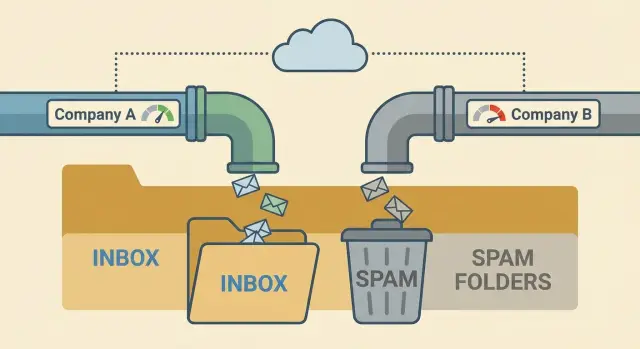
Why deliverability problems happen even with good emails
You can write a polite, clear email and still see it land in spam, promotions, or not arrive at all. Inbox placement is mostly a trust decision made by email providers. Your message is only one signal. The bigger question is whether they trust the sender enough to show it in the inbox.
That trust is often described as sending reputation. It’s your track record based on what happens after you hit send. If people ignore you, mark you as spam, or your emails bounce, providers learn to be cautious with your future messages.
Deliverability drops even when your copy is fine because of things like sudden volume jumps, poor list quality, or missing authentication. Even a well-written email sent to old, risky, or scraped addresses can produce bounces and complaints fast.
On some platforms, other senders can affect you because parts of the sending setup are shared. If you share an IP or other infrastructure with “neighbor senders” who send low-quality mail, providers may associate that shared source with higher risk. Your emails can suffer even if you did nothing wrong.
Tenant-isolated sending infrastructure aims to reduce that risk by keeping customers separate so sending history doesn’t mix. But isolation isn’t magic. You still have to earn trust with basic habits: ramp volume gradually, keep bounce rates low with clean data, make opt-outs easy, avoid constantly rotating domains and mailboxes, and write for real humans.
Tools like LeadTrain can handle pieces like authentication and warm-up, which reduces common technical mistakes. The day-to-day choices (who you email, how fast you ramp, and how people react) still decide whether “good emails” reach the inbox.
What tenant-isolated sending infrastructure actually means
A tenant is one customer account inside a provider’s system. Infrastructure is the behind-the-scenes sending setup: the servers, IP addresses, and settings used to hand your email to the wider internet.
With tenant-isolated sending infrastructure, your outbound traffic is kept apart from other customers at the infrastructure layer. Their mistakes are far less likely to poison your reputation. This differs from a shared pool where many customers send from the same underlying resources.
What is separated (and what usually is not)
In practice, isolation often means your sending resources and controls are separated in the places that matter for deliverability. That can include your IP (or IP pool), your domain and mailbox authentication (SPF, DKIM, DMARC), sending rules like throttling and bounce handling, and access controls so other accounts can’t touch your settings.
What it doesn’t do is protect you from your own behavior. If you upload low-quality leads, blast volume too fast, ignore bounces, or trigger complaints, you can still burn your reputation.
Also watch the wording providers use. Account-level isolation means separate logins, workspaces, and data. Infrastructure-level isolation affects deliverability: which IPs, routing, and sending resources your mail actually uses.
For example, LeadTrain’s tenant-isolated sending infrastructure via AWS SES is designed so each organization maintains its own deliverability reputation. That helps most when your domains, mailboxes, and sending habits stay clean and consistent.
What “separate reputation” means in practice
“Separate reputation” means your results mostly follow your own behavior, not the behavior of other customers on the same platform. If you send thoughtfully and keep your list clean, you’re less likely to be dragged down by someone else blasting spam.
Email providers build trust using signals they can measure from your sending. The biggest ones are bounces, spam complaints, engagement, blocks and rate limits, and unsubscribes (unsubscribes aren’t always bad, but spikes are a warning).
On shared systems, a “neighbor sender” can hurt you. If another customer sends to scraped lists, racks up bounces and complaints, and triggers blocks, providers may tighten filtering for that shared source. Even if your copy is good, your emails can start landing in spam or being deferred because the shared source looks risky.
With tenant-isolated sending infrastructure, each customer has their own sending environment, so the damage stays contained. LeadTrain uses tenant-isolated sending via AWS SES so your deliverability reputation isn’t mixed with other accounts. You still have to earn trust, but you’re less likely to pay for someone else’s bad habits.
A simple analogy: shared sending is like sharing one utility meter in an apartment building. If one neighbor wastes power, everyone’s bill goes up. Separate reputation is having your own meter. Isolation doesn’t make you automatically trusted, it just makes trust and consequences more fair and predictable.
Shared, dedicated, and tenant-isolated: the real differences
Most deliverability talk sounds abstract until you compare the three common setups providers use: shared, dedicated, and tenant-isolated. The difference is who you’re “paired” with when you send, and how much their behavior can affect you.
With a shared pool, many customers send through the same underlying resources. If another sender in that pool blasts low-quality lists or racks up spam complaints, filters can treat the whole pool with more suspicion.
A dedicated setup reserves key sending resources for just your organization. That usually means more control and less risk from other customers, but you take full responsibility for your own metrics. If your list quality slips or you increase volume too fast, there’s no “healthy pool” to blend into.
Tenant-isolated sending infrastructure sits between those two. You still use the same platform, but your sending environment is separated in a way that matters to mailbox providers. In practice, the tradeoffs look like this:
- Shared: fastest start, highest neighbor risk.
- Dedicated: most control, more setup and monitoring.
- Tenant-isolated: lower neighbor risk than shared, usually less overhead than fully dedicated.
Cost and setup time are only half the story. The other half is responsibility. The more isolated you are, the more your own practices decide outcomes: clean targeting, steady volume, and consistent sending patterns.
The reputations that matter: IP, domain, and mailbox
When people say “deliverability,” they usually mean one thing: will your email land in the inbox? Providers look at several reputations at once. If one is weak, it can drag the others down.
IP reputation
IP reputation is the trust score of the sending server’s IP address. It answers: do emails from this IP usually get complaints, bounces, or spam flags? Tenant isolation helps most here because your IP reputation isn’t mixed with other customers.
A clean IP still doesn’t guarantee inbox placement. If you blast large volumes on day one or send to bad lists, you can damage that IP quickly.
Domain and mailbox reputation
Domain reputation is tied to your sending domain (the part after @). Mailbox reputation is tied to the specific sender identity (like [email protected]) and how consistently that mailbox behaves.
A simple mental model: the IP is the delivery truck, the domain is the brand on the truck, and the mailbox is the driver. Mail providers judge all three.
What tends to matter most is authentication and alignment (SPF, DKIM, DMARC), consistent sending patterns (no big spikes and crashes), low hard bounces, low complaint rates, and engagement signals. Opens are noisy, but replies and “not spam” actions help.
SPF and DKIM prove you’re allowed to send for the domain. DMARC ties it together and tells providers what to do when something fails. The key is alignment: your “From” domain should match what SPF/DKIM authenticate.
Warm-up matters because it shapes first impressions. A new mailbox that goes from 0 to 500 cold emails overnight, with 8% bounces, will look suspicious even on a clean IP. Platforms like LeadTrain reduce setup mistakes by handling SPF/DKIM/DMARC and warm-up in one place, but the basics still matter: steady volume, clean lists, and careful targeting.
How to set up outbound so isolation can actually help
Tenant-isolated sending infrastructure only protects you from other senders. You still have to earn trust with mailbox providers through clean setup and steady behavior. Think of isolation as your own lane on the road. It helps, but you can still crash if you speed.
A practical setup sequence looks like this:
Start by choosing a sending domain and authenticating it properly with SPF, DKIM, and DMARC. Then create mailboxes that send using that same domain and confirm alignment with a few test emails. Warm up gradually and keep changes predictable. Early on, focus on smaller, cleaner segments where you’re more likely to get real replies and fewer bounces. Finally, watch signals daily and react quickly when something changes.
As a rough example, you might begin with 20 to 30 emails per mailbox per day to a highly relevant segment. If bounces stay low and you get a few real replies, increase in small steps week by week instead of doubling overnight.
Platforms like LeadTrain can reduce setup friction by handling domains, DNS authentication, and warm-up in one place, but outcomes still depend on steady sending habits and clean data.
Questions to ask a provider before you trust their deliverability
A deliverability promise is only as good as the setup behind it. Before you move volume, get clear answers in writing, not marketing language.
Ask how sending is isolated in practice: is it per tenant, per IP, or still a shared pool with labels? If it’s a pool, ask how many customers share it and how senders are grouped.
Ask whether isolation is real at the infrastructure level or only in the UI. Some tools look separate in the dashboard but still send through the same underlying IPs.
Ask what happens during incidents like blocks, spikes, or abuse. Do they pause a single sender, throttle volume, rotate IPs, or freeze the entire pool? And how quickly will you be notified?
Ask how they handle DNS and authentication, and how they verify it after setup. You want confirmation that SPF, DKIM, and DMARC are passing, not just “added.”
Finally, ask what reporting you get that relates to inbox placement. At minimum you should see bounces, complaints, unsubscribes, and reply categories. It’s even better if you can see trends by mailbox and by recipient domain (Gmail, Outlook, and so on).
A quick reality test: ask them to describe a real incident from the last 6 to 12 months and what they changed afterward. If the answer is vague, assume you’ll be the one paying for the learning.
If you use a platform like LeadTrain, ask how tenant isolation works with their AWS SES setup and what metrics you can see per organization. The goal is simple: if another customer gets flagged, your sending shouldn’t be pulled down with them.
Common mistakes that waste the benefit of separate reputation
Separate reputation can protect you from other senders, but it can’t protect you from your own choices. Even with tenant-isolated sending infrastructure, the same deliverability problems show up when basics are off.
One common failure is blaming the setup when the real issue is the list. If you send to scraped, outdated, or loosely matched contacts, you’ll get bounces, spam complaints, and low replies. Those signals are tied to your domain and mailboxes.
Another mistake is rushing warm-up for a fresh domain or mailbox. Jumping from zero to high volume in a week looks suspicious to inbox providers. Warm-up should resemble your future pattern, not spike and then drop.
Mixing cold outreach and newsletters on the same domain also causes trouble. Newsletters depend on opt-in engagement. Cold email gets more ignores and more negative signals. Mixing both without a plan can drag everything down.
Reply handling matters more than people expect. If interested replies sit unsorted, or unsubscribes aren’t honored quickly, your campaign creates negative signals. Tools like LeadTrain help by classifying replies (interested, not interested, out-of-office, bounce, unsubscribe), but you still need a simple process to act on each category.
Consistency wins. Pick a realistic daily send range, stick with it for weeks, and scale only when bounce and complaint signals stay calm.
Quick deliverability checks before you scale volume
Before you increase daily sends, make sure the basics are solid. Even with tenant-isolated sending infrastructure, sloppy setup or weak data can hurt you fast.
A five-minute pre-scale checklist
Confirm your domain authentication is in place and aligned: SPF and DKIM pass, and DMARC exists (even if it starts in monitoring). The From domain should match what you authenticated.
Confirm warm-up is active and your volume is ramping gradually. If you jumped from 20 emails a day to 500, inboxes notice.
Check bounce rates. If hard bounces rise, pause and clean the list before you send more.
Make sure opt-outs are clear and unsubscribes are suppressed quickly.
And make sure you can see your own metrics separately. If the provider only shows blended stats, you can’t tell whether your tenant is healthy.
A simple rule holds: if you don’t trust your list, don’t trust your deliverability.
What “healthy” looks like before you scale
Look for stable patterns over several days, not one good day. Replies can be low and still be fine, but warning signs are usually obvious: rising bounces, rising spam complaints, or a sudden drop in opens while your copy stays the same.
Example: you plan to double volume on Monday. On Friday you notice bounces creeping up after importing a new lead source. The right move is to pause that segment, remove invalid addresses, and keep warm-up and send volume steady. Platforms like LeadTrain can help by keeping warm-up running and showing per-organization performance so you’re not guessing based on other customers’ results.
Example scenario: when a “neighbor sender” hurts you (and when they cannot)
Two SDR teams, Team A and Team B, use the same cold email platform. They sell different products, but both send from new domains and similar daily volume. For the first week, both teams see decent open rates and a few replies.
Then Team A rushes a list upload. The list is old, has lots of role accounts, and includes people who never opted in. Within days, bounce rates jump, spam complaints appear, and mailbox providers start treating traffic from that platform with suspicion.
On a shared sending pool, Team B feels it even though they did nothing wrong. Their emails start landing in spam, replies drop, and they get “not delivered” errors more often. Their copy and targeting didn’t suddenly get worse. They’re taking damage because the pool’s reputation is being dragged down by a neighbor.
Now picture the same week on tenant-isolated sending infrastructure. Team A can still harm themselves, but the blast radius is smaller. Team B’s sending reputation isn’t tied to Team A’s behavior, so Team B is more likely to keep stable inbox placement while Team A cleans up.
Even with isolation, the same factors decide the outcome every day: list quality, message relevance, consistent volume, and fast suppression of unsubscribes and bounces.
A realistic recovery looks like this: Team A pauses sending, removes bad data, tightens targeting, and restarts with a slow ramp. After a week or two of steady habits and fewer negative signals, their inboxing improves again. Team B keeps booking meetings because they weren’t pulled down by a neighbor’s mistake.
Next steps: choosing a setup you can keep stable
If you want consistent results, pick an outbound setup you can keep the same for months, not weeks. The biggest gains usually come from boring discipline: stable sending identity, steady volume, and clean list habits.
Confirm the basics are truly in place: tenant-isolated sending infrastructure (so your deliverability isn’t tied to another customer), proper authentication (SPF, DKIM, DMARC), a warm-up plan for new mailboxes, and reporting that makes problems obvious. If a provider can’t clearly explain any of these, treat that as a signal.
Write down your own sending rules before you change tools or scale volume. Keep them short: where leads come from, how you ramp volume (and when you pause), how replies get handled, and which bounce or complaint thresholds trigger a review.
Then evaluate vendors like a pilot, not a leap of faith. Run one domain and a few mailboxes, and judge based on outcomes and control: can you see mailbox-level stats and reply categories, what happens when a mailbox gets flagged, and how they prevent one customer’s behavior from affecting yours.
If you prefer fewer moving parts, LeadTrain (leadtrain.app) keeps domains, mailboxes, warm-up, sequences, and reply classification together, which makes it easier to stick to your rules without juggling multiple tools.
Scale the way you want to operate long-term: start small, measure daily (replies and bounces are useful proxies), adjust one variable at a time, and increase volume only when results stay steady. " }
FAQ
What is tenant-isolated sending infrastructure in plain terms?
Tenant-isolated sending means your organization’s outbound email is sent through infrastructure that isn’t shared with other customers in the ways that affect deliverability. The goal is to keep your sending reputation from being dragged down by “neighbor senders” who generate bounces or spam complaints.
It doesn’t guarantee inbox placement; it just makes your results track your own behavior more closely.
What does “separate reputation” actually mean for my results?
“Separate reputation” means mailbox providers can judge your IP/domain/mailbox history mostly based on your own sending, not a blended history from many accounts. If you keep bounces and complaints low, you’re less likely to be punished for someone else’s bad practices.
You can still damage your own reputation quickly with poor targeting or big volume spikes.
How is tenant-isolated different from shared or dedicated sending?
Shared sending pools combine multiple customers on the same underlying sending resources, so one sender’s problems can spill over to others. Dedicated sending usually reserves key resources for only your company, which increases control but also makes you fully responsible for your metrics from day one.
Tenant isolation aims to reduce neighbor risk like dedicated sending, while keeping the operational overhead closer to a managed platform experience.
Does tenant isolation always mean I have my own IP address?
Not always. Some tools isolate accounts in the dashboard but still route email through shared infrastructure. That can look “separate” in the UI while deliverability is still influenced by other senders.
A good check is to ask what is isolated at the sending layer (IPs, routing, throttling, bounce handling) rather than just logins and workspaces.
If I use tenant-isolated sending, can I stop worrying about deliverability?
Isolation helps most with IP-level risk from neighbor senders, but it doesn’t protect you from low-quality leads, high hard-bounce rates, or spam complaints. Mailbox providers also watch your domain and mailbox behavior, so sloppy list hygiene can hurt even on a clean setup.
Think of isolation as removing unfair external damage, not as a deliverability shortcut.
What’s the best way to set up outbound so isolation actually helps?
Start with correct authentication and alignment so your From domain matches what’s authenticated. Then warm up and ramp volume gradually, keeping early segments tight and relevant so you get real replies and few bounces.
Once sending is stable, scale in small steps and watch for sudden changes in bounces, complaints, or blocks before increasing volume again.
Why do SPF, DKIM, and DMARC matter even if my emails are “good”?
SPF and DKIM prove you’re allowed to send for a domain, and DMARC tells providers how to handle messages that fail those checks. What matters most is alignment: the visible From domain should match the domain authenticated by SPF/DKIM.
Without proper alignment, even well-written emails can be treated as suspicious and filtered more aggressively.
What is mailbox warm-up, and what problem does it solve?
Warm-up builds a believable sending history for a new domain or mailbox by starting low and increasing slowly. A new sender that jumps from near-zero to high volume overnight often triggers filters, especially if bounces or complaints appear early.
Warm-up helps, but it can’t compensate for bad data or irrelevant targeting.
Which metrics should I monitor to know if deliverability is slipping?
Focus on a few signals you can act on: hard bounces, spam complaints, blocks or deferrals, unsubscribe rate spikes, and reply patterns. Opens are often unreliable, so treat them as a weak signal and prioritize replies and negative signals.
You’ll also want to see metrics by mailbox and by recipient domain so problems don’t stay hidden in blended averages.
What should I do if my emails suddenly start landing in spam?
Pause or slow sending to the segment that’s causing problems, remove invalid addresses, and tighten targeting before resuming. Keep volume changes predictable; big swings up and down can extend recovery time.
If you’re using reply classification, act quickly on unsubscribes, bounces, and “not interested” signals so you stop generating avoidable negative feedback.