Subdomain vs root domain for outreach: when to use each
Subdomain vs root domain for outreach: when to use a separate subdomain, how it reduces brand risk, and what to set up so replies still feel trustworthy.
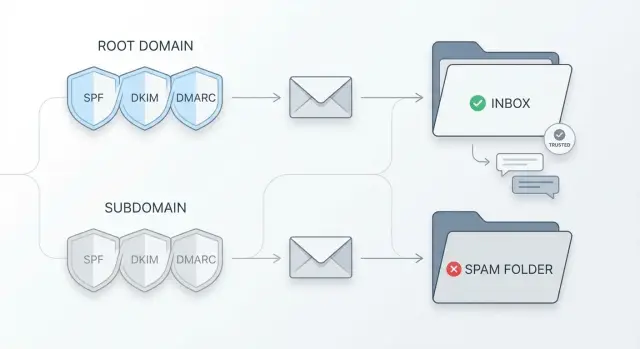
Why the domain choice matters for outreach
Choosing between a root domain and a subdomain isn’t a small technical detail. It determines what happens if your outreach gets flagged, bounces a lot, or triggers spam complaints. It also shapes how credible you look in the first couple of seconds.
The biggest risk is straightforward: if cold outreach damages the reputation of your primary domain, you feel it everywhere. Password resets, invoices, customer onboarding, and partner emails can start landing in spam or showing up late. Even if outreach is bringing leads, the hidden cost can be higher than the upside.
That’s why many teams separate different types of email. Transactional messages (receipts, login codes, product alerts), marketing emails (newsletters and promos), and outreach (cold or semi-cold prospecting) behave differently, and they carry different levels of risk. Keeping them apart makes problems easier to contain. If outreach has a bad week, your billing emails shouldn’t pay the price.
Deliverability is only half the story. The other half is trust. Recipients quickly ask: does this look like it really comes from the company it claims to represent, and does it feel safe to reply?
People scan for fast signals: the domain in the From address, whether it matches what they find when they search your company, and whether the email feels consistent with the sender’s online presence. If the domain looks unfamiliar or oddly different, some people assume it’s a reseller, an affiliate, or a scam, even if the email lands in the inbox.
A common scenario: you sell B2B software from acme.com, but you send cold emails from a random-looking domain like acme-mailer.com. Some prospects hesitate to book a call or share details because the identity feels off. But sending from the root domain raises the stakes if deliverability slips.
That tradeoff is the real decision.
Root domain vs subdomain: the simple difference
Your root domain is your main website name, like company.com. It’s the address people already associate with your brand.
A subdomain is a branch of that root domain, like try.company.com, mail.company.com, or hello.company.com. It’s still connected to your brand, but it can behave like a separate sending identity in important ways, especially around email authentication and reputation.
Recipients (and inbox filters) notice this difference in a few places:
- From address:
[email protected]feels like the core brand.[email protected]feels related, but more campaign-like. - Behind-the-scenes routing details: reply-to and return-path behavior is mostly invisible to people, but it matters to mailbox providers.
- Where you send someone after they read: if your email is from
try.company.combut everything else points tocompany.com, the mismatch can create doubt. It’s not always a deal breaker, but consistency helps.
Most teams end up with one of these patterns:
- Core brand only:
[email protected] - Dedicated outreach subdomain:
[email protected](oroutreach.company.com) - Separate domain for outreach:
[email protected](more distance from the brand)
A subdomain is popular because it keeps the brand connection while adding a bit of separation. The separation reduces risk, but you still need the identity to feel coherent so replies don’t feel like they’re going to a different company.
Brand risk: what you’re actually protecting
Most debates about root domain vs subdomain are really about brand risk, not theory. If outreach causes complaints or looks spammy, you don’t want the blowback to touch the email identity your customers already trust.
What domain reputation is (and why it sticks)
Domain reputation is the track record mailbox providers build about your sending behavior over time. They look at spam complaints, bounces, engagement, and whether authentication is set up correctly. Once a domain gets a bad pattern attached to it, recovery can take weeks or months. Even if you stop a bad campaign, the history doesn’t disappear overnight.
That’s why short spikes matter. One messy list upload or one annoying message can create a burst of complaints that follows the domain.
How complaints can hurt your main domain
Your root domain is usually tied to the most important emails you send: onboarding, receipts, support replies, account alerts, and real one-to-one conversations. If the root domain reputation drops, those messages can start landing in spam or getting delayed. At that point, it’s no longer “just an outreach issue.” It becomes a customer experience problem.
A dedicated outreach subdomain reduces the blast radius. If something goes wrong, the damage is more likely to stay on the outreach identity while the main domain keeps its cleaner history.
Protecting the root domain is usually the priority when you already have customers, you send important operational email, you work in a trust-heavy category (finance, health, security), or you plan to scale cold email volume quickly and can’t fully control quality across multiple senders.
The goal isn’t to hide your brand. It’s to separate risky experimentation from the email identity your customers depend on every day.
Deliverability impact: what changes and what doesn’t
Mailbox providers don’t trust a domain just because it looks familiar. They build trust over time by watching behavior: do people open it, reply, delete it, mark it as spam, or bounce because the address is invalid?
The biggest deliverability difference is the starting point:
- A brand-new subdomain usually starts with little to no sending history. It needs time and gradual volume to earn a good reputation.
- A root domain with years of normal business email may have more credibility, but it can also be easier to damage if you suddenly push cold outreach volume through it.
Early on, providers look for stable volume (not spikes), good list quality (low bounces), strong engagement (especially replies), authentication that passes and aligns, and message patterns that don’t look like mass templating.
A subdomain isn’t a get-out-of-jail card. Sloppy outreach still creates problems. Recipients can still report you, your links and tracking patterns may stay the same, and people will associate the subdomain with your brand name anyway. Most importantly, content and targeting matter more than the domain choice. A well-warmed domain can still land in spam if you email the wrong audience, use spammy language, or send to scraped lists.
When to use the root domain vs a dedicated outreach subdomain
This choice is mostly about risk and expectations.
Use the root domain when the email is closely tied to existing trust and you can keep volume low and steady. Think onboarding customers, reactivating recent users, partner intros, or a short list of warm leads who already engaged.
Use a dedicated outreach subdomain when you’re doing true cold outreach, iterating quickly on messaging, or sending at higher volume. It’s also a strong option when you want a clear boundary between sales outreach and company-critical email like billing, login, and support.
One rule that saves a lot of pain: pick a setup and stick with it long enough to build reputation. Frequent switching often creates more problems than it solves.
Step by step: setting up a dedicated outreach subdomain
A dedicated outreach subdomain is a practical middle ground, especially if you’re sending at volume or testing new offers.
-
Pick a normal-looking subdomain name. Choose something that fits your brand and reads like a real inbox, such as
sales.,team., orinfo.. Avoid words that sound like a campaign machine, such asblast,promo, ordeals. -
Create mailboxes and keep the sender identity consistent. Use a real person or clear role in the From name (for example, “Maya Chen, Partnerships”). Keep mailbox naming consistent across the team so it doesn’t feel like a different company every email.
-
Set up SPF, DKIM, and DMARC for the subdomain. These records prove your emails are authorized and unaltered. Start DMARC in monitoring mode (often
p=none) while you validate alignment and sending sources, then tighten later once you’re confident. -
Add a simple web presence that matches the sender identity. It doesn’t need to be fancy. Basic company info, what you do, and a way to contact you is often enough. The goal is to remove doubt when someone quickly checks who you are.
-
Warm up gradually before real campaigns. Start low, increase slowly, and watch bounces, complaints, and replies. If you ramp too fast, you can tank a new identity before it has a chance.
How to keep replies feeling trustworthy
A dedicated outreach subdomain can protect your main brand, but it shouldn’t feel like you’re hiding.
A plain, complete signature does more for trust than fancy design. Include your full name, role, company name, and one easy way to confirm you’re real (for example, “You can find me on our company site under Team”).
Then make the reply experience match what you promised. If you send from an outreach subdomain, make sure replies go to an inbox you actually monitor, and respond quickly. Slow or missing replies do more damage than the domain choice.
A few practical habits that help:
- Keep the sender name, company name, and tone consistent across the sequence.
- Explain why you chose them in the first email. Specific beats generic.
- Avoid mismatched domains in links or branding elements that feel unrelated.
Example: a realistic setup for a small team
A two-person B2B service business (say, a bookkeeping firm) is starting outbound for the first time. They already use brightbooks.com for their website and client emails.
They want to book calls, but they don’t want to put their day-to-day client inbox at risk if early campaigns get complaints. They choose a dedicated outreach subdomain because they plan to email new prospects daily and they’re still learning what messaging gets positive replies.
Their setup looks like this:
- Website and client work stays on
brightbooks.com. - Outbound sending uses a separate space like
mail.brightbooks.com(orhello.brightbooks.com). - Mailboxes:
[email protected]and[email protected].
They keep the brand consistent: the display name is still “Sara at BrightBooks,” the signature mentions BrightBooks, and the email doesn’t look like it’s coming from a different company.
What the first two weeks might look like
They start slow, focusing on reputation before volume:
- Days 1-7: warm-up only (no cold campaigns), one mailbox at a time.
- Days 8-10: 5-10 cold emails per mailbox per day to a tightly matched list.
- Days 11-14: 15-25 cold emails per mailbox per day, only if bounces and complaints stay low.
Handling an interested reply without sounding “separate”
On day 12, a prospect replies: “Sounds interesting, can you share pricing?” The worst move is to reply from a totally different address on the root domain with a completely different signature. It feels like a handoff.
Instead, Sara replies in the same thread from [email protected] and makes trust cues obvious in the first sentence: “Yes, happy to share. I’m Sara from BrightBooks (the bookkeeping team behind brightbooks.com).” Then she keeps it simple: 1-2 pricing options, a short qualifying question, and a clear next step.
Common mistakes that hurt trust and inbox placement
Most outreach problems aren’t caused by one “bad email.” They come from small setup and behavior choices that add up.
- Rotating through lots of subdomains too fast. New domains start with no reputation. If you keep switching (hello1, hello2, get-started), you never build stable history.
- DMARC missing or misconfigured. SPF and DKIM without DMARC leaves room for spoofing and can hurt alignment. A wrong DMARC record can also break things.
- High volume on day one. Even with a great list, sending hundreds of emails from a fresh mailbox looks suspicious.
- Brand mismatch across the journey. If the email comes from one identity but the sender name, website cues, and meeting invite show something else, people hesitate.
- Ignoring bounces, unsubscribes, and negative replies. High bounce rates suggest poor list quality, and too many complaints can damage reputation quickly.
Quick checklist and next steps
Pick the option you can run consistently, then set the basics up correctly. Most problems come from “almost configured” domains and “we’ll warm up later” habits.
Before sending your first real campaign:
- Confirm you’re sending from the exact domain you intended (root or outreach subdomain).
- Verify SPF, DKIM, and DMARC are set and passing for that exact sending domain.
- Start warm-up and set conservative send limits for the first month.
- Decide who owns replies and what a good response time looks like.
- Write down the setup (sending domain, mailboxes, daily limits, and who to contact if deliverability drops).
If you want to keep the operational side simpler, LeadTrain (leadtrain.app) combines domains, mailboxes, warm-up, multi-step sequences, and AI-powered reply classification in one place, which can make it easier to keep outreach consistent while protecting your main domain.
FAQ
Should I send cold outreach from my root domain or avoid it?
Use the root domain when the email relies on existing trust and the volume stays low and steady, like customer onboarding, partner intros, or reaching out to warm leads. The upside is strong brand recognition, but you’re taking on more risk if complaints or bounces spike.
When is a dedicated outreach subdomain the better choice?
A dedicated outreach subdomain is usually the safer default for true cold email, higher daily volume, or fast iteration on messaging and targeting. It helps contain reputation damage so billing, support, and login emails on the root domain are less likely to be affected.
How does a subdomain protect my main domain reputation?
It’s mainly about reducing blast radius. If outreach gets flagged or generates complaints, a subdomain is more likely to absorb the damage while your main domain keeps a cleaner history for customer-critical messages.
Will a subdomain automatically improve deliverability?
Not automatically. A subdomain still needs good setup, warm-up, and careful sending habits, and people can still report your emails as spam. It’s a risk-management tool, not a deliverability shortcut.
What’s a “safe” subdomain name for outreach?
Pick something simple and normal that looks like a real company inbox, such as "sales", "team", or "hello". Avoid names that look like a bulk-sending machine, because that can reduce trust before the reader even opens the message.
What email authentication do I need on the subdomain?
Set up SPF, DKIM, and DMARC for the exact sending domain you’ll use, and confirm they pass. Start DMARC in monitoring mode first so you can validate alignment and sending sources before enforcing stricter policies.
How should I warm up a new outreach subdomain?
Warm up gradually by starting with very low volume, then increasing in small steps while watching bounces, complaints, and reply rates. Sudden spikes from a new domain or mailbox are a common reason inbox providers start filtering you to spam.
How do I keep outreach replies feeling trustworthy from a subdomain?
Keep the identity consistent. Use a real sender name, a clear signature with your company name, and make sure what people see in the email matches what they find when they check you out. Mismatched domains or confusing branding can kill replies even if you land in the inbox.
Is it a bad idea to rotate through multiple subdomains?
Frequent switching usually makes things worse because each new domain starts with little history. You get more stability by picking one setup, building reputation over time, and fixing problems with targeting, copy, and list quality instead of constantly changing domains.
What’s the simplest setup to reduce risk but stay consistent?
If you already send important operational emails (like invoices, password resets, or support) from the root domain, default to an outreach subdomain for cold campaigns. Tools like LeadTrain can simplify this by handling domains, mailboxes, warm-up, sequences, and reply classification in one place, which makes it easier to stay consistent and avoid risky setup gaps.