SES bounce and complaint event pipeline for clean lists
Build a SES bounce and complaint event pipeline to store events, auto-suppress risky emails, and keep an audit trail your team can trust.
Why you need a bounce and complaint pipeline
A bounce happens when an email can’t be delivered. Sometimes it’s permanent (the address doesn’t exist). Sometimes it’s temporary (the mailbox is full, the server is busy, or the provider is throttling you). A complaint happens when someone marks your email as spam or reports it as unwanted. Both are clear signals to stop sending to that address, or at least pause and investigate.
Ignore those signals and deliverability deteriorates quickly. Mail providers learn your messages create problems, so more future emails land in spam - even to good leads. You also waste money sending to dead addresses and waste time chasing people who never saw your message.
A bounce and complaint event pipeline isn’t about fancy analytics. It’s a small, dependable system that:
- captures every bounce and complaint event
- suppresses bad addresses fast
- keeps a searchable audit trail
That last part is easy to underestimate. A week later someone will ask, “Did we actually email this person?” or “Why was this address suppressed?” If you only keep a single suppression flag and no history, you can’t answer with confidence.
The setup below uses common AWS building blocks (SNS, SQS, Lambda) to capture events, process them safely, and store them. It doesn’t cover copywriting, list sourcing, sending domains, or full SES configuration.
The simple architecture at a glance
A reliable pipeline should be boring: every event lands somewhere safe, gets processed in a repeatable way, and leaves behind a record you can look up later.
The flow (ingest -> queue -> work)
A proven path is:
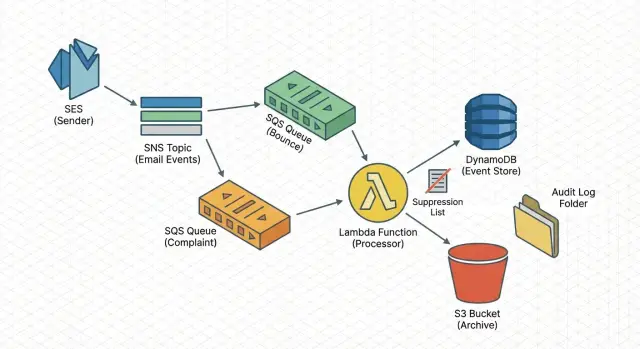
SES sends bounce/complaint notifications to SNS, SNS delivers to SQS, and a Lambda worker reads from SQS.
This approach absorbs spikes, survives brief outages, and lets you retry without blocking your sending.
What the worker does
Keep the Lambda focused. It should validate, normalize, write the event, then apply side effects (like suppression). Typical steps:
- validate the payload (malformed JSON, missing email, missing type)
- dedupe using an event ID, or a stable key like message ID + recipient + type
- classify the event (hard bounce, soft bounce, complaint)
- apply a simple action (suppress, warn-only, ignore)
- attach context (sending domain, mailbox, campaign ID)
Storage + actions (fast lookup and audit)
Use two storage layers: one optimized for fast queries and one for long-term proof. For example:
- a “latest status per address” record for fast lookups
- an archive of the raw event payload for audits and debugging
From the same worker, you can also trigger actions: add the address to a suppression list, alert when complaint rate spikes, and tag the campaign so you can trace which message caused the issue. This is the same general pattern tools like LeadTrain use to keep deliverability clean when sending through separate SES setups.
Set up SES to publish bounce and complaint events
First, make sure SES emits the right signals every time an email fails or a recipient complains.
In SES, create a configuration set (or reuse one you already attach to outgoing mail) and enable event publishing for Bounce and Complaint. Keep the payload as close to raw as possible. You’ll want details later: timestamp, message ID, destination address, bounce type, and complaint feedback.
Treat environments separately. Use one SNS topic for production and another for staging so test activity doesn’t pollute real metrics.
A straightforward setup:
- Create one SNS topic per environment (for example, ses-events-prod and ses-events-staging).
- In your configuration set, publish Bounce and Complaint events to the matching SNS topic.
- Subscribe SQS queues to the SNS topic. Many teams use one operational queue for suppression/alerts and a separate queue for reporting.
- Lock down each SQS queue policy so only your SNS topic can send messages (restrict by SourceArn and account).
- Send a small test batch and confirm you receive both bounce and complaint messages with the fields you expect.
Buffer events safely with SQS
SQS is the safety buffer between SES events and your code. It decouples the system so a spike in bounces or complaints doesn’t overload your worker. If Lambda is down for a few minutes, events wait in the queue instead of disappearing.
For most pipelines, a Standard queue is the simplest choice. It can deliver messages more than once, so the worker must be idempotent (safe to run twice). Choose FIFO only if you truly need strict ordering or queue-level deduplication.
Standard vs FIFO in plain words
FIFO can make sense if you need:
- strict ordering for the same email address
- deduplication at the queue level
- predictable, lower volume that won’t run into FIFO limits
Dead-letter queue and retry limits
Use a dead-letter queue (DLQ) so poison messages don’t block healthy traffic. A safe starting point:
- max receives: 5 to 10
- message retention: long enough to investigate (a few days is common)
- alarms when DLQ depth is greater than 0
Keep messages small, but don’t throw away context. Store the full SES event payload (or the full SNS message body) so you can audit later. If you change suppression rules in the future, the original payload is what lets you explain why an address was suppressed.
Process events with a small Lambda worker
The Lambda worker translates SES events into the decisions you care about. Keep the job narrow: parse one message, extract a few fields, write one event record, and update suppression state when needed.
Start by normalizing SES payloads into one internal schema. Different event types don’t always look the same, so pick a consistent shape and map everything into it. A practical minimum:
- event_type (bounce, complaint, delivery)
- message_id (SES mail.messageId)
- recipient_email
- event_time (one consistent timestamp)
- source (configuration set, sending identity, or system name)
Normalize bounce types early. Keep “bounce” as the main type, and store hard vs soft as a separate field. Do the same for complaints: keep subtype details if they exist, but don’t let them fragment your core flow.
Idempotency matters because SQS can deliver messages more than once. Use a stable key such as message_id + recipient_email + event_type. Before writing, check whether you’ve already stored that key. If yes, acknowledge and exit. That prevents double suppression and keeps counts honest.
Be strict about timestamps. Store the event’s timestamp in one consistent format (for example, ISO strings). Also store received_at separately so you can spot delays.
A good rule of thumb: write the event record first, then apply side effects. If the worker fails after writing but before suppressing, you can safely re-run suppression later without losing the audit trail.
Store events for both speed and audit trail
You want two things at once: quick answers (“is this address safe to email?”) and a full paper trail when something looks wrong.
Store a small summary you can query fast, and keep the raw AWS payload separately. The raw payload is your source of truth when you need to explain a complaint spike or prove why an address was suppressed.
A summary record can be small:
- event_id (your unique ID)
- message_id (from SES)
- recipient (email address)
- type and subtype (bounce, complaint; hard/soft)
- reason (short text or code)
A common pairing is DynamoDB for fast lookups and S3 for archive. DynamoDB works well when your sending path needs a quick “has this recipient bounced before?” check. S3 is cheap for storing raw JSON at scale.
One simple pattern: write the summary to DynamoDB, store the raw payload in S3 using a key that includes date and message_id, and save that S3 key on the DynamoDB record.
Retention is a policy choice. Some teams keep summaries long-term and expire raw payloads sooner. If you need deep audits, do the opposite.
Auto-suppress bad addresses (keep rules simple)
Auto-suppression is where the pipeline pays off. The goal isn’t a perfect model. It’s to stop known-bad addresses quickly, and to be able to explain the decision later.
Start with rules that are easy to defend:
- Hard bounce: suppress immediately.
- Complaint: suppress immediately.
- Soft bounce: suppress only after N events in a rolling window (for example, 3 soft bounces within 7 days).
- Unsubscribe (if you capture it separately): suppress immediately.
Soft bounces are tricky because they can be temporary. The threshold rule keeps you from overreacting to one bad day, while still removing addresses that repeatedly fail.
Maintain a small allowlist for internal domains, test inboxes, and seed addresses. Keep it tight and reviewed so it doesn’t hide real issues.
Every suppression should be auditable. Store:
- the rule that triggered the suppression
- the triggering event metadata (timestamp, message ID, bounce type)
- the source context (campaign ID, sending domain, mailbox)
That paper trail makes automation safer and makes reversals straightforward when someone says, “This lead is valid, please unsuppress it.”
Keep a suppression list you can trust
A suppression list only helps if everyone treats it as the source of truth. That means two things: a clear status per recipient, and a single place the sending system checks before every send.
Many teams do well with three statuses:
- active: ok to send
- suppressed: do not send
- pending-review: paused until a human confirms
The sending path shouldn’t guess. Before an email goes out, do a lookup and block the send if the status is suppressed or pending-review. Put that check in the service that builds the send list, not in a dashboard someone might forget to use.
Unsuppressing is where mistakes happen. Make it possible, but deliberate. Require a reason and record who approved it. If you have multiple tools, keep it simple: only one system is allowed to change suppression status, and everything else must call it.
Also, don’t overwrite history. Every status change should create an audit event: what changed, from what to what, when, and what triggered it.
Example: an address hard bounces on Monday and gets suppressed automatically. On Thursday, the lead replies from a corrected email. You keep the old address suppressed, mark the new one active, and log both changes with notes. In platforms like LeadTrain, that kind of history helps reply classification and sending logic rely on one consistent suppression decision.
Common mistakes and how to avoid them
A pipeline can look finished on day one and still produce bad decisions later. Most problems come from small assumptions that skew metrics or trigger the wrong suppression.
One trap is treating “delivered” as “inbox.” SES can tell you the receiving server accepted the message, not where it landed. Use delivery as a sending health signal, not proof of inbox placement.
Another issue is treating all bounces the same. A transient bounce shouldn’t get the same response as a permanent bounce. Over-suppressing shrinks your list and can hide real problems like pacing, content, or new-domain reputation.
Common mistakes and fixes:
- No retries: if your worker fails once, the event disappears. Fix: SQS + retries + DLQ + idempotent processing.
- No dedupe key: the same event gets processed twice. Fix: store a unique event ID and ignore repeats.
- Suppressing on every bounce: temporary issues become permanent penalties. Fix: suppress hard bounces and complaints immediately; use thresholds for soft bounces.
- Storing only aggregates: you can’t answer “why was this suppressed?” Fix: store raw events with message IDs, timestamps, and the rule that fired.
- Assuming delivery equals inbox: metrics look fine while replies drop. Fix: separate delivered from engaged and watch reply rates by mailbox and domain.
Example: you send 2,000 emails and see 1,980 delivered. If 30 are soft bounces from a single domain and you suppress them immediately, you might remove valid leads. A better rule is “suppress only hard bounces and complaints, and suppress soft bounces only after 3 events in 7 days,” with an audit record for each decision.
Quick checklist to keep the pipeline healthy
A pipeline only helps if you can trust it week after week.
A simple routine (daily, or a few times per week):
- Confirm events are flowing: queue depth should move when bounces/complaints happen.
- Check the DLQ: it should usually be empty. If not, inspect a few messages, fix the cause, then replay safely.
- Spot-check recipients: pick a handful of recently-sent addresses and verify you can see their event history and timestamps.
- Verify suppression is enforced before sending: suppression checks should happen before an email is queued to send.
- Sample an audit export weekly: confirm key fields are present (recipient, event type, reason codes, message ID, campaign ID, timestamp).
A quick spot-check that works well: choose 3 addresses that bounced and 2 that replied. You should be able to trace each one from attempted send to final outcome without guessing which system has the truth.
If you run outbound from a platform like LeadTrain, the goal is the same: keep the event trail complete and suppression automatic, so your team spends time on good leads instead of patching data gaps.
Example: a real week of outreach events
A small SDR team runs a 600-email sequence to a targeted list. Their pipeline is already wired up, so every bounce and complaint is captured, stored, and acted on without anyone babysitting it.
On Monday, one address hard bounces (user doesn’t exist). Within seconds, the event is stored and the address is suppressed. The next step in the sequence tries to send on Wednesday, but the send is blocked before it leaves the system. No repeated bounces, no extra damage.
By Thursday, a different prospect hits “Report spam” after the first email. Complaints are urgent, so the address is suppressed immediately, even if a follow-up would have gone out later that day.
The team’s event log might look like:
- Mon 10:14:12 - Hard bounce - [email protected] - suppressed (reason: bounce)
- Wed 09:00:03 - Send blocked - [email protected] - already suppressed
- Thu 15:27:40 - Complaint - [email protected] - suppressed (reason: complaint)
- Fri 11:05:18 - Manager review - why did alex stop? - full trail shown
On Friday, a manager asks why [email protected] stopped receiving emails. Instead of guessing, you show the bounce payload, the suppression action, and the later blocked send attempt. That’s the difference between “it disappeared” and “here’s the chain of events.”
Mistakes happen too. If the bounce was caused by a typo in the uploaded list and the correct address is [email protected], don’t quietly delete entries. Keep an approved unsuppress record (who requested it, when, and why), and add the corrected address as a new recipient.
Next steps: ship a small version and iterate
Pick one outcome to ship first: reliable ingestion, durable storage, or automatic suppression. Trying to perfect all three on day one is how pipelines stall.
A practical order is ingestion first (stop losing data), then storage (answer questions later), then suppression (take action).
A small first release that still pays off:
- Capture SES bounce and complaint events into one queue and log every message.
- Store the raw payload plus a few normalized fields (timestamp, type, mailbox, message_id).
- Apply only two suppression actions at first: hard bounces and complaints.
- Add a simple lookup: “Why was this address suppressed?”
Keep rules small for a week, then expand based on what you actually see. If transient bounces spike for one domain, you might add a temporary pause rule for that domain instead of suppressing every address.
Write down your event schema and suppression rules in plain English and keep them in one place the team will actually read.
If you want fewer moving parts, LeadTrain is an example of an all-in-one cold email platform that brings domains, mailboxes, warm-up, sequences, and reply classification into one workflow, while still relying on the same fundamentals: accurate events, quick suppression, and a clear audit trail.
FAQ
What’s the difference between a bounce and a complaint, and why should I care?
A bounce means the email couldn’t be delivered, and a complaint means the recipient reported your message as spam or unwanted. The practical default is to treat both as “stop sending” signals, because ignoring them quickly hurts deliverability and wastes sends.
What’s the simplest AWS setup for capturing SES bounces and complaints?
Start with the boring, reliable path: SES publishes Bounce and Complaint events to SNS, SNS fan-outs to SQS, and a Lambda reads from SQS. This keeps you from losing events during spikes or brief outages and makes retries safe.
Should I separate production and staging for SES event pipelines?
Use separate SNS topics and queues per environment so test bounces and complaints don’t pollute production data. It also makes debugging safer because you can change rules in staging without risking your real suppression list.
Should I use an SQS Standard queue or FIFO for SES events?
A Standard queue is the default choice because it scales and is simple, but it can deliver messages more than once. That’s fine as long as your Lambda is idempotent, meaning processing the same event twice doesn’t create double counts or double suppression.
How do I handle bad or malformed SES events without breaking the pipeline?
Use a dead-letter queue so bad messages don’t block good ones, and set a max receive count like 5–10. If the DLQ gets anything, investigate the cause and replay only after you’ve fixed parsing or validation, otherwise you’ll just fail the same messages again.
What should my Lambda worker do (and not do)?
Keep it narrow: validate the payload, normalize fields into one internal schema, dedupe using a stable key, store the event, then apply side effects like suppression. Writing the event before suppression is safer because you keep the audit trail even if the function crashes mid-way.
How do I prevent double-processing when SQS delivers the same message twice?
Assume duplicates will happen and dedupe with a stable key like message_id + recipient_email + event_type. Store that key and treat repeats as no-ops so you don’t suppress twice or inflate bounce and complaint counts.
How should I store events so I can both query fast and audit later?
Keep two layers: a fast “latest status per address” record for send-time checks, and a raw event archive for audits and debugging. A common pattern is a summary in DynamoDB plus raw JSON in S3, with the S3 object key saved on the summary record.
What are good default auto-suppression rules for bounces and complaints?
Start with rules that are easy to defend: suppress hard bounces and complaints immediately, and only suppress soft bounces after a threshold (for example, 3 within 7 days). Record the rule that triggered suppression along with message ID and timestamp so you can explain decisions later.
How do I make sure suppression is actually enforced and reversible safely?
Treat the suppression list as the source of truth and enforce it before every send, not in a dashboard people might forget. Make unsuppressing possible but deliberate by requiring a reason and logging who approved it, while keeping the historical events intact.