Segmentation strategies to protect sender reputation in cold email
Use Segmentation strategies to protect sender reputation by separating ICPs, regions, experiments, and high-volume sends so problems stay contained.
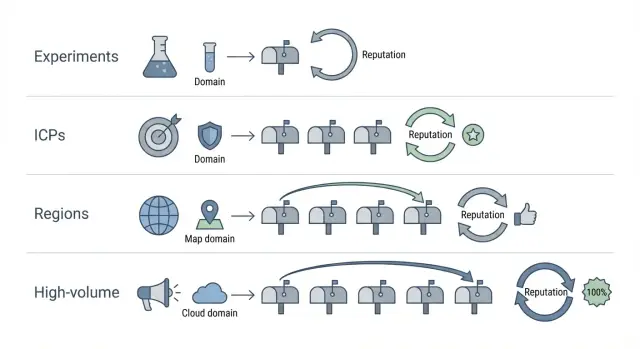
Why segment spillover hurts sender reputation
Spillover is when a problem in one slice of outreach starts affecting everything else you send, including campaigns that were working yesterday. It often shows up as a sudden jump in spam placement, a drop in opens and replies, or more bounces and "message not delivered" notices across multiple campaigns.
Mailbox providers judge you by sender signals that are shared. If you run a risky experiment, send to a low-quality list, or ramp volume too fast from the same sender identity, you create negative signals (complaints, bounces, low engagement). Those signals don’t stay inside the one "bad" campaign. They can drag down the reputation of the domain, the mailbox, and sometimes the whole sending setup.
A common example: a founder tests a new lead source for one region. The list is outdated, bounce rates spike, and a few people mark the emails as spam. The next day, the founder’s core ICP campaign also starts landing in spam, even though the copy and list were fine. That’s spillover.
It also helps to separate two situations:
- Segment issue: one campaign or list has higher bounces, more complaints, or very low replies, while other segments stay normal.
- Overall issue: multiple segments drop at once, including your best-performing ICPs and your safest lists.
This is why segmentation matters most for SDRs, founders, and small teams scaling outbound. When you only have a few domains and mailboxes, one "quick test" can quietly damage the channels that pay your bills.
The separations that matter most (ICP, region, tests, volume)
Not every audience behaves the same. If one group ignores you or marks you as spam, that negative signal can spill into other sends that share the same sender identity.
1) ICP separation (industry and company size)
A fintech startup and a 5,000-person manufacturing company read email differently. They use different language, have different buying cycles, and react differently to cold outreach. If you mix ICPs, the lower-performing group can drag down engagement for your best-fit prospects.
A simple rule: if the offer, pain point, or decision maker changes, treat it as a separate segment.
2) Region and language separation
Regions differ in language, workweek patterns, and expectations around tone. Even when you write in English, what works in the US can fall flat in DACH or APAC. When engagement drops in one region, it can make your sending look unwanted overall.
Separate by region when time zones, language, or cultural tone changes the message.
3) Experiments (copy, offer, data source)
New copy and new lists are the biggest unknowns. A fresh subject line might work, or it might trigger complaints. A new data source might contain outdated emails, which leads to bounces.
Keep tests contained. Don’t run them on the same sender identity you depend on for your core pipeline, especially in the first week.
4) High-volume vs normal-volume sending
Volume spikes create sudden patterns: more complaints, more bounces, more deletes. Even if the message is fine, sending too much too fast can hurt.
When deciding what deserves its own segment, ask:
- Will the message change meaningfully?
- Is the list quality uncertain?
- Will volume be 2x (or more) than usual?
- Would you be fine pausing this without stopping everything else?
If the answer is "yes" to any of those, isolate it.
Step-by-step: build a segmentation map before you send
A segmentation map is a simple plan that answers one question: if something goes wrong in one campaign, what exactly is allowed to be affected? Write it down before you send a single email.
Start by listing every campaign you’re running now, plus the ones you plan to launch in the next 2 to 4 weeks. For each one, note the ICP, region/language, the offer (and what’s being tested), and expected daily volume. This prevents "surprise" overlap later, like a test quietly sharing the same mailbox as your best-performing segment.
Next, group campaigns by risk level:
- Low risk: proven copy to a familiar ICP with clean data.
- Medium risk: a new ICP or a new region.
- High risk: aggressive volume, a brand-new domain, a new data source, or a sharper angle that could trigger complaints.
Then set clear boundaries so problems can’t spread:
- Sender identity: which domain and which mailboxes are allowed to send
- Daily cap: a hard limit per day for that segment
- Success metrics: what "good" looks like (reply rate, positive replies, bounces, complaints)
- Failure metrics: what "bad" looks like (bounce spike, complaints, sudden engagement drop)
- Pause rule: the exact trigger that stops sending
Define those metrics in numbers, not feelings. For example: "Pause if bounces exceed 3% in a day" or "Pause if two spam complaints happen in 24 hours."
A quick scenario: you want to A/B test a punchier subject line for a new UK segment. Put that test in its own high-risk group with a separate sender identity and a low cap (like 20 to 40 per day) until it proves safe. If it flops, your proven US ICP campaign keeps running.
Separate sender identities (domains and mailboxes) the simple way
Sender identity is the firewall between "one segment is having a bad week" and "everything starts landing in spam." Separate more aggressively when risk level, audience, or volume changes.
Separate domains vs separate mailboxes
Use separate mailboxes when the audience and offer are similar and you mainly want cleaner tracking, workload split across SDRs, or tighter daily pacing.
Use separate domains when risk is different. New experiments, edgy copy, a new data source, or a big jump in volume deserve their own domain so complaints, bounces, and low engagement don’t contaminate the domain you rely on.
A practical setup many teams use:
- Core pipeline: 1 domain, multiple mailboxes, steady volume
- Experiments: 1 separate domain, a few low-volume mailboxes
- High-volume lane: 1 separate domain that never runs tests
Naming conventions that prevent chaos
Pick a naming pattern that stays readable in reports and inboxes. Keep it consistent.
For example: reserve one root for core, one for tests, and add a short tag for region or team. Whatever you choose, write it down once and don’t improvise later.
If a domain already has mixed history
If a domain has been used for everything (tests, blasts, multiple ICPs), treat it as compromised. Reduce sending, stop experiments on it, and move your best segment to a clean identity. Keep the old domain for low-risk follow-ups or internal use, but don’t let it carry your highest-value outreach.
Warm-up matters most for new identities. Start low, ramp slowly, and only increase volume when replies and bounces look healthy.
Volume controls that keep one segment from sinking the rest
Volume is where spillover happens fastest. One segment starts bouncing or getting complaints, and if it shares the same sending pool and pace, your good segment gets dragged down with it.
Ramp-up should match risk. A "safe" segment (tight ICP, clean data, proven copy) can usually grow faster than a new region, a new list source, or a brand-new offer.
Set daily limits per segment and keep headroom. If your total comfort level is 200 emails/day, don’t schedule 200. Schedule 140 to 160 and keep the rest as a buffer for replies, resends, and small spikes. That buffer also makes it easier to pause one segment without breaking everything.
Protect your best segment by capping risky segments hard. For example: keep your core ICP at 120/day and cap a new region test at 20/day until it proves it can hold bounce and complaint rates.
Time zones can quietly create spikes. If you "send at 9am local time" across four regions, you might stack sends into the same hour. Stagger send windows (or randomize within a window) so volume stays flatter across the day.
When metrics worsen, change the smallest thing first:
- Pause the weakest segment for 48 to 72 hours before touching your best segment.
- Cut that segment’s daily cap by 30% to 50% (not 5%).
- Tighten the list (remove old leads, risky titles, and catch-all heavy domains).
- Slow follow-ups before rewriting everything.
Keep copy and formatting isolated so tests stay contained
Experiments don’t just risk a worse reply rate. A test with spammy patterns (too many links, aggressive phrases, odd punctuation) can trigger filtering that affects other sends if you reuse the same copy too broadly.
Treat each segment as its own message environment. Keep subjects and first lines specific to the segment, and don’t copy a "winning" experimental line into your core segment after a day or two. Early results can be noise, and deliverability problems often show up later.
Consistency matters as much as creativity. Within a segment, keep layout and tracking consistent so results are comparable. If one variant has two links and a different signature while the other is plain text, you’re not testing one idea. You’re testing everything at once.
Personalization rules by segment
Pick a few things you’ll vary, and lock the rest.
- Vary: subject line, first sentence, one value prop angle, one call to action
- Keep stable: sender name, signature, link count (ideally none or one), plain-text style, paragraph length
- Vary by region/ICP: local phrasing, time references, industry terms
Document versions so results stay clean
Version control doesn’t need fancy tools. Use a simple naming rule like Segment + Sequence + Version + Date (for example, UK_SaaS_Seq1_v3_2026-01-16). Add one sentence on what changed and why.
Monitor deliverability and replies by segment, not in aggregate
If you only look at one dashboard for all outbound, you miss early warning signs. A single bad list or risky experiment can push up bounces or complaints, and you won’t notice until your best segment starts suffering.
Treat each segment (ICP, region, test, volume lane) like its own mini-program. Review deliverability signals and engagement side by side so you can spot what changed, where, and when.
Track these numbers per segment:
- Hard bounce rate (especially sudden spikes)
- Spam signals (complaints, blocks, spam-folder placement if you measure it)
- Unsubscribe rate
- Reply rate (split positive vs negative)
- Out-of-office rate (useful for timing and list quality)
Reply rate alone can mislead you. If a new subject line increases replies but most are "not interested" or "unsubscribe," you’re taking on reputation risk.
A simple weekly routine helps:
- Pick one day and review each segment for 10 minutes.
- Compare this week vs last week before changing anything.
- Write down the biggest risk and the next action per segment.
- Check whether list, copy, or volume changed right before a metric moved.
Set pause thresholds so you act fast instead of debating. For many teams, a sudden doubling of bounce rate, a noticeable unsubscribe jump, or a sharp drop in reply quality is enough to stop that segment and protect everything else.
Common mistakes that cause reputation spillover
Spillover usually starts with a reasonable idea: "Let’s add one more audience" or "Let’s test a new offer." The problem is that email systems judge the sender identity (domain, mailbox, sending pattern). If you mix risk into the same identity, the consequences are shared.
The mistakes that cause the most damage:
- Adding a brand-new data source to your best segment. If the list has stale emails or spam traps, your safest campaign pays the price.
- Changing too many variables at once. If you change list, pitch, copy style, and volume in the same week, you can’t tell what caused the dip.
- Using one mailbox for unrelated audiences. Wildly different audiences create uneven engagement and complaint patterns, but providers still see one sender.
- Making global changes when only one segment is failing. Isolate the weak segment first, then adjust only that segment.
- Ignoring regional expectations. Timing, language, and formality affect deletes, unsubscribes, and spam reports.
A simple example: your core ICP is performing well, so you add an A/B test with a more aggressive subject line and a new list source, using the same mailbox. If the test triggers more complaints, that mailbox’s reputation drops and even your core messages start landing in spam.
Quick checklist before launching a new segment
Treat a new segment like a new mini-business inside your outbound. If something goes wrong (bad data, weak offer, complaints), it should stay contained.
Before you send:
- Decide how it will be isolated (separate domain/mailboxes, or strict daily caps).
- Confirm warm-up is real (new inbox or new pattern means you ramp again).
- Sanity-check the list (remove invalids, role accounts like info@, and duplicates across segments).
- Review copy for this exact audience (wrong examples and mismatched tone get punished).
- Write down stop rules (who can pause, what triggers it, and when you review after launch).
If you can’t explain in one sentence how this segment is different and how it’s contained, it’s not ready.
Example: keep a risky experiment from damaging your best segment
A team runs two steady outbound motions: US SMB outreach that drives most meetings, and EU enterprise outreach that is slower but high value. Both are healthy, so the goal is simple: keep the stable segments stable.
Now someone proposes a risky experiment: a brand-new data source (unknown list quality) plus a new offer (more direct, more likely to trigger complaints). One bad batch can drag down every mailbox that touches it.
How to isolate the experiment
Run it as its own mini-program with its own sender identity and rules:
- Use a separate sending domain and a small set of dedicated mailboxes.
- Keep the test audience tight (one ICP, one region).
- Cap daily volume hard and ramp slowly, even if the data source claims it’s "verified."
- Keep offer, subject lines, and formatting consistent inside the test.
The main point: EU enterprise mailboxes should never touch the risky list or the new offer.
When to pause the experiment
Decide stop rules before you send. Good triggers include bounce spikes above baseline for 2 days in a row, a noticeable jump in unsubscribes or complaints vs your control segment, or a drop in reply quality (more "not interested," fewer real conversations).
How to graduate a passing test
If the experiment holds up for 1 to 2 weeks at low volume, don’t merge it into a core lane right away. Expand on the test sender first: increase volume gradually, add one similar sub-segment, and only then consider porting the offer to a safer program.
Next steps: make segmentation easy to run week after week
Segmentation only protects you if it becomes routine. Turn your map into a few daily rules people follow without thinking: experiments don’t share sender identity with proven campaigns, and anything showing trouble gets paused before it spreads.
Naming and ownership should be boring on purpose. For example, us-saas-icpA-core-01 for a core segment and eu-saas-icpA-test-subjectline-01 for a test. Assign one owner per segment who decides pause/continue.
If you want fewer moving parts, an all-in-one cold email platform like LeadTrain (leadtrain.app) can help keep domains, mailboxes, warm-up, sequences, and reply classification in one place, so isolation rules are easier to follow.
Pick the next segment to split and define success in 14 days with numbers you can act on: stable bounces, no unsubscribe spike, improving positive replies per 1,000 sends, and no drop in your best segment’s performance.
FAQ
What does “segment spillover” mean in cold email?
Spillover is when negative signals from one campaign (like bounces, spam complaints, or low engagement) hurt the reputation of the sender identity you share across other campaigns. Because mailbox providers evaluate domains, mailboxes, and sending patterns together, a “bad” segment can reduce inbox placement for your “good” segment too.
How can I tell if it’s one bad segment or an overall deliverability problem?
Start by comparing metrics per segment instead of looking at totals. If only one list or region suddenly shows higher bounces, unsubscribes, or low replies while others stay stable, it’s a segment issue. If multiple previously healthy segments drop at once, it’s likely an overall sender reputation issue tied to the shared sender identity.
When should I separate campaigns by ICP (industry or company size)?
Split by ICP when the offer, pain point, decision maker, or expected tone changes. Different industries and company sizes engage differently, and low engagement in one group can drag down reputation signals for the sender identity. Keeping ICPs separate makes it easier to pause the weak one without harming the best-performing one.
Do I really need separate segments for different regions or languages?
Separate by region when time zones, language, and cultural expectations change the message or response behavior. A segment that underperforms in one region can generate more deletes, unsubscribes, or complaints, which can affect how mailbox providers view the sender overall. Isolation helps you tune copy and timing without putting other regions at risk.
Should I isolate with separate mailboxes or separate domains?
Use separate mailboxes when you’re mostly splitting workload, pacing, or tracking within a similar audience and risk level. Use separate domains when risk is meaningfully different, such as a new data source, sharper copy, higher volume, or early-stage experiments. The goal is to keep high-risk learning from contaminating the domain you rely on for core pipeline.
How do I run copy or offer experiments without risking my core campaign?
Default to a small, capped test on its own sender identity if the change could increase complaints or bounces. Keep the audience narrow, ramp slowly, and wait long enough to see delayed deliverability effects instead of promoting a “winner” after a day. If the test fails, you can stop it without interrupting proven campaigns.
What volume rules prevent one segment from sinking the rest?
Set hard daily caps per segment and avoid sudden spikes. If your comfortable total is 200 emails per day, schedule below that so you have buffer to pause a risky segment without breaking everything else. When a segment looks unhealthy, reduce its volume sharply or pause it first before touching your best segment.
What are good “pause thresholds” to stop a segment before it spreads damage?
Pick numeric pause rules ahead of time so you act quickly. A practical default is pausing when hard bounces spike above your baseline (for example, exceeding 3% in a day) or when you see even a small number of spam complaints in a short window. After pausing, fix the smallest likely cause first: list quality, targeting, or volume, before rewriting everything.
Which metrics should I monitor by segment (not in aggregate)?
Track bounces, complaints or blocks (if you can measure them), unsubscribes, and reply quality per segment. Reply rate alone can be misleading if most replies are negative or asking to unsubscribe, because that can still harm reputation. Reviewing each segment weekly and comparing week-over-week makes it easier to spot which change caused the decline.
What are the most common segmentation mistakes that cause spillover?
The biggest mistakes are mixing risky tests with proven campaigns on the same sender identity, changing too many variables at once, and adding an untrusted data source to a high-value segment. Another common error is making global changes when only one segment is failing, which can reduce performance without fixing the root issue. A simple rule is to isolate new lists, new offers, and volume jumps by default.