Inbox placement testing with a seed list: read results calmly
Inbox placement testing with a seed list helps you track inbox, promotions, and spam across providers. Learn setup, sample size, and how to interpret shifts without panic.
What problem seed list testing actually solves
Inbox placement sounds like a simple question: when you send an email, where does it actually land for real people?
Opens won’t give you a clear answer. Many email apps block images, some prefetch tracking pixels, and privacy features can create “opens” that don’t mean a human read your message. You can see decent open rates while a chunk of mail quietly goes to spam, or gets sorted into a tab you didn’t expect.
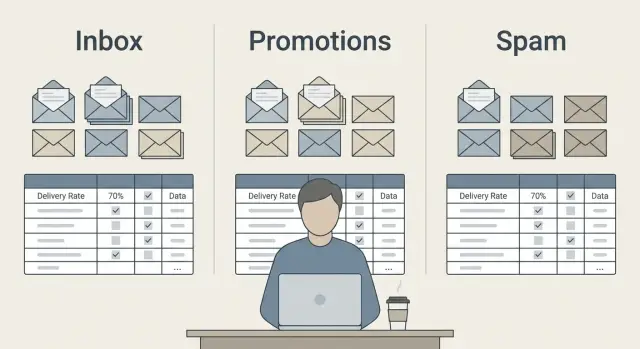
Inbox placement testing with a seed list is a lightweight way to catch those routing issues. You send the same message to a small set of test addresses across major providers, then check where it shows up.
The placements that matter are:
- Primary inbox (best case)
- Tabs like Promotions or Social (still delivered, but less visible)
- Spam or Junk (a red flag)
- Missing or bounced (often authentication or reputation)
This kind of test is most useful right after a change, when you want fast feedback. For example: new sending domains, updated SPF/DKIM/DMARC, a big copy rewrite, a volume increase, or a new sequence.
It also helps separate two common problems: “People aren’t replying” versus “People never saw it.” If Gmail pushes you to Promotions but Outlook puts you in Inbox, that often points to content and formatting tweaks, not a broken setup.
Results vary by provider and by day. Filters react to many signals at once: sending patterns, engagement, complaint rates, bounces, and even small wording changes. A single test shouldn’t send you into panic mode.
A lightweight test can tell you the direction (rough health and sudden shifts). It can’t tell you your exact inbox rate across your whole list, or how every segment will experience your emails.
Seed lists: what they are and what they are not
A seed list is a small set of email addresses you control, spread across major providers (Gmail, Outlook, Yahoo, plus a couple smaller ones). You send a campaign email to those addresses and note where each message lands: inbox, Promotions, spam, or missing.
Think of it as an early warning signal. It’s good for spotting “something changed” quickly. It’s not a reliable score for your entire audience.
Seed tests are especially helpful when you need quick feedback on one specific change. If you just started using a new sending domain, changed your copy in a big way, or switched list sources, a seed list can help you catch obvious problems before you send at scale.
They can also mislead you if you treat a handful of inboxes as “the truth.” A seed list is small, and mailbox providers personalize decisions based on signals your seed accounts don’t fully represent (recipient history, engagement habits, and sometimes plain randomness). If every test is dramatically different (new offer, new segment, new volume), you’ll struggle to tell trend from noise.
Realistic expectations:
- A seed list shows placement for your controlled accounts, not your whole list.
- It’s strongest for comparisons (before vs after), not absolute performance claims.
- It catches big issues fast (sudden spam placement, authentication mistakes, broken tracking).
- It’s weak at predicting outcomes at higher volume or different audiences.
A full deliverability audit is broader. It looks at authentication (SPF/DKIM/DMARC), sending reputation, bounce and complaint patterns, content risk, list quality, and sending behavior over time. A seed test is one piece of that picture.
A practical example: you add more links and a stronger call to action. Your seed Gmail lands in Promotions and one Outlook seed hits spam. That’s a signal to pause and investigate, not to panic. Re-run the same setup, then change one thing at a time so you can learn what actually caused the shift.
Building a simple seed list across providers
A seed list is just a set of addresses you control across the inboxes you care about. The goal isn’t perfect measurement. It’s a consistent, repeatable signal you can compare week to week.
Which providers to include
Start with the providers that show up most often in real prospect lists. A practical mix is:
- Gmail (consumer)
- Google Workspace (custom domain on Google)
- Outlook.com (consumer Microsoft)
- Microsoft 365 (custom domain on Microsoft)
- Yahoo or iCloud (pick one for a non-Google, non-Microsoft view)
That’s usually enough variety to catch big shifts without turning this into a project.
How many seed addresses to start with
Small is fine, but not tiny. One address per provider is noisy because a single mailbox can behave oddly. A good starter range is 6 to 12 total seeds (for example, 2 each across 3 to 5 providers).
If you send for multiple segments or brands, keep one shared “global” seed set, then add a few extra seeds for any segment that sends very different content.
Keep seeds separate from your main list. Don’t pull them from your CRM or prospect database. Create new mailboxes that have no prior history with your sending domain. Also avoid mixing seeds into a live prospect import or automation.
To keep results comparable, label and store seeds in a way that won’t change over time (for example: Seed-Gmail-01, Seed-M365-02). Track:
- Provider type (Gmail, Workspace, Outlook, M365)
- Mailbox creation date (new mailboxes can behave differently)
- Any mailbox rules you added (filters, tabs, Focused mode)
- A note if a seed is ever “burned” (used too much, subscribed to lists, shared)
When a seed stops being clean, replace it and mark it as retired. Consistency matters more than scale.
Step by step: run an inbox placement test in 20 minutes
To keep inbox placement testing with a seed list useful, test one thing at a time. Pick a single campaign email (one subject, one body, one sending domain, one sender) and don’t tweak it mid-test. You want a clean snapshot you can compare later.
1) Choose the email you will test
Use an email you’d actually send to prospects, not a special “deliverability-only” message. If you’re testing a multi-step sequence, pick one step (usually step 1) so results are easy to compare across runs.
2) Add a unique identifier so you can track it
Add a small test ID you won’t reuse by accident. Put it in the subject and once near the top of the email.
Example: Subject: "Quick question (SEED-2026-01-16-A)". First line: "Test ID: SEED-2026-01-16-A".
This makes it easy to confirm you’re looking at the right send and not an older copy.
3) Send at a fair time and volume
Send the test to your seed addresses in one short batch, then stop. For most teams, 10 to 25 total seed emails is enough for a quick check.
A few rules help keep it fair:
- Send from the same mailbox you normally use for outreach.
- Send during your usual sending window and keep that window consistent each time.
- Avoid running the test in the exact same minute as a large prospect send. Do the seed test first, then wait.
- Don’t resend to “fix” results. One run equals one data point.
4) Check placement inside each provider
Open each seed inbox and record where the email landed (and whether it’s clipped, warned, or missing). Look in the common spots:
- Gmail: Primary, Promotions, Spam
- Outlook/Hotmail: Focused, Other, Junk Email
- Yahoo: Inbox, Spam
- iCloud: Inbox, Junk
- Google Workspace or Microsoft 365: Inbox and Junk/Quarantine (if you can access it)
If the message is missing, search the unique test ID. Sometimes it landed, just not where you expected.
5) Capture the result quickly
For each seed address, note: provider, date/time sent, folder/tab, and any warning (like “Be careful with this message”). That’s enough to move on without overreacting to one run.
How to log results and create a baseline
The goal isn’t “100% inbox” on a single send. It’s building a small, repeatable log so you can spot real changes and ignore noise.
Start with one simple table. Keep it boring and consistent.
| Date | Send type | Provider | Seed inbox | Subject/Variant | Folder | Notes |
|---|---|---|---|---|---|---|
| 2026-01-16 | First send | Gmail | [email protected] | A | Promotions | New domain week 1 |
| 2026-01-16 | First send | Outlook | [email protected] | A | Inbox | |
| 2026-01-16 | Follow-up #1 | Gmail | [email protected] | A | Inbox | Moved from Promotions |
The fields that matter most:
- Date/time and campaign name
- Provider and exact folder (Inbox, Promotions, Spam, Focused, Other)
- Send type (first email vs follow-up)
- Subject/variant (especially if you A/B test)
- Notes (new domain, new copy style, list source)
Separate first sends from follow-ups because they behave differently. First sends carry cold-start signals: new domain reputation, new content patterns, and whether recipients engage at all. Follow-ups often land better because the thread exists and the message tends to be shorter and more consistent.
For a baseline, run the same test 3 to 5 times across a week or two, using similar timing and volume. Then summarize by provider. Example: “Gmail first sends: 2/5 inbox, 3/5 promotions, 0/5 spam.” Do the same for follow-ups. That summary becomes your normal.
What should make you pay attention? Changes that are both large and repeated:
- One random spam hit is usually noise.
- A jump of 20 to 30 percentage points for the same provider and send type across two tests is a signal.
- Any repeatable move into Spam is urgent, even if it’s only a couple of seeds.
If Gmail first sends usually split Inbox/Promotions, don’t panic when Promotions wins on Tuesday. But if Gmail first sends go to Spam twice in a row after you changed a template or ramped volume, log the change and roll back one variable.
How to interpret results without overreacting
Seed tests are useful, but they’re noisy. Placement changes day to day because providers tweak filters, your send timing shifts, and even the same message can be treated differently depending on what else is happening in that mailbox.
Look for patterns, not single points. A small wobble in one run isn’t a deliverability crisis.
Noise vs a real issue
Treat these as normal “weather” unless they persist across several sends: a couple Promotions placements, one missing open, one spam hit.
Start paying attention when you see the same direction repeatedly, especially across multiple providers and multiple seed accounts.
Promotions is not the same as spam
A shift into Gmail’s Promotions tab is often about content and formatting, not trust. Sales-y language, heavy templating, lots of links, or a newsletter-like layout can push you there.
If Promotions jumps but Spam doesn’t, make smaller changes first: tone down obvious marketing phrasing, reduce link count, and keep the email looking like a plain note from a person.
One spam hit does not mean you’re burned
Seed lists are small by design, so one message landing in spam can overstate the problem. It might be that specific seed mailbox, that provider on that day, or an odd interaction with the subject line.
Before making big moves, confirm it:
- Re-run the same email to the same seeds 24-48 hours later
- Send a lightly edited version (same offer, simpler wording)
- Check whether spam placement is isolated to one provider
- Compare against your baseline, not your best-ever result
What to change first (in order)
When results are consistently worse, start with the lowest-risk levers:
- List quality: remove risky segments (old leads, scraped contacts, role accounts)
- Copy: fewer spammy phrases, fewer links, more specific and human
- Sending pattern: slow down, keep volumes steady, avoid spikes
- Authentication and setup: confirm SPF/DKIM/DMARC are correct and stable
Example: if 2 out of 10 Gmail seeds move to Promotions but Outlook stays in inbox, don’t rebuild your domain setup. First simplify the email (one link max, fewer “value prop” lines) and keep sending volume steady for a few days.
Provider quirks that affect inbox, promotions, and spam
Inbox placement isn’t one score. Each provider has its own habits, and seed results reflect that. Seed tests are most useful when you compare like with like (same message, same sending setup) and watch for consistent shifts over time.
Gmail: Inbox vs Promotions in plain language
Gmail often treats Promotions as sorting, not punishment. You can have strong deliverability and still land in Promotions if the email looks like marketing.
Gmail tends to react to a mix of:
- Content cues (sales language, heavy formatting, too many links)
- Engagement history (open, reply, delete, mark as spam)
- Consistency (sudden spikes in volume, brand new sending domains)
- Personal feel (short, plain-text notes often land in Primary more)
If Promotions increases but spam stays low and replies are steady, it’s usually not an emergency.
Outlook and Microsoft: patterns to watch
Microsoft (Outlook, Hotmail, Microsoft 365) can be more sensitive to trust signals and sudden changes. It may also junk mail faster when something feels unfamiliar.
Two common patterns: it reacts strongly to new or recently changed setups (new domain, new mailbox, new sending infrastructure), and it can be “sticky” once a sender looks risky. If your seed list shows Outlook going to junk while Gmail is fine, that often points to reputation and authentication consistency, not copy alone.
Yahoo and smaller providers: what tends to matter most
Yahoo and smaller providers can be less predictable with small sample sizes. They tend to reward basics: clean authentication, low complaints, and avoiding spammy formatting.
Don’t overread one or two placements. Look for repeated outcomes across several tests before making changes.
Why two accounts on the same provider can disagree
It’s normal for the same email to land differently for two Gmail accounts or two Outlook accounts. Providers personalize filtering based on each mailbox’s history.
Example: one Gmail seed has previously opened and replied to similar outreach, so Gmail learns it’s wanted and places it in Primary. Another seed never engages and deletes fast, so the same message lands in Promotions, or even spam.
Treat those differences as a reminder: seed tests are directional. Focus on the overall pattern per provider, not one account’s opinion.
Common mistakes and traps in seed list testing
Seed tests are easy to misuse. Most bad decisions come from treating a tiny snapshot as proof something is “broken,” then making big changes based on it.
The biggest trap is changing too many things between tests. If you swap the domain, rewrite the email, change sending volume, and adjust audience, you won’t know what caused the shift. Treat each run like a small experiment: one main change, then compare.
Common mistakes that create misleading results:
- Mixing variables at once (new domain + new copy + higher daily sends)
- Using too few seed addresses and drawing big conclusions from 1-2 placements
- Testing only with internal company accounts (they often have unusual trust and filtering)
- Watching folder placement but ignoring bounces, complaints, and unsubscribes
- Treating one provider as “the truth” (Gmail and Microsoft can behave very differently)
Another trap is assuming seeds behave like real prospects. Seeds help with consistency, but they don’t match real-world variety in engagement habits, contact history, and personal settings. A seed landing in spam is a warning, not always a verdict.
Don’t ignore hard signals. If your test email lands in Inbox but bounces rise or spam complaints appear in real sends, that matters more than whether one Gmail seed hit Promotions.
A realistic scenario: you test on Monday and two Gmail seeds land in Promotions. On Tuesday you panic, change the subject line, remove links, lower volume, and switch to a fresh domain. Wednesday looks “better,” but you learned nothing because you moved every lever. A calmer approach is to keep the domain and volume stable, adjust one element (for example, the intro line), then re-test.
Quick checklist before you trust the numbers
Before you change anything based on seed results, do a quick sanity check so you don’t “fix” the wrong thing.
A fast pre-check (10 minutes)
- Authentication is truly working, not just “set”: SPF should pass, DKIM should sign, and DMARC should align with the domain you send from.
- Your sending is warmed up and ramped: If you doubled volume yesterday or started a new domain this week, treat today’s placement as a transition snapshot.
- Your test is controlled: Same subject, body, sender name, and sending time across runs.
- You’re watching health signals next to placement: Placement without bounces, unsubscribes, and reply patterns is incomplete.
- Your re-test schedule matches your cadence: Daily senders can check weekly. Monthly senders shouldn’t test every day.
A quick example of “don’t overreact”
Say Gmail suddenly puts 3 out of 10 seed emails into Promotions. If bounces are flat, unsubscribes are normal, and replies are steady, that’s usually not a crisis. It may be a content cue or normal variation.
On the other hand, if the same run shows new bounces, fewer replies, and a jump in spam placement across multiple providers, that’s a stronger signal to slow sending, review targeting, and verify authentication.
A realistic example and next steps
A small SDR team launches a new outbound campaign to book demos. They test two subject lines on the same list and send from fresh mailboxes that have been warming up.
After their first seed list run, results look mixed:
- Gmail: Subject A lands mostly in Promotions; Subject B splits between Inbox and Promotions
- Outlook: both subjects mostly land in Inbox
- Yahoo: a few messages hit Spam, especially on Subject A
The first instinct is to change everything. They don’t. They treat the seed list as an early warning signal, then run controlled tests.
What they change (and what they leave alone)
They make a few targeted changes tied to likely causes, and keep everything else stable so the next test is readable:
- Reduce daily send volume for 3 days and keep spacing consistent
- Keep Subject B and pause Subject A
- Simplify the first line and remove one risky word (like “free” or “discount”)
- Keep the same domain and sender names
- Don’t rewrite the entire sequence or swap tools mid-test
Notice what they leave alone: list source, offer, and overall structure. If you change five variables at once, you can’t tell what helped.
How long they wait before deciding it worked
They run the same seed test again after 48 hours, then again after a full week. They only call it a win if the direction holds across multiple sends, not one lucky run.
Next steps stay simple: keep logging placements, build a baseline for each provider, and compare new campaigns against that baseline.
If you want fewer moving parts while you do this, LeadTrain (leadtrain.app) keeps domains, mailboxes, warm-up, multi-step sequences, and reply classification in one place, which makes it easier to run consistent tests before you scale volume.
FAQ
What does seed list inbox placement testing actually tell me?
A seed list test tells you where a specific email lands for a small set of inboxes you control, so you can spot sudden routing problems quickly. It’s most useful for comparing “before vs after” when you changed something like a domain, copy, or sending volume.
Why can’t I just use open rates to judge deliverability?
Open tracking is unreliable because images can be blocked, pixels can be prefetched, and privacy features can generate opens that don’t reflect real reading. A seed test avoids that by checking the actual folder placement in the mailbox.
When should I run a seed list test?
Run a seed test right after a meaningful change, like a new sending domain, SPF/DKIM/DMARC updates, a big rewrite, a volume increase, or a new sequence. It’s also useful as a baseline check when you start a new campaign, as long as you keep the setup consistent.
Which email providers should my seed list include?
Start with the providers you see most in real prospect lists: Gmail, Google Workspace, Outlook.com, Microsoft 365, plus one extra like Yahoo or iCloud. The goal is coverage across the big filtering systems, not every provider on earth.
How many seed addresses do I need for useful results?
A practical starting point is 6 to 12 total seed addresses, usually two per major provider so one odd mailbox doesn’t dominate your conclusion. Too few seeds makes results feel more dramatic than they really are.
What’s the simplest way to run a seed test without messing it up?
Put a unique test ID in the subject and near the top of the email so you can confirm you’re looking at the right send. Send the same message in one short batch from your normal sending mailbox, then check each provider’s inbox areas (like Gmail Primary/Promotions/Spam and Outlook Focused/Other/Junk).
If Gmail puts me in Promotions, is that a deliverability problem?
Promotions is usually categorization, not a trust failure. If you’re seeing Promotions but not Spam, you can often improve placement by making the email look more like a personal note: simpler formatting, fewer links, and less salesy phrasing.
How do I interpret a single spam hit in my seed results?
One spam placement in a small seed set can be noise, especially if it doesn’t repeat. Treat it as a prompt to re-run the same test later and check whether the shift is consistent across multiple seeds and multiple sends.
What should I change first if seed results get worse?
First, change the lowest-risk levers: tighten list quality, simplify copy, and avoid sudden volume spikes. If the problem repeats across providers, then verify authentication stability and alignment (SPF/DKIM/DMARC) and keep your sending behavior steady while you test fixes.
Why don’t seed list results match what happens on my real prospect list?
Seed accounts don’t behave like real prospects because mailbox providers personalize filtering based on engagement history, settings, and randomness you can’t control. That’s why seed testing is best for spotting direction and sudden shifts, not for claiming an exact inbox rate for your full audience.