SDR outbound goals for new hires: track progress before revenue
Set clear SDR outbound goals and track research, sends, and conversations so a new SDR can show real progress weeks before revenue appears.
Why new SDR goals feel unclear at the start
New SDRs often hear one loud expectation: “bring in revenue.” The problem is that revenue is a lagging signal. Even if someone is doing the right work, results usually show up weeks later. They need time to learn the pitch, build a list, test messaging, and get enough replies to create real conversations.
When goals are only meetings booked or pipeline created, things can go sideways fast. New reps panic and rush, sending sloppy emails to the wrong people just to hit a number. Managers see a quiet week and change the message too often, which makes it hard to learn what’s actually working.
Clear SDR outbound goals fix this by focusing on leading indicators: actions and early outcomes that predict future results. That reduces stress because progress is visible before revenue. It also makes coaching simpler because you can spot whether the issue is targeting, message, deliverability, or follow-up.
For the first 60 to 90 days, it helps to measure three buckets:
- Research quality: are they building a focused, relevant prospect list?
- Sends consistency: are they sending steadily without hurting deliverability?
- Conversations: are they getting replies that show intent, even if the prospect isn’t ready to book yet?
A new SDR might have zero closed-won in month one. But if targeting is tight, bounce rates are low, and “not now, check back next quarter” replies are increasing, they’re on track.
Leading vs lagging indicators in outbound
New SDRs get judged by revenue too early. Revenue is a lagging indicator. It comes after many steps that take time, and not all of them are under the SDR’s control.
A simple way to set SDR outbound goals is to separate metrics into three layers:
- Input metrics (what you do): accounts researched, contacts verified, emails sent, follow-ups completed.
- Output metrics (what you get back): delivered emails, replies, positive replies, conversations started.
- Outcome metrics (what the business wants): meetings held, opportunities created, closed revenue.
These layers move at different speeds. Inputs can improve in days. Outputs usually shift within 1 to 2 weeks. Outcomes often take 4 to 8+ weeks depending on deal cycle and calendar availability. If you only track outcomes in week two, you’ll miss whether the rep is building momentum.
It also helps to separate what the SDR can control from what they can’t. They control research quality, list hygiene, message relevance, and consistent sending. They don’t control whether a prospect is in budget season, already under contract, on vacation, or stuck in legal.
A quick example: an SDR sends 40 emails a day for a week but gets few replies. If deliverability is weak (domain setup problems, no warm-up, spam placement), the send metric looks fine but output stays flat. That’s why delivery and bounce rates matter alongside volume.
When inputs stay steady and outputs start rising, outcomes usually follow. That’s the bridge you want to measure during ramp.
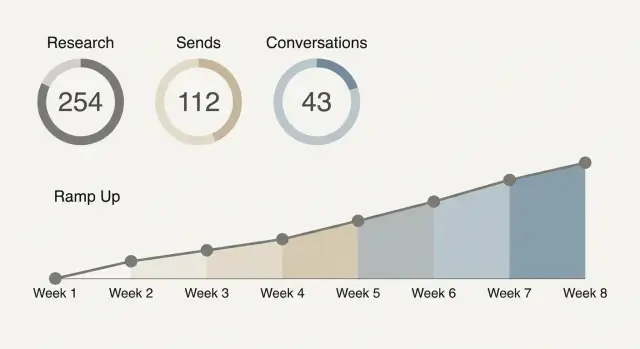
A realistic 8-week ramp timeline
A new SDR rarely produces revenue in the first month, even with good work. The point of an 8-week ramp is to reward the right inputs first, then add outcomes when they become realistic.
What “good progress” often looks like:
- Weeks 1-2 (setup, training, first sends): Learn the ICP and talk track, build a simple daily routine, and start sending small batches. Expect more time on list research, message practice, and deliverability basics (domain and mailbox setup, warm-up, slow volume ramp).
- Weeks 3-4 (consistent volume, early conversations): Sending becomes steady. The SDR should start seeing patterns in replies: common objections, wrong personas, and which angles get attention. The goal is a few real back-and-forth conversations, not a packed calendar.
- Weeks 5-6 (first meetings, cleaner targeting): Feedback loops tighten targeting and improve reply quality. First meetings appear, and you can usually point to specific segments that work.
- Weeks 7-8 (early pipeline influence): The SDR contributes meetings regularly and creates early pipeline, even if deals haven’t closed.
If the territory or ICP is brand new, add buffer time. Weeks 3-4 may look like “learning what not to target” instead of booking meetings. That can still be progress if you can show clearer segments, better lists, and fewer low-intent replies.
Example: if an SDR is emailing a new vertical, by week 4 you might not see meetings yet, but you should see fewer bounces, more direct replies, and clearer notes on which titles actually own the problem.
Research goals: define quality, not just quantity
Early SDR outbound goals often fail because “do more research” is vague. Make it concrete. Define what a “completed review” means, then set a daily target.
A completed account or lead review should include:
- Fit check: the company and role match your ICP (size, industry, use case).
- Correct contact: the person can realistically influence the decision.
- Reason to reach out: one specific trigger or pain tied to your offer.
- Clean data: name, title, and company details are accurate enough to personalize.
Keep the quality bar simple. If the SDR can’t answer “why this person, why now” in one sentence, it isn’t done.
To check quality without slowing anyone down, sample instead of policing every record. Pick 5 leads per day (or 20 per week) and score them quickly: pass/fail on fit, reason, and correct contact. Track the pass rate. If it drops, reduce the daily research quota until quality recovers.
Research depth should change by segment. For SMB, speed matters more: a light fit check plus one quick trigger is often enough. For mid-market, add another data point (team size, tools used, hiring). For enterprise, research is fewer but deeper: org structure, initiatives, and a tighter match between contact and problem.
Example: an enterprise SDR might fully research 12 accounts a day, while an SMB SDR might review 40 leads. The goal is the same: every record should support a believable first message, not just fill a spreadsheet.
Sends goals: volume, consistency, and deliverability
“Sends per day” isn’t one number. Separate it into (1) unique new prospects you contact and (2) follow-ups to people already in a sequence. Follow-ups often drive a big share of replies. Blasting too many brand-new prospects can hurt deliverability and make results noisy.
For SDR outbound goals during ramp, aim for volume that increases safely, not a heroic daily spike. Start with a small number of new prospects per day, keep follow-ups running, and add 10 to 20 percent more volume each week only if email health stays clean.
Deliverability basics decide whether your activity even has a chance to work. New domains and mailboxes need warming, and authentication (SPF, DKIM, DMARC) helps inbox providers trust your mail. If those are off, you can hit your sends goal and still get nothing because messages land in spam or bounce.
Track a few guardrails alongside volume:
- Bounce rate (and whether bounces rise week over week)
- Spam complaints (even a few is a warning)
- Reply rate on follow-ups vs first touches
- Unsubscribe rate
Avoid counting activity that hurts performance. “Spray-and-pray” sends inflate numbers while damaging sender reputation and making future weeks harder. If you see lots of new prospects but weak replies, high bounces, or rising unsubscribes, slow the ramp and fix list quality, targeting, and messaging.
Example: a new SDR sends 25 new prospects/day in week 1 with follow-ups running, then moves to 35/day in week 2 after warm-up is stable and bounces stay low.
Conversation goals: replies that show real progress
Early on, conversation goals are the best proof that outbound is working, even before meetings and revenue show up. To make them useful, define what counts.
A simple set of definitions:
- Reply: any response to your message.
- Conversation: at least 2 back-and-forth replies (you respond, they respond again) within 14 days.
- Positive reply: clear interest, curiosity, or a request for details (even “send info”).
- Objection: a “no” with a reason (price, timing, already using a competitor).
- Out-of-office: an auto reply with a future date.
Track two rates separately so you don’t confuse noise with progress. Reply rate (replies divided by delivered emails) shows whether targeting and message get attention. Conversation rate (conversations divided by delivered emails, or per positive replies) shows whether you can move interest forward.
Reply classification helps here. If an inbox is full of out-of-office messages, bounces, and quick “not interested” replies, activity looks busy but isn’t meaningful. When replies are categorized consistently (interested, not interested, out-of-office, bounce, unsubscribe), weekly reporting becomes clearer.
For meetings, define the handoff point: a conversation becomes a meeting attempt when the prospect shows intent and you ask for a next step. Once you see any of these signals, propose times within the next 48 hours:
- They ask for pricing or a deck.
- They confirm they’re the right person.
- They share a problem you can help with.
- They say “not now” but give a timeframe.
That keeps SDR outbound goals focused on forward motion, not vanity replies.
Step-by-step: set outbound targets that fit your team
Start by narrowing the job. New SDRs get stuck when they try to sell to everyone with five different messages. Pick one clear ICP slice (for example, “US-based HR agencies with 10-50 employees”) and one primary offer (a short call to see if a specific problem is real). Learning stays faster and the numbers are easier to read.
Then set SDR outbound goals that connect daily effort to weekly learning:
- Lock the focus for 2 weeks. One ICP slice, one channel (often cold email first), and one offer. Avoid stacking “maybe we should also try” until you have baseline data.
- Set weekly activity targets. Track (a) research blocks completed, (b) new prospects added, and (c) total sends. Keep them realistic for a new hire so quality doesn’t collapse.
- Add small quality checks. Each week, sample a handful of accounts and emails. Look for basic fit, correct role, and a message that matches the right pain. A 10-minute spot check can prevent 1,000 bad sends.
- Define conversation progress. Set targets for positive replies, real questions asked back, and meeting attempts (not just booked meetings). This shows momentum before revenue appears.
- Review weekly and adjust with evidence. If sends are high but replies are flat, fix targeting or the opener before raising volume. If replies are decent but meetings are low, tighten the call-to-action.
Example: in week 2, a new SDR sends 300 emails, gets 12 replies, and 5 are “not a fit.” That still tells you the ICP is close enough to trigger responses. Next week, keep volume steady, improve the opener, and tighten the role filter.
How to review metrics without micromanaging
The goal of metric reviews is to spot problems early and remove blockers, without turning every day into a scorecard. Agree on a few signals, check them on a steady rhythm, and save the rest for deeper reviews.
A light cadence that still catches issues
Daily checks should be fast. Think 5 minutes to confirm things look normal and the SDR can keep working. You’re looking for patterns, not perfection:
- Deliverability basics: bounce spikes, sudden drop in opens, or a jump in spam complaints.
- Reply trend: are replies showing up, and are they mostly negative or out-of-office?
- Send consistency: did planned sends go out without big gaps?
Weekly reviews are where coaching happens. Start with totals (research completed, new prospects added, sends, replies), then sample quality. Pick 10 prospects and look at targeting fit, personalization, and whether the first line matches the person and company. Keep feedback specific, like “subject is too vague” or “CTA is too big for a first touch.”
Biweekly, make changes on purpose, not constantly. Decide on one or two updates or A/B test ideas, then let them run long enough to learn something.
Who owns what
Clear ownership prevents micromanaging because everyone knows their lane:
- SDR: daily execution, clean notes, flag issues early.
- Manager: weekly coaching, prioritization, decisions on what to change.
- Ops: data hygiene, deliverability setup, tooling and tracking.
If the SDR can explain what they tried, what they learned, and what they’ll do next week, you’re reviewing well, not hovering.
Example: a new SDR showing progress before revenue
Maya joins a 5-person SaaS team as the first dedicated SDR. The product is solid, but pipeline has mostly come from founders. In her first month, there are no closed-won deals tied to her yet, so her manager focuses on SDR outbound goals that show progress early.
Here’s what Maya’s first 4 weeks look like:
- Week 1: 80 accounts researched, 40 contacts added, 0 to 20 emails/day while domains and mailboxes warm up, goal of 3 to 5 real replies (not bounces or auto replies).
- Week 2: 120 more accounts, 200 emails/week, 6 to 10 conversations started (questions, pain confirmation, requests for more info).
- Week 3: 150 accounts, 300 emails/week across 2 short sequences, 10 to 15 conversations, 2 meeting-ready threads handed to AE.
- Week 4: Research stays steady, 300 to 400 emails/week, 12 to 18 conversations, 3 to 5 meeting-ready threads.
When revenue still hasn’t shown up, the manager doesn’t say “try harder.” They say: “Your research quality is improving, bounces are down, and you’re getting more human replies. That’s the work that makes meetings predictable.”
One change turns the corner in week 3: Maya tightens the ICP from “mid-market HR software” to “HR teams hiring 20+ roles/quarter” and runs a simple subject line test. Reply volume barely changes, but conversation quality jumps because the message matches a clearer pain. Two of those threads become intro calls the next week, even before any deal closes.
Common traps when measuring new SDR performance
The fastest way to lose a new SDR is to judge them like a fully ramped rep. Early outbound work is mostly setup, learning, and iteration. If you only look for booked meetings in week one, you’ll miss real progress and push the wrong behavior.
One common mistake is setting a single big meeting quota from day one. Meetings are a lagging result. In the first few weeks, a better signal is whether the SDR is building a clean list, writing targeted messages, and getting any sign of human engagement.
Another trap is celebrating raw send volume while ignoring deliverability. If bounce rates rise, spam placement increases, or unsubscribe rates spike, the activity isn’t helping. A smaller number of emails that reach inboxes is worth more than a huge send count that damages reputation.
Messaging churn is also a quiet killer. If the SDR changes the pitch every day, you never get a baseline. Keep one main version long enough to learn, then change one thing at a time (subject line, first line, offer, or call to action).
Be careful with what you count as success. Tracking only meetings ignores conversation quality. A reply like “Not now, follow up next quarter” shows more traction than silence.
Warning signs your SDR outbound goals are pushing the wrong behavior:
- Meetings are the only metric discussed in 1:1s.
- “More sends” is praised even when bounces rise.
- Copy changes happen before you have enough data.
- Replies are counted, but intent isn’t.
- New hires are compared to top performers with no ramp allowance.
Quick checklist for the first 30 days
The first month is where habits form. If you want SDR outbound goals to be fair and measurable, make sure the basics are in place before you judge results.
Use this once a week (same day, same time) so you spot issues early and keep the ramp predictable:
- Confirm every sending domain and mailbox is authenticated (SPF, DKIM, DMARC) and matches the “from” address you use.
- Check warm-up is active and volume is increasing gradually, not jumping from 0 to full speed in a few days.
- Watch bounce rate for stability. If it spikes, pause new sends and fix list quality or inbox setup before pushing more volume.
- Lock definitions for what counts as “research,” a “send,” and a “conversation.”
- Prove you can pull a weekly report in under 10 minutes, with the same fields each time (sends, deliverability, reply types, conversations).
Example: if a new SDR is doing solid research and warm-up is progressing, but replies are mostly out-of-office and “not interested,” that can still be progress. It means emails are landing and the list is active. The next lever is targeting and messaging, not “more sends.”
Next steps: make the system easy to run every week
Weekly tracking only works if it stays simple. If the setup feels like homework, it gets skipped, and your data turns into guesses. Agree on one place to look and a small set of numbers that show progress.
A basic dashboard is enough if it answers one question: is the SDR building momentum?
- Research completed (accounts and contacts that meet your ICP)
- Sends (new emails sent, not total touches)
- Conversations (positive replies and real back-and-forth)
- Meetings booked
The next biggest win is using a unified workflow so you don’t waste time reconciling tools. Data gaps show up when research lives in one place, sequences in another, warm-up somewhere else, and replies in a shared inbox. If domains, mailboxes, warm-up, sequences, and reply handling stay connected, weekly reviews become faster and fairer.
If you want an example of what that looks like in practice, LeadTrain (leadtrain.app) bundles domains, mailboxes, warm-up, multi-step sequences, and AI-powered reply classification into one platform, which makes it easier to separate deliverability issues from targeting and messaging problems during ramp.
To keep SDR outbound goals realistic, run the same short rhythm every week:
- Pick targets for next week (research, sends, conversations, meetings).
- Do one 15-minute review at a fixed time.
- Test one change (subject line, list source, persona, or offer).
- Keep what works, drop what doesn’t.
That rhythm builds trust. The SDR knows what “good” looks like before revenue shows up, and the manager gets clear signals without hovering.
FAQ
Why shouldn’t a new SDR be judged on revenue in the first few weeks?
Revenue is a lagging result that usually shows up weeks after the work starts. In the first 60–90 days, focus on leading indicators like research quality, steady sending, and real conversations so progress is visible before deals close.
What’s the difference between input, output, and outcome metrics for outbound?
Input metrics are actions you control, like accounts researched and follow-ups completed. Output metrics are what you get back, like delivered emails and replies. Outcome metrics are business results like meetings held and pipeline created, which typically take longer to move.
What’s a realistic ramp timeline for a new SDR doing cold email?
A useful ramp is 8 weeks: first focus on setup and small sends, then build consistent volume and early conversations, then aim for first meetings and repeatable segments. You can start adding outcome targets once outputs like reply and conversation rates stabilize.
How do I define “good research” for SDR outbound goals?
Quality means each prospect clearly fits your ICP, the contact is plausibly involved in the decision, and there’s a specific reason to reach out now. If the SDR can’t explain “why this person, why now” in one sentence, the record isn’t ready to use.
How can I check research quality without micromanaging?
Sample a small number of researched leads each day or week and score them quickly on fit, correct contact, and a clear reason to reach out. If the pass rate drops, lower the research quota temporarily so quality recovers instead of letting bad lists flow into sequences.
How many cold emails should a new SDR send per day during ramp?
Start low and ramp gradually, increasing weekly volume only if bounce and complaint signals stay clean. Consistency beats spikes, because sudden big jumps can hurt deliverability and make results noisy.
Which deliverability metrics should we watch alongside send volume?
Track bounce rate, spam complaints, unsubscribe rate, and whether reply rates are stable on follow-ups as well as first touches. If these guardrails worsen, pause the ramp and fix list hygiene, targeting, or setup before sending more.
What should count as a “conversation” for SDR goals?
A reply is any response, but a conversation is at least two back-and-forth messages where the prospect engages again after you respond. Early on, conversations and positive intent signals are better proof of progress than only counting booked meetings.
How often should managers review outbound metrics for new SDRs?
Daily checks should be quick, mainly to catch deliverability spikes and confirm sends are going out. Weekly reviews are for coaching: look at totals, sample a handful of prospects and emails, and make one or two changes based on evidence rather than changing the pitch every day.
How can a unified outbound platform help track SDR progress during ramp?
It helps when domains, mailboxes, warm-up, sequences, and reply classification live in one place, so you can separate deliverability problems from targeting or messaging issues. A platform like LeadTrain can also reduce manual sorting by categorizing replies, which makes weekly reviews faster and more consistent.