Role-based targeting vs named-person targeting for churn
Role-based targeting vs named-person targeting: how to choose when org churn is high, and how to adjust personalization so campaigns stay relevant.
Why org churn makes targeting decisions harder
Org churn is simple: people move. They change companies, switch roles, get promoted, or their old mailbox gets shut off. In outreach, it shows up as hard bounces, auto-replies that say “no longer with the company,” and replies like “wrong person, talk to our new Head of Ops.”
The problem isn’t just losing a few contacts. Churn quietly breaks three things cold outreach depends on: accurate lists, believable personalization, and clean follow-ups. A list that was “fresh” last month can be full of expired emails today. A line like “congrats on your new role” can land on someone who left two weeks ago. And a careful multi-step sequence can turn awkward when step 3 references a project the new owner has never heard of.
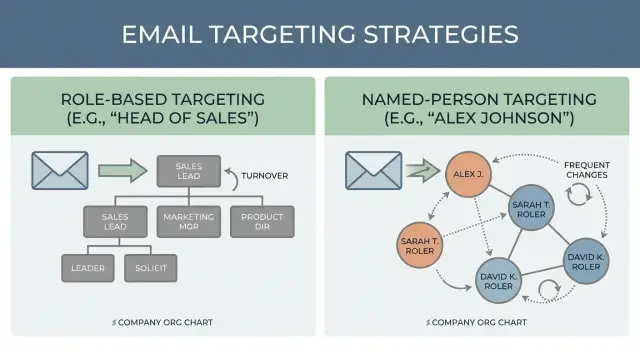
Churn also makes targeting less obvious. If you focus on a named person and they leave, the whole thread can die. If you focus on a role, you keep relevance, but you can sound generic. That tension is the real point behind role-based targeting vs named-person targeting: stability versus specificity.
Here’s a simple example. You email “Jordan, VP Sales” at a fast-growing startup. Two weeks later, Jordan is gone, the VP seat is open, and your follow-up hits a dead inbox. If you had aimed the message at “whoever owns outbound,” your content might still fit the account, but you’d need a different personalization style.
Role-based vs named-person targeting: plain definitions
Role-based targeting means you aim outreach at a job function, not a specific human. You decide, “We want Heads of RevOps at mid-market SaaS,” and you message whoever currently holds that role at each account.
Named-person targeting means you pick the exact individual first, then build your message around them. You’re emailing “Priya Shah, VP of Sales at Acme,” not “a VP of Sales somewhere at Acme.”
If you’re weighing role-based targeting vs named-person targeting, the difference is what you treat as stable. Roles and departments change slowly. People change faster.
In practice, your data inputs usually look like this:
- Role-based: title, seniority, department, company size, industry
- Named-person: full name, verified email, profile signals, recent activity
- Hybrid (common): start with roles, then add a few named contacts per account
Success looks different, too. With role-based targeting, success is consistent coverage: you reach the right function across many accounts even when contacts churn. Replies tend to be more about the problem and less about the person.
With named-person targeting, success is relevance: higher-quality conversations because the message fits their situation. The trade-off is upkeep. When churn is high, lists decay quickly, and you can end up spending more time updating contacts than improving your offer.
How to tell when churn is actually your main problem
If your outreach feels random even when the messaging is solid, the issue might not be your copy. It might be that the people in your list keep changing faster than you can keep up. That’s when the role-based vs named-person choice becomes less about preference and more about risk control.
Signals your list is churning
Look for patterns across accounts, not one bad campaign. Common signals include:
- Rising hard bounces (especially “mailbox not found”)
- Frequent “no longer works here” replies
- Your CRM and reality drifting apart (titles, departments, or domains don’t match)
- Lots of change in the segment (rebrands, mergers, sudden headcount swings)
- Long gaps between list build and first send (older than 30 to 60 days)
If a couple of these are happening at once, churn is probably driving underperformance.
Churn doesn’t only lower reply rates. Repeated bounces and spam flags can hurt deliverability and drag down sender reputation.
The fastest fix is often not “more personalization.” It’s timing and list freshness. A simple, timely message sent to a verified, recently updated contact will usually beat a clever paragraph sent to someone who left three months ago.
A practical rule: if you can’t refresh data often, bias toward safer targeting and shorter cycles. If you can refresh often, you can afford deeper personalization and longer sequences.
When role-based targeting is the safer bet
Role-based targeting is usually safer when people change jobs faster than the work changes. If your contact list goes stale in weeks, not months, you want a targeting style that survives turnover.
It works best when responsibilities stay steady even if the name on the badge changes. Think “Head of Sales” or “RevOps Manager” at a company that keeps hiring and reshuffling, but still needs the same outcomes every quarter.
Role-based targeting tends to win when:
- The function churns (SDRs, recruiting, support, retail ops)
- Companies are growing fast and reshaping teams
- You need volume and speed more than perfect research
- You can predict the problem, but not the exact owner
The big practical benefit is list longevity. Your “VP Marketing” segment stays useful even if half the contacts leave, because you can refresh names without rebuilding your targeting logic. Sequences also stay reusable longer: you keep the same core message and swap in the current person for that role.
The trade-off is certainty. “VP Operations” might be the right role, but not the right owner for your specific project. And because your targeting is broader, your copy can drift into being too general.
If you choose this route, be strict about role clarity: pick one role per sequence, name one problem that role owns, and use proof points that match their metrics. That’s how you avoid turning “role-based” into “generic.”
When named-person targeting is worth the effort
Named-person targeting is worth it when the individual you pick can make the deal move. If the motion is champion-led (someone has to push it internally), or the decision depends on niche expertise (security, RevOps, data engineering), a generic “Head of X” message often lands flat.
It also makes sense when you’re reacting to a real initiative: a new product line, a leadership hire, a systems migration, an expansion to a new region. In those cases, the person’s context is the personalization.
You have enough confidence to go person-first when:
- The email is verified and the contact looks current
- Their scope clearly matches your offer
- Multiple sources agree on title and employment
- You have a reason they’ll care now (trigger, change, pain signal)
The payoff is relevance. Named-person outreach can be specific about what they own, what they likely measure, and what you want from them (a quick yes/no, a short call, an intro). Replies are often higher quality because the recipient is either the right owner or can redirect you quickly.
The trade-off is maintenance. In high-churn orgs, every stale contact costs time and can harm deliverability. If you run cold email at scale, you still need a process to refresh contacts and pause sequences when signals look outdated.
A step-by-step way to choose your targeting approach
When churn is high, the real question isn’t “Which style do I like?” It’s “How often does my target disappear?” Use this process to choose without guessing.
The 5-step decision process
-
Score churn risk for the segment. Early-stage companies, fast-growing teams, and high-turnover functions usually mean faster list decay. If you expect many contacts to change jobs within a quarter, assume your data won’t stay fresh.
-
Check what your personalization can rely on. Do you have a clear trigger you can verify (funding, job posts, tool change, compliance deadline), or only a broad pain like “improve pipeline”? Triggers support named-person outreach. Broad pains tend to work better at the role or team level.
-
Pick the targeting unit and write down why. Choose one: a role (“Head of RevOps”), a team (“RevOps”), or a person (“Jordan Lee”). Write a single sentence explaining why that unit fits churn risk and your sales motion. It keeps your SDR targeting strategy consistent across reps.
-
Set hygiene rules before you send. Decide how often you’ll refresh the list and re-verify emails, plus a clear switch rule. Example: “If hard bounces rise above X% or we see repeated ‘no longer here’ replies, we move from person-based to role-based for this segment.”
-
Choose success metrics that match the approach. Watch bounce rate and spam complaints first, because they reveal list health. Then track reply rate, positive reply rate, and meetings booked. Compare by segment, not just overall.
A practical example: if you’re emailing Series A startups, a “VP Sales” name can change quickly. Start role-based, refresh weekly, and only use named-person personalization when you have a strong trigger you can confirm.
Personalization that works for role-based targeting
Role-based targeting works best when you personalize to the job, not the person. In high-churn teams, personal details like “saw your post” age badly. Responsibilities, KPIs, and workflow stay more stable.
Write like you’re talking to “the person who owns this problem.” Use role signals: what they measure, what breaks, and what they’re judged on.
Subject lines that feel specific (without being creepy)
Clear beats clever. Good subject lines sound like an item in their backlog:
- “Reducing no-shows for SDR demos”
- “Cutting reply sorting time for Sales Ops”
- “Fixing warm-up and deliverability for outbound”
- “Keeping sequences consistent across reps”
In the body, use proof points that fit the role: time saved per rep, fewer manual steps, fewer missed interested replies, cleaner handoffs. If you can, anchor it to a common setup (team size, number of mailboxes, number of sequences) so it doesn’t read like a generic template.
Handling unknown names and wrong contacts
Assume you might be off by one seat. Be polite, brief, and make forwarding easy.
A simple line works: “If you’re not the right person for outbound deliverability, who owns that today?” When someone replies “not me anymore,” thank them and ask for the current owner (or the right role).
For follow-ups, use angles that still hold if the person changed: a quick benchmark, a simple checklist, or a small process win. Avoid references that depend on who they are. Reference what the role needs done this month.
Personalization that works for named-person targeting
Named-person targeting works when your personalization proves you picked them on purpose, not just because their first name was available.
Anchor the message to one real, checkable detail: a specific initiative (new product line, new region), their tech stack, a hiring push, or a change like a new VP or a re-org. Pick one detail, then connect it to a simple hypothesis about what they might care about.
Keep it defensible. If they reply, you should be able to explain where you saw the signal and why it mattered. Avoid guessing personal opinions or quoting numbers you can’t back up.
A simple structure that stays human:
- Observation: one concrete signal about their situation
- Hypothesis: why that signal creates a problem or goal
- Ask: one small next step (yes/no or a short fit check)
Churn means your contact might leave mid-sequence. Make follow-ups handoff-safe by referencing the company and project, not just the person, and include: “If you’re not the right owner anymore, who should I speak to?”
If you learn they moved roles, don’t pretend nothing happened. Acknowledge it, ask if the topic is still relevant in the new seat, and if not, request the current owner.
Example: a high-churn segment and two ways to run outreach
Picture a fast-growing SaaS company that just doubled headcount. RevOps and SDR leadership keeps changing: “Head of RevOps” becomes “Revenue Systems Lead,” the SDR manager gets promoted, and email routing shifts.
You can run two clean angles for the same account.
Angle A: Role-based version (safer when titles and people move)
Your opener talks to the job-to-be-done: improving meeting quality, fixing lead routing, raising reply rates. You address the function and make it easy to forward.
Keep the sequence simple:
- Opener asks who owns the workflow today, plus a one-sentence outcome.
- Follow-up includes a forward line.
- CTA is a low-friction question like “Is this on your plate, or should I speak to someone else?”
Angle B: Named-person version (worth it when the person is stable)
Your opener is specific: “Saw you hired two AEs in Q4” or “Noticed the new SDR pod structure.” You anchor the message to a recent change that only matters to that owner.
Follow-ups can be more direct because you’re not asking them to route you. The CTA can be tied to their reality: “15 minutes next week to compare how you handle warm-up, sequencing, and reply triage?”
Mid-campaign, pivot based on signals. If bounces spike or you keep getting “wrong person” replies, switch those accounts to role-based messaging and broaden contacts. If replies are engaged and specific, lean further into person-based personalization for that account.
Common mistakes that make churn hurt more
High churn turns small mistakes into big ones. What would be a mild mismatch in a stable org can become a public callout, a wave of bounces, or a messy handoff that wastes weeks.
One common trap is “deep” personalization built on shaky data. If someone left last month, lines like “Congrats on your promotion” or “Loved your recent post” can land badly. In high-churn segments, fewer personal details done well beats many details done wrong.
Another mistake is choosing a role-based list, then writing like you researched a specific person. Lines like “I saw you’re leading the team” can feel fake when the only thing you truly know is the title.
Deliverability also gets ignored when teams start rewriting copy. If churn is high, bounces and inbox placement often change faster than your messaging. Watch hard bounces, spam complaints, and sudden drops in replies. Fixing domains, authentication, and warm-up often matters more than another subject line tweak.
Churn also breaks sequences when you don’t have a replacement process. Decide upfront what happens when the contact is gone: do you route to the next person in the same role, move to a different role in the account, or pause the account until data is refreshed?
Before you scale, sanity-check five things:
- Personalization is based on facts likely still true (role, team, tool, trigger)
- Role-based emails read like role-based emails (no pretend “research”)
- Deliverability signals are tracked consistently, not only after results dip
- There’s a clear replacement rule when someone leaves or bounces
- Success is measured by reply quality and bounce trends, not opens alone
Quick checklist before you launch
Before you send a single email, make one page of decisions you can stick to for the next 2 to 4 weeks. High-churn outreach often fails because teams change the target, the message, and the rules mid-flight, then blame the list.
Lock these in:
- Churn risk: label the segment low, medium, or high based on how often people change jobs in that function.
- Targeting choice (and why): role, team, or a specific person, plus one sentence explaining the choice.
- Personalization level: role-only (safe and scalable) or role + trigger (a real reason now).
- List hygiene rules: verification cadence (for example, recheck records older than 30 days) and a hard bounce threshold that stops the campaign.
- Sequence + reply handling: number of steps and a pivot rule (example: if step 2 gets repeated “wrong person” replies, switch to team-based contacts).
Next steps: test, learn, and scale without losing control
When churn is high, the goal is to learn quickly without burning sender reputation or drowning in messy results.
Test role-based and named-person targeting as two separate sequences. Keep everything else the same (offer, tone, send times) so the outcome points to the targeting choice, not random changes.
A clean two-week test looks like this:
- Build two small lists from the same segment: one role-based (for example, Head of RevOps) and one named-person (specific people you can verify).
- Send from warmed-up mailboxes and ramp volume slowly while watching inbox placement and bounces.
- Track replies with a few categories you’ll actually use: interested, not interested, out-of-office, bounce, unsubscribe.
- After 100 to 200 sends per sequence, compare reply rate, positive replies, bounces, and how many contacts were no longer at the company.
- Change one thing for the next round (list source, targeting rules, or messaging), not all three.
If you prefer fewer moving parts, an all-in-one platform like LeadTrain (leadtrain.app) can keep domains, mailboxes, warm-up, sequences, and reply classification in one place, which makes it easier to spot churn early and adjust before it drags down deliverability.
Scale with one simple rule: only increase volume when bounces stay low and positive replies hold steady. If results dip, tighten your data freshness or switch to a targeting unit that survives the churn in your segment. " }
FAQ
What’s the simplest difference between role-based and named-person targeting?
Role-based targeting means you aim at a job function (like “Head of RevOps”) and expect the specific person to change over time. Named-person targeting means you pick an individual first and tailor the message to their context. The trade-off is stability versus specificity.
When should I use role-based targeting instead of named-person targeting?
Choose role-based when contacts change jobs quickly and you can’t reliably keep names and emails current. Choose named-person when the exact person can drive the deal forward and you have a real, checkable reason they’ll care right now. If your segment churns every few weeks, role-based is usually safer.
Is a hybrid approach better than choosing just one?
Start with a role to keep relevance even if someone leaves, then add 1–3 named contacts per account when you have strong signals. That way you keep coverage while still earning higher-quality conversations on accounts that show clear intent. Hybrid also makes it easier to replace contacts mid-sequence without rebuilding your whole approach.
How do I know if org churn is the real reason my outreach is failing?
Rising hard bounces, frequent “no longer here” replies, and titles in your CRM that don’t match what people reply with are the usual signs. Another clue is when performance feels random even though your offer and copy are consistent. In that case, your list health is likely the bottleneck, not the wording.
How do I personalize role-based emails without sounding generic?
Personalize to the job, not the individual, by naming the outcome the role owns and the workflow pain that blocks it. Keep claims general enough to stay true even if the recipient changed recently, and make forwarding easy with a simple “who owns this today?” line. The goal is to sound specific to the function without pretending you researched the person.
What kind of personalization works best for named-person targeting?
Anchor the email to one defensible detail you can explain if asked, like a confirmed initiative, a tool choice, or a hiring push. Keep the message focused on that single signal and a clear hypothesis about why it matters now. If you can’t verify the detail, don’t build the email around it.
What should I do when someone replies “wrong person” or “I left the company”?
Don’t force the sequence to continue as if nothing happened. Ask who the current owner is, then route the thread to the right person or restart with the new contact using a company-and-project framing instead of personal references. If you can’t identify the new owner quickly, pause the account until your data is refreshed.
Which metrics matter most when churn is high?
Watch hard bounce rate and unsubscribe or complaint signals first because they reveal list health and deliverability risk. Then look at reply rate and positive reply rate to judge whether the targeting and message fit. For churn-heavy segments, also track how often replies are redirects versus true conversations.
Should I run shorter or longer sequences in high-churn segments?
Shorter cycles are safer when you can’t refresh data often, because every extra day increases the chance the contact changes roles or leaves. Longer sequences can work when your contact data is kept current and your follow-ups stay “handoff-safe” by referencing the company problem rather than personal details. If redirects and bounces rise mid-sequence, shorten and refresh.
How can a tool like LeadTrain help when contacts churn a lot?
Use one system that keeps domains, mailboxes, warm-up, sequences, and reply handling together so you can spot churn signals early and act fast. For example, LeadTrain combines sending setup, warm-up, multi-step sequences, and AI reply classification so teams spend less time sorting responses and more time updating targeting and engaging real buyers. The main benefit is operational consistency: fewer handoffs, fewer missed signals, and faster pivots when the data goes stale.