Reply-to address strategy for teams: pick the right setup
Use a reply-to address strategy to decide between per-rep inboxes, a shared inbox, or routed replies based on speed, ownership, and reporting.
Why Reply-To strategy becomes a team problem
A Reply-To address sounds like a small setting. For a team, it decides where revenue conversations actually show up. If replies land in the wrong place, outreach can look busy on paper while real opportunities sit unseen.
Most teams notice the issue after they scale outbound across multiple reps, add handoffs, or start sending at higher volume. One person can keep things straight in their head. Five people cannot, especially once you add meetings, follow-ups, and opt-out requests.
When Reply-To isn't clearly designed, the symptoms are predictable: follow-ups slow down because the right person never sees the reply, two people respond to the same lead, opt-out requests get missed, and handoffs (BDR to AE, or rep to manager) lose context. Reporting gets weird too, where booked meetings don't match what the team thinks happened in replies.
This is why reply-to address strategy becomes a team problem. It affects three basics that decide whether outbound feels controlled or chaotic.
Speed: The best reply is the one answered quickly. If replies route into a mailbox nobody watches (or the wrong rep), response time stretches from minutes to days.
Ownership: Who is responsible for the next action? With unclear ownership, leads bounce between people, or worse, they are ignored because everyone assumes someone else is handling it.
Reporting: Teams want to know what's working. But when replies are split across random inboxes (or mixed with internal threads), your reply rate and interested counts get messy. Even if you use tools that classify replies, routing still decides who sees what and who acts.
A simple example: an SDR books meetings, but the AE is supposed to handle pricing questions. If Reply-To goes to the SDR only, the AE never sees the pricing reply. If Reply-To goes to a shared inbox, the SDR may not know they need to jump back in. The Reply-To choice sets the rules of the game, whether you meant to or not.
The three setups in plain terms
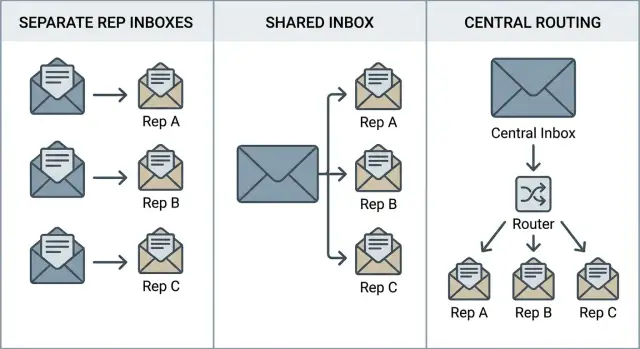
A good reply-to address strategy answers one question: where should replies land, and who is responsible for them? Most teams end up in one of three setups. Each can work, but each optimizes for a different kind of team.
1) Per-rep inboxes (replies go to the sender)
Every email is sent from a real rep mailbox, and replies return to that same mailbox. It feels natural because the conversation stays with the person who started it.
This is strongest when you want clear ownership and fast, personal follow-up. It gets messy when someone is out sick, leaves the company, or simply forgets to check a secondary inbox.
2) Shared inbox (replies go to one team mailbox)
Emails can still look like they come from a person, but replies are directed to a shared address (like a team sales inbox). That shared inbox becomes the single place where replies show up.
It is great for coverage because nothing sits unnoticed in one rep's mailbox. The trade-off is ownership: without a simple process for who answers what, you'll see slow replies and occasional double replies.
3) Routed replies (central Reply-To that assigns)
Routed replies use a central Reply-To address, but replies get forwarded or assigned based on rules. For example, interested replies go to the assigned rep, while unsubscribe or out-of-office messages go to a tracking queue.
This option is useful when you want team-level control without losing rep ownership. Reply classification can help routing stay clean, but the bigger requirement is simple rules the team trusts.
What stays the same in all three
No matter where replies go, a few basics do not change. The visible From name still affects trust and response rate. Your sending domain and mailbox reputation still drive inbox placement. And if your setup confuses people (for example, From is a person but replies go somewhere unexpected), reply rates can drop.
Pick the setup that matches how your team actually works day to day, not the one that looks most organized on paper.
How to choose: speed, ownership, reporting, coverage
A reply-to address strategy is really a decision about handoffs. When a prospect replies, who gets it, who acts, and how do you track what happened next?
Start by ranking these four needs for your team. Most teams can only optimize two without tradeoffs.
1) Speed: who can act first
Speed matters when replies go cold fast. If replies land where someone is already watching, you respond faster. If they land in a rep's inbox but the rep is in meetings all day, speed drops.
Ask: do you need first response within minutes, or is same-day fine?
2) Ownership: who is responsible for the next step
Ownership is about accountability. If one person owns the conversation, follow-ups feel consistent and prospects do not get bounced around.
A simple rule: if a rep is credited for the meeting, that rep should either receive the reply directly or be assigned the reply automatically.
3) Reporting: how you count outcomes per rep
Reporting gets messy when replies land somewhere different from where sends are tracked, or when multiple people reply from different inboxes.
If you need clean numbers per rep (replies, positive replies, meetings), choose a setup where each reply can be tied back to one sender and one owner. Classification helps, but only if replies are captured consistently.
4) Coverage: what happens when people are out
Coverage matters when someone is sick, on vacation, or leaves the company. A setup that relies on one person's inbox can quietly drop hot replies.
To avoid gaps and double replies, decide this up front: who backs up each rep, how quickly they should jump in, where the team can see open conversations, what happens to replies after a rep leaves, and how you prevent two people replying at once.
A quick example: a 4-person SDR team wants fast replies and clear credit per meeting. They might route replies into one place for visibility, but still assign each thread to a single owner within minutes. That keeps coverage high without turning every reply into a group chat.
Option 1: Per-rep inboxes (high ownership)
With per-rep inboxes, every outbound email uses the rep's own mailbox, and replies land back in that same inbox. It's the easiest setup to understand: one person owns the conversation from first touch to meeting (or disqualification).
This works best for small teams and consultative sales, where the rep needs continuity. If a prospect replies with a detailed question or a pricing nuance, the rep who sent the email can answer quickly without asking someone else to forward context.
To keep quality consistent, standardize a few basics so personal does not turn into messy. Align signatures, agree on what can be customized in templates, and keep calendar rules consistent. Also decide how handoffs work (SDR to AE): who replies, who books, and when the thread officially moves.
Coverage is the main weakness here, so solve it deliberately. A simple plan often includes delegation during PTO, a backup owner by territory or account list, and an internal escalation rule if a reply sits too long.
Reporting can also get confusing if terms are undefined. If someone other than the original rep steps in (manager, coverage rep, shared support mailbox), decide whether the response counts as a team reply or credits the original sender. Set the rule before you start comparing rep performance.
Operationally, onboarding and offboarding matter more than teams expect. When a new rep joins, they need the right domain, sending identity, warm-up, templates, and tracking set up from day one. When a rep leaves, you need a plan for open threads and mailbox access for a defined period.
Option 2: Shared inboxes (high coverage)
A shared inbox means every reply goes to one place (like sales@ or sdr@), and the team works out of that queue. It's a good fit when speed matters more than "this lead belongs to one rep forever," and when you need rotating coverage across time zones, shifts, or part-time schedules.
This setup often feels more like inbound support: whoever is available picks up the next thread. That's why it works for fast response teams, early-stage SDR groups, and orgs that treat replies as a team score.
How to prevent chaos
Shared inboxes only work when assignment is boring and predictable. Without rules, two people answer the same prospect, or nobody answers because "someone else probably has it." Keep guardrails simple:
- Pick one assignment method (round robin, territory, or first-touch ownership).
- Set a response target for high-intent replies (for example, "Interested" within 1 business hour).
- Define how threads get reassigned when the owner is out.
- Use a short tone playbook so the voice stays consistent.
What to track (so reporting stays honest)
A shared inbox can still support cold email reporting, but the metrics need to reflect teamwork. First response time matters. So do unresolved threads, ownership changes, and duplicate responses (a clear sign the process is unclear).
Where shared inboxes break is accountability. If nobody owns the outcome, follow-ups get missed and deals stall. A practical fix: when a reply signals real intent (pricing, timeline, "can you call tomorrow?"), assign it to a named owner immediately.
Option 3: Routed replies (control plus flexibility)
Routed email replies sit between per-rep inboxes and a shared inbox. Replies go to one controlled place first, then get sent to the right person (or team) using clear rules. This setup fits teams that want per-rep ownership with a safety net.
A practical approach is to keep Reply-To consistent, then route based on context you already know from the outbound message.
Common ways teams route replies
Most teams choose one primary routing rule and one fallback:
- Route by sender identity (the rep who sent the email owns the reply).
- Route by campaign (replies go to the pod handling that campaign).
- Route by lead owner (territory, account assignment).
- Route by time (after-hours replies go to an on-call inbox).
The biggest gotcha is thread cleanliness. If you change recipients mid-thread, you create messy CC chains and split context. Pick one owner for the thread and keep it stable. If someone needs help, handle it internally instead of bouncing the prospect between different visible recipients.
Reporting and attribution
Routed replies can produce the cleanest reporting when done well: a central log of every response plus rep attribution. That lets you measure reply rate, interest rate, and speed-to-first-response without losing the trail in personal inboxes.
Before you commit to routing, confirm the reliability basics: unsubscribes are honored no matter who receives the reply, stop requests are not trapped in forwarding loops, auto-replies are not counted as real leads, and bounces are logged centrally so you can fix deliverability issues quickly.
If you want control without forcing everyone into one shared inbox, routed replies are often the cleanest compromise.
Step-by-step: decide your Reply-To setup in an afternoon
This is less about what's "best" and more about getting fast responses, clear ownership, and clean reporting. Treat it like a short ops session, not a debate.
Set a 90-minute working session with one person from sales, one from ops, and whoever owns reporting. Bring one recent campaign as a sample.
A simple 5-step process
-
List your active campaigns and owners. For each campaign, write down who should respond when a prospect replies, then sketch today's path from "reply arrives" to "next action" so you can see where it stalls.
-
Choose a default setup, then allow up to two exceptions. Most teams do best with one default (per-rep, shared, or routed) and only a couple exceptions like "enterprise accounts go to account owners" or "event follow-ups go to a shared inbox."
-
Write assignment rules and response times. Decide how replies get claimed and what fast enough means. Include handoff rules when a rep is out.
-
Decide what you will report and where truth lives. Pick the level that matters (per rep, per campaign, per account) and make sure the setup can produce that view without manual tagging.
-
Pilot, then switch. Run the new setup on one campaign for a week, review missed or delayed replies, then adjust before rolling it out everywhere.
Example: a 4-person SDR team runs three outbound campaigns. They choose per-rep replies by default, but route demo requests to a small shared inbox with a 15-minute response goal. Reporting stays per rep for coaching and per campaign for deliverability checks.
Example: a small SDR team that needs speed and clear ownership
Picture a team with 6 SDRs, 1 AE, and 1 manager split across two time zones. The goal is simple: when a prospect replies during business hours, someone responds in under 1 hour, and nobody wonders who owns the conversation.
A good fit is routed replies: outbound emails go out from each SDR's sending identity, but replies are automatically routed to the right rep while staying visible to the manager (and, when needed, the AE). This keeps the human feeling of "you emailed me, you replied to me" while giving the team a safety net.
In practice, each SDR owns their accounts and gets replies first. The manager can see every reply stream and reassign when needed. If an SDR is offline, routing rules can hand off interested replies after a defined window.
Edge cases are where this setup earns its keep. Out-of-office replies should be tagged and snoozed until the stated return date. Bounces should stop that mailbox from emailing the same prospect again and trigger a check of domain and mailbox health. Unsubscribes must be honored immediately, even if the original SDR is away.
Weekly reporting should focus on outcomes and speed, not just volume. Track interested replies, meetings booked (by SDR and by campaign), median first-reply time during business hours, follow-up speed on interested threads, and unsubscribes and bounces as deliverability health signals.
Common mistakes that create lost replies and bad reporting
Most reply problems do not look like "Reply-To is wrong." They look like silence, messy threads, and numbers you cannot trust. A good reply-to address strategy prevents that by making deliverability, ownership, and tracking line up.
A common mistake is setting a Reply-To that does not match what your sending domain expects. If you send from one domain but push replies to a different domain (or a free inbox), you can confuse recipients and mail systems. It also makes it harder to keep SPF, DKIM, and DMARC aligned with what the recipient sees. Even when mail still lands, people hesitate to reply because the address feels inconsistent.
Another frequent issue is two people replying in parallel from different inboxes. It happens when one rep answers from their personal mailbox while someone else answers from a shared inbox, or when replies are routed but not locked to an owner. The lead gets mixed messages, internal notes go missing, and reporting splits one conversation into two.
Ownership gaps create quieter losses. Many teams have no clear rule for what happens when a reply is interested versus "has a question." Questions sit because everyone assumes someone else will take it. Interested replies get handled late because they are not prioritized.
Other mistakes show up repeatedly: treating out-of-office replies like real leads (inflating results), routing replies but forgetting unsubscribe handling, and measuring only emails sent instead of how fast replies are handled and what outcome they produce.
Example: an SDR team uses a shared Reply-To to cover replies during meetings. Two SDRs answer the same prospect within 10 minutes, from different addresses, with different pricing details. The prospect stops responding. In the report, it looks like a positive reply went cold, but the real issue was parallel ownership.
If you want cleaner cold email reporting, track reply handling, not just sending. One owner per thread, one place to reply from, and consistent categories for replies will fix more than most tool changes.
Quick checklist and next steps for teams
Before you change Reply-To settings, agree on what counts as a missed reply. Is it a lead waiting 24 hours? A prospect that unsubscribed but still gets emailed? A rep who cannot see replies on their day off? Your setup should prevent those moments by design.
A fast check:
- Who receives replies first, and how quickly do they see them?
- Who owns the next step for each reply type, and who covers when the owner is out?
- How are unsubscribes handled so they stop future sends everywhere?
- How are bounces and out-of-office replies recorded so they do not pollute follow-ups?
- Can you attribute replies clearly to both the rep and the campaign?
If any answer is "it depends" or "we'll figure it out later," that's the warning sign. Reply-To is not just an email setting, it's a workflow rule.
Lock in a default rule and make it easy to follow. The goal is not the perfect system. It's a system everyone uses the same way.
If you're already standardizing outbound operations, an all-in-one platform can reduce the number of moving parts. For example, LeadTrain (leadtrain.app) brings domains, mailboxes, warm-up, sequences, and reply classification into one place, which makes it easier to keep routing, ownership, and reporting consistent as volume grows.
FAQ
What Reply-To setup should we pick: per-rep, shared inbox, or routed replies?
Use Per-rep inboxes when you want one person to own the whole conversation and you care about a personal feel. Use a Shared inbox when coverage and fast first response matter more than strict ownership. Use Routed replies when you want both: a safety net for coverage plus clear ownership per thread.
How do we stop two reps from replying to the same prospect?
Default to one owner per thread. If you use a shared inbox or routing, add a simple “claim/assign” rule so the first person who takes it becomes the owner, and everyone else stays out of the prospect-facing reply. This prevents mixed messages and keeps follow-ups consistent.
What’s the best way to handle replies when someone is on PTO or out sick?
Treat coverage as part of the Reply-To plan, not a side task. Set a clear backup owner (by territory, account list, or rotation) and a time threshold for reassignment if a reply isn’t handled. If you can’t reliably cover PTO with per-rep inboxes, routing or a shared inbox is usually safer.
How do we keep reporting clean when replies go to different inboxes?
Keep reply capture consistent and tie each reply back to a single owner and the campaign that generated it. If replies are scattered across personal inboxes, reporting will drift unless you have a reliable way to log every reply centrally. Routed replies often make reporting easiest because you can keep one audit trail while still assigning ownership.
Will using a shared Reply-To reduce reply rates?
If your email looks like it comes from a person but replies go somewhere unexpected, some prospects hesitate or assume it’s automated. A safe default is matching the Reply-To with the sender identity whenever possible, or using routing that still keeps the conversation feeling one-to-one from the prospect’s point of view.
Should Reply-To be on the same domain as the From address?
Don’t mix unrelated domains without a good reason. Sending from one domain but pushing replies to another can confuse recipients and can complicate alignment with SPF/DKIM/DMARC expectations. The simplest, least confusing setup is keeping the sending domain and reply domain consistent for the prospect.
How should we handle unsubscribe requests with different Reply-To setups?
Make unsubscribes impossible to miss by ensuring they’re captured centrally and applied to future sends everywhere, not just in one rep’s inbox. If you route replies, route unsubscribe messages into a controlled queue that always updates suppression, even when the original rep is unavailable.
What should we do with out-of-office replies so they don’t mess up results?
Auto-replies should be tagged and removed from the “real reply” counts so they don’t inflate performance and don’t trigger unnecessary follow-ups. A practical rule is to snooze the lead until the stated return date and keep the thread with the same owner so context doesn’t get lost.
How do bounces affect Reply-To strategy, and what’s the right response?
Bounces should automatically stop further sending to that address and trigger a quick check of mailbox and domain health. If bounces aren’t logged in one place, teams keep emailing dead addresses and hurt deliverability. Central logging plus clear ownership for fixes keeps the problem small.
How can we decide and implement a Reply-To strategy quickly without overthinking it?
Pick one default setup, write a few rules, and pilot it on one campaign for a week. Decide who owns which reply types, what “fast enough” means, how reassignment works, and what you’ll report. Then review missed or delayed replies and adjust before rolling it out team-wide.