Reply handling rotation for sales teams without losing context
Learn reply handling rotation for sales teams to split inbound replies across reps, keep clear ownership, and avoid missed follow-ups.
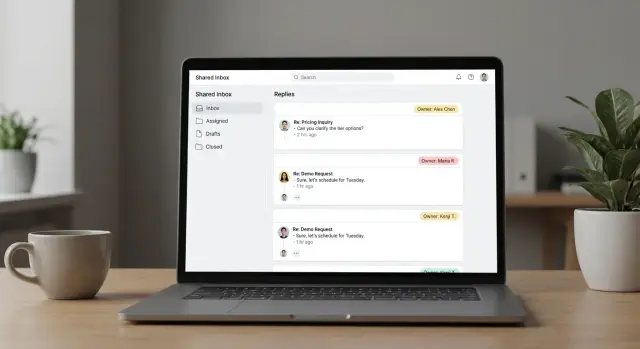
Why teams need reply rotation in the first place
When replies land in one person’s inbox, the whole team ends up waiting on that person’s schedule. If they’re in calls, out sick, or buried in other work, “quick replies” become next-day replies and interested leads cool off.
The symptoms show up fast: slow response times, two reps replying to the same prospect, and threads that get “handled” in chat but never actually answered. The quiet failure is the worst one: a strong reply sits unread because it arrived in a mailbox nobody watches closely.
A reply rotation fixes this by making one thing explicit: ownership. Ownership means one rep is clearly responsible for the next action on a specific conversation (reply, book a meeting, qualify, or close the loop). It also means everyone else knows not to jump in unless asked.
Rotation helps most when you’re running high-volume outbound with a consistent offer and a shared playbook. It also works best when common outcomes are easy to spot, like interested, not interested, out-of-office, bounce, and unsubscribe.
Rotation helps less when every lead needs deep account knowledge, or when relationships are already personal (late-stage deals, renewals, strategic accounts). In those cases, continuity usually beats speed.
A simple example: three SDRs share outbound replies. Without rotation, everything goes to the person who launched the campaign, and replies pile up during call blocks. With rotation, buying-intent replies go to the next available rep, while anything tied to an existing deal stays with the account owner.
If you’re using a platform like LeadTrain, automatic reply classification can take care of the first sorting step so the team spends time deciding what to do next, not digging through the inbox.
Set clear ownership rules before you rotate anything
Rotation only works if everyone knows who’s responsible at any moment. Without rules, you get the two worst outcomes: slow replies because everyone assumes someone else will handle it, or double replies that make your team look disorganized.
Define “conversation ownership” the instant a reply arrives. This is not the same as “account ownership.” Account ownership is the long-term relationship. Conversation ownership is the short-term right to respond right now.
Keep the rules simple and visible. A set like this prevents most confusion:
- Every new reply gets assigned to one rep quickly (even if the response comes later).
- Only the assigned rep sends the next message in that thread.
- If an account owner needs to take over, the handoff is explicit (no silent switching).
- Time-sensitive replies (pricing, meeting requests) override rotation and go to the right owner.
- If the assigned rep is out, ownership moves to the on-call rep.
Plan for sick days and vacations ahead of time. Decide what “out” means in practice (for example, no response within 60 minutes during working hours triggers reassignment). Tools can help flag urgent categories, but the team still needs a clear backup schedule.
To prevent two reps replying to the same prospect, treat “assigned” like a lock. If Sam opens a thread and starts drafting, that thread stays with Sam until they send, reassign, or mark it as needs help.
Pick a routing model that matches how you sell
A rotation only feels fair if it matches your sales motion. If speed matters and leads are similar, keep it simple. If you sell account-based, routing should protect continuity.
Most teams fit into one of these models:
- Round robin: New replies go to the next rep in line.
- Account-based: All replies from the same company stay with one rep.
- Territory-based: Route by region, industry, segment, or company size.
- Skill-based: Route by language, product line, or deal complexity.
- Hybrid: Start with territory or account buckets, then round robin inside each.
Whatever you choose, define fallback rules for messy data. This is where rotations usually break down, because the routing logic can’t decide who owns the conversation.
Fallback rules that keep things moving:
- Unknown company domain: assign round robin.
- Existing owner in the lead record: keep it with that owner.
- Out-of-office: keep ownership, set a follow-up date.
- Clear language need and only one rep supports it: route to that rep.
- Anything unclear: send to a designated triage rep.
If your tooling can classify replies (interested, not interested, out-of-office, bounce, unsubscribe), use that classification as the first branching point. It reduces guesswork and makes routing more consistent.
Decide: shared inbox, separate inboxes, or a hybrid
Rotation only works if everyone knows where replies show up and who’s allowed to answer. Pick an inbox setup first, then build rules around it.
Option 1: Shared inbox
A shared inbox works best when speed and coverage matter most. Anyone can jump in, which helps when someone is out sick or you sell across time zones.
The tradeoff is accountability. Two people can answer the same prospect, or answer with different explanations. If you go shared, use a simple lock: the first person to take a reply becomes the owner until the thread is resolved.
Option 2: Separate inboxes
Separate inboxes are best for consistent ownership. The rep who sent the email handles the reply, so the prospect always hears from the same person.
The tradeoff is coverage. If that rep is in meetings, replies wait. It can also make rotation harder, because messages are stuck in individual mailboxes.
A common middle ground:
- Use a shared inbox for first-touch triage.
- Move active conversations to the rep’s inbox once the thread is clearly owned.
- Define one handoff moment (for example, after booking intent is confirmed).
- Store handoff notes in one place (usually the CRM).
Be careful with CC/BCC and aliases. Random BCCs clutter threads and can backfire when someone hits Reply All. If you use an alias like sales@, decide whether it’s only for inbound or also used as Reply-To for outbound, and keep it consistent.
Step-by-step: implement a reply rotation workflow
Rotation works when the team agrees on what a reply means and what happens next.
-
Define reply types you actually see. Start simple: interested, question, objection, not interested, out of office, bounce, unsubscribe. If you use LeadTrain, AI-powered reply classification can do the first pass, but you still decide what each label triggers.
-
Choose the routing fields. Pick fields that match how you sell, not how your tools are organized. Common ones: segment, territory, campaign, company size, and current owner. Everyone should be able to look at a thread and understand why it was assigned.
-
Decide how assignments happen. Auto-assignment is faster. Manual review is safer when you’re new, changing messaging, or dealing with edge cases. A practical split is manual for buying intent, automatic for everything else.
-
Set the core rules. Most teams only need a handful:
- Tag the reply type and priority quickly.
- Assign an owner immediately (one person, not “the team”).
- Set a response target (example: within 2 business hours for interested).
- Escalate when the target is missed (reassign or alert the manager).
- Define what a handoff requires (notes, reason, and who replies next).
- Pilot before you roll out. Test with one campaign and 2 to 3 reps for a week. Review missed targets, wrong assignments, and “no owner” threads. Adjust one rule at a time.
Keep conversation context intact during handoffs
Rotation only works if the next rep can understand the story in seconds. Never hand off a reply without the full thread visible in the same place the assignee will answer from. Copy-pasting snippets into chat or forwarding messages is how details get lost: what was promised, which angle you used, which objection already came up.
A good handoff also needs a short internal note that explains why you reached out and what you want next. Keep it factual and brief.
Use tags and a tiny fact sheet
Standard tags make scanning faster and reporting cleaner. Keep the tag set small, like pricing, demo, competitor, timing, referral, security, procurement.
Pair tags with a quick handoff note that takes about 30 seconds:
- Context: why you contacted them and what you offered
- What happened: their last reply in one sentence
- Tags: 1 to 2
- Key facts: persona, pain point, tools, timeline (if known)
- Next step: what you’ll do and any date promised
Example: Rep A offered a quick deliverability check to a Head of Sales. The lead replies asking for pricing and mentions they use Outreach. Rep B takes the reply, sees the full thread, the tag “pricing,” and a note: “Promise: send pricing tiers today by 4pm.” The response stays consistent, and the prospect never feels the handoff.
Set response time targets and a triage order
Speed matters, but not every reply deserves the same speed. Set targets by reply type so reps know what “good” looks like.
One simple approach:
- Interested: 15 to 60 minutes during business hours
- Direct questions and referrals: within 2 hours
- “Not now”: by end of day
- Unsubscribe and complaints: immediate action (delays can turn into spam reports)
Reduce stress by separating “urgent now” from “follow up later.” Urgent usually means they’re ready to talk, asked a direct question, or raised a risk (unsubscribe, complaint). Follow up later includes out-of-office, “check back next month,” and anything that needs research.
A practical triage order
Use the same order every shift so important replies don’t get buried:
- Unsubscribe or complaint: confirm opt-out and stop future sends
- Bounce: pause the mailbox or prospect, fix data or deliverability
- Out-of-office: log the return date, set a reminder
- Interested: reply and propose the next step
- Not interested: close the loop politely, tag for learning
Coverage is part of the target. If you sell across time zones, assign an early and late rep, plus a weekend plan (even if it’s one person checking urgent replies twice a day).
Track misses and keep the reasons simple: owner absent, unclear routing, no coverage, saw it too late. If your system classifies replies, review patterns by category and tighten the targets where you actually lose deals.
Common mistakes that create more chaos than speed
Most rotation problems come from treating every reply the same, even when a clear owner already exists.
The mistakes that create extra work:
- Rotating everything, including owned accounts. Rotation is for new, unclaimed replies.
- No single source of truth for notes and next steps. If notes live in DMs, spreadsheets, and memory, handoffs break.
- Ownership changes without a reason. Log a short reason like “pricing question, moved to AE” or “technical review.”
- Over-automation. Auto-routing can misfire. Keep humans in the loop for edge cases.
- No plan for out-of-office coverage. Decide who watches replies and how ownership returns after someone is back.
Another trap is measuring only activity. If you only track “replies handled,” people rush and close threads too early. Track outcomes and speed:
- First response time
- Meetings booked
- Qualified reply rate
- Unsubscribe and spam complaint rate
- Handoffs per thread
Quick checklist to confirm your rotation is working
If reps still ask “who owns this?” or replies sit untouched, the routing isn’t doing its job. Use this once a week and after any change to sequences or team coverage.
- New replies get one named owner quickly, and everyone knows where to see the assignment.
- The owner can read the full thread plus the campaign context without jumping between tools.
- Reassignment is rare and predictable, with clear reasons (PTO, account conflict, language, region) and a backup rep.
- The team uses the same small set of triage labels every day.
- Response targets are written down and tracked (even a daily count of “over target” replies).
If something fails, fix the rule before adding complexity. For example, if owners can’t see context, add a standard handoff note field with three lines: lead summary, next question to ask, next step.
Example: a simple rotation for a 3-rep outbound team
Picture a small outbound team: three reps (Ava, Ben, Cam) and one manager (Maya). Two campaigns are running: one to founders and one to ops leads. Replies land in one place, but ownership stays clear.
The rule: any new reply that signals buying intent goes to the next rep in a round robin, unless that prospect already has an owner.
An interested reply comes in: “Yes, can you share pricing and a quick overview?” The system tags it as interested (LeadTrain can auto-classify replies), assigns it to Ava because she’s next, and sets a 2-hour response target. Ava replies in the same thread, proposes two meeting times, and updates the record so everyone can see what was sent.
An out-of-office arrives: “Back next Tuesday.” It’s tagged as OOO and stays with the campaign owner (Ben), even if Ben isn’t next. Ben sets a follow-up for Tuesday morning and pauses further steps to avoid awkward extra emails.
Now a handoff: the prospect replies, “Can someone talk security and SOC 2?” Ava reassigns it to Cam, the team’s security specialist, with a quick note about what was promised.
To keep this clean, the team logs a few basics every time: current owner, why it was assigned, the prospect’s ask in one line, the last message sent and promised next step, and a follow-up date if the thread goes quiet.
Next steps: roll it out safely and keep it simple
Start small. Pick one active campaign, choose one routing model, and run it for two weeks. The point is to learn where replies get stuck and which rules need to be clearer.
Keep your rules on one page. If someone can’t explain the flow in 30 seconds, it’s too complicated. Include: who owns a reply at each stage, when ownership changes, what counts as “handled,” and what happens if the owner is out.
A simple rollout plan:
- Week 1: run rotation on one campaign and log every late or missed reply
- Week 2: fix the top two issues and repeat
- End of week 2: decide keep, tweak, or stop
Tooling matters most when it reduces context switching. If domains, mailboxes, warm-up, sequences, and replies live in different places, people waste time and drop conversations. Having one place to see the thread, the prospect, and the campaign step is what keeps handoffs clean.
If you use LeadTrain (leadtrain.app), keeping sending setup and reply handling together, plus AI-powered reply classification, can reduce manual sorting and make routing rules easier to apply.
Decide what you’ll measure next and keep it tight:
- Speed: time to first response
- Meetings: booked calls per 100 replies
- Safety: fewer missed replies and fewer duplicate responses
FAQ
What is reply rotation, in plain terms?
Reply rotation is a way to assign each new inbound reply to one specific rep so someone is clearly responsible for the next action. The goal is faster responses without double-replies or “someone will handle it” gaps.
When should we use reply rotation, and when should we avoid it?
Use rotation when you have high outbound volume, a consistent offer, and you’re losing leads to slow response times. Avoid rotating replies for late-stage deals, renewals, or strategic accounts where continuity with the same owner matters more than speed.
How do we prevent two reps from replying to the same prospect?
Make ownership explicit the moment a reply arrives, treat the owner like a lock on the thread, and require an explicit handoff if someone else takes over. This stops both “no one replied” and “two people replied” problems.
What’s the difference between conversation ownership and account ownership?
Conversation ownership is the short-term right to respond to a specific thread right now. Account ownership is the long-term relationship owner, and rotation should respect that by keeping sensitive or already-owned accounts with the right person.
Which routing model should we pick: round robin, account-based, territory, skill-based, or hybrid?
Round robin is best when leads are similar and speed is the priority. Account-based or territory-based routing is better when context and continuity matter, and a hybrid approach often works well by assigning within buckets.
What should we do when routing data is missing or messy?
Use simple fallback rules so every reply gets an owner quickly, like round robin when the company is unknown and sending anything unclear to a designated triage rep. The key is to avoid “routing can’t decide” situations that leave replies unassigned.
Should we use a shared inbox or separate inboxes for rotation?
A shared inbox makes coverage and speed easier, but you need a clear lock/assignment rule for accountability. Separate inboxes keep ownership consistent, but replies can wait if the sender is busy, so many teams use a hybrid with a shared triage step and explicit handoff.
How fast should we reply, and how do we prioritize different reply types?
Set targets by reply type so reps know what to prioritize, like fast responses for interested and direct questions, and immediate action for unsubscribe or complaints. A consistent triage order keeps important replies from getting buried even during busy periods.
How do we hand off a conversation without losing context?
Keep the full thread visible where the assignee will reply, and add a short internal note with the reason for outreach, what the prospect asked, and the next step promised. This prevents context loss and keeps your messaging consistent across reps.
How can LeadTrain help with reply rotation and sorting replies?
LeadTrain can consolidate domains, mailboxes, warm-up, sequences, and replies in one place, so reps don’t bounce between tools to find context. Its AI-powered reply classification can label replies like interested, not interested, out-of-office, bounce, or unsubscribe to speed up triage and routing.