Reply classification workflows for SDRs that save hours
Reply classification workflows help SDRs route interested, not now, OOO, bounces, and unsubscribes into clear next steps with simple rules.
Why reply handling eats up SDR time
An SDR inbox gets messy fast. A few replies are obvious yeses, but most aren’t. You’ll see one-liners, forwards, auto-replies, and long threads that look urgent but aren’t. Without a shared way to sort them, every message becomes a fresh decision.
Time disappears in tiny, repeatable tasks: re-reading the thread to remember the pitch, guessing what the prospect meant, deciding whether to follow up now or later, then updating the CRM and setting a reminder. Multiply that by 30 to 60 replies a day and you’re losing hours.
Most teams get slowed down by the same problems:
- Constant context switching (opening records, scanning history, hunting for the last question)
- Interpreting vague intent (“not now” vs “never” vs “ask me next quarter”)
- Rewriting the same follow-ups and manually pausing or rescheduling sequences
- Letting good replies sit too long
- Unclear ownership (two people respond, or nobody does)
Slow handling costs meetings. If an interested prospect waits half a day, momentum fades. It also creates a bad experience when opt-outs aren’t handled cleanly and someone gets emailed again.
A good reply classification workflow reduces decisions. Each common reply type should map to one clear next step, with obvious ownership and fast routing.
The 5 reply types worth standardizing first
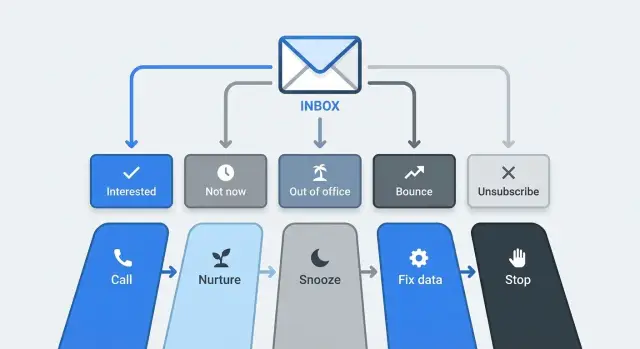
Most replies feel unique, but most fall into a small set of repeatable buckets. Start with five categories that cover nearly everything in cold outreach:
- Interested: Clear positive intent. They ask for details, pricing, a deck, or suggest a time.
- Not now: Not a rejection, but timing is wrong. “Next quarter,” “busy,” “no budget,” “already evaluating.”
- Out of office (OOO): Temporary absence, often with a return date and sometimes an alternate contact.
- Bounce: Delivery failure (invalid address, full mailbox, blocked domain). It’s not a “no,” it’s a delivery problem.
- Unsubscribe: Any opt-out request (“remove me,” “stop emailing”). Treat it as urgent and non-negotiable.
These categories work because each implies a different action. “Interested” needs fast human follow-up. “Bounce” needs cleanup. “Unsubscribe” needs suppression so you don’t email them again.
One quick example: “Back in two weeks, contact Alex for urgent requests” is OOO, not Interested. Your workflow should tell the SDR exactly what to do with the return date and whether to contact Alex.
Map each reply type to one clear next step
A label only helps if it triggers an obvious action. The goal is that an SDR can glance at the category and know what to do without re-reading the whole thread.
A simple default playbook looks like this:
- Interested: Reply same day, confirm the goal, and propose two concrete meeting times.
- Not now: Confirm timing with one question, set a reminder, and move them to a light follow-up later.
- Out of office: Capture the return date, pause outreach until then, and decide whether to contact an alternate.
- Bounce: Stop sending to that address, replace it, and check why it failed.
- Unsubscribe: Stop outreach immediately and add them to your suppression list.
Make the “Interested” path specific. For example: “Are you the right person for X? If yes, does Tue 11:00 or Wed 15:00 work?” That keeps momentum and avoids long back-and-forth.
For “Not now” and “OOO,” the common mistake is over-selling. Keep it short, confirm the date, then let the system do the waiting.
For “Bounce,” don’t just swap the email and move on. Track patterns. A sudden spike can point to bad data, an authentication issue, or mailbox health problems.
For “Unsubscribe,” treat it as a rule, not a debate. One action should stop all future sends.
Step-by-step: design a workflow your team will actually follow
Start simple: a small set of reply types, plain definitions, and one next step per type. The goal is less thinking per message, not more rules.
Write definitions so two people would tag the same reply the same way. For example, decide what counts as “Not now” versus “Not interested” (a clear no with no timeline). Then build the workflow in a short sequence:
- Define your 5 core categories in 1 to 2 sentences each, plus one real example reply.
- Assign one default owner per category (SDR, AE, or ops). If there’s doubt, pick one owner to avoid stalls.
- Set response time targets by category (minutes for Interested, hours for Not now, immediate for Unsubscribe).
- Draft one short reply template per category that can be personalized in 10 seconds.
- Decide what’s automatic vs what requires review, and document it on one page.
Automation helps most when it handles sorting and routing, not relationship-sensitive messages.
A safe split for many teams:
- Automate: OOO, bounce, unsubscribe tagging, and routing.
- Review first: Interested and Not now (a human should confirm context and choose the right next step).
Routing rules that keep replies from getting stuck
Replies get stuck when they land in a shared inbox and everyone assumes someone else will handle them. Routing fixes that by assigning one clear owner the moment a reply is recognized.
Route by who must act next
Pick a stable default rule, like account ownership or “the person who launched the sequence.” Then keep exceptions minimal.
A practical setup:
- Interested: route to the account owner or assigned AE, mark urgent
- Not now / OOO: keep with the SDR, snooze until the date
- Bounce / Unsubscribe: route to an ops/admin queue (sending health and compliance)
- Admin replies (billing, wrong person, referral): route to a triage queue with a clear SLA
This protects prime time for hot replies and prevents low-value threads from stealing attention.
Make it searchable and hard to ignore
Use short labels people will actually search later (Interested, Not now, OOO, Bounce, Unsubscribe, Referral). Add one escalation rule for missed SLAs. Example: if an Interested reply isn’t touched within 60 minutes during business hours, notify the lead and reassign to a backup owner.
For CRM updates, keep it minimal and useful:
- Reply category
- Current owner
- Next step date/time
- Lead/deal status
- One-sentence note
Automation rules that save time without being careless
Good automation removes boring work and reduces mistakes. The safest approach is to automate the obvious replies, and create a small “needs review” lane for anything messy.
Safe-to-automate actions
These have one correct next step and should happen immediately:
- OOO: tag as OOO and schedule a follow-up based on the return date (or a default like 7 days).
- Unsubscribe: stop sequences and mark do-not-contact.
- Bounce: flag the address for cleanup and prevent resend to the same address from the same mailbox.
- Not now: pause the sequence and set a reminder date (30 to 90 days is common).
You can also auto-create tasks for Interested replies, but keep the actual message human.
Add a human-review lane
Some replies contain mixed signals: an OOO that also asks a question, or an opt-out that still asks for information. A simple guardrail is: if a message matches more than one category, or confidence is low, route it to review instead of sending anything.
Edge cases to define once (so SDRs don’t guess under pressure)
Most inbox chaos comes from “weird” replies that don’t fit neatly into one bucket. You don’t need dozens of categories. You need a few tie-breaker rules.
Mixed intent: “Yes, but not now”
Treat it as interest with a delay. If they give a timeframe, schedule the follow-up for that date and pause the sequence. If they don’t, reply once with one question (“When should I reach back out?”), then set a default follow-up (like 30 days).
Referrals, pricing asks, and negative (but not unsubscribe)
These get mislabeled a lot, so keep a short decision guide:
- Referral: thank them, ask for an intro or permission to reach out, then create a new lead.
- Pricing request: answer briefly, then ask one qualifying question.
- Not a fit (no opt-out): acknowledge and stop the sequence.
- “Stop emailing me” (even without the word unsubscribe): treat as Unsubscribe.
- Angry/spam complaint: apologize once, confirm you’ll stop, and suppress.
If a message is both a delay and a referral (“Not now, but email my colleague Sam”), pick a tie-breaker rule (usually referral first) and stick to it.
Common mistakes that create more work
Teams don’t lose time because they lack a tool. They lose time because the workflow is unclear. If two SDRs would take different actions on the same reply, you’ll get delays, duplicate follow-ups, and missed meetings.
The biggest mistakes:
- Too many similar categories that nobody remembers under pressure
- One bucket for “ready to meet” and “curious but not ready,” which slows scheduling
- Auto-sending replies based on keywords without enough context
- Mixing bounces and unsubscribes (creates compliance and deliverability problems)
- No clear owner for fixing bad data, domain health, or mailbox issues
Separating bounces from unsubscribes matters. A bounce is usually a data or deliverability issue to fix. An unsubscribe is a preference to honor immediately. Treating them the same either risks emailing someone who opted out, or hides a real sending issue.
Quick checklist before you turn it on
Before launch, make sure your rules match how your team actually works. Every reply type should lead to one obvious action.
- Write categories with examples (2 to 3 real replies for each).
- Give each category one default next step and one owner.
- Keep templates short (2 to 4 sentences) and in your voice.
- Make OOO follow-ups date-based (return date + 1 day).
- Treat unsubscribes as immediate, consistent, and irreversible.
Do a dry run: take 20 recent replies, classify them, and check that the next step feels correct every time.
Example: a simple workflow for a 2-SDR team
Picture a small outbound team with two SDRs, Sam and Priya. They run one cold email sequence and handle replies with the same labels and the same next step every time.
On a typical day they see 15 replies: 3 Interested, 5 Not now, 2 OOO, 4 Bounces, 1 Unsubscribe. Instead of scanning an inbox thread by thread, replies land in two queues: “Needs reply today” and “Needs review.”
Routing stays predictable:
- Interested: task due today for the owner, with clear “book meeting” expectations
- Not now: reminder set, sequence paused
- OOO: follow-up scheduled for the return date
- Bounce: removed from sequence, cleanup task created
- Unsubscribe: marked do-not-contact and excluded from future sends
They automate the repeatable parts (pausing, tasks, follow-up scheduling, suppression) and keep the human work human (a short, specific reply to Interested leads).
Next steps: measure, refine, keep it manageable
Treat the first month as a tuning period. Watch a small set of numbers that tell you whether the workflow is helping or quietly creating work:
- Time to first response (by rep and category)
- Reply-to-meeting rate (from Interested and Not now)
- Bounce rate (by sending domain and mailbox)
- Unsubscribe rate (by sequence step)
Then do a short weekly review of real replies. Pull 20 to 30 threads and ask: “Was the category right?” and “Did the next step make sense?” This is where you tighten definitions that confuse people, like the line between Not interested and Not now, or what to do with an OOO that includes a referral.
If you’re consolidating your outbound stack, it can help to pick a system that covers both sending and reply handling. For example, LeadTrain (leadtrain.app) includes AI-powered reply classification (interested, not interested, out-of-office, bounce, unsubscribe) alongside domains, mailboxes, warm-up, and sequences, so teams spend less time sorting inboxes and more time running real conversations.