Reactivation campaign for old outbound lists: safe restart
Plan a reactivation campaign for old outbound lists with safe re-verification, smart segmentation, and gradual sending to cut complaints and earn replies again.
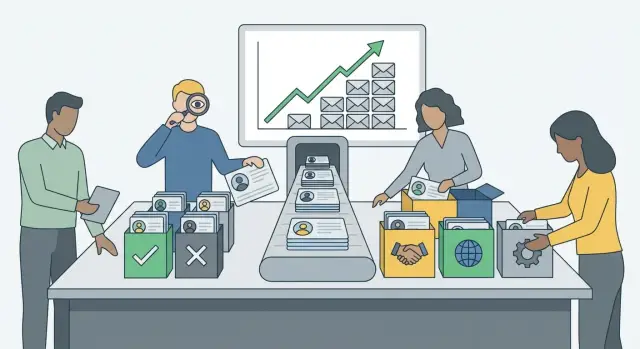
Why old outbound lists stop working
Old outbound lists fail because they were built for a different moment. People change jobs, companies rename, domains expire, and inbox providers tighten rules. If you restart outreach as if nothing changed, your email looks like it’s going to a random address, and that’s exactly the pattern spam filters are designed to catch.
Stale lists create problems that stack up fast:
- More invalid addresses means more hard bounces. Hard bounces aren’t just missed sends, they’re a strong “low quality sender” signal.
- Older lists are more likely to include recycled addresses or spam traps.
- Even when an address is valid, the person may not remember you. That leads to spam reports, complaints, and sharp replies.
You’re probably dealing with an aging list if you see a jump in hard bounces, an uptick in “who are you?” replies, more unsubscribes on the first message, or a drop in inbox placement. Another red flag: the list hasn’t been touched in 6-12+ months and job title was a major filter.
It’s not only the list that ages. Your sending reputation drifts too. If you’ve been quiet and suddenly send a lot, that alone can look suspicious. Providers reward steady patterns.
A good reactivation campaign has three jobs: confirm you’re reaching real people, restart in a controlled way, and learn who’s still a fit. It’s not a chance to blast the database.
Set goals and stop rules before you send
With older lists, you don’t know how people will react today. Decide what success looks like and what would make you pause. That’s the simplest way to protect deliverability.
For the first wave, pick one goal. Keep it small and clear:
- Get replies (even “not a fit” is useful)
- Ask for a referral to the right owner
- Ask for permission to keep emailing
Keep the offer simple. One offer, one call to action. If you pile on options (demo, audit, webinar, case study), people tune out.
A safe reactivation question is low pressure and easy to answer in one line. For example: “Should I close your file, or is it OK if I send one short note next month if something relevant comes up?”
Track metrics that protect you, not just your pipeline. Watch reply rate, hard bounce rate, spam complaints, unsubscribes, and the share of angry replies.
Set stop rules before you hit send. If hard bounces spike, complaints appear, or replies turn hostile, pause and fix the cause (list quality, targeting, or copy) before sending again.
Clean and re-verify the list (the minimum)
Treat your old list as untrusted until it proves otherwise. Reactivation fails fast when you keep bad addresses, hit people who already opted out, or send duplicates.
Start by removing addresses that should never be emailed again:
- Past hard bounces
- Unsubscribes and anyone who asked you to stop
- Spam complainers (from your ESP or inbox feedback)
Then reduce obvious risk. Role accounts like info@ and support@ can trigger filters and are more likely to create complaints. If you rely on light personalization, also drop contacts missing basics like company name.
Next, re-verify what’s left. Don’t settle for a single “valid/invalid” result. You want labels you can segment on: valid, invalid, catch-all, unknown, and risky. Catch-all and unknown aren’t always bad, but they’re higher risk, so save them for later testing.
While cleaning, standardize your fields so you can control who gets what. At minimum: first name, company, role, source, country or time zone (if you have it), and last contact date. Someone you emailed last month can handle a different tone than someone you haven’t touched in two years.
Finally, deduplicate. This is where a lot of complaints come from. If you merged lists from multiple sources, one person can appear multiple times. Deduplicate by email first, then by person (same name and company), and choose one best record to keep.
Example: you start with 10,000 old leads from mixed sources. After removing bounces, unsubscribes, and complainers you’re at 8,200. Verification marks 6,900 valid, 900 catch-all, and 400 unknown. Start with the 6,900 valid addresses only. Treat catch-all and unknown as later experiments, not day one.
Re-segment so you start with the safest contacts
In reactivation, who you email first matters as much as what you write. Segmentation helps you begin with people least likely to complain.
Start with recency. A lead from four months ago is very different from one exported two years ago. Split into simple buckets (for example 3-6 months, 6-12 months, 12+ months), then layer in what you know:
- Replied before vs. never engaged
- Fit (role and seniority)
- Company match (industry and size)
- Practical constraints (region and time zone)
Then build a small pilot segment with the lowest risk. A strong pilot group usually looks like: contacted in the last 3-6 months, replied at least once, clear fit, and no prior “stop” signals.
If you sell to B2B SaaS finance teams, start with finance leaders at 50-500 person SaaS companies who replied before (even if they said “check back next quarter”). Save the 12+ month, never-engaged group for later, or skip it entirely.
Set up sending so you don’t trip filters
Before you touch an old list, make sure your sending setup fits outbound. Reactivation fails quickly when you send from your main company domain or from mailboxes that have been quiet for months.
Use a dedicated sending domain and outbound-only mailboxes. That keeps risk away from your core inboxes (support, finance, hiring) and gives you tighter control.
Make sure authentication is correct. SPF, DKIM, and DMARC are table stakes. If they’re missing or misconfigured, even good copy can land in spam or get rejected.
Warm up mailboxes gradually, even if they’re not new. An idle mailbox that suddenly sends volume can look like a compromised account. Start small and keep patterns steady.
Also control volume. Keep daily caps low per mailbox in week one, and spread sends across the day. If you need more volume, add mailboxes rather than pushing one mailbox too hard.
Step-by-step: how to restart outreach safely
A safe restart is mostly pacing. Treat it like a new sender launch, even if you used to send a lot.
- Start with the safest segment. Recent leads, prior conversations, or anyone with a clear signal of interest. Avoid the oldest records early.
- Set a low daily cap per mailbox. Keep it steady for several days so results are readable.
- Use a short sequence (1-3 touches). One email and 1-2 follow-ups is enough for the first wave.
- Increase volume in small steps. If bounces stay low and replies stay neutral-to-positive, scale slowly every few days.
- Add segments only after the prior segment behaves well. Don’t mix risk levels in the same batch.
Pause quickly when signals go bad. Don’t “push through” a spike:
- Bounces jump (often list quality or missing verification)
- Spam complaints show up (message mismatch, weak targeting, or ramping too fast)
- Unsubscribes rise sharply (people don’t recognize you)
- Reply tone turns angry (targeting or framing is off)
Message tweaks that reduce complaints
Old contacts are more likely to be surprised. Your email should lower that surprise, give control, and be easy to skim. Think “permission reset,” not hard pitch.
Put context in the first 1-2 sentences. Say why you’re reaching out again and why now. Keep it plain:
- “We spoke last spring about onboarding support. Reaching out because we added a self-serve option that might fit your team.”
- “You were on a list I built for X. I paused outreach for a while and wanted to check if this is still relevant.”
Make opting out effortless and visible in the body:
- “If you want me to stop, reply ‘no’ and I won’t follow up.”
- “Wrong person? Reply with the right contact and I’ll update my notes.”
- “Not a priority? Reply ‘later’ and I’ll pause for 60 days.”
Keep formatting boring on purpose. Plain text, short lines, one clear question. Avoid heavy styling, multiple links, and pushy language.
When you test, keep it small. Subject line and opening line matter most because that’s where trust is won or lost:
- “Quick check” -> “Should I close the loop on this?”
- “Still relevant?” -> “I’m re-checking whether this is worth a conversation for you.”
- “Wrong timing?” -> “If this isn’t a fit, tell me and I’ll stop.”
Common mistakes that cause spam placement or angry replies
Most reactivation problems are self-inflicted.
The fastest way to get flagged is blasting the full list on day one. Sudden volume looks suspicious, and it increases the chance you hit expired inboxes or people who don’t match your offer anymore.
Another mistake is reusing the exact old subject lines and copy. If the last campaign got low engagement, repeating it often recreates the same negative signals. It can also irritate recipients who remember the old thread.
Don’t mix clean contacts with risky ones in the same send. One pocket of bounces or complaints can drag down the whole batch.
Reply handling is where trust breaks. If you miss an unsubscribe, ignore a clear “not interested,” or keep following up after an out-of-office, you invite complaints.
Quick checks before you scale
Treat your pilot like a safety test. Old lists can look fine on day one and then degrade as you hit more providers or older addresses.
Only scale when results stay steady for at least 2-3 sends to the same pilot segment. If you change the audience, subject line, or sending domain, assume it’s a new test.
Look at the signals together:
- Hard bounces stay low and flat
- Spam complaints stay near zero
- Unsubscribes don’t trend upward
- Reply rate stays consistent in the safest segments
- Reply tone is mostly neutral (not interested, out of office) rather than angry
If anything worsens versus the prior send, hold volume and fix the cause first.
To scale safely, keep growth predictable: add a small number of sends per mailbox, hold for a day, then reassess. Expand into the next-safest segment before touching the oldest records.
Example 3-week plan and next steps
You have 8,000 outbound leads last contacted 10 months ago from mixed sources. Assume some emails are dead, some people changed jobs, and a few will be annoyed if you show up like nothing happened.
A simple 3-week plan
- Week 1 (prep + 300-person pilot): Re-verify, remove role accounts, dedupe, and suppress bounces, unsubscribes, and complainers. Segment by recency and source. Send a short 2-step sequence to a 300-contact “safest” pilot and watch bounces, complaints, and reply tone.
- Week 2 (controlled expansion): If week 1 is clean, expand to the next “recent and engaged” segment. Keep the sequence short and the goal simple (confirm relevance, not a hard pitch).
- Week 3 (test never-engaged separately): Treat “never engaged” as higher risk. Test a different angle, keep volume low, and stop quickly if replies trend negative.
After each week, make one decision: continue, pause, or tighten the segment.
Make it repeatable
Write down what worked: the safest segments, the best openings, and which reply categories showed up most.
If you want fewer moving parts, LeadTrain (leadtrain.app) combines domains, mailboxes, warm-up, multi-step sequences, and AI-powered reply classification in one place. That can make reactivation easier to manage because bounces, unsubscribes, and “not interested” replies are surfaced quickly, so you can suppress them before follow-ups go out.
Set a simple rule for scaling volume, such as only increasing after two clean send days. Predictable growth beats guessing.
FAQ
How do I know if my outbound list is too old to use?
Assume it’s stale if it hasn’t been touched in 6–12+ months, especially if job title or company info mattered. Common signals are a jump in hard bounces, more “who are you?” replies, higher unsubscribes on the first email, and worse inbox placement.
Why are hard bounces such a big deal during reactivation?
Hard bounces are a strong “low-quality sender” signal, and they can hurt inbox placement fast. The practical move is to stop, clean, and re-verify before sending more, rather than trying to “push through” the spike.
What’s the minimum list cleaning I should do before reactivating?
Start by suppressing past hard bounces, unsubscribes, and anyone who asked you to stop, then remove duplicates. After that, re-verify the remaining addresses and segment by risk so you don’t send to the sketchiest contacts first.
Should I email catch-all or “unknown” verification results?
Yes, but treat them as higher risk. Keep catch-all and unknown results out of your first wave, and test them later in small batches after your “valid” segment performs cleanly.
How should I segment an old list for a safe restart?
Start with the safest people first: more recent contacts, prior replies, clear fit, and zero “stop” signals. A simple approach is to bucket by last contact date (for example 3–6 months, 6–12 months, 12+ months) and only expand when the earlier bucket behaves well.
Do I need a separate domain and mailbox setup for reactivation?
Use a dedicated sending domain and outbound-only mailboxes so you don’t put your main domain at risk. Make sure SPF, DKIM, and DMARC are set correctly, then warm up and ramp volume slowly so your pattern doesn’t look suspicious.
How fast can I ramp up sending volume on an old list?
Start low and keep it steady for a few days so the results are readable. Scale by adding volume in small steps or adding more mailboxes, and pause immediately if bounces, complaints, unsubscribes, or angry replies trend up.
What should I say in the first email to reduce complaints?
Lead with context and a low-pressure “permission reset” question that’s easy to answer in one line. Make opting out obvious in the body (for example, “Reply ‘no’ and I’ll stop”), and keep the email plain and skimmable.
What are the biggest mistakes that trigger spam placement or angry replies?
Blasting the full list on day one, mixing clean and risky segments in the same send, and reusing old copy that previously underperformed are common causes. Another big one is sloppy reply handling—missing unsubscribes or continuing after clear “not interested” responses.
What metrics should I check before I scale a reactivation campaign?
Only scale after 2–3 sends to the same pilot segment stay stable. Look for low, flat hard bounces, near-zero spam complaints, unsubscribes that don’t trend upward, and mostly neutral replies rather than angry ones.