Prospect list hygiene checklist before cold email sending
Prospect list hygiene checklist to cut bounces: dedupe contacts, filter risky roles, handle catch-all domains, and exclude segments that hurt deliverability.
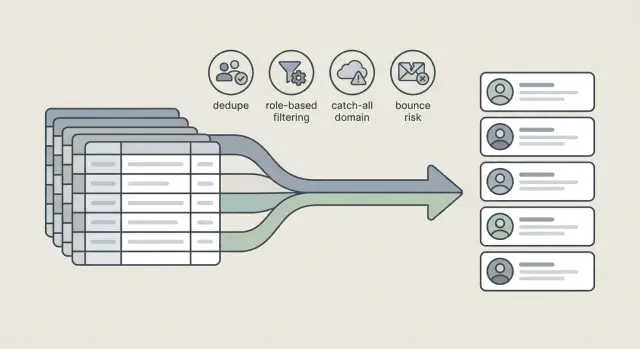
Why list hygiene matters before you hit send
Prospect list hygiene is the unglamorous part of cold email that decides whether your first campaign feels manageable or turns into a mess. A dirty list does not just waste credits. It can damage your sender reputation before you even learn what messaging works.
Dirty data tends to show up in the same ways: duplicates across exports (the same person spelled differently), stale contacts who changed jobs or domains, generic inboxes mixed into a targeted list, catch-all domains that hide invalid addresses, and risky segments with missing company context.
Bounces and spam complaints often start with the list, not the copy. If many emails go to addresses that do not exist, inbox providers learn that your sending is careless. If you email the wrong people (or the same person twice), you increase the odds of “mark as spam” or “stop emailing me” replies, even when your offer is reasonable.
Most people do a quick cleanup right before sending: remove obvious duplicates, spot-check a few rows, and ship it. A real hygiene pass is more deliberate. It checks identity (who is this), fit (should they be on this campaign), and risk (is this likely to bounce or annoy).
The goal of this checklist is simple: prevent the problems that hurt fastest, like high bounce rates, repeated contacts, mismatched roles, catch-all guesswork, and segments that are likely to trigger complaints.
Bounces, reputation, and what can go wrong
A bounce is a signal from the receiving mail server that your email did not get delivered. Some bounces are harmless one-offs, but patterns matter.
- Hard bounce: a permanent failure (“mailbox does not exist,” “domain not found”).
- Soft bounce: a temporary failure (“mailbox full,” “server busy,” “message too large”).
Soft bounces can still become a problem if they repeat, but hard bounces are the fastest way to damage trust.
Bounce rate affects your sender reputation. When reputation slips, more emails land in spam (or fail entirely), even for valid addresses. That’s why prospect list hygiene is not just about fewer errors. It’s about keeping inbox placement stable across the whole campaign.
One bad segment can drag down the rest of your sending domain because mail providers judge your overall behavior. If you upload a risky slice and it generates lots of bounces, reply rates can drop everywhere, including your “good” leads. This can be especially painful when multiple mailboxes send under the same domain.
In list terms, “risky” usually means contacts that are more likely to be invalid, blocked, or monitored: stale exports with no recent verification, scraped lists with inconsistent formatting, domains that often behave like catch-all, and job titles that rarely map to real work inboxes.
A common scenario: you upload 2,000 prospects and 300 are from an old event list. Those 300 alone can push bounces high enough that the other 1,700 start landing in spam.
Prep: define who should be on the list (and who should not)
Before you clean anything, decide what “good” looks like. Prospect list hygiene starts with your ICP: the types of companies and roles you can actually help. If you send to the wrong people, even a perfectly verified list still performs poorly (low replies, more complaints, wasted volume).
Write down your boundaries in plain terms: industry, company size, and region. Be strict. If you sell to the US and Canada only, remove everyone else now. If you only want teams of 10-200 employees, don’t keep out-of-range companies “just in case.”
Next, standardize the fields you will rely on for filtering and personalization. Messy data makes later steps harder and can create duplicates that look like different companies.
Normalize the basics before you dedupe:
- Company name (pick one format and stick to it)
- Website or domain (use the root domain, not long URLs)
- Country or region (consistent spelling or codes)
- Job title (cleaned up and readable)
- Source and import date (so you can trace where records came from)
Then split the list into segments you can control, such as by region, persona, or “high confidence vs. experimental.” This lets you pause a risky slice without stopping the whole campaign.
Set a week-one target that matches your capacity to reply quickly and follow up. For example: “300 contacts total, 3 segments of 100, and we only scale the segment that stays under 3% bounce.”
A useful gut-check: if you import 2,000 contacts and your ICP rules remove 900, that’s not a loss. It’s protection.
Step 1: dedupe without deleting the wrong people
Dedupe is where good lists get ruined. The goal is not “fewer rows.” The goal is one clean record per real person or inbox, with the best data kept.
First, define what counts as “the same prospect.” Use stable identifiers before you rely on names:
- Email address (strongest when it’s a personal inbox)
- LinkedIn URL (useful when emails are missing or change)
- Full name + company domain (fallback when other fields are blank)
- CRM contact ID (if your export includes it)
Start with exact duplicates (same email or same LinkedIn URL). Remove extra rows, but keep the richest row as your source of truth.
Then handle near-duplicates: small typos (gmal.com), extra spaces, different casing, or alias variants (john+test@, john.doe@ vs jdoe@). Don’t auto-delete these. Mark them for review and choose the address that’s most likely deliverable.
Shared inboxes need special handling. If you have both [email protected] and [email protected], they are not duplicates. Treat them as different targets with different messaging and different risk.
Before you delete anything, merge useful details into the kept record: keep the newest job title, merge notes and tags (don’t overwrite), preserve unsubscribe and “do not contact” flags, and keep your best personalization fields.
Step 2: filter role-based emails and generic inboxes
Role-based and generic inboxes look safe because they often exist at every company. In practice, they convert poorly, create confusion about who should reply, and can raise complaints.
Start by scanning for patterns that usually point to a shared inbox, not a person. Common examples: info@, support@, admin@, billing@, careers@.
A simple rule set helps:
- Block by default: info@, support@, help@, admin@, billing@, careers@
- Review manually: sales@, partnerships@, press@ (sometimes valid, often not)
- Remove obvious distribution lists (team@, all@, everyone@)
- Prefer a named person whenever possible
Don’t make it absolute without a safety valve. Keep a small allowlist for cases where role addresses are genuinely the best option, like very small companies where info@ is the founder’s real inbox, or a domain where nobody uses named emails.
If you’re unsure, route those leads back to enrichment to find a real decision-maker instead of forcing the send.
Step 3: handle catch-all domains without guessing
A catch-all domain accepts email sent to almost any address, even if the person does not exist. That sounds helpful, but it hides a problem: you cannot tell if “[email protected]” is real just because it didn’t bounce. The message might land in a black hole, get ignored, or create low-engagement patterns that hurt you later.
Treat catch-all as a risk flag, not as “verified.” Keep those leads in a separate lane so they don’t mix with your high-confidence contacts.
How to work catch-all safely
Tag catch-all leads as “needs extra caution” (or similar), then send differently:
- Use smaller batches (10-20 per day, not 100)
- Ramp more slowly on new mailboxes and new domains
- Keep copy conservative: short, specific, no attachments, fewer links
- Watch replies more than opens
- Pause quickly if bounce or complaint patterns look unusual
Example: you export 2,000 prospects and discover 400 are catch-all. Instead of tossing them, you move them into a separate sequence with lower daily volume and a simpler first email. If replies show up, you can scale that segment. If it stays silent, revisit targeting before you increase volume.
When to exclude catch-all entirely
If you’re sending from a brand-new domain or mailbox, or you cannot afford deliverability risk (for example, you use one sender reputation across many campaigns), exclude catch-all leads at first. Reintroduce them later, once your sending reputation is stable and the message is proven.
Step 4: exclude risky segments that drive bounces
Prospect list hygiene is not only about fixing what’s messy. It’s also about removing rows that are most likely to hurt deliverability, even if they look like “more volume” in a spreadsheet.
Start with people who already told you “no.” If someone unsubscribed, complained, or hard bounced before, keep them out of future sends.
Practical exclusions that usually reduce bounces and spam reports quickly:
- Suppress recent unsubscribers, previous complainers, and known hard bouncers (keep one master suppression list).
- Exclude contacts tied to broken or suspicious company data: missing websites, malformed domains, or domains that don’t resolve.
- For B2B, avoid free email domains unless you have a clear reason to include them.
- Remove contacts that clearly don’t fit the offer: wrong geo, wrong seniority, or off-target job titles.
- Flag very broad “spray and pray” segments for review.
Old data is another quiet bounce driver. People change jobs, companies rebrand domains, and inboxes get shut down. Treat records older than 6-12 months as stale unless they were verified or engaged recently.
A quick checklist you can run in 15 minutes
If you only do one thing before sending, do this quick pass. It helps your first wave go to the safest people first.
First, check whether each row is actually send-ready. If any of these are missing, fix them or hold the record back:
- First name (or a safe fallback, like company name for a greeting)
- Company name and company domain
- One email address per person (no multi-email cells)
- Role or job title
- Source and import date
Next, add a simple risk tag. You don’t need a perfect model. A Green/Yellow/Red label is enough.
- Green (low risk): unique email, real person name, fits role criteria, not a free email domain. Send first wave: 60-80%.
- Yellow (medium risk): partial name, uncertain role, unfamiliar domain, or known catch-all. Send first wave: 20-40%, with conservative copy.
- Red (high risk): unresolved duplicates, obvious typos, role inboxes (info@), past bounce history, or segments you know bounce. Send first wave: 0% until fixed.
Finally, log what you learn. Add three columns: Risk tag, Reason (duplicate, role inbox, catch-all, typo, old data), and Outcome after the first wave (delivered, bounced, replied). Next month, patterns show up fast.
Example: cleaning a real-world prospect export
You export 5,000 leads from a data provider for a new outbound push. The file looks fine at first glance, but it includes duplicates, generic inboxes, and a chunk of domains that are hard to validate.
Start by sorting rows into a few buckets so you can decide what to email first:
- Clean: unique person, company domain, plausible role
- Catch-all domains: valid-looking email, but the domain accepts all addresses
- Role-based: sales@, info@, support@, admin@, contact@
- Unknown or broken domains: typos, missing TLD, parked domains, no mail records
- Duplicates and conflicts: same email repeated, or the same person with two emails
Send the “Clean” bucket first, and start with a small slice. Put catch-all leads on pause for a second pass, and don’t send role-based addresses unless your offer truly fits that inbox. Unknown or broken domains usually get excluded (or fixed) before any send.
A simple launch plan: start with 200-500 of the cleanest records, then expand only if the signals look healthy.
Before you scale, watch:
- Hard bounce rate
- Unsubscribes
- Spam complaints
- Reply quality (real conversations vs. “wrong person”)
- Domain patterns (one bad domain can create a bounce cluster)
If the numbers are stable, move the next 500 from “Clean,” then test catch-all domains in small batches.
Common hygiene mistakes (and how to avoid them)
Most bounce problems aren’t caused by one big mistake. They come from small shortcuts that add up.
Mistake 1: Dedupe only by exact email
If you only remove duplicates when the email string matches perfectly, you’ll miss common variations: typos, plus-addressing ([email protected]), and the same person exported from two sources with slightly different formatting.
Dedupe in two passes: first by normalized email (trim spaces, lowercase, remove obvious tagging), then by a backup key like domain + full name. When there’s a conflict, keep the most recent record and the one with the strongest job match.
Mistake 2: Treat catch-all domains as safe
Catch-all only means the domain accepts mail. It does not mean the person exists. If you send a big catch-all list on day one, you can rack up bounces or complaints fast.
Start small, watch bounces and replies, then scale gradually.
Mistake 3: Mixing in unsubscribers and old CRM contacts
A common trap is combining a new prospect export with an old CRM list without checking suppression. Someone who unsubscribed last quarter might show up again as “new” because they appeared in a third-party database.
Keep one suppression list that includes unsubscribes, hard bounces, and “do not contact” notes. Apply it before every import, not after a campaign starts.
Mistake 4: Skipping small test sends
Sending the full list first is like proofreading after you publish. You only see the damage once it’s already done.
Before you scale, run a quick preflight:
- Send 20-50 emails per segment (by source and domain type)
- Check bounce rate, complaints, and unsubscribe signals
- Pause any segment that spikes bounces
- Fix the list, then resume with a slightly larger batch
If you import 2,000 leads from two providers, test them separately. You may find one source drives most bounces, and you can slow that segment down or remove it before it harms the rest of your sending.
Next steps: turn this checklist into a repeatable process
Prospect list hygiene works best when it’s a repeatable preflight check, not a one-time cleanup.
Turn your rules into a short SOP anyone on your team can follow: what to remove, what to keep, and what to flag for review. Save a few example rows (a duplicate, a role inbox, a catch-all) so decisions stay consistent.
A simple SOP to reuse for every export:
- Name the list, record the source, and save a raw backup copy.
- Run dedupe rules (by email, then by domain + name) and note edge cases.
- Apply filters (role inboxes, risky segments) and tag what you exclude.
- Quarantine unknowns (like catch-all domains) instead of guessing.
- Create a small pilot segment and send it first before you scale.
Keep deliverability basics in place while you ramp: authenticated sending domains (SPF/DKIM/DMARC), warmed mailboxes, and gradual volume increases.
If you prefer keeping domains, mailboxes, warm-up, sequences, and reply sorting in one place, LeadTrain (leadtrain.app) is built around that workflow. Clean lists still matter, but having bounce, unsubscribe, and reply outcomes categorized as they come in makes it easier to keep your suppressions and segments accurate for the next send.
FAQ
Why should I clean my prospect list before sending any cold emails?
Start with list hygiene because bounces and complaints can harm your sender reputation before you learn what copy works. A cleaner first wave keeps inbox placement stable so you can actually evaluate targeting and messaging.
What’s the difference between a hard bounce and a soft bounce, and why does it matter?
A hard bounce is a permanent failure like a missing mailbox or invalid domain, and it’s the fastest way to hurt reputation. A soft bounce is temporary, but repeated soft bounces can still become a problem if you keep retrying the same bad segment.
What should I decide before I start deduping and cleaning fields?
Define your ICP boundaries first: industry, region, company size, and the roles you want. Then remove out-of-scope records immediately so you don’t send “perfectly deliverable” emails to the wrong people and trigger more spam complaints and negative replies.
How do I dedupe without accidentally deleting the right contacts?
Dedupe in passes using stable identifiers, not just names. Start with exact matches like email address or LinkedIn URL, then review near-duplicates (typos, aliases, plus-addressing) manually so you keep the most deliverable address and the richest record.
Should I email role-based addresses like info@ or support@?
Usually block role inboxes like info@, support@, admin@, billing@, and careers@ because they convert poorly and often annoy recipients. Keep a small manual review lane for borderline ones like sales@ or partnerships@ if your offer genuinely fits that inbox.
What is a catch-all domain, and why isn’t it automatically safe?
A catch-all domain accepts mail for almost any address, so “no bounce” doesn’t prove a person exists. Treat catch-all leads as higher risk, separate them from your clean segment, and send in smaller batches only after your core messaging and sending reputation look stable.
Which segments should I exclude first to reduce bounces and complaints?
Exclude leads that are likely to bounce or trigger complaints: past hard bouncers, unsubscribers, complainers, broken domains, stale records, and obvious off-ICP roles or geos. Keeping “more rows” rarely helps if they drag down deliverability for the rest of the campaign.
What’s the fastest list hygiene check I can do right before sending?
Run a 15-minute preflight by checking required fields (name fallback, company, root domain, one email per person, role/title, source and import date). Add a simple Green/Yellow/Red risk tag so you can send the safest 60–80% first and quarantine the rest.
How small should my first send be if I’m unsure about list quality?
Start with a small pilot per segment, like 20–50 emails, instead of blasting the full list. If one source or domain type spikes bounces, pause that slice, fix the data, and only then scale the next batch.
How do I keep suppression lists and hygiene rules consistent over time?
Keep one master suppression list and apply it before every import so old unsubscribes and hard bounces don’t sneak back in from new data sources. In LeadTrain, reply classification and outcomes help you keep suppressions and segments updated as responses come in, so the next send stays cleaner.