Personalize cold email replies fast with a 3-step workflow
Learn to personalize cold email replies in 3 steps after a prospect shows interest, with quick research, reusable snippets, and a simple checklist.
Why reply personalization matters more than first-touch
Personalizing the very first cold email can feel like the right move, but it often has a low payoff. You spend minutes researching someone who may never open, may not be the right person, or may not care. Multiply that across hundreds of prospects and the time disappears.
Replies change the math. When someone answers with interest, they’ve already raised their hand. Now a few well-chosen details can turn a maybe into a meeting. This is the moment to personalize, because your effort is going to someone who is actually engaged.
The timing is different, too. On the first touch, relevance matters, but speed is rarely the deciding factor. On an interested reply, speed and relevance work together. A fast response signals you’re attentive. A relevant response signals you listened. Miss either one, and the conversation cools off.
Reply personalization isn’t about writing a long message. It’s about removing friction and guiding them to a next step. Helpful and clear beats perfect.
Good reply personalization usually does three things:
- Mirrors their words so they feel understood (a short quote or paraphrase is enough).
- Adds one piece of context that proves you’re paying attention (role, use case, timing).
- Proposes a simple next step with options (a question, or two time windows).
Notice what’s not on that list: a full biography, a deep company audit, or a mini pitch deck in email form. Over-writing backfires. It slows you down, buries the ask, and can feel oddly intense for a first real conversation.
A practical goal for every interested reply is to confirm fit quickly and book the next step. If you can do that in 4 to 7 sentences, you’re winning.
If you have a system that surfaces interested replies for you, it’s easier to put your best effort where it matters. For example, LeadTrain includes AI-powered reply classification that can bucket common responses so you spend less time sorting and more time responding.
What counts as interest and how to spot it fast
Not every reply deserves the same effort. The goal is to catch the messages where speed plus a little personalization will move the deal forward.
Four common reply types (simple definitions)
A quick way to think about replies is by what the person is giving you.
- Interested: They want the next step. They mention a meeting, pricing, timeline, or ask how it works.
- Curious: They’re not saying yes yet, but they ask for info, a deck, or an example.
- Objection: They push back on fit, budget, timing, or they say they already use someone.
- Referral: They’re not the buyer, but they point you to the right person or team.
When you can label the reply in seconds, it gets much easier to personalize without overthinking.
Signals that deserve fast handling
Speed matters most when the window is short. Jump on replies that include timing cues (“this week,” “evaluating now,” “send options today”), several specific questions, concrete context (their tool, team size, region, current process), a clearly positive tone, or routing language (“talk to my colleague,” “loop in procurement”).
When to keep it short vs add detail
Keep it short when they’re already leaning yes, like a simple scheduling question or “send times.” Add detail when they ask “how,” “what’s included,” or raise a specific concern. Long answers to short scheduling replies often slow things down.
A simple decision rule:
- Reply now if they asked for next steps or offered availability.
- Ask one question if you’re missing one key detail (use case, who owns the decision).
- Schedule if there are multiple questions or stakeholders, or the topic is easier to walk through live.
Step 1: Sort and tag replies in minutes
The fastest way to personalize replies is to stop treating every message like a blank page. Make one quick decision first: what kind of reply is this, and what does it need next?
Keep your buckets small. If you create ten categories, you’ll hesitate and lose time. Most teams do fine with 3 to 5 buckets that cover most replies, such as:
- Interested (asking for a call, details, or next step)
- Pricing / budget (direct price question or “send pricing”)
- Timing (later, next quarter, “not now”)
- Referral (looping in someone else, “talk to X”)
- Not a fit (clear no, unsubscribe, harsh pushback)
Once you pick a bucket, add a simple tag that captures intent in plain words: “wants pricing,” “busy this month,” “needs security review,” “send to colleague.” The tag isn’t for reporting. It’s a note to your future self so you can respond fast without rereading the whole thread.
Set a response-time goal you can actually hit. A realistic target for most small teams is within 2 business hours for “Interested,” and by end of day for everything else. If you can’t do that, pick a smaller promise (like twice a day) and stick to it. Interest cools quickly, and the next email you send often decides whether the thread stays warm.
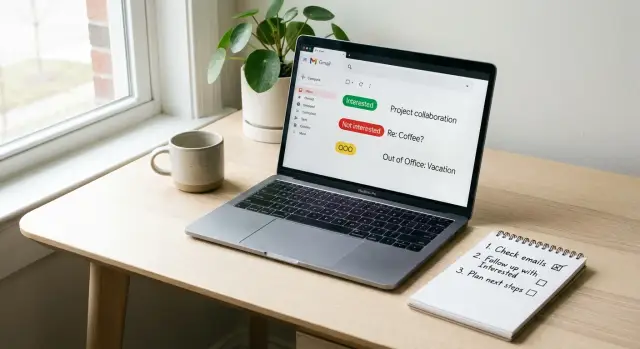
Automation can help, but don’t let it drive. If a tool auto-labels replies (interested, not interested, out-of-office, bounce, unsubscribe), treat that as a first draft. Before you reply, do a 10-second sanity check:
- Did the person ask a real question, or just say “sure”?
- Is this actually a referral or just a CC?
- Is the “yes” conditional (timing, budget, approval)?
After that, you’re ready for Step 2, and you’ll already know what context matters because your tag tells you what to look for.
Step 2: Pull just enough context (fast research)
Once someone replies with interest, your job isn’t to become a detective. Your job is to respond like a real human, quickly, with one or two details that prove you understand their situation.
A simple rule: spend 60 seconds, not 10 minutes. One solid detail beats five random ones.
The 60-second research loop
Start a timer and look only for what helps you write the next message.
Skim for:
- Their role and team (what they own day to day)
- The company homepage (what they sell and who they sell to)
- One fresh signal (a new job post, a product update, a recent announcement)
- A quick scan of their LinkedIn headline or “about” line (one phrase is enough)
- Clues in their reply (timing, budget, priorities, objections)
Stop as soon as you can write down two facts in plain language:
-
Their goal: what they likely want (more demos, faster pipeline, fewer no-shows, better deliverability).
-
Their context: what makes their situation specific (industry, target customer, team-size hint, tool they mentioned, region, hiring).
What to ignore (to stay fast)
Most research feels productive but doesn’t improve your reply. Skip deep tech rabbit holes, long funding timelines, every press mention, and anything that changes only your ego, not your message.
Example: an SDR at a mid-market HR software company replies, “Interested, can you send pricing and how this works?” In 60 seconds, you find they’re hiring “Outbound SDR” and their site emphasizes “compliance for multi-state teams.” Your notes become:
- Goal: evaluate pricing + process quickly
- Context: HR compliance product, growing outbound team
Now your reply can reference that growth and keep the next step clear.
Step 3: Write a tailored reply with a repeatable template
When someone shows interest, speed matters. You want to respond while the thread is warm, but still make it feel like you actually read their message.
The easiest way to stay fast without sounding generic is to use one simple structure every time, then swap in one real detail.
A simple reply template you can reuse
Keep your reply short enough to scan on a phone. This structure works across most B2B follow-ups:
- Acknowledge their note (one sentence)
- Connect it to a specific detail (one sentence)
- Ask one clear question (one sentence)
- Offer a next step (one sentence)
Pick one personalization angle, not five
Avoid cramming in multiple facts. Choose one angle that best matches why they replied:
- Their role (what they likely own or care about)
- A recent company change (hiring, launch, expansion)
- A pain they hinted at (time, pipeline, deliverability, tooling)
- Timing (“next quarter,” “after budget,” “this week”)
Then add one question that moves the thread forward. Good questions are specific and easy to answer quickly.
Here’s a fill-in template you can keep in a snippet:
“Thanks for getting back, [Name]. Re: [their interest point], I noticed [one detail about role/company/timing]. Quick question: are you mainly trying to improve [A] or [B] right now? If it helps, I can share a couple options and we can pick what fits. Are you free [time option 1] or [time option 2]?”
If scheduling feels too heavy for the moment, offer a lightweight next step instead: “Want me to send a 3-bullet outline first?”
Example: they reply, “Yes, we are exploring outbound but deliverability has been rough.” Your response can be:
“Good to hear, Sam. If deliverability has been rough, it usually comes down to domain setup, warm-up, or sending volume. Quick question: are you seeing spam placement, or low reply rates even when emails land? If you want, we can do a 10-minute check and I’ll suggest the simplest fix. Does Tue 11:00 or Wed 3:00 work?”
Snippets that save time without sounding copy-paste
Snippets work best when they’re small, flexible, and used after someone shows interest. That’s when the payoff is highest.
Think of your snippet library as a few building blocks you can mix and match in under a minute: a warm opener that references their message, one credibility line, one clear question, and a close that offers two options (call or async). Add a polite off-ramp so they can say no without drama.
To keep snippets human, change 1 to 2 variables that show you actually read their reply. Swap what they asked about, mirror their tone (short and direct vs. chatty), and add one detail from your 60-second research (role, use case, current tool). Avoid rewriting every word. Over-editing makes it sound fake.
Here are a few starter snippets you can paste and lightly edit:
Pricing
"Totally fair question on pricing. It usually depends on {team_size} and how many mailboxes you want to run. Are you planning to start with {use_case} or something broader? If you share a rough range, I can point you to the right tier."

Timeline
"If you want this live by {date}, we can keep it simple: first we set up the sending setup, then launch a small test batch. What does success look like in week 1 for you?"

Competitor
"If you're comparing us with {competitor}, the biggest difference is {difference}. What matters more for you right now: deliverability, speed to launch, or reporting?"

Referral
"Thanks for the intro from {referrer}. Quick check: are you looking to improve reply rates, or just reduce the time your team spends sorting responses?"
Common cases are where snippets shine because the structure stays the same even when the details change: pricing (“send me a ballpark”), timeline (“how fast can we start?”), competitor comparisons, internal handoffs (“looping in my colleague”), and referrals.
If you A/B test, keep it tiny. Change one sentence only (for example, a question vs. a two-option close). That way you learn what works without losing your voice.
Example: Turning an interested reply into a booked call
A prospect replies: “Sounds interesting, what does it cost?” That message is gold because they’re asking a buying question, not just being polite.
First, do 60 to 90 seconds of quick research to pick the right angle. You’re not writing a report. You’re looking for one detail that helps you frame price in a way that matches their situation. Check their role, scan the company site for a “why now” signal (hiring, new product, new market), and look at your own notes: what did you pitch, and what did they react to?
Now choose one price frame, like per mailbox, per team, based on volume, or a starting range with a quick qualification question. Then reply with three parts: a simple range, one question to anchor the right plan, and a clear next step.
Here’s a sample reply you can reuse and lightly adjust:
Subject: Re: pricing

Thanks for the reply.

Pricing depends mainly on how many mailboxes and sequences you want running. For most teams, it typically lands in the $X to $Y/month range.

Quick question so I point you to the right option: how many people would be sending (and roughly how many new prospects per week)?

If you’re open to it, I can also walk you through the best-fit setup in 10 minutes and give an exact number. What does your calendar look like tomorrow or Thursday?
Success isn’t “keeping the conversation going.” It’s a decision point: they answer your one question so you can quote accurately, or they pick a specific time for a short call.
Common mistakes that waste time or reduce trust
Most reply personalization fails for one of two reasons: you spend too long crafting it, or you make it feel like you didn’t read their message.
The mistakes that cost you replies (and time)
These patterns reduce trust or slow you down:
- Writing a mini essay. Long paragraphs delay your response and bury the point.
- Skipping their question and pitching anyway. If they asked about pricing, timing, integration, or who you work with, answer that first.
- Using fake familiarity. Forced compliments (“love what you do”) or vague praise makes people suspicious.
- Treating every reply the same. An out-of-office message isn’t interest. A bounce isn’t a lead. An unsubscribe isn’t a negotiation.
- Not making the next step easy. Even a strong reply can stall without a simple next action, like a quick call, two time options, or one clear question.
Handling non-sales replies the right way
Unsubscribe, bounce, and out-of-office replies are deliverability and trust signals, not just admin work.
If someone unsubscribes, confirm you’ll stop and don’t ask why. If an email bounces, remove that address and look for a corrected one only if you have a strong reason. If they’re out of office, set a reminder to follow up after the return date and avoid re-sending the full pitch.
Example: if a person replies, “Back next Tuesday. Please email me then,” and you respond with three paragraphs plus a meeting request, you look pushy and you’ll likely be ignored. A better reply is one sentence acknowledging their note and one sentence confirming when you’ll follow up.
Quick checklist before you hit send
A fast reply still needs to feel human. Before you hit send, take 20 seconds to scan your draft like you’re the prospect.
- Lead with the direct answer first. If they asked about pricing, timing, integration, or who it’s for, respond in the first 1 to 2 sentences.
- Prove you read their message with one specific detail. Mention a constraint, tool, goal, or phrase they used (“If Q2 is your deadline…”). One detail is enough.
- Make the next step easy to say yes to. Use a single clear ask with two options, or a question they can answer in one line.
- Match their tone and pace. If they were short and direct, keep it tight. If they shared context, acknowledge it.
- Keep it skimmable. No big blocks of text, just the essentials.
If you fail any one item, fix that before you add more words. Most “good” replies get worse because they try to cover everything.
One practical habit: after you draft, delete any line that doesn’t do one of these jobs: answer, confirm you understood them, or move to a next step.
Next steps: make reply personalization repeatable at scale
Fast reply personalization only works long term when it becomes a team habit, not a hero move. The goal is simple: every interested reply gets a timely, thoughtful response, and everything else gets handled without stealing attention from real opportunities.
Turn the workflow into a habit
Start by agreeing on a small set of buckets everyone uses, and what “done” looks like for each one. Keep it boring and consistent.
Define:
- Buckets (Interested, Not now, Not a fit, Out of office, Bounce, Unsubscribe)
- One short base reply per bucket with 2 to 3 editable slots (reason, proof, next step)
- A clear response time for Interested (for example, within 30 to 60 minutes during business hours)
- Ownership (who replies, who books, when to hand off)
- One-line notes after sending (what they care about, what you offered)
A practical rule: if the team can’t explain the workflow in one minute, it’s too complex to stick.
Automate the boring parts, protect the human parts
Automation should reduce clicks, not reduce care. Decide upfront what can be handled automatically and what should stay manual.
Automate things like categorizing replies, stopping sequences on unsubscribe, routing bounces, and creating follow-up tasks. Keep the first reply to “Interested” manual, including the one sentence that proves you read their message and the final ask (time, format, agenda).
This is where an all-in-one cold email setup can help. When domains, mailboxes, warm-up, sequences, and reply handling live in one place, your team spends less time bouncing between tools. LeadTrain is one example of a platform that combines those pieces and uses AI-powered reply classification to sort common responses.
A simple scaling checkpoint: if two people can reply in the same tone, hit the same response-time target, and book the same quality of meetings, you have a repeatable system, not just good individual writing.
FAQ
Why should I personalize replies more than the first cold email?
Personalize more after a reply because the person has already shown intent. Your time goes to someone engaged, so one relevant detail and a clear next step can move the deal forward faster than deep research on a first-touch email.
How fast should I respond to an interested reply?
Aim to respond to clearly interested replies within about 2 business hours, or faster if they mention timing like “this week” or ask for meeting slots. For everything else, same day is usually fine as long as you’re consistent.
What counts as an “interested” reply?
Treat “interested” as anything that asks for a next step: meeting, pricing, timeline, how it works, or specific questions. A simple “sure” can still be interest, but it’s best handled with one clarifying question to confirm what they want.
What are the best categories to sort replies into?
Use a small set of buckets so you don’t hesitate. Most teams can cover 90% of replies with 3–5 labels like Interested, Pricing, Timing, Referral, and Not a fit, then add a short tag like “wants pricing” or “busy this month” to guide your reply.
How much research should I do before replying?
Spend about 60 seconds and stop as soon as you have two facts: their likely goal and one piece of context (role, use case, timing, or a tool they mentioned). Don’t do deep research; one good detail beats five random facts.
What’s a simple template for a personalized reply?
Use a repeatable structure: acknowledge their note, connect to one specific detail, ask one clear question, and propose a next step. Keeping it to 4–7 sentences makes it easy to scan and keeps the conversation moving.
When should I keep my reply short versus add more detail?
Keep it short when they’re already leaning yes, like asking for times or saying “send options.” Add detail only when they ask “how,” request specifics, or raise a clear concern, otherwise long replies slow down scheduling.
How do I personalize without sounding copy-paste?
Mirror their wording in one line so they feel heard, then add one context detail that shows you paid attention, and finish with a single next step. Avoid mini-essays, forced compliments, or stacking multiple personalization angles in one email.
How should I reply when someone asks, “What does it cost?”
Answer their pricing question first, then ask one qualifier that determines the right plan, like number of senders or mailboxes. Finish with an easy next step, such as offering two time windows for a quick call to confirm fit and give an exact number.
How should I handle out-of-office, bounce, or unsubscribe replies?
Treat unsubscribes, bounces, and out-of-office messages as signals, not leads. Confirm unsubscribes briefly, remove bounces and only seek a new address if you have a strong reason, and for out-of-office replies, acknowledge and follow up after their stated return date.