Redirect strategy for outreach domains: safe forwarding tips
Redirect strategy for outreach domains: forward to your main site safely, keep tracking and attribution, and avoid spammy footprints.
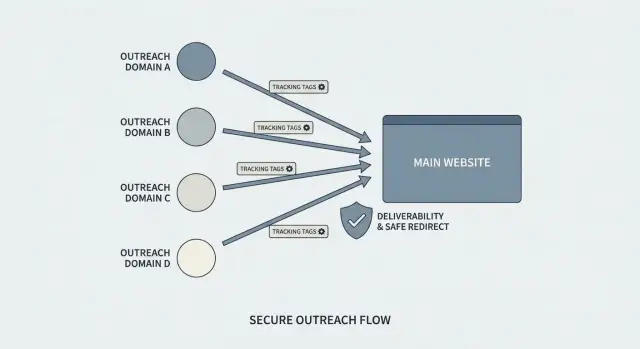
What problem redirects solve for outreach domains
Sales teams often use separate outreach domains because cold email can get messy. A new sequence, higher volume, or a bad list can lead to spam complaints. Keeping outreach on its own domain helps protect your main brand domain and its long-term reputation.
Redirects solve a simple human problem: someone clicks a link in an email and then types the domain they saw. If that domain is blank, looks broken, or shows a parked page, trust drops fast. A clean forward to your real site (or a simple "about" page) makes the click feel legitimate.
Redirects can also create a footprint. If every outreach domain instantly points to the same homepage, uses the same redirect pattern, and shares the same tracking setup, it can look manufactured. That doesn't automatically make you "spammy," but it can weaken the point of splitting risk and make attribution harder when everything collapses into one destination.
A practical redirect strategy tries to balance three goals:
- People land on a real page that matches the sender name and offer.
- Tracking still shows which domain and campaign drove the visit.
- The setup is consistent and secure (DNS, SSL), without weird hops or errors.
Example: an SDR sends from "try-acme-mail.com". When a prospect checks the site, the domain forwards to a lightweight "Acme Sales Outreach" page on the main site with consistent branding and a clear path to the product. The click feels normal, and analytics can still credit the right email sequence.
If you're using an all-in-one outbound tool like LeadTrain, it can take some of the domain setup work off your plate (buying domains, DNS, authentication) so you can spend more time making the landing experience credible.
Do you even need to forward the outreach domain?
Not always. A redirect can make an outreach domain look real to a human, but it also adds moving parts that can break later (SSL, tracking, analytics, caching). If you don't have a clear reason to forward it, leaving it alone is often the simplest option.
The most useful question is: what do you want a prospect to see if they type the domain into a browser?
When redirecting helps (and when it doesn't)
Redirecting makes sense when the outreach domain is clearly a variation of your brand and you want to remove confusion. Example: someone receives an email from [email protected] and types try-acme.com to check if you're legit. Sending them to your main site can be reassuring.
It's usually not worth it when the domain is purely operational (one of several sending domains) and you aren't using it in public. In that case, a redirect doesn't add much value, and it's one more thing to misconfigure.
A simple way to decide:
- Redirect if the domain will be seen or searched by prospects.
- Skip it if the domain exists only to send email.
- Keep one consistent setup across outreach domains you do redirect.
- If you're unsure, choose the option with fewer dependencies.
Do you need a website at all?
Sometimes a tiny, basic site is better than a hard redirect. A one-page "About" page (who you are, what you do, how to contact you) can look more natural than a domain that instantly bounces elsewhere.
Some platforms, including LeadTrain, can generate simple websites for new domains. Whether you host a small page or forward to your main site, the principle stays the same: fewer moving parts means fewer surprises during active campaigns.
Pick the right redirect type (without overthinking it)
A redirect strategy is mostly about choosing the least confusing option for humans, browsers, and analytics.
A 301 redirect means "this moved for good." It's the default choice when your outreach domain should always end up on the same destination. A 302 means "this is temporary." Use it when you're testing where traffic should go, or you might change the destination soon. For most outreach domains, either works, but 301 is usually cleaner.
Avoid "masked" or "framed" forwarding (where the browser keeps the outreach domain in the address bar while showing your main site). It often breaks tracking, looks suspicious, and can cause issues with cookies, logins, and sharing. If someone clicks your domain from an email, you want the address bar to match where they actually landed.
Decide whether you need a whole-domain redirect or just a few paths. Whole-domain redirects are the simplest: everything goes to one landing page. Path redirects are better if you want consistent destinations, like sending:
- example.com/pricing to mainsite.com/pricing
- example.com/case-study to mainsite.com/case-study
- example.com/anything-else to your homepage
Finally, use HTTPS even "just for a redirect." The padlock matters because many email clients and browsers warn users when a click goes to an insecure page. A valid certificate also helps avoid blocked requests and broken attribution caused by security restrictions.
Step by step: set up a clean redirect safely
Start by deciding where the outreach domain should land. Many teams send it to the main homepage or a simple "about" page. If your main site is busy (heavy scripts, popups, region switches), a neutral page can feel more trustworthy and load faster.
Next, separate what you change at the registrar from what you change at the host. At the registrar, you point the domain's DNS to whoever will handle the redirect. That's usually a web host, a redirect service, or your main website infrastructure. DNS doesn't perform the redirect itself. It only decides where requests go.
Once DNS is pointing to the right place, turn on HTTPS for the outreach domain before you redirect. A domain that lands on a browser warning is a trust killer.
After HTTPS is active, add one clean redirect rule and keep it boring:
- Use a single 301 (or 302, if you truly need temporary) redirect to the final destination.
- Redirect both the root domain and www to the same place.
- Avoid redirect chains (A to B to C).
- Keep the destination on HTTPS.
- Decide whether you preserve the path (example.com/x goes to mainsite.com/x) or always send to one page.
Test like a real prospect would: open an incognito window, try it on mobile, and type the domain without "www". Also check that it lands fast and without extra hops.
Finally, keep a small record: domain, where it redirects, DNS changes made, HTTPS issued date, and redirect type. When tracking later looks off, this saves hours. If you manage outreach domains in LeadTrain, keeping the same note alongside each sending domain helps you stay consistent.
How to keep tracking and attribution intact
A redirect is supposed to be invisible to the reader, but tracking systems notice every hop. The goal is to keep the path simple so analytics, CRM source fields, and calendar bookings still tell the same story.
Start by deciding what you need to measure. Most teams care about three things: website analytics (sessions and conversions), CRM attribution (source, campaign, first touch), and booked meetings (calendar or scheduling tool).
UTM tags help when they reach the final page unchanged, like ?utm_source=outreach&utm_campaign=q1-demo. They get lost when the redirect strips the query string, or when you redirect to a destination that doesn't keep parameters. They also don't help much inside some booking flows if the scheduler opens on a clean URL without carrying UTM values forward.
Keep the redirect chain short. One hop is ideal: outreach domain -> final landing page. Extra steps (tracker -> redirect -> landing) raise the chance that UTMs drop, cookies fail to set, or your CRM gets a blank referrer.
Try not to change the final landing URL often. When the destination keeps moving, reports split across multiple pages and historical attribution becomes harder to compare. If you must update a page, keep the URL stable and change the content instead.
A simple end-to-end check:
- Send yourself a test email with a UTM-tagged link.
- Click it in a normal browser window (not incognito).
- Complete the form or book a meeting.
- Confirm UTMs show in analytics on the landing page.
- Confirm the lead in your CRM has the right source and campaign.
If you use a platform like LeadTrain, standardizing UTMs across sequences and A/B tests makes this easier to repeat. Running the test once per domain catches broken redirects and missing attribution before you scale.
Avoid spammy footprints that can hurt trust
A redirect is a tiny moment where a reader decides whether your email feels legit. If the click looks messy, people hesitate, and some filters may treat it as a bad sign. The best redirect setups feel boring: one hop, clear branding, and a page that matches what the email promised.
Long redirect chains (domain A to domain B to shortener to tracking to landing page) create a trail that looks improvised. Keep it to a single 301 or 302 where possible. If you must add tracking, avoid stacking multiple services on top of each other.
Mixed signals are another trust killer. If you rotate many outreach domains but every click always lands on the same generic page, it can look like a template operation. Instead, keep the core message consistent and adjust small, honest details: a headline that matches the email angle, real company contact info in the footer, and branding that matches your main site.
A few rules that prevent spammy vibes:
- Use one redirect hop, not a chain.
- Send clicks to a relevant page, not your homepage by default.
- Avoid aggressive popups, auto-play video, or a hard gate as the first stop.
- Keep the destination URL stable during an active campaign.
- Make sure the domain shows a valid HTTPS page (no browser warnings).
Example: a small SDR team runs five outreach domains for deliverability. Each domain redirects to a matching page on the main site, but each page mirrors the email topic (pricing question, quick case study, or a simple meeting page). During a two-week sequence, they don't change destinations mid-flight.
Separate domains vs subdomains: a practical choice
If you only need a "looks legit" click destination from cold email, a subdomain is often enough. A common setup is offers.yourcompany.com that redirects to a page on your main site. It keeps branding consistent, and it's easier to measure because everything stays under one root domain.
A separate outreach domain is a better fit when you want a hard boundary between your main brand and your outbound sending. If an outreach mailbox gets a rough patch (complaints, bounces, or a bad list), that reputation risk is less likely to bleed into your primary domain. The tradeoff is more moving parts: extra DNS, SSL, redirect rules, and analytics setup so attribution doesn't get split across similar domains.
A simple rule:
- Use a subdomain when your main domain is healthy and volume is modest.
- Use separate domains when you're scaling volume or testing new markets and you want isolation.
Naming matters more than people think. Pick something that looks like a normal part of a real business, not a throwaway tracking trap:
- go.yourcompany.com or learn.yourcompany.com
- yourcompanyhq.com or yourcompanymail.com
- tryyourcompany.com (only if it matches your product tone)
How many outreach domains do you actually need? Most teams overbuy. As a rough guide, start with 1 domain per offer or persona, then add only when volume forces it. If you're sending a few hundred emails a day total, one well-warmed setup is usually plenty. If you're sending thousands a day, multiple domains (and multiple mailboxes per domain) gives you room to spread volume and keep each sender steady.
Tools like LeadTrain can make the "separate domains" approach easier to manage because domains, authentication (SPF/DKIM/DMARC), mailboxes, warm-up, and sequences live in one place.
Example setup: a small sales team running multiple domains
A small SaaS team has 3 SDRs. Each SDR uses 2 inboxes (6 total) to spread volume, and each SDR has 2 outreach domains (6 total) so one domain can rest if deliverability dips.
Their redirect rule is simple: every outreach domain forwards to the main site, but not all to the homepage. The primary outreach domain for each rep goes to the main homepage with a clean 301 redirect. The secondary domain forwards to a short, generic page like a demo or case study page. Both redirects keep the full path and query string, so tracking tags survive.
They also keep the setup consistent:
- One redirect target per domain (no chains like domain A -> B -> main site)
- HTTPS on every outreach domain, with a valid SSL certificate
- A plain root redirect and no extra pages that look like a mini site
For tracking and attribution, they don't rely on guesswork. Each SDR uses one consistent set of fields on every link they send:
- utm_source=coldemail
- utm_campaign=Q1-outbound
- utm_content=sdr-alex (or a short rep code)
- A unique "thread" or "sequence" ID from their sending tool
Example: Alex sends from [email protected], links to the main site with UTMs, and the CRM attributes sessions and signups to "sdr-alex".
Every Friday they do a 10-minute check: click a few recent email links, confirm the redirect lands correctly, confirm UTMs still appear in analytics, and verify DNS and email authentication are unchanged. This catches most issues before they become "why did tracking drop to zero?" on Monday.
Quick troubleshooting when redirects or tracking break
Redirect issues usually look scarier than they are. Most problems fall into a few buckets: loops, wrong destinations, random 404s, SSL warnings, extra hops, or tracking that never shows up.
First, confirm where the redirect really ends
Open a private or incognito window, type your outreach domain, and watch the final page that loads. Then copy the final URL from the address bar. If it changes more than once, you may be hitting extra hops added by a registrar forwarding service.
If you want one quick, non-technical check, use any reputable "HTTP status checker" tool and paste your outreach URL. You're looking for a single 301 (or 302) that lands on the correct final page.
For a simple technical check (optional), you can run:
curl -I https://your-outreach-domain.com
The key lines are the status code (301 or 302) and the final location: value.
Common symptoms and the usual fix
Redirect loop: often caused by forwarding A to B while B forwards back to A, or mixing http and https rules. Make sure only one place controls the redirect.
Wrong destination or 404: the forwarding target is mistyped, or the target page was removed. Test the target URL directly.
Browser SSL warning: SSL isn't set up for the outreach domain, or the forwarding service doesn't support HTTPS cleanly. Enable SSL for the domain, or move the redirect to a host that supports HTTPS.
"Too many redirects" after changes: DNS and SSL can take time to update. Retest after 30 to 60 minutes.
Tracking missing in analytics or CRM: the redirect strips UTM parameters, or an extra hop drops them. Test with a URL like ?utm_source=test and confirm it survives to the final page.
If you're building a redirect strategy for outreach domains, aim for one clean hop, HTTPS, and a final URL that keeps parameters intact.
Common mistakes that create bad signals
A clean redirect is mostly about trust. The fastest way to create weird signals is to do something that looks normal to a human, but odd to a browser, an email client, or an analytics tool.
One common trap is masked forwarding (sometimes called framed forwarding). It keeps the outreach domain in the address bar while showing your main site inside a frame. That often breaks analytics, confuses cookies, and can make the page look suspicious because the domain and content don't match.
Another mistake is changing the redirect target in the middle of a campaign. If you point your outreach domain to Page A for a week, then to Page B, attribution gets messy. Old emails keep sending people to the domain, but your tracking now tells a different story.
It also helps to pick one tracking approach and stick to it. When you stack multiple systems (UTMs plus multiple pixels plus different redirect rules), you can get conflicting numbers and spend hours chasing ghosts.
Problems that most often create "bad signals":
- No HTTPS, mixed content warnings, or an expired certificate on the redirect domain
- Masked forwarding instead of a normal 301 or 302 redirect
- Redirect chains (A to B to C) or loops that sometimes fail to load
- Copying the exact same setup across many domains without notes (hard to audit later)
- Mid-campaign target changes with no plan for how attribution will be preserved
If you manage outreach domains inside LeadTrain, document the target URL, redirect type, and tracking parameters per domain before you launch. That one habit prevents most silent breakages.
Launch checklist you can run in 5 minutes
A redirect can look fine until someone clicks from a real email on a real phone. This quick check helps you confirm your setup is clean, trustworthy, and measurable.
Run the test like a prospect would: open your outreach email in an inbox, click the link, and watch what happens in the browser and in your tracking tools.
- Confirm it's a single hop: the outreach domain should go straight to the final page.
- Check HTTPS end to end: the outreach domain loads without warnings, and the destination page is also secure.
- Validate tracking from click to result: the click is recorded, and the lead shows up where you expect (analytics and CRM).
- Match message to landing page: the destination reflects the offer in the email, with no surprise page swaps.
- Write one line of documentation: domain, redirect destination, date changed, and who owns it.
A simple scenario: you send an email offering a 10 minute demo. The link should land on a demo booking page, not your homepage. If you change the redirect later, keep the old offer URL working or update the campaign links. Otherwise attribution gets messy and replies feel confused.
Even if you manage domains and outreach setup in one place (for example, in LeadTrain where domains, mailboxes, warm-up, and sequences can live together), it's still worth doing this checklist. It catches the small issues that cause big headaches: broken tracking, mismatched offers, and trust-killing browser warnings.
Next steps: make redirects and outreach easier to manage
Consistency beats cleverness. Pick one redirect pattern and use it everywhere (for example: every outreach domain 301s to a single page on your main site, and every email uses the same tracking template). When every domain behaves the same way, it's easier to spot problems and harder for the team to accidentally create odd signals.
Decide ownership early, so changes don't drift. Redirects touch DNS, hosting, and analytics, so a small "who does what" agreement prevents broken setups after someone edits a record or swaps a tracker.
A simple ownership split that works for many teams:
- Marketing owns destination pages and UTM rules.
- RevOps or IT owns DNS and SSL (and approves redirect changes).
- SDR lead owns sending schedule, inbox rotation, and reply handling.
- One person is accountable for the final "does it work?" check.
Put a quarterly audit on the calendar. Domains expire, DNS gets edited, and inbox health changes over time. In 20 minutes, you can verify that each outreach domain still redirects correctly, certificates are valid, tracking still attributes visits, and inboxes aren't showing rising bounces or spam placement.
If you want fewer moving parts, tools like LeadTrain (leadtrain.app) can help by keeping domains, authentication, warm-up, sequences, and reply classification under one roof. Less tool-hopping means fewer places where a redirect or tracking setting can quietly break.
Your goal for the next week: write down your standard redirect rule, assign an owner for DNS and tracking updates, then run one end-to-end test click from an email to your analytics report and confirm the source shows up correctly. "
FAQ
Why do teams use separate outreach domains for cold email?
Separate outreach domains help protect your main brand domain if a campaign gets high bounces or complaints. If one sending setup has a deliverability dip, it’s less likely to drag down the long-term reputation of your primary domain.
What’s the main reason to redirect an outreach domain?
Redirects prevent the “blank or parked domain” trust problem. If a prospect types the sending domain into a browser, they land on something real instead of a broken-looking page.
When is it better to not redirect an outreach domain at all?
Skip redirecting if the domain is purely operational and prospects will never see it. Fewer moving parts means fewer surprises during active campaigns, especially around SSL and tracking.
Is a simple one-page site better than a hard redirect?
A lightweight page often feels more natural than an instant jump to a different domain. It can also explain who you are and why the email came from that domain, which reduces confusion without adding complex routing.
Should I use a 301 or 302 redirect for outreach domains?
Use a 301 when the destination will stay the same long term; it’s the clean default for most outreach domains. Use a 302 only if you’re actively testing destinations or expect to change the target soon.
Why is “masked” forwarding a bad idea for cold email clicks?
Avoid masked or framed forwarding because the address bar doesn’t match the real destination. That can break analytics and cookies, and it often looks suspicious to users when the visible domain and the page content don’t line up.
What usually breaks tracking and attribution when you add a redirect?
The most common break is lost query parameters, especially UTMs, when a redirect strips them or an extra hop drops them. Keep it to one hop and confirm the final landing page receives the full URL including parameters.
How do I avoid a redirect setup that looks suspicious to prospects?
Make the redirect feel boring and predictable: one hop, HTTPS, and a destination page that matches what the email promised. If every outreach domain instantly dumps into the same generic homepage, it can feel manufactured and hurt credibility.
Should I use a subdomain or a separate domain for outreach?
Choose a subdomain when you mainly want a clean, branded click destination and you’re not trying to isolate risk. Choose separate domains when you want a stronger boundary between outbound sending reputation and your main brand domain.
What’s the safest way to set up an outreach domain redirect without headaches?
Start by deciding the exact destination, then point DNS to the place that will handle the redirect, enable HTTPS for the outreach domain, and add a single redirect rule for both root and www. If you use LeadTrain, it can handle domain purchase, DNS, and email authentication in one place, reducing setup errors while you focus on the landing experience and tracking.