Outbound for PLG SaaS: Reach Free Tier Users Without Being Invasive
Outbound for PLG SaaS with free tier users: use product signals to choose the right persona, write respectful emails, and avoid sounding creepy.
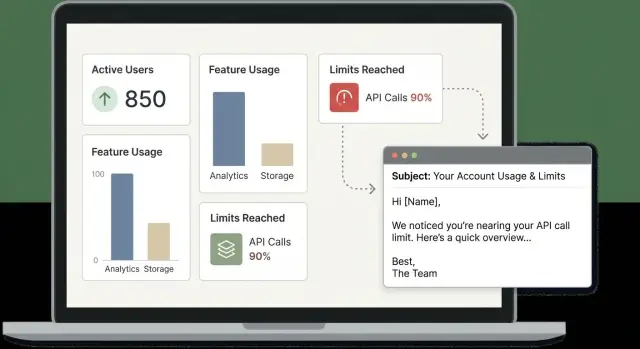
Why outbound feels risky with free tier users
Outbound changes the moment someone is already using your product. Classic cold outreach starts with zero context, so the bar is mostly about relevance. With free tier users, you have context, but you also have more ways to get it wrong. If your message hints that you’re watching them too closely, it can feel creepy, even when your intent is genuinely helpful.
That’s why PLG outbound often feels like walking a tightrope. Usage signals can make an email timely, but the more specific you get, the more invasive it can sound.
Most teams are trying to balance two goals:
First, help the user succeed right now so they get value quickly. Second, qualify whether there’s a real expansion path (a bigger team, admin controls, higher limits). When those blur, emails start to read like “We noticed you hit a limit, pay us,” and people get defensive.
A better approach is to treat signals as a cue to start a normal business conversation, not as proof you have a surveillance dashboard. You can be specific without quoting sensitive details by focusing on outcomes and common patterns, and by giving people an easy way to correct you.
A simple example: a small team on your free tier starts inviting teammates and creating projects quickly. A risky email says, “We saw you invited 7 users yesterday and created 12 projects.” A safer email says, “Teams that start inviting others usually run into shared ownership and reporting questions. Are you the person who owns this setup, or should I talk to someone else?” You’re still acting on the signal, but you’re not exposing their exact activity.
The mindset shift is straightforward: you’re not calling them out. You’re offering help at a moment when help is likely relevant, and you’re letting them decide what they want to share next.
What counts as a product signal (and what doesn’t)
A product signal is a small, observable hint that someone is trying to get value from your product. It’s not a biography of everything they did.
A useful test: would a reasonable user expect you to notice this? If yes, it’s usually safe to reference lightly. If no, keep it as internal targeting only.
Signals that make good “helpful context”
Signals that relate to success, friction, or a clear next step are usually safe to mention in broad terms. Examples include starting a core workflow (like creating a first project), connecting an integration, inviting teammates, or hitting a visible limit.
If something blocks progress (repeated import failures, setup checks failing, verification errors), that can also be a good reason to offer help, as long as you stay general.
Even with safe signals, keep the reference broad. “Noticed you started setting up X” feels normal. “Saw you clicked X three times” doesn’t.
Data you shouldn’t reference directly
Some data can be useful for scoring and routing internally, but surprising to see quoted in an email. Avoid calling out:
- Exact timestamps and step-by-step timelines of actions.
- Page-by-page or click-by-click tracking.
- Personal data you don’t need to solve the problem.
- Content they entered into the product (uploaded files, draft text, prospect lists).
- Sensitive attributes inferred from behavior.
A practical rule: separate targeting from messaging. You can use detailed analytics to decide who to reach, but only include the minimum context that makes your email useful. If a team is close to a free tier sending limit, “Looks like you’re nearing the monthly cap” is usually enough. Don’t include the day, hour, or a list of actions that got them there.
Pick the right persona from signals, not titles
Job titles are messy in PLG. A “Head of Product” might never touch your app, while an “Analyst” might run it every day. The safest way to decide who to email is to follow what people actually did, not what their profile says.
A simple persona map (based on behavior)
Most free tier accounts include a few repeat characters. You can often spot them from light, non-creepy product signals:
- Builder (daily user): creates projects, pushes configs, runs workflows, hits errors, retries.
- Champion (internal promoter): invites teammates, shares links, helps others adopt.
- Approver (budget owner): asks about pricing, limits, invoices, adding seats.
- Security/IT (risk checker): requests SSO, audit logs, SCIM, vendor docs.
- Procurement (paperwork owner): focuses on vendor onboarding and payment terms.
What you send should match the signal. If someone invited three teammates, that’s usually a champion or admin problem, not procurement. If someone is assigning roles and permissions, that’s often your best first contact for a rollout conversation.
Rules of thumb for multi-user accounts
When an account has more than one user, start closest to the pain and expand carefully.
If the signal is friction (limits, errors, timeouts), email the builder first. If the signal is adoption (invites, new workspace, multiple active users), start with the champion or admin-like person. If the signal is compliance (SSO, domains, data export), keep your note short and route it to Security/IT. If the signal is buying intent (upgrade clicks, direct “need more” behavior), loop in the approver.
If you’re unsure, choose the person who took the last meaningful action, not the highest title.
Privacy and tone: reference signals safely
The fastest way to lose trust with free tier users is to sound like you’re spying on them. You can use product signals, but describe them like a helpful hint, not a surveillance report.
A simple rule: mention what’s happening, not how you know.
“Noticed you’re getting active with team invites” feels normal. “Saw you clicked Settings > Roles at 9:12am” feels creepy.
A safe way to explain your reason for reaching out
Your “why now” should read like support, not a gotcha. Use neutral language and avoid implying they made a mistake.
Good patterns:
- “Reaching out because teams usually hit X when they start doing Y.”
- “Sharing a quick option in case it saves you time.”
- “If you’re the right person, great. If not, who owns this?”
- “If this isn’t relevant, feel free to ignore and I won’t follow up.”
Keep your ask light. One small question is enough: “Want the 2-step setup?” or “Worth a 10-minute chat?” Heavy questions like “What’s your budget and timeline?” are too much when someone is still exploring.
When to switch to generic language
Some signals are too sensitive to name directly, even if they’re true. Usage tied to a specific customer, data type, or internal workflow can feel invasive. In those cases, be less specific and offer a choice.
Instead of “I saw you imported 4,812 contacts,” say “If you’re starting to import a larger list, there are a couple settings that prevent headaches later.” You still sound relevant, but you’re giving them space.
Finally, make opting out effortless. A simple “Reply ‘no’ and I’ll stop” lowers pressure and reads as respectful.
Step-by-step: build a signal-based outbound list
Start with the idea that you’re not blasting users. You’re reacting to a small set of moments that usually mean someone is about to get stuck, upgrade, or invite others.
1) Define 3 to 5 trigger events
Pick triggers that are easy to explain in one sentence and map to a real next step. Examples: hitting 80% of a limit, using a key feature twice in a week, adding a second user, creating a project but never finishing.
Write down what each trigger likely means (“getting value,” “evaluating,” or “might churn”). If you can’t describe the meaning, drop the trigger.
2) Add a simple priority system
You don’t need fancy scoring. You just need to know what to act on first.
Hot: strong intent in the last 24 to 72 hours. Warm: meaningful usage signals but not urgent. Nurture: early or inactive.
Then set an outreach window. Hot gets same day or next day. Warm gets this week. Nurture gets a monthly touch or an automated message.
3) Enrich only what you’ll actually use
Before you pull extra data, ask: will this change the email I write?
Useful fields are usually role (or function), a rough company size band, and whether they look like an agency vs an internal team. Tech stack can help, but only if you can speak to it naturally.
If a field won’t change your subject line, your first sentence, or who you contact, skip it.
4) Set a clean handoff
Decide what goes to a person and what stays automated. For example: high-intent accounts go to sales, “stuck” accounts go to customer success, and nurture stays in a light sequence.
If you run campaigns in a cold email platform like LeadTrain, keep the same structure in separate segments so the right team sees the right queue and you don’t double-contact the same account.
5) Keep the list fresh
Signals expire fast. Rebuild the list on a schedule (daily for hot, weekly for warm). Remove people who replied, upgraded, or unsubscribed. Relevance protects trust, and it also protects deliverability.
Step-by-step: write the first email and follow-ups
When someone is already using your free tier, your email should feel like help, not monitoring. The job of the first message is simple: give a safe reason you reached out, offer a clear next step, and make it easy to say no.
A solid first email usually has four parts:
- Context: a light reference to a broad product moment (no timestamps, no counts)
- Value: one specific benefit they can get in 10 minutes
- Question: one simple choice (yes/no or A/B)
- Low-pressure close: permission to stop or route you to the right person
Keep language plain. The more detail you include about their exact behavior, the more you risk triggering “how do they know that?”
Templates for common triggers
Use these as starting points, not copy-paste scripts:
Subject: Quick help with {product} limits?

Hi {FirstName} -

Noticed your team may be getting close to the free tier limit in {product}. If it helps, I can share the 2-3 easiest ways teams avoid getting blocked (without committing to a plan).

Worth sending that over, or is someone else the right contact?

- {Name}
Subject: Adding teammates in {product}

Hi {FirstName} -

Saw you’ve started inviting teammates. When teams do that, the next question is usually “who owns setup and access?”

Do you handle this, or should I reach out to whoever runs the account?

- {Name}
Subject: About the {integration} setup

Hi {FirstName} -

Looks like you began connecting {integration} in {product}. If you want, I can send a short checklist that avoids the most common hiccups.

Do you want the checklist, or would a 10-minute call be easier?

- {Name}
Follow-ups should be fewer and more helpful than classic cold outreach. A simple cadence:
Touch 1: help tied to the signal. Touch 2 (2 to 3 days later): one tip or checklist, one question. Touch 3 (4 to 7 days later): “should I close the loop?” with a polite exit.
Deliverability still matters, even when these emails are warm-ish. Send from an authenticated domain (SPF/DKIM/DMARC), use warmed mailboxes, and keep volume consistent. If you’re using LeadTrain, domain setup and warm-up live in the same place as sequences, which makes it easier to keep the basics from drifting.
Realistic example: a free tier team nearing a limit
A small design agency signs up on the free tier. In week one, one person creates the workspace. By week two, they invite three teammates and start using the core feature daily. A few days later they hit a free tier limit (projects, seats, integrations, or monthly usage). Work is getting blocked, but they haven’t asked for help.
The first person to contact is usually the original workspace creator or billing admin (if you have one). They’re the least likely to feel surprised by a product email. If that person is clearly hands-on but not a decision maker, your next best contact is often the person inviting teammates, since they’re acting like an internal champion.
At a high level, the first email should cover:
- A neutral reason for reaching out: they may be running into a limit during rollout
- A general observation: teams often hit limits right after adding teammates
- One helpful option: a short guide, quick call, or recommendation to avoid disruptions
- A clear choice: keep using the free tier with a workaround, or upgrade if they need capacity
The goal is to be useful when friction appears, not to list every detail you know.
Likely replies and what to do next
If they say “Yes, we got blocked,” offer two times for a quick call or ask one routing question (urgency, team size). If they’re not ready to upgrade, send a short guide to stay productive on the free tier and set a reminder to check back.
If they tell you to talk to IT or procurement, ask who owns the decision and forward a brief summary tailored to that persona. If they say “Stop emailing,” confirm the unsubscribe and remove them from future outreach.
If the reply is really a support issue, route it to Customer Success instead of pushing a sales conversation.
Common mistakes that make you sound invasive
Free tier users already have a relationship with your product, but not always with your team. The fastest way to make outreach feel creepy is to talk like you’re watching every click.
These patterns tend to trigger a “how do they know that?” reaction:
- Being too specific about behavior (exact buttons, screens, or timestamps).
- Pushing for a meeting before the benefit is clear.
- Adding personal details unrelated to product use (scraped profile facts, hobbies, job history).
- Emailing from a poorly set up sending domain that lands in spam.
- Writing to the wrong person, which creates internal friction.
A safer approach is to reference the situation at a higher level. Instead of “I saw you created 7 projects yesterday,” say “Noticed your team is getting active in the workspace. Want a quick note on how teams avoid hitting limits later?”
Deliverability is part of tone, too. If your email looks like spam, people assume spammy intent. Warm up mailboxes, authenticate your domain, and keep volume steady.
Quick checks before you hit send
Before you email free tier users, do a quick sanity check. The goal is to reach out based on something real, in a way that feels normal and helpful.
A five-minute pre-send checklist
- The signal is fresh and meaningful. If it happened weeks ago, or it’s a vague metric like “logged in once,” skip it.
- You can explain the email without “how we tracked you.” If you feel tempted to cite timestamps or page names, dial it back.
- You’re contacting the right person for the signal. A heavy user isn’t always the buyer. When in doubt, write a message that still makes sense if the reader is “just a user.”
- Your ask is small and clear. One question, one simple option.
- Your sending basics are solid. SPF/DKIM/DMARC, sane daily volume, and automatic handling for unsubscribes.
Example: if your signal is “created a second workspace,” don’t write “We saw you created Workspace B at 3:12 PM.” Email the person who created it with: “Looks like you may be separating projects into multiple workspaces. Is that for permissions, reporting, or something else?” It shows relevance without revealing tracking details.
If any check fails, pause. The best emails come from clean signals, a reasonable persona guess, and a low-pressure question.
Next steps: run it consistently without extra tools
Keep it small at first. Pick one trigger you trust and one short sequence, then run it every week. Consistency beats complexity, especially when signals change daily.
A simple starting setup:
- One trigger (reached 80% of a limit, invited 2 teammates, or repeated a key action)
- One persona guess tied to that trigger (admin, power user, budget holder)
- One short sequence (2 to 4 emails over 7 to 12 days)
- One clear goal (book a call, unlock a trial, add seats)
Treat each trigger type like its own mini-experiment. Don’t blend results together. A “near limit” trigger might drive more meetings, while “invited teammates” might drive faster expansions.
Keep reporting lightweight but specific: reply rate and meeting rate by trigger type, expansion within 30 days (if you can measure it), and unsubscribes or spam complaints as an early warning.
Decide early what stays manual. Automate the boring parts, keep judgment calls human. List building, sequence sending, and reply sorting can be automated. Picking the right accounts, deciding whether a signal is strong enough, and writing a personal first line for high-value accounts often stays manual.
Tool sprawl is where teams lose momentum. If domains, mailboxes, warm-up, sequences, and reply triage live in separate tools, weekly execution becomes a chore and deliverability suffers when settings drift. If you want everything in one place, LeadTrain combines domains and mailboxes, automated warm-up, multi-step sequences, and AI-powered reply classification, which helps teams spend less time sorting replies and more time talking to the right people.
When you’re ready to expand, add one new trigger at a time and keep the same sequence structure. You’ll learn faster, and your outreach will stay consistent and respectful.
FAQ
How do I reference product usage in an email without sounding creepy?
Use the signal to pick timing and audience, but describe it in plain, high-level terms. Say what situation they might be in and offer a small next step, without quoting exact counts, timestamps, or screens.
What product signals are safe to mention to free tier users?
A good signal is something a reasonable user would expect you to notice, like starting a key workflow, inviting teammates, connecting an integration, or nearing a visible limit. If the signal clearly maps to “they might need help right now,” it’s usually safe to mention lightly.
What should I never include in a PLG outbound email?
Don’t quote click-by-click tracking, exact timelines, or anything they typed or uploaded into the product. Keep sensitive or surprising data for internal targeting only, and keep the email focused on outcomes and common patterns.
Who should I email first when multiple people are active in the same account?
Start with the person closest to the likely pain. Friction signals (errors, failed setup, blocked workflow) usually go to the hands-on builder, while adoption signals (invites, multiple active users) often go to the champion or admin-like user.
What if I’m not sure who the decision maker is?
Write the email so it still makes sense if you guessed wrong. Ask one routing question like “Are you the person who owns setup, or should I talk to someone else?” and keep the ask small so you don’t create internal awkwardness.
How quickly should I follow up on a product signal?
Reach out while the signal is fresh, typically the same day or within 24–72 hours for high intent. If it’s older than a week and you don’t have a clear reason for “why now,” it’s better to wait for a new trigger or use a more general check-in.
How do I email someone who’s close to a free tier limit without it feeling like pressure?
Lead with help, not pricing. A simple default is to offer a quick tip, checklist, or short call to prevent their work from getting blocked, then give them a choice to stay on the free tier with a workaround or upgrade if they need more capacity.
What’s a good follow-up cadence for PLG outbound?
Keep follow-ups fewer and more helpful than classic cold outreach. One useful touch tied to the signal, a second message with a concrete tip, and a final “should I close the loop?” note is usually enough.
How should I handle opt-outs and “stop emailing me” replies?
Make it effortless and respectful. A clear line like “Reply ‘no’ and I’ll stop” sets the tone, and you should actually suppress them from future sends to protect trust and avoid complaints.
How do I protect deliverability when emailing free tier users?
Authenticate your sending domain (SPF, DKIM, and DMARC), use warmed mailboxes, and keep volume steady. Platforms like LeadTrain can keep domains, mailboxes, warm-up, sequences, and reply sorting in one place so settings don’t drift and replies get triaged faster.