Outbound lead gen mistakes that make emails feel spammy
A practical teardown of outbound lead gen mistakes that make outreach feel spammy, plus simple rewrites, timing tweaks, and quick checks to get more real replies.
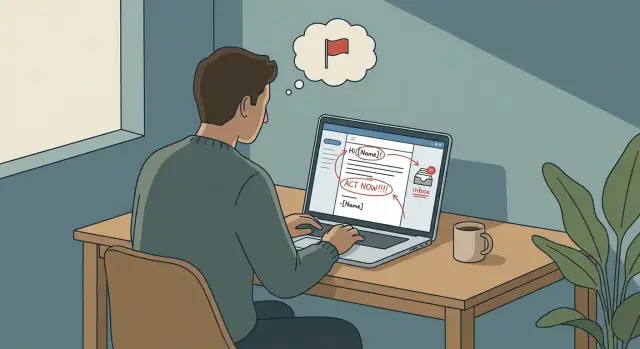
Why outbound can feel spammy even when you mean well
“Spammy” usually doesn’t mean “you emailed me without permission.” It means the message feels careless, self-serving, or unsafe to engage with. People scan cold emails fast and decide what you’re about in seconds.
Good intent doesn’t protect you from bad perception. You might genuinely want to help, but if your note reads like it was sent to a thousand strangers, the reader assumes you’ll waste their time. If anything feels hidden or slippery, they’ll ignore it.
A spammy tone can kill replies even when cold email deliverability is fine. Landing in the inbox is only the first hurdle. Trust is the real one.
A few common “spam” signals:
- It’s all about you (awards, “industry-leading,” big claims) and not their situation.
- It tries to sound personal but gets basic details wrong.
- It asks for too much too soon (a call, a referral, a long form).
- It leans on pressure (guilt, urgency, “just bumping this” on day two).
Picture an SDR emailing a Head of Ops: “Saw you’re crushing it. We help teams 10x productivity. Can you do 30 minutes tomorrow?” It might be well-meant, but it reads like a script. A better version is simpler: a specific observation, one relevant problem, and one small next step.
The goal isn’t to sound clever. It’s to be clear, relevant, and respectful.
Pattern 1: Me-first messaging that ignores the reader
One of the most common outbound lead gen mistakes is leading with your product, your features, your story, and your ask. Even if your offer is solid, the reader has no reason to care yet. Their inbox is a triage list, and “Here’s what we do” often translates to “Here’s more work for you.”
A classic version is the vague promise: “We help teams save time” or “increase revenue.” That might be true, but without a specific situation it feels like filler. Details build trust. Slogans don’t.
Forced urgency is another trust-killer. “Spots are filling up” or “only this week” can work when it’s real, but most of the time it isn’t. Manufactured urgency reads as manipulation.
Then there’s the early meeting ask. A calendar request in the first paragraph can work for warm intros, but in cold outreach it often feels like a stranger asking for a favor.
A cleaner pattern:
- Name the situation you think they’re in.
- Add one concrete observation that shows you’re not guessing.
- Ask one small question.
- If you ask for time, do it last and keep it optional.
Example: instead of “We built an all-in-one outreach platform, can we meet?” try:
“Noticed you’re hiring SDRs. If new reps are sending from fresh domains, deliverability can dip for a few weeks. Are you already warming up new mailboxes, or still setting that up?”
Pattern 2: Fake personalization that triggers distrust
Nothing makes a cold email feel spammy faster than personalization that’s only decorative. If the message reads like a template with a few swapped words, people notice. It can feel worse than no personalization, because it signals you’re willing to pretend.
Common tells:
- First name and company name repeated, but no real reason for reaching out.
- “I looked at your website” or “saw you’re growing fast” with no proof.
- Generic flattery (“you’re crushing it”) aimed at someone who’s never heard of you.
The fix is simple: use one specific, true detail and connect it to your reason for writing. Keep it small and verifiable.
What to use instead
Pick one detail that would still make sense if the reader forwarded the email internally:
- A concrete event (new role, product launch, hiring for SDRs)
- A visible constraint (enterprise buyers, long sales cycle)
- A clear trigger (new pricing page, new integration, new market)
- A single data point you actually have (job post wording, public quote)
Example: “Saw you’re hiring two SDRs for outbound. When teams do that, inbox placement often becomes the silent bottleneck. Is improving reply rates or deliverability the bigger priority this quarter?”
When you stop pretending and anchor the message in something real, many personalization pitfalls disappear.
Pattern 3: Too much in the first touch
A first cold email isn’t a pitch deck. When it tries to do everything at once, it reads like spam, even if your intent is honest.
What usually makes it feel heavy is the combo of a long intro, a big block of text, and extra asks. The reader hasn’t agreed to spend time with you yet, so every additional line increases the chance they skim, distrust it, or delete it.
Multiple calls to action make it worse. “Book a call,” “reply with your goals,” “check this doc,” and “follow me” in one email forces the reader to decide too much, too soon. Most people choose the easiest option: do nothing.
Early links, attachments, and fancy formatting can also backfire. Even when deliverability is fine, it can feel like marketing automation and trigger caution.
A simple first-touch structure:
- Reason (why you picked them)
- Proof (one credibility cue)
- One small ask (a yes/no or quick question)
- One line that removes pressure (optional)
Example: “Saw you’re hiring 3 SDRs this month. We helped a similar team cut time spent sorting replies by auto-tagging interested vs not interested. Is reply handling a priority right now?”
Pattern 4: Deliverability mistakes that look like spam
Sometimes your copy is fine, but your sending behavior screams “junk mail.” Email providers judge patterns. If a brand-new domain or mailbox suddenly starts blasting outreach, it looks like a compromised account, not a careful business.
New domains and inboxes need time to earn trust. Erratic volume is especially damaging: 100 emails on day one, then 0 for a week, then 300 the next day. Steady sending is boring, and boring is good.
Skipping warm-up is another quiet deliverability killer. Warm-up creates normal-looking activity and gradually increases daily sends so providers don’t see sudden spikes.
Ignoring bad signals makes things worse fast. Bounces, unsubscribes, and spam complaints aren’t just “metrics.” They’re feedback providers use to judge your reputation. If you keep sending to addresses that bounce, you can poison the whole domain.
A basic reset:
- Start low on new domains and increase volume slowly.
- Warm up mailboxes before real outreach.
- Remove hard bounces immediately.
- Make unsubscribing easy and honor it quickly.
- Keep daily sending consistent (no bursts).
Example: an SDR spins up a new domain on Monday and sends 200 emails by lunch. Half the list is old, so bounces pile up. On Tuesday they pause, then send 400 on Thursday. Providers see a new sender with spikes and failed deliveries, and future emails start landing in spam.
Pattern 5: Subject lines and tone that feel manipulative
A lot of spammy outreach isn’t about the offer. It’s about the vibe. If your subject line sounds like a trick or your tone feels pushy, people assume the rest is dishonest.
The fastest way to lose trust is a clicky subject line that doesn’t match the email. If the subject hints at urgent news but the message is a generic pitch, the reader feels played.
The same goes for “RE:” and “FWD:” shortcuts. They might spike opens, but many people see them as a lie. Once the reader thinks you’re faking a thread, they stop reading.
Hype language also sets off alarms: too many exclamation points, ALL CAPS, “last chance,” “guaranteed,” or pressure like “need an answer today.” It can also hurt cold email deliverability because it looks like mass promo.
Simple swaps:
- Write a subject that matches the first sentence.
- Use plain words. No fake forwards. No “quick question” bait.
- Keep punctuation normal.
- Be specific about who you help and the problem, then ask one small next step.
Example: instead of “RE: your team” + “Just circling back!!!” try “Question about onboarding” and then:
“Not sure if this is relevant, but I noticed you’re hiring SDRs. Do you have a simple way to track replies and route them? If yes, I’ll leave you alone.”
A simple step-by-step reset
If outbound is getting ignored, the fix is rarely “write cleverer lines.” It’s usually fewer assumptions, less pressure, and clearer targeting.
Start by narrowing the audience until you can name one real problem they likely have. “HR leaders” is too broad. “HR leaders at 50-200 person companies hiring 5+ roles this quarter” is a usable start.
Keep your first email to three sentences: who this is for, the problem, and one clear question. Proof should be light, one short example is enough.
Follow-ups should add something new (a tip, a short template, one extra observation). Avoid “bumping this.” Keep daily send limits small, then increase slowly as replies and deliverability stay healthy.
Example first touch:
“Noticed you’re hiring 6 SDRs. When teams scale fast, reply times often slip and leads go cold. Is improving speed-to-lead a priority this month?”
Then track replies by type and adjust. Too many bounces usually means your list or setup is off. Too many “not interested” replies means your problem statement doesn’t match that audience.
Common traps that keep teams stuck
Most teams don’t keep sending spammy outreach because they’re careless. They get stuck because the feedback loop is noisy, and small mistakes compound.
One trap is treating your list as “done” once it’s uploaded. If you keep emailing bounced addresses, or keep nudging someone who asked to stop, each send starts from a worse position.
Another is using one message for everyone. A founder, a sales manager, and a recruiter can all “need leads,” but they don’t respond to the same problem framing. One core message per role usually beats one universal template.
Follow-ups can also turn good intent into pressure. When the second email lands a few hours later, or you send six touches in a week, it feels like you’re trying to corner the reader. Spacing and restraint signal respect.
Testing can keep you stuck too. If you change the subject line, pitch, offer, and audience at the same time, you can’t tell what helped or hurt. Change one variable per test.
Finally, don’t chase opens. Opens are noisy. Replies (including “no”) are a clearer signal that you sounded like a person.
Quick checklist before you hit send
Read your email once as the recipient. If you feel even a little defensive, tighten it.
- Can you state the reason for reaching out in one plain sentence?
- Is your ask tiny, something a busy person can answer in 10 seconds?
- Is there exactly one next step?
- Would it still sound fair if it got forwarded internally?
- Are your sending habits reasonable for this mailbox (warmed up, consistent volume, no sudden spikes)?
Instead of asking for a 30-minute call plus a referral plus a form fill, ask one thing: “Worth sending two lines on how we help X teams reduce Y?” If they say yes, you’ve earned the right to send more.
Last check: remove anything that implies you know more than you do. If the “personalization” is just a vague compliment, delete it and be direct.
A realistic teardown: from spammy to straightforward
Picture an SDR targeting operations managers at small logistics firms. The intent is good: book a short call. But a few outbound lead gen mistakes can make the message feel like spam.
Here’s a “bad” first email. It looks busy, pushy, and generic:
Subject: Quick question

Hi {FirstName},

We help logistics companies improve ops with our end-to-end platform. We offer scheduling, dashboards, automations, reporting, and more.

Can you do a 30-minute demo this week? Here are links to our site, deck, and case study.

Best,
Name
Now a “better” version. It uses a real trigger, one proof point, and a small ask:
Subject: question about dispatch load

Hi {FirstName},

Noticed you’re hiring dispatchers in {City}. When teams grow fast, missed handoffs between dispatch and drivers can spike.

Have you tried a simple daily check (one owner, one metric) to keep loads from slipping?

If you tell me how you track it today (sheet, TMS, or something else), I can share a 2-sentence template that’s worked for similar teams.

Name
If they don’t reply, avoid “bumping this.” Add something useful:
Quick add: one ops manager I spoke with found their biggest delay was “waiting for confirmation.” They fixed it by setting a 15-minute rule and a single escalation channel.

Is that a problem for you too, or is your bottleneck elsewhere?
When replies come in, keep your handling clean:
- Interested: answer their question first, then offer 2 time options.
- Not interested: thank them, ask if there’s a better owner, then stop.
- Out-of-office: wait until their return date and send one short restart.
Next steps to run outbound that feels respectful
Treat the next 2 weeks like a reset, not a full rebuild. Pick one audience, one simple offer, and one measurable goal you can actually hit in 10 business days.
Then fix the foundations before you send more volume. Clean the list. Remove old data, generic inboxes, obvious role accounts, and anyone who doesn’t match your audience. Fewer, better contacts usually beats more, noisier contacts.
Get the basics right (sending domains, SPF/DKIM/DMARC, separate mailboxes), then warm up slowly. Watch bounces and unsubscribes closely and adjust before you scale.
If you want fewer tools to manage, LeadTrain (leadtrain.app) combines domains, mailboxes, warm-up, multi-step sequences, and reply classification in one place, which makes it easier to keep sending consistent and spot issues early.
FAQ
Why does my outbound email feel “spammy” even if my intent is good?
It usually means the email feels careless, self-centered, or risky to engage with. Even if your offer is legitimate, readers decide quickly based on relevance, clarity, and whether you’re asking for too much too soon.
What’s the simplest structure for a first cold email that doesn’t feel like spam?
Default to one specific observation, one likely problem, and one small question. Keep the meeting ask optional and at the end so it doesn’t feel like a stranger demanding time.
What’s the biggest “me-first” mistake in outbound messaging?
Lead with their situation, not your product. If your first paragraph is mostly “we,” features, awards, or big claims, the reader has no reason to keep going.
How do I personalize without sounding fake?
Use one real, verifiable detail and connect it to why you’re reaching out. If your personalization is just a compliment or a vague “saw you’re growing,” it reads like a template and can feel worse than no personalization.
What’s a “small ask” that works well in the first touch?
Ask for something they can answer in about 10 seconds, like a yes/no or a quick choice. Early requests for a 30-minute call, referrals, or long explanations create friction and trigger avoidance.
Why do longer first emails get ignored more often?
Keep it short and remove extra demands. Long intros, multiple calls-to-action, and heavy proof all at once makes the email feel like marketing automation, not a human note.
Should I include links or attachments in the first cold email?
They can feel unsafe and salesy, and they also raise deliverability risk. A clean first touch is usually plain text with one clear next step, then share resources only after someone shows interest.
What sending habits make me look like a spammer to email providers?
Warm up new mailboxes, increase volume gradually, and send consistently instead of in spikes. Also remove hard bounces quickly and take unsubscribes seriously, because those signals can tank your sender reputation fast.
What subject lines and tone tend to trigger distrust?
Use subjects that match the first sentence and avoid tricks like fake “RE:” or “FWD:”. Plain, specific language beats hype because it builds trust and reduces the “this is a scam” feeling.
How do I diagnose whether I have a messaging problem or a deliverability problem?
Track replies by type so you can fix the right problem. If deliverability and reply handling are a bottleneck, a single platform like LeadTrain can help by combining domains, mailboxes, warm-up, sequences, and AI reply classification so you can send steadily and spot issues early.