Outbound for manufacturers: stakeholder map and angles
Outbound for manufacturers is hard because decisions span ops and IT. Learn who the real buyer is, how to map stakeholders, and outreach angles that fit plant life.
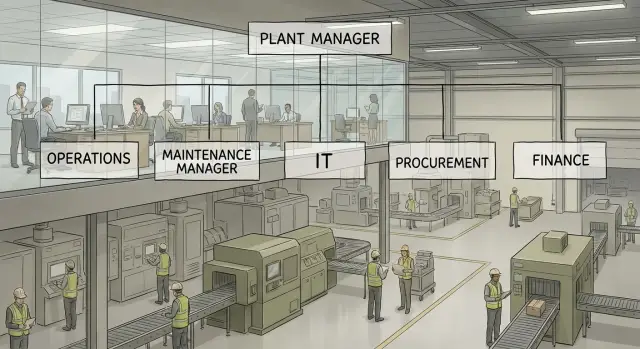
Why outbound to manufacturers often misses the real buyer
Outbound to manufacturers fails more often than it should, even when the offer is solid. The usual reason is simple: the email lands with the person who has the title you expected, not the person who feels the pain, owns the budget, or can actually change what happens on the floor.
Plants do not buy like office teams. Production is tied to shifts, safety rules, maintenance windows, and constant pressure to protect uptime. If your message reads like a generic productivity pitch, it gets ignored because it does not connect to what they protect every day: output, quality, and risk.
Another blocker is split ownership. In many manufacturing deals, operations defines the problem (missed changeovers, scrap, unplanned downtime), while IT controls access (systems, security, integrations). Either side can stop the project.
A few “wrong buyer” patterns show up again and again:
- You start with a corporate procurement inbox, but the real push has to come from the plant.
- You target a plant manager, but maintenance or quality owns the issue day to day.
- Ops is interested, but IT was never included, so the deal dies at “security review.”
- You sell features, while the buyer is judged on throughput, safety, and compliance.
Example: you email the plant manager about “automation.” They forward it to the continuous improvement lead, who asks IT if the system can connect to MES. IT raises access and vendor risk concerns. With no clear champion across ops and IT, the thread goes cold.
The rest of this guide gives you two practical tools: a simple manufacturing stakeholder map (so you include the right people early) and outreach angles that match each role’s reality.
Plant realities that shape buying decisions
A lot of manufacturing outreach fails because it sounds like a software demo, while the plant thinks in risk. A new tool is judged first on what it could break, not what it could improve.
Downtime risk beats nice-to-have features every time. If your message sounds like it could slow a line, interrupt maintenance routines, or create unplanned work for IT, it will be ignored even if the benefits are real.
The day-to-day constraints behind every “yes”
Plant teams make decisions inside a few non-negotiables:
- Safety: anything that adds uncertainty gets pushback fast.
- Quality: changes that could affect scrap or traceability trigger scrutiny.
- Throughput: if it touches cycle time or uptime, it must be proven.
- Labor: if it adds extra steps per shift, adoption drops.
- Compliance: documentation and audits matter more than flashy dashboards.
Shift work shapes access. The people you need might be on nights, in a stand-up, or on the floor. That’s why short, specific asks work better than “can we book 30 minutes?”
Plants also avoid long discovery calls early because they’ve seen the pattern: a vendor asks broad questions, then sells a generic package, then the plant owns the mess. Early trust is earned in small steps: name one concrete problem, offer a low-effort way to validate it, and be clear about what you need from them.
For example, instead of “Let’s discuss your digital transformation,” try: “If unplanned stops are tracked in spreadsheets, I can share a 2-question checklist to see if the top 3 causes are visible by shift. If it’s not useful, I’ll drop it.”
The roles in a typical manufacturing buying group
Most deals in manufacturing are decided by a small group, not one person. If your outreach assumes there’s a single “buyer,” you’ll often end up pitching the wrong person with the wrong proof.
It helps to think in terms of the role people play in the decision, not their exact title:
- Economic buyer: can say yes to spend. They care about payback, risk, and timing. Their fear is funding something that disrupts production or fails to deliver savings.
- Champion: pushes the change internally. They care about solving an everyday pain and looking competent. Their fear is being blamed if rollout goes badly.
- Technical approver (often IT/OT/security): protects systems and standards. They care about security, integrations, and support load. Their fear is creating a vulnerability or inheriting another tool to babysit.
- Implementation owner: makes it work on the floor. They care about downtime, training time, and whether the vendor actually helps. Their fear is “another project” landing on their team.
- Procurement/finance gatekeeper: checks terms and vendor fit. They care about pricing, contracts, and vendor risk. Their fear is getting stuck with a bad contract.
To spot who owns budget vs who owns implementation, listen to the questions. Budget owners ask, “What does it cost? What’s the ROI? What happens if we do nothing?” Implementation owners ask, “How long will it take? Who does what? What breaks if it goes down?”
The loudest contact is not always the buyer. A maintenance lead may be the most responsive (often a strong champion), but the plant manager may hold the budget, and IT may have veto power. Your job is to earn a “yes” from each, in their language.
Stakeholder map: who to include across ops and IT
A good manufacturing stakeholder map is less about titles and more about who feels the pain, who owns the risk, and who controls access. In most accounts, you need at least one operations owner and one IT owner, plus the people who will live with the change.
Start by listing the roles and the signals that tell you they’ll care:
- Plant manager or ops leader: missed output, overtime, downtime reviews, daily/weekly production meetings, pressure to hit OEE and ship dates.
- Maintenance and reliability: rising PM backlog, repeat breakdowns, spare parts chaos, too much time chasing work orders.
- Engineering or continuous improvement: new lines, changeovers, kaizen events, CAPEX projects, standard work updates.
- Quality and EHS: audit prep, scrap spikes, nonconformances, safety incidents, training records.
- IT and security: new vendors touching the network, identity and access, data retention, security questionnaires, integration and support load.
Then add the money and process gatekeepers. Procurement cares about vendor risk, terms, and whether the purchase fits an approved category. Finance cares about payback, cash timing, and whether savings are real (not just “soft” time).
A simple way to apply this: if you’re selling a monitoring tool that needs shop-floor data, the plant manager is your urgency, maintenance is your daily user, IT is your permission slip, and procurement is your final checkpoint. If one is missing, deals stall.
How to build your stakeholder map step by step
A useful stakeholder map starts on the shop floor, not in a generic org chart. Pick one specific problem you solve and name where it shows up: unplanned downtime on Line 3, scrap spikes after a changeover, late maintenance parts, slow quality holds, or manual data entry between systems.
Then build the map in a quick pass that mirrors a normal week at the plant:
- Trace the workflow where the problem appears. Follow the moment it happens to the moment someone reports it, fixes it, and explains it.
- List every team that touches that workflow. Think production, maintenance, quality, engineering, EHS, IT/OT, procurement, and sometimes finance.
- Tag each person as pain, approve, or block. Pain feels it daily. Approve controls budget or priority. Block can stop access, integration, or change control.
- Write one measurable outcome for each stakeholder. Plant manager: OEE and ship dates. Maintenance: MTTR and repeat failures. Quality: fewer holds. IT: security and support load.
- Choose two contacts to start: one primary and one parallel. Primary is closest to the pain. Parallel confirms feasibility or removes friction.
Example: if you reduce changeover time, the pain might sit with the production supervisor, while engineering validates method changes, quality signs off on new checks, and IT/OT decides how data is captured. Your measurable outcomes should match that reality, not generic “cost savings.”
Finally, decide the outreach order and handoffs. Start with the person who can describe the problem in numbers, then bring the parallel contact in early so you don’t get stuck later. This prevents the common loop where ops says “talk to IT” and IT says “we need ops to sponsor it.”
Outreach angles that match each stakeholder
If your message sounds the same to everyone, it will land with no one. Each role is protecting a different number: output, uptime, quality risk, safety exposure, or system stability. Pick one clear problem per person and make the next step easy.
Ops-side angles (what hits the floor today)
Use these when writing to people who live on the production schedule.
Operations leaders (plant manager, ops director) care about throughput and schedule adherence under staffing limits. Instead of pitching “efficiency,” ask about the one constraint that keeps them from hitting plan (labor, changeovers, material flow).
Maintenance cares about unplanned downtime, MTTR, and repeat failures. Offer a way to spot failures earlier or shorten diagnosis, then ask where the biggest repeat downtime shows up.
Quality cares about scrap, rework, audit findings, and traceability gaps. Focus on reducing escapes and making it easier to prove what happened (who, when, lot, spec).
After you get a reply, don’t force a demo. Offer a small next step like a 10-minute call to confirm where the loss is coming from and who else should be involved.
Risk, change, and systems angles (what can block the deal)
These stakeholders often decide how fast you can move.
EHS cares about incidents, near-misses, training, and compliance evidence. Lead with reducing exposure and improving reporting without adding paperwork.
Engineering (process, CI, industrial) cares about changeovers, bottleneck removal, and standard work. Talk about making improvements stick across shifts and lines.
IT cares about access control, data flow, security, and support load. Be specific about what you integrate with, who can access what, and what you need from them (and what you don’t).
A simple sanity check: if you sell a monitoring tool, ops cares about lost hours, maintenance cares about false alarms and response time, and IT cares about permissions and network impact. Same product, different story.
Message framework for manufacturing outreach
Manufacturing outreach works best when it sounds like someone who’s been on a plant floor, not a brochure. Use plain words, name one real problem, and connect it to one measurable outcome. If you try to cover every feature, you’ll look like you don’t understand how busy plants are.
A simple structure is: context -> problem -> outcome -> proof -> small question.
Start with context that shows you did basic homework (site, product line, hiring, recent expansion). Then lead with one plant-relevant problem, not a vague “efficiency” claim. Think unplanned downtime, changeover delays, late quality holds, missed ship dates, or slow approvals between ops and IT.
Keep the first message tight:
- One sentence on what you noticed (specific, not creepy)
- One problem tied to plant constraints (shifts, downtime windows, safety rules, approval cycles)
- One outcome you can help reach (hours saved per week, fewer stops, faster changeovers)
- One line of credibility (a relevant customer type, a small result, or a clear method)
- A low-commitment question
Leave out deep technical details, full implementation plans, and long attachments. Those belong after you have the right people in the thread.
Example:
“Noticed you’re adding a second shift in packaging. When shifts change, small handoff gaps can turn into short stops and late pallets. If we could cut those interruptions by even 10-15 minutes per line per day, would that matter this quarter? If yes, who owns the handoff process today - production or IT?”
The question does the heavy lifting. Make it easy to answer in one line: yes/no, who owns it, or which metric matters more. That keeps the door open even when the recipient isn’t the final buyer, and it helps you map the real buying group without pushing for a meeting too early.
Sequencing: coordinating ops and IT without friction
Manufacturing deals rarely move in a straight line. Ops wants fewer stoppages and less manual work. IT wants security, supportability, and something that fits standards. Good sequencing respects both without dragging IT into the thread too early.
A simple 5-touch sequence:
- Touch 1 (Ops-first): a plant outcome and a small proof point (scrap, downtime, changeovers, manual reporting).
- Touch 2 (Ops): a short question to confirm where the pain lives (line, shift, site, or across plants).
- Touch 3 (Bridge): a clear line about the IT footprint and how teams usually roll it out with controls.
- Touch 4 (IT-intro): ask who owns approvals like access, integrations, or vendor review.
- Touch 5 (Close): offer two options (15-minute fit check or send a one-page summary).
When to involve IT without triggering a shutdown: wait until you have one concrete use case and one boundary. For example: “Start on one line, no changes to PLCs in phase one, read-only where possible.” That keeps the conversation practical and reduces reflexive risk talk.
Reply routing matters once multiple people answer. If an ops leader says, “Loop in IT,” keep them in the thread and ask for the exact owner (security, infrastructure, apps). If IT replies first, confirm the business driver and ask who measures it on the floor.
If you get forwarded internally, treat it like a warm handoff: thank them, restate the goal in one sentence, and ask what would make it a clear yes or no.
When you hear “we already have a system,” don’t argue. Ask where it falls short today (coverage, adoption, data quality, time-to-fix). Then position a pilot that complements the current stack rather than replacing it.
Example scenario: finding the real buyer in a plant
A mid-size manufacturer has one plant, three shifts, and an ongoing problem: unplanned downtime from a packaging line. Ops feels the pain every day, but the data needed to fix it sits across SCADA, a maintenance system, and a few spreadsheets.
Start with the person closest to the pain: the maintenance manager. They own uptime, they know the line history, and they can tell you if the issue is mechanical, process, or data visibility. Keep the first note practical: less downtime, fewer emergency callouts, and a faster way to see patterns across shifts.
On day two, add a parallel contact: the plant manager (or operations manager). That shifts the conversation from “my team’s workload” to “plant-level impact.” Keep the offer the same, but speak to their outcomes: hitting output targets, stabilizing schedule adherence, and avoiding overtime.
Bring IT in early, but with a different framing:
- Ops message: “Reduce downtime on Line 3 by spotting repeat causes and making handoffs cleaner.”
- IT message: “Clear access needs, minimal disruption, and a straightforward security review before anything touches plant systems.”
- Plant leadership message: “A small pilot tied to a measurable metric, with a timeline and owner.”
A good next meeting request is specific and low-friction: a 20-minute call with maintenance plus one person from IT to confirm three things: where the data lives, who approves access, and what a 30-day pilot success metric looks like (for example, downtime minutes per week on the target line).
Common mistakes and traps in manufacturing outbound
The fastest way to lose a plant account is to talk like you already know the answer. Manufacturing teams are busy, risk-aware, and measured on uptime, safety, and quality. If your first message is a feature dump, you signal you didn’t take time to understand the plant problem.
Common traps:
- Selling capabilities before confirming what is breaking (downtime, scrap, changeovers, labor gaps, audit findings).
- Treating IT like paperwork instead of a real gatekeeper for security, integrations, and network access.
- Waiting too long to include EHS and quality, then getting blocked on safety reviews or validation.
- Asking for a 30-minute call as the first step, when a 10-minute fit check or a simple question is easier to accept.
- Using generic proof like “we helped a manufacturer” without a plant-like scenario, constraints, or measurable outcome.
Another mistake is over-contacting one person and burning the account. If you send five follow-ups to the plant manager but never loop in maintenance, controls, or IT, you create internal friction. Rotate light touches across the buying group with messages tailored to each role’s concerns.
Example: you email a plant manager about “AI dashboards” and ask for 30 minutes. No reply. Instead, lead with a specific operational symptom (unplanned stops after changeovers), ask one question, and offer a short call. Then send IT a separate note focused on access and security (data source, read-only options, audit trail). Bring quality in early with how you handle traceability and validation.
Quick checklist before you send your first sequence
Before you hit send, take five minutes to pressure-test your plan. Small gaps like “who actually signs?” or “who can block IT access?” turn a good message into a dead end.
- Name one likely economic buyer (budget owner) and one likely blocker (can delay approvals). If you can’t name both, targeting is still fuzzy.
- Write one clear outcome per stakeholder in plain words. Plant manager: less unplanned downtime. IT: no new security headache.
- Make touch 1 and touch 2 ask for a tiny next step. A 10-minute call, a quick “who owns this?” redirect, or permission to send a one-page summary beats a big demo request.
- Add one IT-safe line that reduces fear: what access you need (if any), where data would live, and what support looks like.
- Decide how you’ll handle replies before they arrive: interested, not a fit, out-of-office, bounce, unsubscribe.
That last point gets missed, and it matters. If replies sit in a shared inbox, you lose speed and context. Even a simple routing rule (SDR gets “interested,” ops lead gets “security questions”) keeps momentum.
Next steps: turn the map into a repeatable outbound process
Start small and treat your first maps like a learning sprint. Pick 10 to 20 target accounts, build a stakeholder view for each, and keep notes on what you learn from replies, bounces, and handoffs.
Keep one master stakeholder map template your whole team uses. If everyone records roles, priorities, and likely objections the same way, you can compare accounts and spot patterns (for example, which plants require IT sign-off on anything that touches the network).
A simple repeatable workflow
Use a tight process you can run every week:
- Choose 10 to 20 accounts and confirm the plant type, footprint, and critical line issues.
- Map 5 to 8 roles (ops, maintenance, quality, EHS, engineering, IT, procurement, finance).
- Write one angle per role, focused on one plant reality (downtime, scrap, safety, change control).
- Run small A/B tests on angles.
- Review results weekly and update your template with what worked.
Testing angles keeps things honest. If one message gets replies from plant managers but stalls with IT, you learned something real: the value is clear, but your security, integration, or rollout story is missing.
Keep execution boring and consistent
Manufacturing outreach breaks when the plumbing breaks. Use one system to manage sending domains, mailbox warm-up, and multi-step sequences so deliverability stays steady and your team doesn’t lose track of who said what.
If you want fewer tools in the stack, LeadTrain (leadtrain.app) combines domains, mailboxes, warm-up, sequences, and reply classification in one place, which can help teams keep stakeholder-based outreach organized while staying responsive to real plant conversations.
FAQ
How do I quickly figure out who the real buyer is in a manufacturing account?
Start by mapping the workflow around one specific problem (like downtime on one line), then list who feels it daily, who owns the budget, and who can block access or change control. In most plants you’ll need at least one ops owner and one IT/OT owner in the conversation early, or you’ll stall at “talk to IT” and “get ops to sponsor it.”
Why does outbound to manufacturers fail even when the offer is good?
Because plants buy around risk and uptime, not around feature checklists. If your email sounds like a generic productivity pitch, it won’t connect to what they protect every day: output, quality, safety, and compliance.
Who should I email first: plant manager, maintenance, or IT?
Start with the person closest to the pain because they can confirm if the problem is real and measurable, and they’ll tell you what’s actually happening across shifts. Then add a parallel contact who controls priority or access (often a plant leader or IT/OT) so you don’t get stuck later.
What if the person who replies isn’t the budget owner?
A plant manager may care and even reply, but maintenance, quality, or engineering often owns the day-to-day issue and can be the real champion. Treat a fast responder as a signal of pain, then use one short question to identify who owns budget and who controls approvals.
How do I tailor my message differently for ops vs IT?
Ops wants a clear use case and a fast path to fewer stops, less scrap, or less manual work. IT wants clear boundaries: what systems you touch, what access you need, how security is handled, and what support load looks like. Send separate messages with the same goal but different proof and next steps.
When should I involve IT without triggering a security shutdown?
Bring IT in once you have one concrete use case and one clear boundary, like starting on a single line and using read-only data where possible. That keeps the conversation practical and reduces reflexive shutdowns triggered by vague “integration” talk.
What’s the best “next step” to ask for instead of a full demo?
Default to a tiny next step: a 10–20 minute fit check, a one-line “who owns this?” redirect, or permission to send a brief summary. Plants are busy and shift-driven, so lowering the commitment increases replies and still moves you toward the right stakeholders.
What should my first email to a plant contact include?
Name one plant symptom, tie it to a measurable outcome, then ask a question they can answer in one line. If you ask for 30 minutes and lead with features, you’re making them do work before they trust you.
What do I do when my email gets forwarded internally?
Treat it like a warm handoff: thank them, restate the goal in one sentence, and ask what would make it a clear yes or no. Keep the original sponsor in the thread, and ask for the exact owner you need (security, OT, applications) rather than “IT” in general.
How can I keep multi-stakeholder manufacturing outreach organized without losing replies?
Run outreach and reply handling in one place so domains, mailboxes, warm-up, sequences, and reply routing don’t get fragmented across tools. If you’re managing stakeholder-based outbound at scale, an all-in-one platform like LeadTrain can help keep deliverability stable and route replies (interested, not interested, out-of-office, bounce, unsubscribe) without manual sorting.