Multi-threading outbound emails without spamming: a 2-4 person playbook
A practical playbook for multi-threading outbound emails to 2-4 stakeholders: who to start with, how to reference threads, and when to stop.
What multi-threading is and how it goes wrong
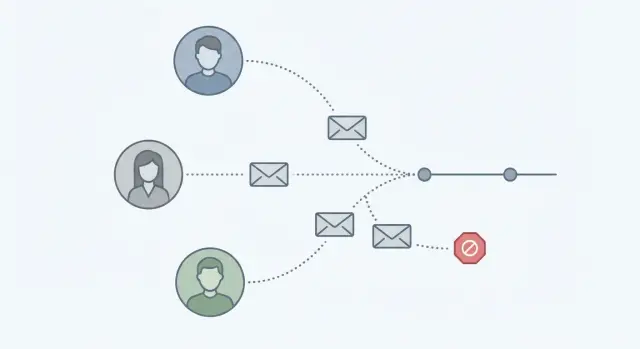
Multi-threading means emailing 2-4 people at the same company about the same problem, instead of betting everything on one inbox. Done well, it raises your odds of a reply because you’re not stuck if your first contact is busy, out-of-office, or simply not the right owner.
It backfires when it turns into noise. From their side, it looks like several coworkers getting near-identical cold emails within a day or two. Someone forwards it internally with a note like, “Are we being targeted?” and now your name and domain feel risky before you’ve even made your point.
Why it helps
A small set of stakeholders gives you coverage. One person may care about outcomes, another about budget, and another about day-to-day work. If messages are role-specific and spaced out, you come across as prepared, not pushy.
How it goes wrong
Most negative outcomes come from the same handful of patterns: hitting too many people at once, sending the same template to everyone, naming coworkers in a way that feels creepy (“I emailed your CFO yesterday”), running a tight cadence that floods the company, or pushing past soft signals (low fit, no engagement, or a polite “not a priority”).
Multi-threading makes sense when the decision needs more than one perspective and you can explain why each person should care. It’s a bad fit when the company is tiny, your fit is uncertain, or your only angle is “checking in.”
The goal is simple: earn more real replies while lowering complaints. Your emails should feel like thoughtful reach-outs, not an account being worked by autopilot.
Pick the right 2-4 stakeholders (and skip the rest)
Multi-threading works when you contact a small, intentional set of people who can actually move the decision forward. If you spray a whole department, it reads like spam.
Start by picking roles, not “everyone with a relevant title.” In many B2B deals, you can cover the decision path with a few seats:
- A likely champion (feels the pain and will engage)
- A budget owner (can approve spend)
- A reviewer (security, data, integrations, process)
- An end user (lives with the tool daily)
Use signals you already have: seniority keywords (Head/VP/Director vs Manager vs IC), team name (RevOps, IT, Finance), and recent activity (new role, hiring for the problem, posted about a related initiative). If you only have one strong signal, start there and keep the list short.
Avoid “org chart detective work.” If you’re guessing between five similar managers, pause and simplify. Pick one representative per function and move on.
Set a max-stakeholders rule before you start. For example: no more than 4 contacts per company in the first 10 days. This keeps outreach polite and also protects deliverability.
Concrete example: if you’re selling a cold email platform, a sensible set might be the SDR Manager (champion), Head of Sales (budget), RevOps (reviewer), and one senior SDR (end user). Everyone else can wait until you get a reply or a referral.
Who goes first: a simple sequencing rule
The first person you contact sets the tone. Start with the person most likely to feel the problem daily and reply without needing permission. That’s usually a user, operator, or project owner, not the most senior title.
A practical rule: begin where the pain is highest, then move one step up. A champion can translate your value into the team’s language and share context that makes your later note to a manager feel relevant.
When to lead with the manager first
Lead with the manager only when the buying decision is clearly centralized, or when a user-level conversation is likely to stall. If the tool affects budgets, compliance, security, or headcount, the manager may be the only person who can even consider it.
Skip manager-first if you have no proof of urgency and your message is broad. Generic pitches to senior people get ignored, and they get flagged.
If you have an inbound signal, prioritize the signal
If there’s a real signal (website visit, form fill, job post aligned with your use case, or a reply from anyone at the company), start with the person closest to that signal.
If a user replied “not now,” don’t jump straight to the CEO the next day. Follow a chain only if you have new, specific information: user -> their manager -> an adjacent stakeholder when it genuinely helps.
A simple sequence that avoids flooding one account:
- Day 1: Contact the likely user/champion.
- Day 3: Contact their manager (reference the topic, not that you’re “following up again”).
- Day 5 or 6: Contact one adjacent stakeholder (ops, procurement, or a reviewer) only if it makes sense.
- Day 7+: Stop or pause if there’s no engagement.
Step-by-step playbook for running a 2-4 person thread
Treat the account like one problem, not four separate leads. Write a single account-level problem statement you can defend in one sentence (for example: “Your team is losing time to manual follow-ups and inconsistent handoffs”). If you can’t say it plainly, the thread will feel random.
Then build one core message and adjust the angle by role. Keep the offer and proof consistent, but change the “why you” line. Finance cares about cost and risk, RevOps cares about process and data, managers care about outcomes this quarter.
A clean way to run a 2-4 person thread:
- Define the account problem, then choose 2-4 roles that actually touch it.
- Write one core email, then create 2-3 role-specific versions (same length, different hook).
- Use a light cadence per person (days, not hours) and stagger sends across the week.
- Decide limits upfront: a hard stop date and a max email count per person.
- Track replies daily. The moment you get traction, pause the rest.
Make “pause on traction” a rule, not a judgment call. If someone replies “loop in Sarah,” stop the other touches and continue with Sarah. If you get “not the right person,” redirect once and pause the original contact.
Stop rules that keep you polite (and out of trouble):
- Any unsubscribe or complaint: stop the whole account.
- Two clear “no” signals: stop that person, and usually the account.
- No engagement by your stop date: pause for 60-90 days.
How to reference prior emails without sounding spammy
Give context without making it feel like you’re tracking them. Keep it brief, neutral, and focused on the problem.
A useful rule: reference the outreach, not the person’s behavior. “Quick note in case it got buried” feels normal. “I saw you didn’t reply” feels pushy.
The “quick note” reference that doesn’t feel creepy
Use one short line, then move on:
- “Quick note in case my email last week got buried.”
- “Circling back with one detail that might help.”
- “Reaching out again with a clearer example.”
After that line, change something: a new angle, a tighter example, or a smaller question. Repeating the same paragraph signals copy-paste.
“I also reached out to…”: when to use it (and when not to)
Say it when it reduces confusion, like when you’re contacting two people in the same function and either could own the decision. Keep it practical: “I also reached out to Alex on your team so you’re not both doing the same work.”
Avoid it when it creates pressure. If you’re reaching up the org chart, you usually don’t need to mention you emailed their boss.
If they forward your email internally, reply to the thread with a short thank-you and restate the ask in one sentence. Don’t add new stakeholders immediately. Wait for the handoff to settle, then follow up only if the thread goes quiet.
Cadence that avoids flooding one company
A good cadence keeps you top of mind without making the account feel hunted. You want one clear conversation at a time, even if you’re contacting multiple people.
Start slow, then add the next stakeholder only if you don’t get a reply. If you contact three people at the same company on the same morning, it looks coordinated and often triggers internal forwarding like “who is this?”
A spacing pattern that stays respectful:
- Day 1: Email stakeholder #1 (most likely owner of the problem)
- Day 3: Follow up #1 (short, new angle)
- Day 5: Email stakeholder #2 (mention you reached out to the team)
- Day 7 or 8: Final follow-up to #1 or a light follow-up to #2
- Day 10: Email stakeholder #3 only if there’s still no signal
For most accounts, cap it at 2-3 emails per person. Past that, it starts to feel like noise.
Time zones and weekends matter. A good sequence can still feel rude if it lands at the wrong time. Send during local business hours when you can, avoid Friday afternoons and weekends for typical B2B audiences, and stagger by region for global companies.
One rule that prevents most account-level mistakes: if you get any reply from anyone, pause the rest of the account touches until you respond.
Message tweaks that reduce complaints and improve replies
Each person should feel like you wrote to them on purpose, not like they were added to a blast. Small copy changes can cut complaints and get faster, clearer replies.
Use subject lines that fit the role. If a VP gets “Quick question about pipeline reviews,” Ops might get “Question on routing rules,” and Finance might get “Budget owner for outbound tooling?” Different subjects reduce the “internal spam” feeling when teammates compare notes.
Keep the first email short and role-specific. One sentence that shows you understand their world is enough.
Make the ask single and simple. Pick one:
- “Are you the right person for this, or who owns it?”
- “Quick yes/no: are you open to changing how you run outbound this quarter?”
- “Worth a 10-minute chat to see if this is relevant?”
End with a plain opt-out that doesn’t sound legal or passive-aggressive: “If this isn’t a priority, reply ‘no’ and I won’t follow up.” That often gets you a clean answer instead of a complaint.
When to stop (and when to pause)
Multi-threading works only when you treat it like a conversation, not a hunt. The easiest way to avoid spamming an account is to decide your stop rules before you send the first message.
Stop immediately after a clear “no” from any relevant stakeholder. Even if someone else never replied, a direct decline is a company-level signal. A calm reply like “Got it - I’ll close the loop on my side” protects your reputation.
Also stop when delivery is telling you to stop. Repeated bounces, sudden spam-folder placement, or platform warnings about sending health are reasons to pause and fix basics, not to “push through” with more stakeholders.
Practical stop rules:
- Any explicit “no,” “remove me,” or unsubscribe request
- Two bounces within the same account (pause and verify addresses)
- No new angle for your next email (same message equals higher annoyance)
- Negative tone or complaint risk (“stop emailing our team”)
Pausing is different from stopping. If someone says “Talk to X,” reply once to confirm: “Happy to - should I mention you suggested it?” Then pause the rest of the account until you get that answer.
Common mistakes that get you labeled as spam
Most spam complaints don’t come from one bad email. They come from a pattern that feels pushy, careless, or deceptive.
Over-targeting is the fastest way to lose. Emailing 6-10 people at the same company “just in case” looks like you’re spraying the org chart. It also increases the odds that someone reports you instead of replying.
Another quick way to annoy people: using CC or suddenly adding coworkers mid-thread with no context. CC can feel like public pressure. And when someone sees a thread they weren’t part of, it often reads like escalation.
Fake personalization is easy to spot. Name-dropping the wrong detail, or overly specific praise that doesn’t match the person, reads like a template with a broken merge tag. If you can’t verify a detail, keep it general and honest.
Other behaviors that commonly trigger complaints:
- Ignoring unsubscribe requests
- Treating an out-of-office as a green light to hammer the team
- Re-sending the same message with tiny edits (“bumping this”) to multiple people
- Using “looping in” executives as a tactic
- Asking for a meeting in the first email with no clear reason they should care
Quick checklist before you hit send
Before you launch, decide your limits and stick to them.
- Cap the account: no more than 4 people at one company.
- Space new stakeholders out: wait 24-48 hours before adding someone else.
- Give each person a role-specific reason: one sentence on why that role should care.
- Pause parallel outreach when someone engages: even “not me” counts as a signal.
- Set a clear stop rule: stop after a fixed number of attempts (for example, 3 touches per person) or by a fixed date (for example, 10 business days from first send).
Example: if a VP replies “Talk to my Ops lead,” don’t keep emailing the VP and add two more managers. Pause the VP thread, move to the Ops lead, and keep everyone else quiet.
Example scenario: a 3-stakeholder outreach that stays polite
You’re targeting a mid-market SaaS account. You pick three people: Head of Sales (owns the number), RevOps (owns the tools and data), and the SDR Manager (owns daily execution). The goal is to get coverage without making it feel like you blasted the whole org.
A day-by-day cadence that keeps space between touches:
- Day 1 (Tue): Email the Head of Sales with the main problem, one proof point, and a clear question.
- Day 3 (Thu): Email RevOps with a narrower angle (systems, reporting, deliverability, routing). Mention you also reached out to the team.
- Day 6 (Mon): Email the SDR Manager with a practical angle (time wasted, follow-ups, reply handling). Mention you emailed the team.
- Day 9 (Thu): One short bump to only the person who seems most likely to answer (often RevOps or the SDR Manager).
How you reference earlier outreach matters. Keep it one line, no guilt.
Example for RevOps:
“Quick note: I reached out to your sales team earlier this week about reducing time spent sorting replies and missed follow-ups. On the ops side, who owns reply categorization and routing today?”
Now assume RevOps replies: “Talk to Jamie.” Reply to RevOps with a thank-you, then follow up with Jamie using that context:
“Thanks - helpful. Jamie, RevOps suggested you’re the right owner here. Worth a 10-minute look, or should I close the loop?”
Where you stop: if Jamie doesn’t engage after the bump, pause the whole account for the quarter. Log who you contacted, when, and which angle got a response.
Next steps: make multi-threading easier to run consistently
Multi-threading stays effective when you set up the basics once and run the same routine every time.
Start with clean sending foundations. Use a separate sending domain from your main company domain, make sure authentication is in place (SPF, DKIM, DMARC), and warm up new mailboxes gradually before you run real campaigns. That protects sender reputation and reduces the odds that your second and third stakeholder emails land in spam.
It also helps to keep execution in one place, so you don’t lose track of who was contacted, what they said, and whether the account should be paused.
If you want an all-in-one setup for this, LeadTrain (leadtrain.app) combines domains, mailboxes, warm-up, multi-step sequences, and AI-powered reply classification, which makes it easier to pause an account as soon as someone replies “not interested,” “out of office,” or “unsubscribe.”
FAQ
Who should I email first when multi-threading an account?
Start with the person who feels the problem daily and can reply without permission, usually an operator, manager, or hands-on owner. If you lead with the most senior title first, your message is more likely to be ignored because it’s too high-level or not obviously actionable.
How many people at one company should I contact without looking spammy?
Default to 2–4 people max, chosen intentionally by role rather than title hunting. If you can’t clearly explain why each person should care, don’t add them yet.
How do I choose the right 2–4 stakeholders?
Pick one clear account-level problem, then map it to a small set of roles like a likely champion, a budget owner, and a reviewer. If the company is small or your fit is uncertain, start with one contact and earn the right to expand.
What cadence works best so the company doesn’t feel flooded?
Space touches out by days, not hours, and avoid emailing multiple coworkers on the same morning. A simple rhythm is to email one person, wait for a signal, then add the next stakeholder 48 hours later if you still have nothing.
How do I reference a previous email without sounding pushy?
Keep it neutral and brief, and reference the outreach, not their behavior. One line like “Quick note in case my email got buried” is enough, then immediately add a new detail or a clearer question.
Should I tell someone I emailed their coworker or boss?
Usually don’t mention it, especially when reaching up the org chart, because it can feel like pressure. Only mention another outreach when it reduces confusion, like when two people could own the same area and you’re trying to avoid duplicate work.
When should I stop multi-threading versus just pausing?
Stop the whole account immediately if you get an unsubscribe, complaint, or a clear “no” from a relevant stakeholder. If you simply get silence, pause after a defined limit (for example, a couple emails per person over about 10 business days) and revisit later rather than expanding to more coworkers.
What are the quickest ways multi-threading turns into spam?
The most common triggers are emailing too many people, sending the same template to everyone, and running a tight cadence that makes coworkers compare notes. CC’ing or adding people mid-thread also raises complaint risk because it feels like public escalation.
How do I tailor the message for different roles without rewriting everything?
Change the “why you” line by role while keeping the core problem consistent. A finance person needs a cost-and-risk angle, ops needs process and routing clarity, and a daily user needs time-saved and fewer manual steps.
How can LeadTrain help me run multi-threading more safely?
Use a system that makes it easy to see account-level activity and pause outreach the moment anyone responds. LeadTrain helps by keeping domains, mailboxes, warm-up, sequences, and reply classification in one place, so you can quickly stop the rest of the thread when you get signals like “not interested,” “out of office,” or “unsubscribe.”