MTA-STS and TLS-RPT setup for outreach domains in steps
Learn what MTA-STS and TLS-RPT setup does for outreach domains, how to publish DNS records, read reports, and catch TLS delivery failures early.
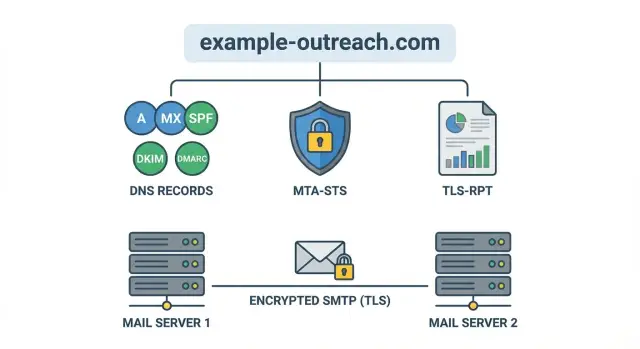
Why outreach domains miss TLS issues until it is too late
A TLS delivery failure happens when one mail server can't set up a secure TLS connection to another mail server, so the message isn't delivered the way you expect. Sometimes it bounces. Sometimes it gets delivered only after falling back to a weaker connection.
That fallback is the trap. Many email systems will try a less secure option if the secure handshake fails, because delivering something feels better than failing. From your side, everything looks normal: the campaign sends, replies come in, and there is no obvious red flag.
But the missing signal matters. If you don't publish clear transport security rules, receiving providers don't know whether they should insist on TLS for your domain or accept a downgrade. That can quietly hurt trust, and it makes troubleshooting painful when deliverability shifts later.
A common scenario: you move to a new mailbox provider or change infrastructure and one small TLS setting is off. Half your recipients still get the emails, a few providers start retrying, and some accept weaker delivery. You only notice weeks later, when reply rates dip or a key account says they never saw your message.
Two tools help you catch this early:
- MTA-STS tells other mail servers what you expect for secure transport, so they don't guess.
- TLS-RPT sends you reports when secure delivery fails, so you see problems before they turn into lost conversations.
The sections below cover a safe MTA-STS and TLS-RPT setup for outreach domains: how to publish the policy without breaking mail, how to enable reporting, and how to read TLS-RPT reports without getting buried in jargon.
If you spin up new domains and mailboxes often, this matters even more. Platforms like LeadTrain can take care of domain, authentication, and warm-up in one place, and transport signals like MTA-STS and TLS-RPT add another layer of visibility when provider-to-provider TLS issues show up.
MTA-STS explained without the jargon
When one mail server sends email to another, they usually try to use TLS (encrypted transport). The problem is that email was built to "try its best" and still deliver even when security is weak. That flexibility can be abused, and it also hides simple misconfigurations.
MTA-STS lets a domain publish a clear rule: "If you send email to us, only use encrypted TLS, and only talk to these real servers." It mainly protects against two failure modes: TLS downgrade (mail delivered without encryption) and misrouting (mail delivered to the wrong server because of bad DNS).
You publish an MTA-STS policy file and a matching DNS TXT record. Receiving mail servers can fetch the policy and follow it when delivering mail to your domain.
MTA-STS has three modes:
- none: effectively off
- testing: receivers may report problems, but will usually still deliver
- enforce: if secure delivery fails, receivers should stop delivery instead of falling back
What MTA-STS does not do: it doesn't stop phishing that spoofs your display name, it doesn't fix your email copy, and it doesn't replace SPF/DKIM/DMARC. It's specifically about safer server-to-server delivery.
TLS-RPT explained: your early warning system
TLS-RPT is a feedback channel for delivery. When another mail server tries to deliver mail to your domain over TLS and something goes wrong, it can send you an aggregated report. Instead of guessing why some messages failed or were downgraded, you get a daily summary of what receivers observed.
What problems show up
TLS-RPT reports often surface:
- expired or mismatched certificates
- unsupported TLS versions or weak ciphers
- handshake failures
- MTA-STS policy conflicts
- DNS or policy fetch problems
A report typically includes who observed the issue (the reporting organization), which host was targeted (your MX), when it happened, and counts of successes vs failures. Failures are usually grouped by reason so you can spot patterns.
How it complements MTA-STS
MTA-STS is the rulebook: it tells other servers whether they should require TLS when sending to you. TLS-RPT is the smoke alarm: it tells you when those rules are causing delivery trouble or when your infrastructure isn't meeting expectations.
If you're rolling out an MTA-STS and TLS-RPT setup, enable TLS-RPT first (or alongside testing). That way you can watch reports while the policy is still in a safe mode and fix issues before enforcing.
Before you publish anything: quick prep for your domain
Before you do an MTA-STS and TLS-RPT setup, get clear on what you're protecting. Outreach stacks often use multiple domains, plus subdomains, and it's easy to publish records on the wrong one.
Write down every domain you use for outreach (a primary brand domain and any outreach domains). Then note any subdomains you actually use in From addresses. MTA-STS applies per domain, so small naming differences matter.
Next, confirm your MX records and who really receives mail for that domain. Some outreach domains don't receive inbound mail because replies go to a different mailbox provider, or the domain is used only for sending. That's fine, but you should know it upfront because MTA-STS is about how other servers deliver to your MX hosts.
Do a quick TLS reality check on your inbound MX hosts. The goal is simple: the server offers STARTTLS and presents a valid, non-expired certificate that matches what the receiver expects.
Keep the prep tight:
- list the domains (and subdomains) you use
- verify the MX records match your real inbound provider
- confirm the MX hosts support TLS with valid certificates
- capture today's bounce rate and common failure messages
If you use LeadTrain, this is also a good time to confirm which domains and mailboxes it manages for you, so you publish records on the right domain and have a clean before/after comparison.
Step by step: publish an MTA-STS policy safely
Publishing an MTA-STS policy is straightforward, but small mistakes can cause confusing delivery behavior. The safest approach is to start in testing mode, confirm everything is stable, then tighten later.
1) Create the DNS TXT record
Add a TXT record at _mta-sts.yourdomain.com. It needs a version and a policy id. The id can be any string, but change it each time you update the policy so receivers know to re-check.
Example value:
v=STSv1; id=2026-01-17
2) Host the policy file on the required hostname
Serve the policy over HTTPS from:
mta-sts.yourdomain.com/.well-known/mta-sts.txt
Make sure the TLS certificate is valid and matches mta-sts.yourdomain.com. Also confirm the exact path returns plain text (not HTML), with no redirects.
3) Start in testing mode with a sane max_age
Use mode: testing first. Keep max_age modest while you validate (for example, 86400 seconds, which is 1 day). Then list the exact MX hosts that should accept mail for the domain.
A safe starter policy looks like this:
version: STSv1
mode: testing
mx: mx1.yourmailhost.com
mx: mx2.yourmailhost.com
max_age: 86400
4) Verify the basics before you wait
Before you walk away, confirm the TXT record resolves, the policy file is reachable over HTTPS, and the MX entries in the policy match your real MX records. Even tiny typos in version, mode, or max_age can waste days.
Once this stays stable for a day or two, move from testing to enforce and increase max_age.
Step by step: turn on TLS-RPT reporting
TLS-RPT is how other mail servers tell you when they couldn't deliver to your domain using TLS (or when your published policy caused a refusal). Setup is quick, and it gives you an early warning before deliverability problems get loud.
1) Pick where reports should go
Reports are sent as aggregated JSON, usually once per day per reporting sender. Use a monitored address, not a personal inbox. A shared mailbox like [email protected] (or a group alias) works well.
Don't be surprised if you see no reports at first, especially on new domains or low volume. Report volume grows with traffic.
2) Publish the DNS TXT record
Create a TXT record at _smtp._tls.yourdomain.com.
Here is a safe, basic value to start with:
v=TLSRPTv1; rua=mailto:[email protected]
A few practical notes: keep the v=TLSRPTv1 tag first, make sure the mailbox can receive attachments, and confirm aliases don't reject larger messages.
3) Confirm it works
After DNS propagates, verify the TXT record is visible and that reports are arriving.
If you're running outreach at scale (for example, across many mailboxes in LeadTrain), routing TLS-RPT to a shared team inbox makes it easier to catch provider-side TLS issues early.
How to use TLS-RPT reports to fix real delivery problems
TLS-RPT reports can look intimidating, but you only need a few fields to find what's actually breaking delivery. Treat each report as a daily summary: who tried to deliver, whether TLS succeeded, and why it failed when it didn't.
What to scan first in a report
Start with the policy the receiver says it observed, then check the outcome counts.
- Policy observed: confirms receivers fetched the right MTA-STS policy file and applied the right mode.
- Summary result types: success vs failure counts, often split by reporting organization.
- Failure reasons: certificate errors, hostname mismatch, no common TLS version, and similar.
- MX/host involved: which mail server name was targeted.
- Date range: helps you match failures to changes (cert rotation, DNS update, provider switch).
Spot patterns and decide where to look
One provider failing while others succeed usually points to a provider-specific expectation (certificate validation behavior, allowed TLS versions). Many providers failing at the same time usually means a shared root cause: wrong MX list in your policy, an expired cert, or a broken endpoint.
Common failures and the first place to look:
- Certificate expired or untrusted: renew the cert, fix the chain, confirm intermediates are served.
- Hostname mismatch: make sure the certificate matches the hostname used during the SMTP TLS handshake.
- No common TLS version or cipher: enable TLS 1.2+ and retire legacy-only settings.
- Policy mismatch (mx not allowed): update the MTA-STS policy MX entries, or fix MX/DNS so they match reality.
- Cannot fetch policy: confirm the policy host is reachable and the file is served correctly.
When to move from testing to enforce
Stay in testing until reports show consistent success across your major receivers for several days, especially after any infrastructure change. After switching to enforce, watch for spikes in failures by provider or MX host.
Used well, TLS-RPT reports turn transport errors from a silent problem into a clear to-do list. When you see one failure repeating, fix that specific cause first instead of changing multiple variables at once.
Common mistakes that cause confusing failures
Most MTA-STS problems feel random because the failure is split across DNS, a small web file, and your mail routing. A mismatch in any of those areas can lead some receivers to fall back to opportunistic TLS while others start rejecting mail.
The most common issue is publishing the wrong MX hosts in your policy. This happens when you copy an old MX list, forget a new provider, or mix up "sending" and "receiving" domains. MTA-STS validates the MX servers that accept inbound mail for that domain. If your MX changed, your policy must match what DNS says now.
The next bucket is the policy file itself. Receivers fetch a specific path, expect plain text, and cache what they saw. If the file is missing, served as HTML, or blocked by redirects, some providers treat it as "no policy" while others keep acting on a cached copy.
Another mistake is switching to enforce too early. That can turn a small TLS mismatch into hard bounces. Start with testing, watch TLS-RPT reports for a few days, then enforce once you're confident.
Finally, avoid changing routing and policy on the same day. If you switch MX providers and publish a new policy at the same time, it's hard to tell whether failures came from DNS propagation, TLS configuration, or policy caching.
A quick checklist before you switch to enforce
Moving MTA-STS to enforce is where mistakes stop being "best practice gaps" and start becoming real delivery failures.
Run this quick pass right before the switch:
- Confirm the MTA-STS TXT record is published and the policy id is the one you intend to be live.
- Open the MTA-STS policy file in a normal browser. It should load over HTTPS with no redirects or certificate warnings.
- Double-check the mode and
max_ageso you don't lock in a bad policy for weeks. - Validate the MX hosts: certificates match what actually terminates TLS, and routing is stable.
- Confirm the TLS-RPT TXT record parses cleanly and reports are going to an owned mailbox.
After that, do a real-world send test to a few major inbox providers, then wait for at least one TLS-RPT reporting cycle. If you see failures like "certificate mismatch" or "no STARTTLS," fix those first.
Assign a single owner for transport security signals. Someone needs to read reports, recognize patterns, and open tickets when something breaks.
Treat policy changes like a release. Write down the policy id, what changed, who approved it, and the rollout time. If you run outbound in LeadTrain, that simple change log pairs well with your domain and mailbox setup notes when you need to trace a deliverability dip back to one specific update.
Example: catching a hidden TLS issue on a new outreach domain
A sales team spins up a fresh outreach domain for a new product line. They send a few tests, get replies, and everything looks normal. For the first week, open rates are fine and nobody reports missing emails.
They then enable MTA-STS and TLS-RPT and start receiving daily TLS-RPT reports. Most receivers show clean delivery, but one mailbox provider stands out: a small (but important) percentage of messages fail with intermittent TLS handshake errors. It's not a total outage, which is why it went unnoticed.
What the report reveals
The TLS-RPT summary shows failures that happen only some of the time, and only for that provider. The pattern points to one MX host behaving differently.
The root cause: during an earlier DNS change, one mail server was moved behind a new endpoint. That endpoint served a certificate that didn't match the hostname used during the SMTP TLS handshake. Some connections landed on the "good" server, others hit the misconfigured one.
They fix it by updating the certificate on the affected host (or adjusting the TLS configuration so the correct name is presented). The next TLS-RPT cycle shows failures drop to zero.
Before switching MTA-STS to enforce, they wait for 2-3 clean reporting cycles, confirm the policy is still reachable and unchanged, re-test sending to that provider, and watch for any new failure types.
Next steps: keep transport signals healthy as you scale
Once your MTA-STS and TLS-RPT setup is working, the biggest risk is drift: you add domains, change mailbox providers, rotate certificates, or move gateways, and the policy no longer matches reality. Those small changes can create silent delivery failures that only show up after replies slow down.
A simple routine keeps you ahead of problems. Pick one day each week to scan TLS-RPT reports, then react quickly when something spikes. You're not chasing perfect zeros. You're watching for sudden changes, new receivers showing failures, or jumps in certificate and TLS errors.
As you add more outreach domains, keep it simple:
- Review TLS-RPT summaries weekly and investigate quickly if failures jump.
- When you change inbound mail routing, update the MTA-STS policy to match what you will use.
- Re-check DNS after any domain move: MTA-STS TXT, TLS-RPT TXT, and SPF/DKIM/DMARC.
- Keep a short changelog of what changed, when, and which domains were touched.
- Test one new domain end-to-end before cloning the setup across the next 10.
Keeping the MTA-STS policy aligned matters most during provider switches. If you move mail handling and forget to update the policy's allowed MX hosts, some receivers will reject mail when they can't validate the expected TLS path.
Using one system for domains and DNS reduces these split-brain mistakes. With LeadTrain, teams can manage domains, authentication, warm-up, and outreach from one place, which makes it easier to keep transport security signals consistent as you scale.