Merge field QA for personalization: prevent broken tokens
Merge field QA helps you catch visible placeholders, bad grammar, and repetitive personalization before a send so your cold emails look human.
Why merge fields fail in real campaigns
Merge fields (also called tokens or placeholders) are the bits of text in an email template that get replaced with real data for each recipient. For example, {FirstName} should become “Maya”, and {Company} should become “Northwind”. They’re what makes one template feel personal.
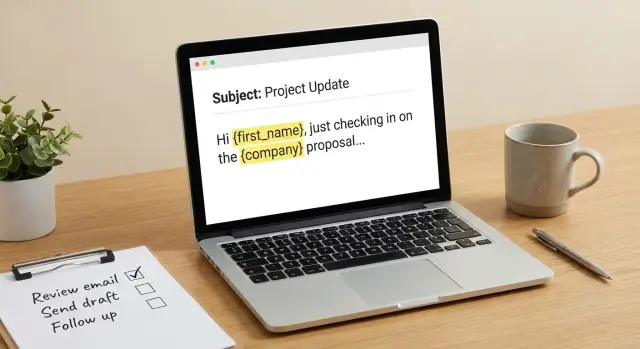
They also break more often than people expect. The giveaway is what the prospect sees: Hi {FirstName}, or Hi , or a sentence that suddenly reads like it was stitched together. When that happens, the email feels careless, and it can drag down replies and cold email deliverability.
Most token problems come from three places: gaps in your data, assumptions baked into the template, and small copy/formatting details that only show up when a value is missing.
A realistic example: you write “Loved your post on {Topic}” because you have a “Topic” column in your sheet. Half your list has it blank, so the line becomes “Loved your post on ”. Or the token shows up literally because the field name doesn’t match exactly.
The goal of merge field QA is simple: every email should read naturally for every recipient, including the messy ones with missing or imperfect data. If a token fails, the email should still make sense, sound human, and not scream “template.”
Key terms: tokens, placeholders, and fallback values
A lot of “personalization bugs” are really vocabulary issues. When teams use different words for the same thing, it gets harder to debug why an email rendered strangely.
A merge field (often called a token) is the special text you put in a template that gets replaced at send time, like {first_name} or {{company}}. A placeholder is what you see when that replacement doesn’t happen, so the raw token shows up in the email.
A fallback value (or default) is the safe text used when the real data is missing. If first_name is empty, you might fall back to “there” or skip the greeting entirely. Fallbacks are what keep a template readable across a messy list.
Missing data vs malformed tokens
These are different problems, and they look different in the inbox.
- Missing data: the token is valid, but the value is blank. This creates empty gaps, weird punctuation, or awkward grammar.
- Malformed token syntax: the token itself is wrong (typo, wrong braces, wrong field name), so it never resolves and gets exposed as a placeholder.
Example: Hi {first_name}, with an empty first name becomes Hi , (missing data). But Hi {frist_name}, becomes Hi {frist_name}, (malformed token).
Where values come from (and what breaks)
Token values usually come from a CRM export, a CSV upload, or enrichment providers. Things break when field names change, columns get renamed, values include extra spaces, or the data is inconsistent across sources (like “Website” in one file and “Domain” in another).
Also, the same template can behave differently across segments. Your “VP Sales” list might have clean first names and company names, while your “Founders” list has missing titles, single-word company entries, or odd capitalization. That’s why merge field QA should sample multiple segments, not just one “happy path” preview.
The main ways personalization goes wrong
Personalization usually fails in predictable ways. Once you know the patterns, you can spot them quickly.
1) Tokens show up in the final email
This is the classic: the email reaches a real person with {first_name} or {{company}} still visible. It happens when a field name is misspelled, a token format changes between tools, or a template block is pasted from somewhere else.
A close cousin is the half-rendered token, like Hi {first_name, or {{ company } after an edit. One visible placeholder can tank trust.
2) The value is wrong (and feels creepy)
Wrong values are worse than blank ones because they look careless or dishonest. Common examples are the wrong company name, the wrong location, or a role that doesn’t match the person.
This often comes from mapping the wrong column (company domain vs company name), stale CRM data, or mixing account-level fields and contact-level fields.
3) The value is blank, so the sentence collapses
Blank strings create emails that look broken even if no token is visible. You get lines like:
- "Hi , quick question" (missing first name)
- "I saw you work at ." (missing company)
- "Congrats on your recent " (missing event)
- "Are you the for ?" (missing role and company)
- "I noticed you’re based in ," (missing location)
4) Grammar breaks around the token
Even when the data is correct, grammar can make it feel off: wrong capitalization ("john"), extra spaces, or awkward articles like "a" vs "an" before a role ("an SDR" vs "a SDR"). Watch for sentences that depend on the token to decide the right wording.
5) Formatting glitches make it look spammy
Tokens often leave behind punctuation and spacing. Common tells are double commas, stray parentheses, and broken line breaks that create odd gaps. Example: "Hi Sarah,," or "at Acme )".
6) Repetition and over-personalization
If you insert the same field in multiple places, it can read like a bot: company name in the subject, first line, and CTA. The person notices the pattern, not the message.
One more thing to watch: identity details. A mismatched sender name, wrong company, or sloppy compliance wording can trigger complaints. Even with a solid sending setup, templates still need clean data and careful token use.
A simple step-by-step QA workflow
A quick merge field QA pass before launch catches the boring problems that cost replies: exposed placeholders, weird grammar, awkward punctuation, and repetitive wording.
The 5-step workflow
-
Inventory every token in the subject and body. Highlight each field you use, including preheader and PS lines. If a token appears twice, note it.
-
Check data coverage, not just “does the field exist.” Ask what percent of your list has a usable value for each token. “Company” might be 98% filled, but “job title” might be 40% and messy.
-
Define fallbacks that keep the sentence clean. A fallback isn’t always a word. Sometimes the best fallback is removing the whole phrase. Read each sentence out loud with the token removed.
-
Preview edge cases on purpose. Don’t only preview “perfect data.” Test missing first names, one-word company names, very long titles, non-ASCII characters, and odd capitalization.
-
Send test emails to real inboxes and check the look. Open on mobile and desktop. Look for line breaks, extra spaces, double punctuation, and subjects that truncate badly. Also confirm your fallbacks didn’t create repeated phrases across steps in a sequence.
Do these five steps on every new template and you’ll catch most token failures before prospects ever see them.
Common mistakes that expose placeholders
The fastest way to lose trust is to show the seams: a blank greeting or a raw token. Some spam filters also treat obvious template artifacts as a low-quality signal.
The most common cause is missing fallbacks. If your record has no first name, a greeting like "Hi {{first_name}}," turns into "Hi ," or "Hi,". A simple default like "Hi there," or "Hi team," prevents that awkward opening.
Wrong field mapping is another big one. It’s how you end up with "Hi Acme," or "Hi John Smith," when you expected a first name. Merge field QA should include checking the source data, not just the template.
Formatting issues can be just as damaging. Extra spaces and weird casing make the email feel copied and pasted: "Hi john" (double space), "HI John" (shouting), or "Hi JOHN" (looks like a CRM export). If your tool supports capitalization helpers, test them against messy data.
Punctuation around tokens is also a trap. When a field is blank, you can end up with stray marks:
- "Hi {{first_name}}," becomes "Hi ,"
- "Hi {{first_name}} - quick question" becomes "Hi - quick question"
- "Loved your post ({{topic}})" becomes "Loved your post ()"
Finally, watch for copy-paste token variants that don’t render in your sending tool. "{first_name}", "[[first_name]]", and "{{FirstName}}" might look similar, but only one will work. Standardize token syntax before you scale.
Fixing grammar around tokens without sounding stiff
Personalization breaks trust fastest when it breaks grammar. Good merge field QA is often just rewriting sentences so they stay normal when data is missing.
Articles, pronouns, and other tiny traps
If your token can start with different sounds, don’t build the sentence around “a/an.” Instead of “You’re an {{job_title}} at {{company}},” use “I saw you work at {{company}}” or “Your role at {{company}} caught my eye.”
Pronouns can also go sideways when you guess. Unless you have reliable data, avoid gendered pronouns. “I noticed you lead…” works for everyone.
Plural and tense without sounding robotic
Fields like team size and responsibilities can make “is/are” and “has/have” tricky. Instead of branching logic inside one line, use phrasing that avoids the fork:
- Use “work on” instead of “works on” if the subject might be singular or plural.
- Replace “has/have” with “offers” or “includes” when describing a company.
Job titles and company names are often inconsistent. If the data says “Founder | Growth | Sales,” don’t write a sentence that assumes one clear role. Safer options are “Looks like you wear a few hats at {{company}}” or “I saw your profile lists {{job_title}}.” You’re referencing the data, not claiming you verified it.
Treat location inserts as optional clauses. If location is missing, omit it rather than forcing “in your area” or “near you.”
Stopping spammy repetition and over-personalization
Personalization should feel like you wrote the email for one person. When the same token shows up everywhere, it has the opposite effect.
A good rule is one strong personal detail, not five weak ones. One relevant point (their role, a specific problem their company likely has, or a trigger you actually verified) beats a stack of generic mentions.
Common patterns that read spammy even when everything renders:
- The same token repeated in three places (subject + opener + CTA) with no new information.
- Company name echoed again in the signature or PS after you already used it twice.
- Token-driven compliments that you can’t back up.
- Over-stuffed intros like: "Hi {{first_name}}, I saw you’re the {{title}} at {{company}} in {{city}}".
Quick fixes:
- Keep
{{first_name}}in the greeting, then avoid it unless it adds meaning. - Use
{{company}}once where it does real work (opener or CTA, not both). - Replace fake compliments with neutral truth: "Quick question" or "Not sure if this is relevant".
Formatting checks that prevent awkward-looking emails
Bad formatting is one of the fastest ways to make a personalized email look automated. The tricky part is that formatting problems often appear only when a token is empty.
Start with whitespace. Missing values can leave double spaces, a hanging blank line, or an odd indent. Then check punctuation. Missing first names can turn into "Hello ,". Missing companies can create "at ,". These look careless.
A quick QA pass that catches most issues:
- Scan greetings and the first two lines for extra spaces and dangling commas.
- Remove each optional clause and re-read the sentence out loud.
- Check line breaks so you don’t end up with a floating “P.S.” or a sudden empty line.
- Test the subject line with empty values and long values.
Be careful when moving text between editors. Copying from rich text tools can introduce curly quotes, non-breaking spaces, or hidden characters. In some tools, braces can also get altered so a token stops rendering.
Example: one template, three recipients, three outcomes
Here’s a practical preview test you can run during merge field QA: same template, three prospects, and three outcomes because the data quality is mixed.
The prospects
- Maya Chen - [email protected] - first_name present, company present
- (blank first name) - [email protected] - company present, first_name missing
- "info" - [email protected] - generic inbox, first_name unusable
Now take this initial template:
Subject: Quick question, {{first_name}}

Hi {{first_name}},

Saw you lead growth at {{company}}. Are you the right person for outbound?

If helpful, I can share a 2-minute teardown of {{company}}'s current emails.

Best,
Sam
What usually fails:
Maya gets a clean email. Jordan gets "Hi ," and a subject with a trailing comma. The generic inbox gets "Hi info," which looks automated and can trigger complaints.
Here’s a revised version with fallbacks and removable clauses:
Subject: Quick question

Hi {{first_name|there}},

I was looking at {{company|your team}} and had a quick question.

Are you the right person to talk to about outbound?

If it helps, I can send a 2-minute teardown of your current cold emails.

Best,
Sam
A good preview reads naturally for all three recipients:
- Maya: "Hi Maya," / "I was looking at BrightMetrics..." / "teardown of your current cold emails"
- Jordan: "Hi there," / "I was looking at NorthPeak..." (no weird gaps)
- info@...: "Hi there," and nothing that calls them "info"
If you find yourself stacking too many fallbacks, that’s a sign to segment instead of forcing one template. If generic inboxes are more than a small slice of your list, create a separate version that avoids first-name personalization entirely.
Quick QA checklist and next steps
Merge field QA is about catching the few failures that can ruin a send: exposed placeholders, broken sentences, and repetitive personalization.
A 10-minute checklist before every new template or big edit:
- Inventory every token and confirm exact spelling.
- Check coverage for each token (what percent is missing?).
- Add fallbacks where blanks are likely, and make sure the fallback reads clean.
- Review punctuation around tokens so blanks don’t leave weird gaps.
- Scan for repetition across subject, opener, and CTA.
Then test with a small matrix, not just one “perfect” contact. Pick 5 to 10 records that include edge cases (missing first name, long titles, all-caps data, non-English names, unusual domains). Send or preview each version and read it like you’re the recipient.
Clear stop rules help prevent “we’ll clean it up later” sends:
- More than 10-15% of contacts are missing a key field you relied on.
- You spot even one exposed placeholder in previews.
- The same token shows up three times in the first two sentences.
- A fallback turns the message into generic filler.
If you want fewer moving parts during QA, it helps when your data, templates, sequences, and reply handling live in the same place. LeadTrain (leadtrain.app) is one example of an all-in-one setup that combines domains, mailboxes, warm-up, multi-step sequences, and reply classification, which can make it easier to preview edge cases before you send.
FAQ
Why do merge fields break even when my template looks fine in the editor?
Merge fields fail because either the data is missing or the token doesn’t match the field name exactly. The fastest fix is to preview with messy records on purpose and add fallback text (or remove the whole phrase) so the sentence still reads naturally.
How can I tell if it’s missing data or a malformed token?
A raw token like Hi {first_name}, usually means the token syntax is wrong or the field name doesn’t exist in your data mapping. A blank like Hi , usually means the field exists but the value is empty for that recipient.
What’s the simplest way to check data coverage before sending?
Start by listing every token used in the subject, preheader, body, and P.S., then check what percent of your list has a usable value for each one. If a field is underfilled or messy, either add a fallback or stop relying on it and move that detail to a segmented version.
When should I use fallback values, and what are good defaults?
Use a fallback when a blank would break grammar or leave ugly punctuation. For things like first names and company names, a safe fallback is often neutral wording such as “there” or “your team,” or rewriting the sentence so the whole clause can disappear without leaving a gap.
How do I fix grammar issues caused by tokens without sounding stiff?
Write sentences that still work if the token is removed entirely. Avoid lines that depend on tokens for articles (“a/an”), tense, or pronouns, and prefer neutral structures like “I was looking at {{company}}” or “I saw your profile lists {{job_title}}.”
What punctuation and spacing problems should I look for during QA?
Test greetings, openers, and any token next to commas, parentheses, or hyphens. Missing values often leave double commas, empty parentheses, or extra spaces, so rewrite to avoid tight punctuation around optional fields and read each line out loud with the value removed.
Why do I sometimes get the wrong company or role inserted?
Wrong values usually come from mapping the wrong column (like domain instead of company name) or mixing account-level fields with contact-level fields. Fix it by verifying your field mapping against the source export and previewing multiple segments, not just one “perfect” contact.
Can too much personalization hurt replies?
Yes, because repeating the same token in the subject, opener, and CTA can look like a pattern rather than a message. A good default is one meaningful personal detail, then keep the rest of the copy clear and relevant without echoing names and companies everywhere.
What edge cases should I always preview before launching a sequence?
Run previews for edge cases: missing first name, generic inbox names like “info,” one-word companies, long titles, all-caps data, and non-ASCII characters. If the email reads awkwardly for any of those, adjust fallbacks or create a separate template for that segment.
What are good “stop rules” that tell me not to launch yet?
Stop and fix before sending if you see even one exposed placeholder in previews, or if a key field you rely on is missing for more than about 10–15% of your list. If fallbacks turn the email into vague filler, it’s better to segment or simplify the template than to force one version to fit everyone.