Holdout testing for outbound: measure incremental meetings
Holdout testing for outbound helps measure incremental meetings by leaving a control group uncontacted and comparing pipeline outcomes over time.
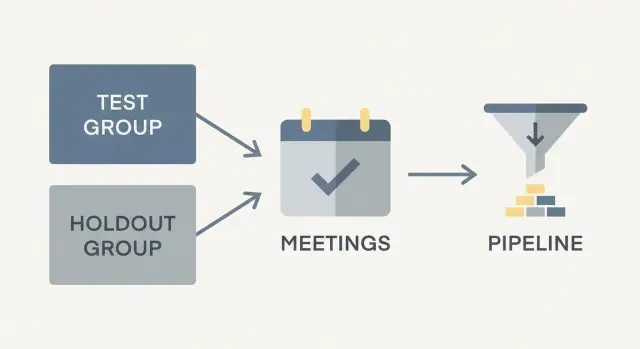
What holdout testing is and why it matters
Holdout testing is a straightforward way to measure what your outbound outreach actually causes. You split a similar set of accounts or leads into two groups: one group you contact (the test group) and one group you intentionally do not contact (the holdout). Then you compare real business outcomes between them.
What you are estimating is incremental meetings. In plain language: how many meetings happened because you ran outbound, not just how many meetings happened while outbound was running. If 20 meetings were booked in total, the real question is how many would have happened anyway through inbound, referrals, existing relationships, or partners.
Reply and click metrics are useful for day-to-day optimization, but they are shaky proof of impact. A reply is not a meeting, and a meeting is not revenue. Attribution can make this worse by giving most or all credit to the last touch, even when the buyer was already on track to engage.
Simple attribution can fool you in a few predictable ways. People reply just to say “not interested”, which looks like engagement but produces no pipeline. Prospects who were already inbound leads get contacted by outbound, and outbound gets the credit. A busy buyer clicks a link, then books through another channel later, and the click gets treated as the cause. Meanwhile, teams focus on the loudest replies, while quieter wins (where outbound nudged timing) never get counted.
Holdouts are worth the effort when you need a trustworthy answer, not just a dashboard. If you are deciding whether to hire more SDRs, increase sending volume, or expand into a new segment, you want to know whether outbound creates net new pipeline.
They are usually not worth it when volume is tiny or cycles are very long. If you only reach 50 leads a month, a holdout can take a long time to show a clear difference.
A useful mental model is two parallel worlds. In one world, Group A receives your outreach sequence. In the other, Group B stays untouched. The gap between outcomes (meetings held, opportunities created) is your outbound lift. That gap is what you can plan around.
Holdout testing vs other outbound experiments
Holdout testing answers a different question than most outbound experiments. Instead of asking “which message performs better?”, it asks “did outbound create meetings that would not have happened anyway?” That difference matters because a team can improve open rates and still create zero new pipeline.
A classic A/B test compares two versions of something (subject line, first line, CTA, send time). Everyone gets contacted, just with different variants. This is great for improving activity metrics like opens and replies, and sometimes even booked meetings. But it cannot tell you how many of those meetings were incremental, because you never observe what would have happened with no outreach.
A holdout test keeps a true control group uncontacted for a defined period. Then you compare outcomes between groups, like meetings booked or opportunities created. That is why holdouts are the best tool for measuring lift, not just activity.
What you can (and cannot) learn
A holdout can tell you whether outbound is worth doing for a segment, offer, or channel mix. If your contacted group books 12 meetings and the holdout group books 10 meetings from inbound, referrals, or existing demand, your incremental lift is only 2 meetings.
What holdouts cannot do well is fine-grained creative decisions. If you are choosing between subject line A and B, a holdout is overkill. Use an A/B test inside the contacted group for that.
A simple way to choose:
- Use A/B tests to improve how you execute outbound.
- Use holdouts to decide whether outbound is creating net new results.
- Use both when you need proof of impact and a clear path to improve it.
How this fits outbound (email, calls, LinkedIn)
Holdouts work across channels because the logic stays the same: some people get outreach, some do not, and you compare pipeline outcomes. The practical requirement is discipline. The holdout truly stays untouched, with clear rules: no cold email, no calls, no LinkedIn touches.
If you run multi-step sequences (for example, email plus a follow-up call), treat the whole sequence as the “treatment.” A platform can help you execute the treatment consistently, but measurement still depends on one thing: the holdout stays clean, and you judge success by outcomes, not effort.
Pick outcomes you will track before you start
A holdout test only works if you decide what “success” means before you send the first email. If you change the scorekeeping halfway through, it becomes easy to “find” lift that is really just moving the goalposts.
Start with one primary outcome you can defend in a meeting. For most teams, that is meetings booked, but define it clearly. For example: a meeting counts only if it is accepted on the calendar, includes the right persona, and is scheduled for at least 15 minutes. Decide whether reschedules count, and whether a no-show counts. Many teams count booked meetings (not attended meetings) to avoid noise from calendar behavior.
Downstream outcomes are helpful but optional. They answer “did these meetings matter?” without forcing the test to run forever. Common choices are sales qualified leads (SQLs), opportunities created, and revenue influenced. If you track them, write the exact rule (for example, “opportunity created within 30 days of first reply”) so every rep logs outcomes the same way.
You also want guardrails for deliverability and brand health. Even if meetings go up, a test is not worth it if it spikes bounces or complaints. Track a few basics: bounce rate (especially hard bounces), spam complaints, unsubscribes, and reply sentiment. A high share of “not interested” replies can be a sign your targeting is off.
Finally, pick a time window for counting outcomes. Outbound often has a long tail, so choose a window that matches your sales cycle but stays practical, like 14 or 30 days from first contact. Use the same window for both groups.
Example: you count a meeting only when it is on the calendar, and only if it happens within 30 days of the first email. You also set a guardrail that spam complaints must stay below your normal baseline. With those rules written down, you can run the test without arguing later about what “worked.”
How to build your holdout and test groups
Your test only works if the two groups start out similar. The simplest approach is to define the full pool of accounts you could contact, then split it so one group gets outreach and the other stays untouched.
Start by locking your eligibility rules. For example: US SaaS companies with 50 to 500 employees, using a specific tech stack, not currently in active talks, and not contacted in the last 60 days. This prevents cherry-picking later.
Next, assign accounts with simple random assignment. In a spreadsheet, add a random number column and sort it. Put the first 80% into the test and the remaining 20% into holdout (or 90/10 if your list is small). The key is that the split is automatic and repeatable, not based on gut feel.
When random is not enough, stratify. This means splitting within important buckets so each group has a similar mix. Do this when you expect outcomes to vary a lot by segment, such as by industry, company size, region, rep ownership, or lead source quality.
One practical method is to create buckets (for example, industry x size), then randomly assign 80/20 inside each bucket.
Finally, protect the holdout. “Uncontacted” has to mean truly uncontacted during the test window. That includes cold email, LinkedIn messages, calls, and even “friendly” follow-ups from a rep who recognizes the logo. If an account is in holdout, nobody touches it until the window ends.
If you keep the split fair and keep the holdout clean, your later pipeline comparison is much easier to trust.
Step-by-step: run a holdout test for outbound lift
A holdout test is simple: keep a slice of target accounts uncontacted, run outreach to everyone else, then compare what happened. The hard part is sticking to the rules when the week gets busy.
Start by picking one clear audience list. Use the same filters you normally use (industry, role, employee size), then clean it. Remove duplicates, obvious bad fits, and contacts you already emailed recently. If your list includes multiple people per company, decide now whether your unit is the person or the account, and stick to it.
A practical workflow:
- Freeze the audience. Export one final list and stop adding “just a few more” later. Put new names into the next test.
- Split into two groups. Randomly assign most to the test group and keep a smaller holdout uncontacted. Many teams start with 10% to 20% holdout and run the test long enough for replies and scheduling to happen (often 2 to 6 weeks).
- Lock definitions before sending. Write down what counts as a meeting and set a cutoff date for counting outcomes.
- Run outreach only to the test group. Send your normal multi-step sequence, and make sure the holdout gets zero touches across all channels.
- Pull results from the same source for both groups. At the end, count meetings, qualified meetings, and early pipeline created for each group using the same rules.
To calculate lift, compare rates, not just totals. Example: if 900 test leads produce 27 meetings (3.0%) and 100 holdout leads produce 1 meeting (1.0%), your incremental lift is 3.0% - 1.0% = 2.0 percentage points. Multiply that lift by your full audience size to estimate incremental meetings driven by outbound.
A practical tip: tag every contacted record so the holdout cannot accidentally get pulled into sequences. If you manage outreach in a system like LeadTrain, keeping the “do not contact” group clearly separated is much easier, as long as you keep your rules fixed.
How to calculate lift without heavy statistics
You do not need fancy math to get value from a holdout test. You need two groups, one clear outcome, and the same time window for both.
Start with a rate, not a raw count. Raw counts can mislead when one group is larger.
Back-of-napkin formulas (using the same outcome for both groups, like meetings booked):
- Outcome rate = (meetings booked) / (accounts in group)
- Absolute lift = (test rate) - (control rate)
- Relative lift = (test rate - control rate) / (control rate)
- Incremental meetings = (absolute lift) x (size of the test group)
Example over 14 days:
- Test group: 1,000 accounts contacted, 40 meetings booked. Test rate = 40/1000 = 4.0%
- Control group: 1,000 accounts not contacted, 25 meetings booked anyway. Control rate = 25/1000 = 2.5%
Absolute lift = 4.0% - 2.5% = +1.5 percentage points.
Relative lift = 1.5% / 2.5% = +60%. Relative lift can sound dramatic, so keep the absolute lift in view. That is what turns into real meetings.
Incremental meetings in the test group = 1.5% x 1,000 = 15 extra meetings you can credit to outreach.
If your numbers are small, do not over-read the result. A difference of 1 to 2 meetings can happen by chance.
When things look noisy, the best fixes are usually simple: run the test longer (same groups, longer window) or use a larger audience (more accounts per group). You can also track an earlier signal like positive replies, but keep meetings as the main decision metric.
A quick sanity check: slice the data one simple way (for example, by industry or company size) and see if the lift still shows up. If the result appears only in one tiny slice, or flips direction week to week, treat it as uncertain and keep testing.
Common mistakes that make results unreliable
Holdout tests fail less because of math and more because of messy real life. The idea is clean separation: one group gets outreach, the other stays untouched. If that separation breaks, your lift number becomes a guess.
Timing is a common trap. If you run the test during a major promo, pricing change, industry event, or holiday swing, your results may reflect the calendar, not outreach. A sudden spike in inbound leads can also make outbound look better than it is, because some accounts might have booked anyway.
Changing the program mid-test is another problem. If you adjust your ICP, swap data providers, or rewrite the sequence halfway through, you are no longer measuring one thing. You are measuring a mix.
The most damaging mistake is leaking into the control group. It starts innocently: a rep recognizes a logo and sends a quick message, or an AE follows up after a demo request. Once holdout accounts get touched, you lose the baseline you need.
Watch for these reliability killers:
- Running the test during a big seasonal swing (holidays, conferences, budget cycles)
- Changing targeting rules, routing, or messaging mid-test
- Allowing any rep to contact holdout accounts “just this once”
- Comparing outcomes without checking list quality (job titles, company size, geography)
- Stopping early after one great (or terrible) week
List quality differences are sneaky. If your test group accidentally has more “ready” accounts, you will overstate lift. Before you start, spot-check titles, seniority, geography, and company size to confirm both groups look similar.
Do not stop early. One week is often noisy because of out-of-office replies, random scheduling patterns, or one rep having an unusually good run. Commit to a fixed window up front.
A practical safeguard: lock the holdout in your CRM with a clear tag and a “do not contact” status. Keep holdout accounts out of sequences entirely, and keep targeting rules frozen until the end.
Data setup: keep tracking simple and consistent
A holdout test only works if your tracking is boring and consistent. Before you send a single email, write down exactly what counts as an outcome, when you will measure it, and what unit you will use to compare groups.
Start with a fixed time window. Pick one window that fits your sales cycle (for example, 14 or 30 days after the first planned touch) and use it for both groups. If you keep extending the window for the test group but not the holdout, you quietly bake in bias.
Next, choose whether you track outcomes by account or by contact. Pick one and stick to it. For measuring outbound lift, account-level tracking is often cleaner because multiple people at the same company can reply or book meetings.
A few definitions prevent messy data later:
- Decide whether you count only the first meeting per account during the window.
- Decide how you dedupe records when the same lead exists twice.
- Decide what to do with accounts that already had an open opportunity, an active thread, or a scheduled meeting before the test start.
- Keep a simple log of anything major that changed during the window (new rep, event sponsorship, pricing change, list source change).
Existing conversations are the most common trap. A simple rule is: if the account had any sales activity in the last X days (reply, call, meeting, open opportunity), exclude it from both groups. That keeps your incrementality question clean.
Keep the fields minimal. You typically need: group assignment (holdout vs contacted), assignment date, first-touch date (or planned first-touch date for holdout), and the outcome fields you care about (meeting booked date, opportunity created date, pipeline amount).
If you use LeadTrain, treat group assignment as a tag you never edit mid-test. Consistency beats detail.
Example scenario: a small sales team measuring incremental meetings
A small B2B SaaS team wants to know whether outbound is creating meetings that would not have happened anyway. They pick 2,000 target accounts for one month and run a holdout test to measure true lift.
They split accounts before any emails go out:
- 1,600 accounts in the test group (contacted)
- 400 accounts in the holdout group (not contacted)
They run a 21-day cold email sequence to the 1,600 accounts, then stop outreach and wait 14 more days. That extra wait matters because some meetings and opportunities show up after the last email, not during the sequence.
When the window closes, they compare outcomes using the same definitions and CRM fields.
Results:
- Meetings: 64 meetings from the 1,600 contacted accounts (4.0%), and 6 meetings from the 400 holdout accounts (1.5%).
- Opportunities: 24 opportunities from the contacted group (1.5%), and 2 opportunities from the holdout group (0.5%).
Interpretation:
- Meeting lift: 4.0% - 1.5% = 2.5 percentage points.
- Opportunity lift: 1.5% - 0.5% = 1.0 percentage point.
For planning, they translate lift into incremental volume. If they plan to contact 8,000 similar accounts next month, they estimate outcomes driven by outreach beyond baseline:
- Incremental meetings: 8,000 x 2.5% = 200 additional meetings.
- Incremental opportunities: 8,000 x 1.0% = 80 additional opportunities.
That is the practical value of the test. It turns “we booked meetings” into “outbound created about 2.5 extra meetings per 100 accounts,” which is easier to forecast, staff for, and compare against cost.
Quick checklist and next steps
Holdout tests fail most often because teams change the rules mid-flight. Write the plan down once, then follow it.
Pre-flight checklist (before you send anything)
- Audience is frozen: the exact list, filters, and time window are saved.
- Random split is done: test and holdout are similar in mix.
- Rules are written: who is eligible, what counts as a meeting, and when you stop.
- Holdout is protected: no manual follow-ups, no extra channels, no exceptions.
- Tracking fields are set: one place to record group, start date, and outcomes.
Run the test long enough to see real outcomes. For most teams, that means waiting for replies and scheduling to settle, not just watching opens and clicks.
While the test runs
Keep the duration fixed, control exposure (only the test group gets the sequence), and track outcomes the same way for both groups. Record bounces and unsubscribes instead of ignoring them. Assign one owner to check that the holdout stays untouched.
When results come in, decide based on lift (the difference between test and holdout).
If lift is clearly positive, scale carefully. Increase volume in steps, keep the same targeting rules, and rerun a smaller holdout regularly to confirm it still works.
If lift is close to zero, iterate before you scale. Change one thing at a time (audience, offer, or sequence length), then test again.
If lift is negative, pause and diagnose. Common causes include poor targeting, deliverability problems, or messaging that triggers quick “not interested” replies.
If you want the execution side to be less fragile, LeadTrain (leadtrain.app) is built to keep outbound operations in one place: domains, mailboxes, warm-up, multi-step sequences, and reply classification. That does not replace holdout discipline, but it can make it easier to keep the contacted group consistent while you protect the control group.
FAQ
What is holdout testing in outbound, in plain English?
Holdout testing measures what your outbound outreach caused, not just what happened while you were sending. You contact one group (test) and intentionally don’t contact a similar group (holdout), then compare outcomes like meetings booked or opportunities created.
The difference between the two groups is your incremental lift, which is the part you can reasonably credit to outbound.
How is a holdout test different from an A/B test?
A/B tests tell you which version of a message performs better among people you contact. Holdouts tell you whether contacting people at all creates net new meetings compared to doing nothing.
If you’re deciding whether to scale outbound, holdouts answer the more important question: “Is this creating additional pipeline, or just claiming credit?”
What outcome should I track for a holdout test?
Start with “meetings booked” because it’s easy to define and doesn’t require waiting for revenue. Write the rule before you start, such as “counts only if accepted on the calendar, with the right persona, at least 15 minutes.”
You can add a secondary outcome like opportunities created within 30 days, but keep one primary metric so the result is hard to argue with later.
How big should the holdout group be?
A common default is 80/20 (80% contacted, 20% holdout). If your list is small, you can reduce the holdout to 10% so you don’t starve your pipeline.
Keep the split consistent for the whole test window; changing the size mid-test makes the comparison less trustworthy.
How do I make sure my test and holdout groups are actually comparable?
Random assignment is usually enough if your audience is fairly uniform. If outcomes vary a lot by segment, stratify so each group has a similar mix, for example by industry, company size, region, or rep ownership.
The goal is simple: the holdout should look like the test group on day one, so later differences are more likely due to outreach.
How long should a holdout test run?
Choose a fixed window that matches your sales cycle but stays practical, like 14 or 30 days from the first planned touch. Use the exact same window for the holdout, even though they weren’t contacted.
Don’t end early after one good week; scheduling patterns and out-of-office replies can create misleading spikes.
How do I calculate incremental meetings from the results?
Calculate rates first, then subtract. For example, if 900 contacted leads book meetings at 3.0% and 100 holdout leads book at 1.0%, your absolute lift is 2.0 percentage points.
To estimate incremental meetings, multiply that lift by the size of the contacted group (or the future audience size you want to forecast).
What are the most common mistakes that ruin holdout results?
The biggest mistake is “leakage,” where someone contacts holdout accounts anyway through email, calls, or LinkedIn. Once the control group gets touched, your baseline is contaminated.
Other common issues are changing targeting or messaging mid-test, running during unusual seasonal swings, and comparing totals instead of rates when group sizes differ.
What non-meeting metrics should I watch during a holdout test?
Track a few deliverability and brand-health guardrails alongside meetings, such as hard bounces, spam complaints, unsubscribes, and the share of clearly negative replies. If those spike, the campaign may be harming your ability to reach inboxes even if meetings rise.
A holdout test is meant to support decisions, so it should include “is this sustainable?” not just “did we get replies?”
How can a tool like LeadTrain help me run holdouts without messing them up?
Use a clear group tag that never changes during the test, and keep the holdout excluded from all sequences and exports. The operational win is reducing accidental touches, especially when multiple reps work the same territory.
Platforms like LeadTrain can help by keeping domains, mailboxes, warm-up, sequences, and reply classification in one place, which makes it easier to execute consistently while you protect the holdout.