From address persona strategy: rep vs team inbox vs founder
From address persona strategy for outbound: choose a real rep, shared inbox, or founder identity based on your audience, offer, and reply workflow.
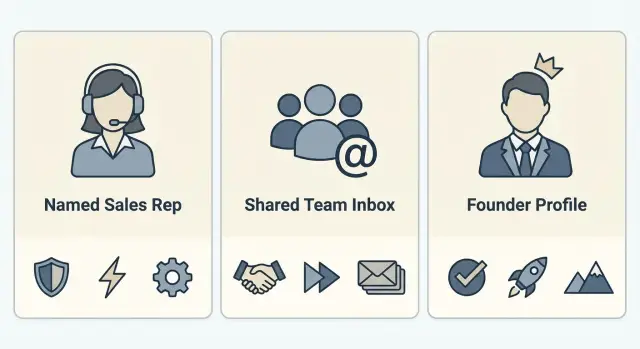
What a From address persona tells your prospects
Your From name and email address are the first story your prospect reads. Before they open the email, they make a quick call: is this a real person, a generic blast, or the founder reaching out directly?
That tiny signal shapes trust. It also shapes behavior. People open emails that feel relevant and human, and they reply when they know who they’re replying to. Even with a strong subject line, a mismatched sender identity can trigger doubt: “Who is this?” or “Why is a company email asking me something personal?”
A good from address persona strategy isn’t about tricks. It’s about matching the sender to the context. Most outbound campaigns fit into one of three sender identities:
- A real rep (example: “Maya Chen, Sales”) for one-to-one conversations and follow-ups.
- A shared team inbox (example: “Acme Partnerships Team”) when multiple people may respond.
- A founder identity (example: “Jordan, Founder”) when the message is truly founder-level.
There’s no single best choice. The right sender depends on who you’re targeting, how high-stakes the offer is, and what kind of relationship you want to start.
If you’re emailing a VP about a complex service, a named rep can signal “this will be a real back-and-forth.” If you’re confirming webinar logistics, a team inbox can feel safer. If you’re pitching a small set of strategic partners, a founder sender can increase replies, but only if the message is short, specific, and believable.
How audience and offer shape the right sender identity
Your sender identity signals one of three things: a peer reaching out, a company process, or the person who owns the decision. Getting that signal right depends less on clever copy and more on who you’re writing to and what you’re selling.
Seniority matters because people protect their attention differently. Individual contributors often respond to someone who sounds like a practical peer. Managers tend to want clarity on scope, effort, and outcomes. Executives and owners look for relevance and credibility fast, and they expect fewer, better messages.
Your offer changes the risk level. A low-risk trial or simple subscription can come from a rep or a team identity without feeling strange. A high-price, consultative sale usually needs a sender who can justify the time investment and handle tough questions. The higher the price and the more custom the solution, the more the “who is asking” becomes part of the pitch.
Deal motion is often the tie-breaker. Ask who will actually run the next step:
- Self-serve: the email’s job is to point to one action, so the sender can be a consistent identity.
- Sales-led: the sender should match the person who will book and run the call.
- Founder-led: if the founder will handle discovery or key accounts, the sender should reflect that reality.
Volume and speed matter too. If you’re sending a few highly targeted notes, a personal identity can carry more nuance. If you’re scaling outreach, a shared identity can keep replies from getting lost and reduce handoff issues, as long as the tone stays human.
Example: If you sell a $49/month scheduling tool to ops managers, a straightforward sales sender can work because the decision is low risk. If you sell a $25,000 implementation service to a founder, a founder sender often wins because the prospect expects senior attention and a consultative conversation.
Using a real rep as the sender
A real rep works best when the prospect expects a person, not a brand mailbox. If you’re reaching out to a specific role, in a specific region, or to a named account list, a human sender makes the message feel earned. Your cold email sender name becomes part of the pitch: “I work with companies like yours,” not “you’re in a generic campaign.”
It also helps when the offer needs trust over time. Multi-touch outreach is easier when the same rep stays on the thread. Prospects can reply with context, and the rep can build a relationship across touches instead of restarting every time.
When choosing which rep to use, aim for a clean match between the rep and the buyer: shared market language, sensible time zone coverage, clear ownership of the account list, and the capacity to reply quickly when someone’s interested.
If you’re running one campaign across several segments, don’t rotate rep names randomly inside the same sequence. Pick one rep per segment or territory, then keep that sender consistent through the full sequence.
Rep changes happen, so plan for continuity. The simplest approach is to keep the original thread, introduce the new rep in one short reply, and keep the signature consistent.
Example: an SDR starts outreach to 40 mid-market accounts in the Northeast, then gets reassigned. The new SDR replies on the same thread: “I’m taking over for Jordan on this. Are you still the right person for onboarding tools?”
Using a shared team inbox as the sender
A shared team inbox works when you want the email to feel like it comes from a real company function, not one specific person. This option is useful when the prospect might reasonably expect to talk to “the team” anyway.
It tends to fit best for inbound-like offers (audits, templates, quick checks), event or webinar logistics, and follow-ups where whoever is available can handle the next step.
The key is the From name. Avoid stiff labels like “Sales Team” or “Marketing.” Use something that reads like a person while staying honest, such as “Sam at Acme” or “Acme Team (Sam).” That sets the expectation that replies are handled by a group, without feeling faceless.
Where shared inboxes win or fail is reply routing. If someone replies “Yes, interested,” it has to land with an owner fast. Keep the rules simple: one person on point each day, a clear response-time expectation, and a consistent way to tag conversations (interested, not now, wrong person).
A shared inbox can hurt trust when the email asks for a high-trust action (pricing call, security review, contract talk) but the sender feels anonymous. Watch for signs like prospects asking “Who am I speaking with?” If that keeps happening, switch later steps to a real rep or founder sender, and use the shared inbox for early sorting and logistics.
Using a founder identity as the sender
A founder sender can open doors that a sales rep can’t, but only when the message matches the role. Use it when the reader expects peer-level outreach or a clear signal of accountability.
Founder emails work best for high-trust asks like an enterprise intro, partnership pitch, strategic pilot, or PR request. They also fit when your offer is new or opinionated and prospects want the “why” from the person who built it.
It feels credible when the note is specific, short, and tied to a founder-level topic (direction, risk, pricing, a customer story). It feels fake when it reads like a template, pushes a basic demo, or implies the founder personally researched dozens of accounts that day.
A simple sanity check: if the prospect replies with a question only a founder can answer, the founder identity fits. If the next questions will be seats, timelines, and setup details, a rep is usually a better match.
To protect the founder’s calendar, set boundaries up front. Offer a couple of specific time windows instead of “grab my calendar,” ask one qualifier question before booking, and be clear about handoff when needed.
If a rep needs to take over mid-thread, do it openly:
“Thanks - looping in Mia, who runs onboarding. She’ll help with next steps. I’m still on this thread if anything needs my input.”
Message and signature choices that match the persona
Your sender persona should show up in the first line people see and the last line they remember. If the name, tone, and signature feel mismatched, prospects get a trust warning even if your offer is solid.
Display name and signature basics
For a real rep, use a normal human format like “Jamie Patel” (or just “Jamie” if your brand is well known). Keep the signature light: name, role, company.
For a shared team identity, make it explicit without sounding robotic. “Jamie at Acme” or “Acme Team” sets expectations. In the signature, include one clear point of accountability, like the first name of who will respond that day.
For a founder identity, use the founder’s name (not “Founder”). Add a short credibility cue like “Founder, Acme” and keep the rest plain.
Reply-to, tone, and handoffs
Decide who answers replies before you send. If you want direct conversations, replies should go to the rep or founder mailbox. If you need speed and coverage, route replies to a central inbox and triage fast.
Tone should match the persona:
- Rep: concise, specific, low pressure.
- Team: helpful, service-minded, clear on next steps.
- Founder: direct, personal, candid about why you’re reaching out.
When you hand off, write it the way a real person would: “If it’s helpful, I can introduce you to Sam on our team who handles this day to day.”
Step by step: picking a persona for a new outbound campaign
A good from address persona strategy starts with one rule: choose one sender identity per campaign. If every email in the same sequence comes from a different person, prospects get confused and replies get messy.
Start by segmenting. The right sender depends on who you’re writing to and what you’re offering. A busy VP reacting to a “book a demo” ask may prefer a real rep, while a small business owner might respond better to the founder when the offer is high-touch.
A simple decision flow:
- Define the audience and offer in one sentence (example: “Ops managers at 50-200 person SaaS, offering a 15-minute workflow review”).
- Pick the sender type for that combo (rep, team inbox, or founder) and stick to it for the whole sequence.
- Write a short sequence that matches the persona’s role. Keep each email to one point and one clear CTA.
- Set a signature that matches the identity.
- Decide how replies will be handled the same day.
Once the basics are set, test one variable at a time. If you test sender persona, don’t also change the offer and subject line in the same experiment.
A clean A/B setup: same list, same copy, same CTA, similar send times. The only change is the sender (for example, “Maya, Sales” vs “Maya, Founder”).
Common mistakes and easy fixes
The fastest way to lose trust in outbound is to pick a sender identity that doesn’t match how you actually work. This isn’t about sounding clever. It’s about setting the right expectation for a real reply.
A common mistake is using a founder name when the founder never replies. Prospects who answer quickly feel ignored, and the next email from “the founder” looks fake. Fix: if the founder is the sender, set a rule that the founder (or a delegated assistant using the founder inbox) replies within a clear window. If that’s not realistic, switch the sender to a real rep or a team inbox and say so early.
Another mistake is switching sender identities mid-sequence with no explanation, like starting as “Mia from Sales” and suddenly following up as “Alex, Founder.” Fix: keep one identity for the whole sequence, or make the handoff explicit: “Looping in Alex, who handles partnerships.”
Shared inboxes also fail when they’re over-personalized. A “Sarah” sender with a signature that says “The Team” feels inconsistent. Fix: make the cold email sender name honest and simple, and make the signature match.
The most expensive mistake is letting hot leads sit. The persona you choose changes who should respond and how fast. Fix it with a small workflow: decide who owns replies before sending, assign a backup owner, define what “hot” means, and set a response-time target you can actually meet.
Quick checklist before you hit send
Before you launch a new sequence, do a final pass. The goal is simple: the sender identity feels believable, replies get handled fast, and you don’t hurt deliverability on day one.
- From name matches the voice. If the email reads like a person, use a person. If it reads like a team note, use a team sender.
- You can explain the choice in one sentence. If you can’t say it simply, prospects will feel the mismatch.
- Replies land with the right owner within one business day. Confirm who monitors the inbox and how interested replies get assigned.
- Domain and mailbox are warmed up before you scale. Start low volume, then ramp gradually.
- Authentication is in place before sending. Verify SPF, DKIM, and DMARC for the sending domain.
One last check: read the first email out loud and compare it to the sender identity. If it sounds like “a company” but comes from a founder, or sounds like a founder but comes from “Sales Team,” adjust the copy or the sender.
A realistic example: one offer, three sender choices
Imagine you sell the same offer to everyone: a done-with-you outbound setup that includes buying a sending domain, warming mailboxes, and launching a first sequence.
The offer stays the same. The best sender doesn’t.
Segment 1: Business owners (high ticket, trust matters)
For founders and owners, the goal is credibility fast. A founder identity can get more reads because it signals, “This is important enough for the top person to reach out.”
A simple workflow: the founder sends the first touch to owners, and once someone replies with interest, a rep takes over for discovery and next steps. The handoff feels natural because the founder opened the door.
Segment 2: Sales leaders (they compare tools and process)
For SDR managers or heads of sales, a real rep often works better than a founder. They expect someone who can answer practical questions without sounding like an executive drop-in.
After interest, use a team inbox only for logistics like scheduling, billing contacts, and access.
Segment 3: Operations-heavy teams (shared ownership)
For RevOps or sales ops, a shared team inbox can be the best primary sender because their questions are usually about setup and compliance: domains, authentication, warm-up, and who has access.
Same offer, three sender choices:
- Founder identity: best when the buyer values trust and speed more than details.
- Real rep: best when the buyer wants a peer-to-peer conversation.
- Team inbox: best when multiple people will be involved from day one.
That’s the point of a from address persona strategy: match the sender to how the buyer prefers to make decisions, not just who’s available to send the email.
Next steps: standardize sender personas without extra tools
Once you have a working from address persona strategy, treat it like a reusable playbook. Pick one sender persona per segment (SMB owners vs enterprise managers) and run it long enough to judge reply quality, not just open rates. More replies don’t help if they’re mostly confusion, wrong person, or unsubscribes.
Standardization is mostly setup. If every campaign starts from scratch, you’ll keep changing too many variables at once.
Write down a default you can repeat: naming rules for each persona, one signature template per persona, warm-up for new mailboxes, and an authentication check before you scale.
Fast follow-up matters as much as the sender name. If replies sit untriaged, even the “perfect” persona looks bad.
If you want to keep the operational parts simple, LeadTrain (leadtrain.app) is built around having domains, mailboxes, warm-up, sequences, and reply classification in one place, so you can focus on the persona and the conversation instead of tool-hopping.
FAQ
How do I choose between a rep, a team inbox, and a founder as the From sender?
Default to one real person when the email is trying to start a conversation and you expect replies with questions. Use a team inbox when speed and coverage matter more than a single relationship, like logistics or quick checks. Use a founder only when the message is truly founder-level and the founder (or someone delegated on that mailbox) can respond fast.
Should I use multiple senders in the same cold email sequence?
Don’t rotate senders inside one sequence because it creates confusion and lowers trust. Pick one sender identity per campaign and keep it consistent from first touch to final follow-up. If you need coverage, solve it with reply routing, not random sender changes.
What’s a good From name for a shared team inbox that doesn’t feel spammy?
Use a name that feels human but stays honest about being shared, so the recipient isn’t surprised when someone else replies. A format like “Sam at [Company]” or “[Company] Team (Sam)” usually reads better than “Sales Team.” Then make sure the signature matches the same idea.
When does using a founder identity help, and when does it backfire?
Only send as the founder if the founder can actually handle replies or has a clear delegated process on that inbox. Keep the email short, specific, and tied to something the founder would realistically care about. If the next steps are mostly scheduling, seats, and setup details, a rep sender will usually feel more believable.
How do I pick which sales rep should be the sender for a campaign?
Match the rep to the segment so the conversation feels natural and the rep can respond quickly. Keep ownership clear by territory, industry, or account list so prospects don’t get bounced around. Consistency matters more than picking the “perfect” name.
Who should handle replies, and how fast should we respond?
The simplest default is: whoever appears as the sender should be responsible for same-day triage of replies. If you need team coverage, route replies to a shared inbox but assign a daily owner so interested responses don’t sit. Slow replies make any sender persona look fake.
How can I A/B test sender persona without messing up the results?
Run a clean test where the list, subject, offer, and copy stay the same and only the sender persona changes. Judge the result by reply quality, not just opens, because opens don’t tell you whether people trust the sender. Give it enough volume to see a real difference, then standardize the winner for that segment.
What’s the best way to hand off a thread from founder to rep (or rep to team)?
If you must change, do it on the same thread and explain it in one plain sentence so it feels like a normal handoff. Keep the signature consistent and make it clear who owns next steps. Silent switches are what trigger “Who is this?” replies.
How do sender persona choices affect deliverability and spam risk?
Warm up new mailboxes before scaling volume and ramp sending gradually so providers trust the sender. Make sure SPF, DKIM, and DMARC are set up correctly for the sending domain before you start. Platforms like LeadTrain can simplify this by combining domains, mailboxes, warm-up, sequences, and reply classification in one place.
Should I use Reply-To differently for a rep sender versus a team inbox?
Use Reply-To when you need one inbox to collect responses while keeping a consistent From identity for the campaign. Keep it simple: recipients should clearly understand who they’re replying to and who will respond. If Reply-To creates confusion, switch to direct replies to the sender mailbox for that sequence.