Email verification strategy for outbound lists: timing and catch-all
Email verification strategy for outbound lists: when to validate, when to re-validate, and how to treat catch-all domains to cut bounces without losing leads.
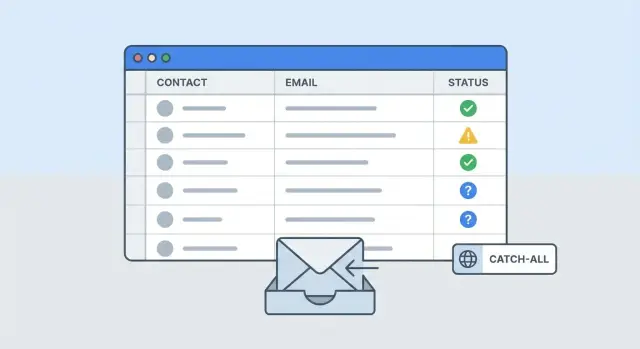
What problem email verification is solving (and what it is not)
Email verification reduces avoidable risk before you hit send. It checks whether an address is likely to bounce, so your campaign does not rack up hard bounces that damage sender reputation.
It helps most with the boring, expensive failures: typos, dead inboxes, and domains that are no longer set up to receive mail. The goal is straightforward: lower your bounce rate without gutting your list.
Verification is good at catching obvious problems, like malformed addresses, domains that cannot receive mail, and mailboxes that probably no longer exist. It can also flag risk patterns so you can segment your list and send more carefully.
What it cannot promise is just as important. A “valid” result does not mean the email will land in the inbox, get opened, or get a reply. It only means the address probably exists and can receive mail.
So don’t treat verification as a deliverability guarantee. Inbox placement is decided by Gmail, Outlook, and other providers. A real person can still ignore you. And some servers accept mail first and bounce later, so “zero bounces” is not realistic.
Outbound lists go stale quickly. People change jobs, companies change domains, and inboxes get disabled. A list that was clean last month can quietly rot as roles shift and IT policies change.
A concrete example: you pull 2,000 “Head of Sales” contacts from a data provider. If you verify and remove only the clear hard-bounce risks, you might keep 1,850 addresses and protect your domain. If you over-prune every “maybe” result, you might drop to 1,200 and lose real opportunities for little extra safety.
The main types of bad email risk in outbound lists
A useful verification strategy starts by naming the risks you’re trying to avoid. Not all “bad” emails fail for the same reason, and different problems need different rules.
Some issues are simple syntax problems: typos and formatting mistakes like missing “@”, extra spaces, or a malformed domain. These are the easiest to remove.
Next are domain-level problems. The address looks fine, but the domain cannot receive mail. Common cases include domains with no MX records, parked domains, or broken DNS setups. If the domain cannot accept email, every address at that domain is effectively dead, even if the mailbox name looks real.
Then you have mailbox-level results: valid, invalid, and unknown. “Valid” usually means the verifier saw signs the mailbox exists. “Invalid” means it almost certainly does not. “Unknown” is the tricky bucket, often caused by servers that block checks, rate-limit, or hide mailbox existence behind strict settings.
Role accounts and shared inboxes are another category. Addresses like info@, sales@, support@, or careers@ may be real, but they often go to a team inbox with lower reply rates and higher complaint risk if your message is too generic.
Finally, watch for disposable or temporary email addresses. They’re designed to be used once and abandoned, and they can inflate bounces and complaints.
If you pull a list of 1,000 prospects and see 40 syntax errors, 30 addresses on domains with no MX, and 120 “unknown,” treat each group differently instead of deleting everything that is not “valid.”
The most common flags worth separating are:
- Syntax or formatting errors
- Domains that cannot receive mail (no MX, parked, broken DNS)
- Confirmed invalid mailboxes
- Role or shared inbox addresses
- Disposable or temporary emails
When to validate an outbound list
Validate before you send the first email, not after you see bounces. A bounce is already a deliverability signal, and you do not want your first campaign to be the one that teaches inbox providers to distrust a new domain or mailbox.
The best time is right after you build or import the list. You still have context (where the lead came from, how fresh it is, what fields are missing), and it is easier to fix basic issues like typos, wrong domains, and duplicates.
Be extra strict with higher-risk sources. Scraped or purchased lists often contain outdated roles, recycled inboxes, and copy-paste errors that look fine until they bounce.
A simple pre-send routine:
- Validate immediately after list building or import.
- Re-validate after any enrichment step that generates or changes emails (pattern guesses, first.last generation).
- Re-validate after dedupe or normalization if it edited addresses.
- Re-validate right before launch if the list has been sitting for a while.
Skipping validation can be reasonable for small, high-trust lists. If you have 40 contacts who opted in at an event last week and you are writing a personal follow-up, you might accept the small risk to move faster. Even then, a quick syntax and domain check is still worth doing.
One common trap: you import 2,000 prospects, then enrich missing emails by generating addresses from a company pattern. Those generated emails were never checked. That enrichment step should automatically trigger re-validation before sending.
If you’re setting up a new campaign in a platform like LeadTrain, treat verification as a gate before sequences start so you’re not learning about bad addresses through live bounces.
When to re-validate (cadence that matches reality)
Re-validation is about time, not perfection. Addresses go stale when people change jobs, companies merge, domains expire, or inbox rules tighten. Different sources decay at different speeds, so one schedule for everything usually fails.
CRM leads you spoke with recently usually stay usable longer than scraped or purchased data. A lead who filled a form last month is less likely to bounce than a name pulled from an old directory.
A simple cadence that matches reality:
- Scraped or heavily enriched lists: every 2 to 4 weeks, and always right before a send.
- Cold lists from a one-time event or webinar: every 1 to 2 months.
- Active CRM leads (activity in the last 90 days): every 3 to 6 months.
- Old CRM records with no activity: re-validate before you email them again.
Time windows help, but triggers are better. Re-validate when something changes: a job-change signal, a new company domain, a spike in hard bounces from a segment, or a domain that starts returning more “unknown” results than usual.
Also, only re-validate what you plan to mail next. If you are planning a two-week outbound push, validate that segment now. Don’t spend money cleaning records you will not touch for months.
Long-running sequences need extra care. If follow-ups run for 30 to 60 days, validate before the sequence starts. If you see warning signs mid-sequence (bounce rate creeping up, more “mailbox full,” more “unknown”), re-check the remaining not-yet-sent contacts rather than reprocessing the whole database.
How to read verifier results and turn them into rules
Verifier outputs only help if they become simple decisions your team follows every time. Map each status to one action, then stick to it.
Most tools label addresses as valid, invalid, risky, unknown, or catch-all. Treat those labels as probability, not truth. “Valid” means “safe enough to try.” “Invalid” means “do not send.” Everything else needs a consistent policy.
“Unknown” is not the same as invalid. Unknown often means the mail server would not confirm the mailbox (timeouts, greylisting, strict providers). Some unknowns are real people. If you delete them all, you can cut your list far more than you expect.
Role accounts deserve separate handling. They can be monitored by a team, have tougher filters, and may trigger higher complaint rates. If your offer is not clearly relevant to a shared inbox, skip them, or only test them in a small batch.
A rule set that avoids constant debate:
- Valid: include in the main send.
- Invalid: suppress permanently.
- Risky: send only in a small test segment, or hold back if you already have enough volume.
- Unknown: re-check later, then test in small batches if it stays unknown.
- Catch-all: do not auto-delete; treat as “unknown with extra caution.”
To keep this repeatable, log enough detail that decisions are auditable later: verification status and date, the tool or method used, any domain notes, any manual override reason, and the eventual send outcome (bounce, reply, unsubscribe).
Catch-all domains: what they mean and why over-pruning happens
A catch-all (also called accept-all) domain is a company email setup that will accept messages sent to almost any address at that domain, even if the exact mailbox does not exist. So [email protected] looks deliverable to the mail server, at least during early delivery checks.
That is why verifiers struggle. Many tools try to confirm a specific inbox by checking the mail server and, in some cases, simulating part of the delivery handshake. On a catch-all domain, the server says “yes” for many addresses. The verifier cannot reliably tell the difference between a real person (jane@) and a made-up inbox (jnae@). Results often come back as “accept-all,” “unknown,” or “risky,” not “valid.”
The risk is not just bounces (though bounce uncertainty is real). Catch-all segments often have lower reply rates because lists tend to include more guessed addresses. You may send more emails to reach the same number of conversations.
Over-pruning happens when teams delete every contact marked accept-all to “be safe.” That usually removes a large chunk of real prospects, especially in industries where IT teams commonly enable catch-all. You protect bounce rate, but you also cut your pipeline.
A better approach is to control risk with segmentation instead of blanket removal. Keep catch-all contacts, label them as a separate segment, send them in smaller batches, and watch bounces and replies closely. Suppress immediately on any hard bounce or unsubscribe.
If your outbound platform supports separate sending plans and automatic suppression, you can test catch-all safely without putting your best-performing segment at risk.
Step-by-step workflow: from raw list to a safe send plan
A workable strategy is less about finding a perfect list and more about building a routine you can run every time.
1) Prep and verify (so results are consistent)
Clean the file before you verify. Small formatting issues can turn into false negatives.
Deduplicate by email address, normalize to lowercase, and fix obvious typos (like gmial.com). Then run verification and save the full result with a timestamp, not just “valid/invalid.”
After verification, treat the output like decision inputs, not a single on/off switch.
2) Turn results into a send plan
Segment into three groups and decide what to do with each:
- Send now: deliverable, non-risky, no red flags.
- Send cautiously: “unknown,” “accept-all/catch-all,” or borderline signals.
- Do not send: confirmed invalid, disposable, repeated bounces, or explicit do-not-contact.
Many teams also separate role accounts, disposable domains, and free inboxes (Gmail/Yahoo) as a second pass. You might still email some of these, but they should not be mixed into your main volume on day one.
Before you roll out to the full segment, create a small test batch. If you have 2,000 “send now” contacts, start with 100 to 200 across a mix of domains and job titles. Watch bounce rate, complaints, and reply quality, then scale.
Finally, re-validate before each new wave if time has passed. If you verified weeks ago and you are about to resend or expand volume, re-check the next batch.
How to send to risky segments without hurting your main domain
Risky segments (catch-all, “unknown,” recently changed companies) are not always bad. They are just less predictable. The goal is to keep your core sender reputation safe while you learn which parts of that segment behave well.
Start with your strongest segment first: verified, non-catch-all, and aligned with your offer. Once early performance looks stable, introduce the riskier segment slowly so one noisy pocket does not drag everything down.
A safe plan most teams can follow:
- Split lists into Strong, Medium, Risky (catch-all/unknown), and Do-not-send.
- Send Strong first, then add Medium, then test Risky last.
- Keep Risky batches smaller and slower than your normal cadence.
- If possible, isolate Risky traffic with a dedicated mailbox pool or separate sending domain.
- Stop quickly if bounces jump early, then tighten rules before scaling.
If you use multiple sending domains or mailboxes, use them to isolate risk, not to “hide” bad data.
Copy matters more than people expect. For risky segments, keep the message short, specific, and clearly relevant. Avoid spammy wording, heavy formatting, and too many links. A small, honest ask like “Is this the right person for X?” usually gets fewer complaints than a big pitch.
Example: you have 2,000 prospects: 1,400 look strong, 400 are medium, and 200 are catch-all. Send the 1,400 first. Once bounce rate and complaints look stable, test the 200 catch-all as 20 to 40 emails per day from a separate mailbox group. Only scale if results stay clean.
What to do after you send: bounces, replies, and suppression
Verification is your best guess before the send. After you send, you get facts. Use those facts to tighten your rules and protect deliverability in the next campaign.
Start by separating hard bounces from soft bounces. A hard bounce (user does not exist, invalid mailbox) is a permanent failure. Suppress it immediately and never email it again. A soft bounce (mailbox full, temporary issue, rate limited) is not always permanent, but repeated soft bounces are a warning. If an address soft-bounces two or three times across different days, treat it like a hard bounce and suppress it.
Replies need consistent handling too. The goal is simple: do not ask someone the same question twice.
- Interested: stop the sequence and move to your next step.
- Not interested: stop and suppress from future campaigns unless you have a clear reason to follow up later.
- Out-of-office: pause and reschedule after the return date (or a safe default like 7 to 14 days).
- Unsubscribe: suppress instantly, no exceptions.
- Bounce: suppress immediately and tag the segment it came from.
Unsubscribe handling matters for reputation and compliance. Even one missed unsubscribe can turn a normal campaign into complaints, blocks, and a damaged sender reputation.
Track outcomes by segment so your rules improve. Compare sources (data provider export vs manual research), risk levels (verified vs catch-all), and other patterns you can act on. If catch-all addresses from one slice bounce 4x more than others, lower volume there or require revalidation sooner.
Common mistakes that create bounces (even with verification)
Verification helps, but it is not a shield. Bounce spikes usually happen when teams treat verifier results as final truth, then send too fast or without clear rules.
A classic mistake is deleting every catch-all result. Catch-all means the domain accepts mail for many addresses, so a verifier cannot confirm the exact inbox. Many of those contacts are real. If you purge them, you lose good leads. If you blast them, you risk bounces. The fix is to route catch-all and “unknown” into a slower, smaller test segment.
Another common mistake is validating once and assuming the list stays clean. People change jobs, companies rework mail systems, and inboxes get disabled. Re-check older leads right before you send, especially if the list has been sitting for weeks.
Volume and reputation mistakes
Even a clean list can bounce if you mail risky segments at full volume on day one. Ramp up sending, and keep new domains and mailboxes on warm-up so you do not look like a sudden burst. This matters most when you add a new sending domain or switch providers.
A quick sanity check: avoid treating catch-all as invalid, sending “unknown” at the same pace as “valid,” skipping warm-up and basic domain setup checks, reusing old lists without a pre-send re-validation, and losing your audit trail across scattered tools.
Tool sprawl hides the real problem
When validation, sending, and reply tracking live in different places, it is easy to lose track of what was verified, when, and under which rules. That is how teams end up re-mailing bounced addresses or forgetting to suppress them.
Checklist and next steps for a repeatable verification routine
A good strategy is doing the same sensible steps every time.
Pre-send checks (5 minutes)
Confirm these before you load contacts into a sequence:
- Validation date is recent enough for the list source.
- Your top domains look normal (no sudden spike in a single provider or company domain).
- The “risky” share is within your comfort zone (especially unknown and catch-all).
- Suppression is on (previous bounces, unsubscribes, and do-not-contact).
- Bounce monitoring and unsubscribe handling are ready so you can spot issues quickly.
If any of these fail, pause and fix the input. Sending “just to test” often turns into sending to the worst segment first.
Mini test batch plan for catch-all heavy lists
Catch-all does not mean “bad.” It means you should learn with a small, controlled send.
Pick a small batch (30 to 100 contacts) and send a simple first step at low volume. Keep the rest on hold. If bounce rate stays low and replies look normal, expand gradually. If bounces jump, stop and tighten rules (revalidate sooner, filter role accounts more aggressively, or improve enrichment quality).
What to document so your team stays consistent
Write down your rules in plain language: revalidation timing by list source, what you do with unknown and catch-all, your maximum acceptable bounce rate, and who can approve exceptions. Add one example decision so new teammates do not guess.
If you want to run this workflow without juggling multiple tools, LeadTrain (leadtrain.app) keeps domains, mailboxes, warm-up, sequences, and reply classification together, which makes it easier to apply suppression and segmentation rules consistently as you scale outbound.
FAQ
What problem does email verification actually solve for cold outreach?
Email verification helps you avoid preventable hard bounces by checking whether an address is likely to exist and whether the domain can receive mail. It’s mainly about reducing obvious failures like typos, dead inboxes, and broken domains before you send.
Does a verified email mean I’ll land in the inbox and get replies?
No. A “valid” result only suggests the mailbox probably exists and can receive mail. Inbox placement, opens, and replies depend on providers and your sending behavior, so verification is a risk-reduction step, not a promise of performance.
How should I interpret common verifier statuses like valid, invalid, unknown, and risky?
Treat them as probabilities and convert them into consistent rules. “Valid” is usually safe enough to try, “invalid” should be blocked, and “unknown/risky/catch-all” should be handled in a separate, slower test segment instead of being auto-deleted or blasted.
What should I do with emails marked “unknown”?
“Unknown” often means the server wouldn’t confirm the mailbox because of rate limits, strict settings, or timeouts, not that the address is fake. A practical move is to re-check later and, if it stays unknown, send in small batches while watching bounces closely.
What is a catch-all domain and why do verifiers struggle with it?
A catch-all domain accepts mail for many addresses, so verifiers can’t reliably confirm whether a specific mailbox exists. Don’t automatically purge catch-all contacts; segment them, send more slowly, and suppress immediately on any hard bounce or unsubscribe.
When should I validate an outbound list?
Validate right after you build or import the list, before the first email goes out. If you enrich or generate emails (like guessing patterns such as first.last), re-validate after that step so you’re not sending to untested addresses.
How often should I re-validate emails in my database?
Re-validate based on how fast the source goes stale. A simple default is every 2–4 weeks for scraped/heavily enriched lists, every 1–2 months for one-time event lists, and every 3–6 months for recently active CRM leads, plus always before emailing an older segment again.
Are role-based emails (info@, sales@, support@) worth emailing?
Role accounts like info@ or sales@ can be real, but they often have lower relevance and higher complaint risk if your message is generic. If you do email them, keep it highly specific and consider testing them in a smaller segment rather than mixing them into your main send.
How can I email risky segments without hurting my main domain?
Separate your list into strong and risky segments and introduce risk gradually. Send the strongest verified segment first, then test catch-all/unknown in smaller, slower batches, ideally from a dedicated mailbox pool or separate sending domain so issues don’t spill into your main reputation.
What should I do after sending if I get bounces or unsubscribes?
Use post-send results as your ground truth. Suppress hard bounces immediately, stop sequences on unsubscribe without exceptions, and treat repeated soft bounces as a signal to stop mailing that address; then review bounce rates by segment so you can tighten rules where problems actually come from.