Email threading in sequences: when to keep context vs restart
Learn when email threading in sequences helps keep context and when a fresh subject line gets better replies, with simple rules, examples, and checklists.
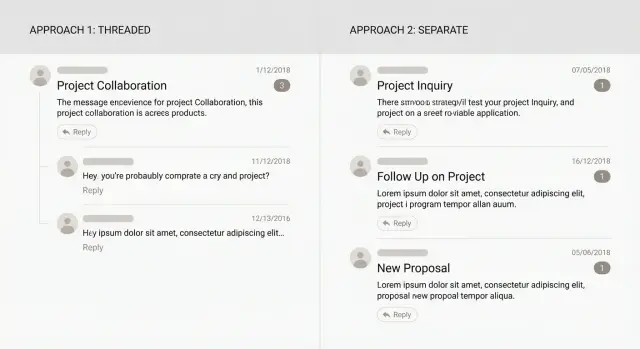
What threading vs new emails actually means
Threading means your follow-ups stay inside the same conversation. In most inboxes, messages stack under one subject line, often with "Re:" added automatically.
Starting a new email means each step in your sequence becomes its own conversation. It gets a fresh subject line, and it shows up as a separate item in the recipient's inbox.
That small choice changes how people experience your outreach. With a thread, the reader can scroll up and see what you said before, what they ignored, and the context you already gave. It feels closer to a normal back-and-forth.
A new email does the opposite. It asks the recipient to decide without the full history right in front of them. Sometimes that helps (it feels lighter, or you have a new angle). Sometimes it just feels like more noise.
From the recipient's side, the difference is simple:
- Threaded: one inbox line with the full story in one place.
- New email: multiple inbox lines that all compete for attention.
Threading reduces friction when someone finally replies because the context is already there. Starting fresh can lift opens when the original subject stopped working.
What goes wrong is usually about mismatched expectations. Threading can confuse people if your follow-up changes topic but keeps the old subject. New emails can feel spammy if someone sees three separate messages in two days.
Many sequence tools support both approaches, including LeadTrain, so the real decision is what you want the email to feel like: "same conversation" or "new, quick note."
When keeping one thread is the better choice
Keeping follow-ups in the same thread works best when the reader benefits from seeing the whole story in one place. It feels like a conversation, not a series of separate pitches.
A single thread shines when you already shared the key context and your follow-up is just moving things forward. If your first email asked a clear question, a threaded follow-up can be one or two lines pointing back to it. The prospect doesn't have to search for the earlier message or guess what you mean.
Threading is also the safer choice once there has been any back-and-forth. If someone replies and you start a brand-new email, it can look like you ignored them. Staying in the same thread keeps the timeline intact.
Threading is usually the better choice when:
- You're continuing a real exchange (questions, objections, next steps).
- You're referencing a specific detail they already saw.
- You're scheduling and you've already suggested times.
- You're making a small correction or clarification.
The main benefit is lower effort. A busy person scanning their inbox can see the subject, your earlier message, and your latest line in one view. That makes it easier to answer with a quick "Yes," "Not now," or "Talk to my colleague."
Example: you email a Head of Sales about improving outbound reporting and ask, "Is this a priority for Q1?" Two days later, replying in-thread with "Quick check: is this on the Q1 list, or should I circle back later?" works because the original question is right there.
When a fresh subject line works better
A new email (a new thread) gives you a clean reset. It's useful when the first subject line didn't earn attention, or when your follow-up needs a different reason to care. Starting fresh isn't "less polite" when it's clearer.
A fresh subject line tends to work best when:
- You have a genuinely new angle (new pain, new proof, new offer).
- The earlier email was ignored and the original subject feels stale.
- You're switching use cases or speaking to a different persona.
- You're re-engaging after a longer gap (often 2-4+ weeks).
- The old thread got long or messy and your next step needs to be simple.
Example: you emailed a VP about "outbound meetings" and got no reply. Two weeks later you learn they just hired three SDRs. That's a different trigger. A new email with a subject like "New SDR team - quick question" can beat replying to an old thread they never opened.
How to keep it respectful
A new thread should still feel connected, not random. Keep the first line honest and short: mention you reached out before, then state what's new. Avoid "Just bumping this" unless you add real value.
Also watch timing and volume. If you send a new subject every day, it can look spammy and damage trust. A good rule is simple: restart only when there's a clear reason.
Aim for a subject that matches the message. If the email is about a different outcome, the subject should say so.
A simple decision process you can use every time
Most people choose threading vs a new email by habit. A better approach is deciding based on what you need the reader to do next, and how much effort you're asking from them.
- Start with the outcome. If the next step is a quick yes/no reply, make it easy. If the goal is a meeting, you may need a little more framing.
- Ask: would they say yes without reading anything below? If no, a thread often helps because the context is already there. If yes, a fresh email can work because it's focused.
- Check the time gap. If you emailed yesterday, the thread is still "alive." If it's been two weeks, the old subject may be buried.
- Match your first line to the format. Threaded follow-ups can be a short nudge. New emails need a one-line reminder of who you are and why you're reaching out.
- Keep the action small and consistent. One clear next step beats multiple options.
Example: you sent a short note offering a 10-minute call to compare notes. If your follow-up is just "Worth a quick chat?" keeping the same thread makes it feel like a continuation. But if your follow-up introduces a different angle (a specific problem you noticed), a new email with a clear subject can reset attention.
If you're running sequences as a team, write down one shared rule: thread when you're nudging the same ask with the same context; restart when the angle changes or the thread is likely stale.
How to write the message for each approach
When you keep one thread, you're borrowing context you've already earned. When you start fresh, you're earning attention again. The writing should match.
Writing a follow-up inside the same thread
Threaded follow-ups work best when they're short. Anchor the reader to the last message, then move things forward with one clear next step.
A simple pattern:
- Reference the earlier note (what you offered or asked).
- Add one new detail (a result, a tighter question, a specific reason).
- Ask for a low-effort reply (yes/no, or two time options).
Example (threaded):
"Quick bump on this - are you the right person for outbound at Acme, or should I talk to someone else? If it's you, happy to share a 2-sentence plan for how teams usually improve replies without changing their offer."
Writing a new email that still feels related
A new email should read like a fresh start, not a forwarded essay. Use a light callback so it doesn't feel random, but don't paste the whole history. Then get to the point faster than you did the first time.
Example (new email):
"Different angle than my last note: are you open to a quick test to see if your current list is the issue, or the message? I can send a small checklist to diagnose it."
For subjects, keep them short, specific, and human. A few patterns that usually hold up:
- "Quick question about {{topic}}"
- "{{Company}} + {{outcome}}"
- "Idea for {{team}}"
Attachments, calendars, and proposals can hurt readability. If you must include something, summarize it in one sentence and save the heavier material until they've shown interest.
Common mistakes that hurt replies
Reply rates usually drop for simple reasons: the prospect gets confused, annoyed, or can't quickly understand why you're emailing again.
One common trap is threading after a non-reply and sounding passive-aggressive. Lines like "Just bumping this again" or "Did you miss my email?" add pressure without adding value. If you stay in the same thread, earn the follow-up with something new: a clearer benefit, a shorter ask, or a specific reason you picked them.
The opposite mistake is restarting too often. A fresh subject works best when you truly reset the angle. If the body still reads like "following up on my last email," the new subject feels like a trick.
Mistakes that show up again and again:
- Replying in-thread but switching to a totally new topic.
- Changing too many variables at once (offer, CTA, subject), so you can't tell what worked.
- Keeping the same subject but writing like it's the first time you contacted them.
- Starting a new thread but using "Re:" language or pretending you already talked.
A quick way to catch most of this is to review your first two lines before sending:
- Do they match the subject and the thread choice?
- Is there one clear reason to reply now?
- Is the ask small and specific?
If you're A/B testing, keep experiments tight: test one change at a time.
Quick checks before you hit send
Before you choose between replying in the same thread or starting a new email, take 30 seconds to picture what the recipient will see first: inbox preview, subject line, and the last thing you asked them to do.
Thread or new email? Use this quick checklist
- If they've replied before (even once), stay in the same thread.
- If your next step depends on earlier details (pricing you shared, times you suggested, a question they asked), keep the thread.
- If your last email asked a clear question, follow up once in-thread before changing anything.
- If it's been more than 2 to 3 weeks, a new subject can make the message feel current again.
- If you're introducing a new offer, new use case, or a different sender, start a new email with a clear subject.
Final sanity checks
After you pick thread vs new:
- Read the last message and make sure your opener still makes sense.
- Keep the opening specific (their role, a goal they mentioned, a prior answer).
- Make the ask match the moment: if they engaged, ask for time; if they haven't, keep it low-effort.
- Check timing: a follow-up 20 minutes later looks careless.
Example: if Jordan replied "Check back next month," replying in-thread with "Still OK to revisit this week?" feels consistent. If it's been a month and you're pitching a different use case, a fresh subject resets expectations.
Example: one prospect, two different follow-up paths
You email Maya, a Head of RevOps, about a small fix you can offer. She doesn't reply to the first two messages. A week later she answers: "Not now, maybe next quarter."
From here, you have two good options. The right one depends on what you want her to do next.
Path A: keep the same thread to keep context
Use this when you're still working the same idea and you want Maya to see the full history without hunting.
A simple thread might look like:
- Original email: one clear problem, one clear ask (15-minute call).
- Follow-up in the same thread: add one new detail (quick proof or a short example).
- After "not now": reply in-thread and make it easy to defer.
Your reply could be:
"Totally fair. If next quarter is better, what month should I circle back? If it helps, I can also send a 3-bullet plan you can forward internally."
Path B: restart later with a fresh subject line (re-engagement)
Use this when time has passed (for example, 6-10 weeks), priorities likely changed, or you have a new angle.
Example re-engagement:
Subject: "Quick idea for reducing manual routing in Q2"
Body: "Hi Maya - you said next quarter might be better, so I'm checking back. Since then, we found one change that cut reply handling time by 20% for a similar team. Worth sharing the 2-minute outline?"
What to track so you know which path wins:
- Reply rate
- Positive reply rate (interest or meetings)
- Time to first reply
- Unsubscribe and bounce rate
Testing and measuring what works in your sequences
Threading vs starting a new email changes what the prospect actually sees. That matters for testing, because a "subject line test" doesn't mean much if half your audience never sees the new subject.
If you want to compare threading against a fresh subject fairly, run it as a step-level split where the only difference is the approach. For example, at follow-up #2, half your prospects get a reply in the same thread, and the other half get a new email with a new subject.
Tie the metric to the thing you changed. With a fresh subject, opens can be useful alongside replies. With threading, opens are less reliable, so focus on replies, especially positive replies.
To keep results clean, change only one variable at a time: subject (only if restarting), first line, CTA, offer, or timing.
Threading often works better once someone has shown engagement. Restarting can be better for prospects who never interacted at all. If you report results, split them into two groups: people who replied at least once vs people who never replied.
Next steps: make it consistent across your outreach
Consistency beats cleverness. When your team uses the same basic rules for threading and restarts, prospects get a more predictable experience and you get cleaner data.
Write down your default rules in one place and keep them practical. Then audit one active sequence and label each step as either "thread" or "new subject." You'll usually spot the odd steps right away, like a thread that suddenly changes topic or a restart that forgets to explain why you're reaching out.
If you want everything in one place, tools like LeadTrain can help you manage the mechanics around outreach (domains, mailboxes, warm-up, and multi-step sequences) and reduce manual sorting by automatically classifying replies like interested, not interested, out-of-office, bounce, or unsubscribe. That makes it easier to apply your thread vs restart rules consistently, especially across a team.
FAQ
What does “threading” mean in an email sequence?
Threading means your follow-ups are sent as replies in the same conversation, so they appear stacked under one subject line in the recipient’s inbox. It helps the reader see the full context without searching for earlier messages.
What counts as “starting a new email” instead of threading?
A new email starts a separate conversation with a fresh subject line, so it shows up as a new inbox item. This can help you earn attention again when the original subject went stale, but it also creates more inbox clutter if you overdo it.
When should I keep follow-ups in the same thread?
Use a thread when your follow-up is truly a continuation of the same ask and the earlier context makes it easier to answer. It’s especially important once you’ve had any back-and-forth, because switching to a new thread can look like you ignored their reply.
When is it better to send a fresh email with a new subject line?
Start a new thread when you have a genuinely new angle, a new trigger, or you’re re-engaging after a longer gap and the old subject is buried. The goal is clarity: the subject should match what’s new, not just disguise the same message.
How long should I wait before restarting with a new subject?
If it’s been within a few days, threading usually feels natural and keeps the conversation “alive.” If it’s been a couple of weeks or more, a new subject can make the message feel current again, as long as you briefly remind them you reached out before.
How do I write a good threaded follow-up without sounding annoying?
In a thread, keep it short and assume they can see what you said last time. Add one new helpful detail and end with a small, specific ask so they can reply quickly without rereading everything.
How do I write a new-thread follow-up so it doesn’t feel random?
A new thread should earn attention fast, so open with a one-line reminder of who you are and what changed since your last note. Avoid pretending you already have a conversation if you don’t, and make the email feel like a clean, focused note rather than a recycled follow-up.
What are the most common mistakes with threading vs new emails?
Threading can confuse people when your follow-up changes topics but keeps the old subject, because the subject no longer matches the content. New threads feel spammy when you send several separate emails close together, because it looks like you’re trying to flood the inbox instead of being helpful.
How can I test whether threading or restarting works better?
Test it at a specific follow-up step and change only the thread choice, not the offer, timing, and CTA all at once. Measure replies and positive replies first; opens are more useful when you restart with a new subject, and less reliable when messages are threaded.
How does LeadTrain help me manage threading and follow-ups in sequences?
LeadTrain supports both threaded follow-ups and new-email steps inside multi-step sequences, so you can standardize the rule your team uses. It also helps with the rest of the workflow—domains, mailboxes, warm-up, and automatic reply classification—so you spend less time managing mechanics and more time acting on interested replies.