Email suppression list: build and maintain it without gaps
Learn how to build an email suppression list that reliably captures unsubscribes, do-not-contact requests, competitors, customers, and duplicates.
What a suppression list is (and why it matters)
An email suppression list is a simple “do not send” file. It’s where you store addresses and identities you should never email again, no matter which campaign you run. Think of it as a safety net: before every send, you check your prospects against it and remove matches.
It matters because sending to the wrong people has a real cost. If you keep emailing someone who unsubscribed or asked you to stop, you push them toward spam complaints and angry replies. If you keep emailing bad addresses, you rack up bounces. Both hurt your sender reputation and drag down inbox placement for people who might actually want to hear from you.
A suppression list is not a lead list. It’s not a place to “park” low-priority prospects. It’s also not a blunt blacklist like “never email @gmail.com.” Good suppression is specific: individual people, specific mailboxes, and known no-go targets.
It also doesn’t need to be perfect to work. A simple process that runs every time beats fancy tooling that gets skipped. If your team reliably adds every unsubscribe, do-not-contact request, and hard bounce to one shared suppression list, you stop repeat mistakes across campaigns and protect deliverability.
What should go on your suppression list
Your suppression list is the set of people and companies you won’t email again (or will only email under clearly defined rules). It’s partly about compliance, but it’s also a deliverability safeguard: fewer bounces, fewer complaints, fewer awkward repeats.
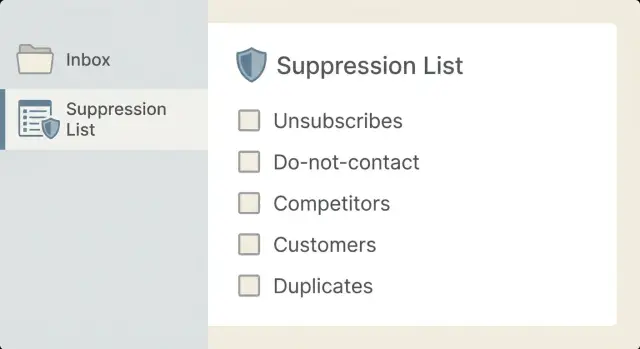
Start with these core groups:
- Unsubscribes from any campaign, mailbox, or sender identity you control. Treat an opt-out as global unless they clearly ask to be re-added.
- Do-not-contact requests, even when they’re not worded formally. “Please stop,” “remove me,” “don’t follow up,” and angry replies all count.
- Existing customers and active trials, so you don’t pitch people who already pay you or are currently evaluating you.
- Competitors and sensitive partners you prefer not to contact.
- Duplicates and near-duplicates (the same person showing up under variations or multiple addresses).
A common failure looks like this: an SDR exports leads from two sources and runs two campaigns a month apart. Without suppression, the same VP gets hit three times (work email, alias, personal). With suppression, the first unsubscribe or DNC reply blocks every future send.
Where suppression data comes from
A suppression list is only as good as the places it listens to. You want every “don’t email me” signal (and every “this address is broken” signal) captured before the next send.
Direct replies are the biggest source. People rarely use perfect wording, so treat “stop,” “remove me,” “unsubscribe,” “don’t contact,” and “wrong person” as suppression triggers.
Unsubscribe actions are another feed. If you include an unsubscribe link or preference option, those clicks should write to suppression immediately. Even a “pause” should be logged so the person doesn’t get re-imported later as a “new” prospect.
Sending reports also matter. Hard bounces (“address does not exist”) and repeated soft bounces are strong signals that continuing to email will damage deliverability. Capture them automatically and keep the reason and date so you can spot patterns.
Your CRM is often the most overlooked input. Customer status, active deals, churned accounts, and “do not contact” flags should flow into suppression so outreach doesn’t collide with existing relationships.
Sales and support conversations still count. A prospect might ask to stop on a call, or support might learn an inbox is shared or sensitive. Make it easy for the team to add entries manually.
One practical rule: if an SDR gets a reply saying, “Please remove me, we already use a competitor,” that should suppress the address immediately. If your policy is to suppress the whole company after that kind of request, document it and apply it consistently.
Decide your source of truth and data fields
Pick one source of truth
A suppression list only works if everyone checks the same place. If “the real list” lives in three different systems (a sheet, a CRM, and an outreach tool), someone will miss it and you’ll re-email the wrong contacts.
Choose one system as the source of truth, then treat everything else as a read-only export. Many teams use the sending system as the source because it’s the last gate before an email goes out. Others use the CRM because customer status and ownership live there. A shared spreadsheet can work early on, but it breaks quickly once multiple people touch it.
Define fields and permissions
Keep fields small and consistent. You want enough context to act fast, not a mini-database no one maintains.
A practical set:
- Identifier (email, and optionally domain or company)
- Reason (from a fixed set)
- Date added
- Source (reply, form, manual request, CRM flag, etc.)
- Added by (person or system)
Use a short, fixed list of reasons (for example: Unsubscribe, DNC, Customer, Competitor, Duplicate, Bounce). Avoid free-text variants that make reporting and automation messy.
Make adding easy (any SDR can do it). Make removal controlled (team lead or ops), and require a note. Accidental un-suppression is how you burn trust.
Finally, set a cadence: a quick daily check for new unsubscribes and DNC requests when you’re actively sending, plus a weekly cleanup to merge duplicates, fix typos, and confirm customer/competitor flags.
Step-by-step: capturing unsubscribes and DNC requests
Speed matters. The longer an unsubscribe or DNC request sits in an inbox or a CRM note, the higher the chance someone emails them again and turns a small complaint into a deliverability problem.
A simple 5-step process
- Capture the request immediately. Log it as soon as it arrives. If it’s unclear, save the exact wording.
- Save the best identifier. Start with the email address. If the person requests a company-wide stop, add the domain too.
- Tag the reason and source. Record what happened (unsubscribe, DNC, complaint, wrong person, customer) and where it came from.
- Make it global. The point is to block future sends across all sequences, mailboxes, and imports.
- Notify the owner when it affects an active deal. If it’s tied to an open opportunity or an existing account, let the account owner know so they can switch to an approved channel.
Tricky cases: aliases, domains, and shared inboxes
Suppression gets messy the moment you leave the clean world of one person, one email. Real inboxes have aliases, forwarding, and shared accounts, and that’s where teams accidentally re-email someone who already said no.
Sometimes a contact replies from a different address than the one you mailed. Common examples: a personal Gmail reply to a work email, plus-addressing ([email protected]), or an alias that forwards into a main inbox. When the reply is a do-not-contact request, treat it as a person-level stop, not just a single address. Capture both the original recipient and the replying address.
Shared inboxes and role accounts (info@, sales@, support@) need stricter handling. If someone unsubscribes from a role inbox, it usually means “stop sending here.” Suppress at the mailbox level and consider filtering role accounts out before sending.
Occasionally, a company asks for a domain-wide stop: “Do not email anyone at our company.” That should trigger domain suppression for @theircompany.com, and sometimes for known sister domains if you have a clear mapping.
Matching rules that prevent accidental re-mailing:
- Normalize emails (lowercase, trim spaces).
- Treat plus-addresses as the same mailbox when you’re confident it’s the same provider behavior.
- If you suppress a person, suppress all known emails tied to that person.
- If you get a domain-level request, suppress the whole domain.
- Track parent/subsidiary relationships for existing customers so you don’t keep prospecting the same organization.
Deduping and matching rules that prevent re-mailing
If your matching rules are too loose, you re-email people who already said no. If they’re too strict, you block good leads. The goal is one person, one decision, respected everywhere.
A simple matching order, from safest to more aggressive:
- Exact email match
- Normalized email match (lowercase, trimmed spaces)
- Provider-specific normalization only when you’re sure (for example, Gmail dots and “+tags”)
- Known alias mapping when you have evidence it routes to the same inbox
- Domain-level match (only for domain-wide requests, repeated bounces, or sensitive cases)
Be careful with domain suppression. Use it when the request clearly applies to the whole company (“Do not contact anyone at our company”) or when the domain is consistently harmful (repeated hard bounces, competitor domains you never want to touch). Otherwise, suppress only the individual address so you don’t block an entire account because one person opted out.
Before any import, dedupe the input file. Remove obvious repeats and keep the best record (freshest, most complete). It’s cheaper to clean a file once than to repair reputation later.
Re-activating a suppressed lead should be rare and controlled. Only do it with a clear reason (for example, they explicitly opted back in) and a single owner approving the change.
Keep an audit trail:
- Reason (unsubscribe, DNC, bounce, competitor, duplicate)
- Source (reply, form, CRM, manual)
- Date and who/what added it
- Notes (the exact wording when relevant)
Example: if “[email protected]” unsubscribes, your normalization should help catch “[email protected]” later, depending on your rules.
How to use suppression before you send
Treat suppression as a gate, not a cleanup task. If someone is suppressed, they shouldn’t get added to a sequence, and they definitely shouldn’t get emailed because someone forgot one last check.
Run suppression checks in two moments:
- Before every import so bad records never enter your active pool.
- Right before a send to catch new unsubscribes, bounces, and DNC requests that came in after the import.
Ownership matters. If nobody owns the step, it gets skipped when things get busy. Make one role accountable (ops for list hygiene, or a team lead for smaller teams).
A practical workflow:
- Suppress on import: block or tag matches so they don’t become active prospects.
- Suppress pre-send: re-check the exact audience selected for the campaign.
- Separate “do not contact” (hard stop) from “do not pitch” (routing rule), when useful.
- Use tool-level blocks where possible so suppression isn’t memory-based.
Write the rules down in a short internal note: the source of truth, who can approve exceptions (usually nobody), and what happens when there’s a match.
Common mistakes that burn reputation
Most outreach deliverability problems aren’t caused by copy. They come from repeatedly sending to people who already said “stop,” or to addresses that never should’ve been emailed in the first place.
A common trap is treating suppression as “per campaign.” If someone unsubscribes in Campaign A, then gets re-added to Campaign B a week later, they’re far more likely to mark you as spam. Suppression needs to be global across every sequence, sender, and list.
Another gap is missing suppression signals that happen outside your sending tool. Someone replies “remove me,” a rep gets a complaint on LinkedIn, or a support inbox receives a request. If those aren’t captured, you keep emailing the same address and it looks careless.
Mistakes that regularly cause problems:
- Keeping suppression local to one campaign or one teammate’s spreadsheet instead of centralizing it.
- Ignoring manual DNC replies because they weren’t tagged automatically.
- Removing suppressed contacts to hit volume goals, then “adding them back later.”
- Failing to normalize data, so the same person slips through as [email protected] vs [email protected].
- Forgetting “never-target” groups (customers, partners, competitors, internal domains) and assuming they won’t complain.
A realistic scenario: an existing customer gets prospecting emails at their billing address because sales imported an old list and the customer record lives elsewhere. Even without a formal complaint, repeated sends can trigger spam signals and hurt future inbox placement.
Quick pre-send checklist
Before you hit send, take two minutes to make sure you’re not emailing people who already said “no,” addresses that will bounce, or contacts you should never target.
Keep it simple:
- Confirm suppression data is up to date (today’s opt-outs should be blocked today).
- Dedupe new prospects against everything you’ve mailed before, not just the current campaign.
- Make opt-outs global across all senders, domains, and campaigns.
- Exclude never-target groups up front (customers, active trials, partners, competitors).
- Review obvious high-risk addresses (malformed emails, suspicious domains) before sending.
Example: you upload 2,000 “new” leads, but 60 are duplicates from last month and 12 previously unsubscribed. Catching those 72 contacts before sending saves you complaints and protects your reputation.
Example: stopping repeats across multiple campaigns
A three-rep team runs two cold email campaigns in the same month: one for “Finance leaders” and one for “Ops leaders.” They start with a combined CSV of 2,000 prospects.
By day two, a few replies come in:
- Mia at BrightCo clicks unsubscribe.
- Someone at brightco.com replies, “Do not email anyone at this company again.” (domain-level DNC)
- Liam is already a paying customer, but he’s still in the prospect list.
- Ava appears twice because one list had [email protected] and the other had [email protected].
The team captures each case in a single suppression list shared by all reps: Mia’s exact email, the whole brightco.com domain for the domain-level request, customer emails/domains for existing accounts, and a dedupe rule so Ava is treated as one person.
On the next upload and before the next sequence step sends:
- Mia doesn’t get another email, even if a different rep imports her later.
- Nobody at brightco.com is contacted again.
- Customers are excluded before the first send.
- Only one version of Ava stays active.
The result is fewer angry replies and fewer spam complaints because the same bad targets don’t get hit again and again.
Next steps: make it routine and keep it centralized
The best suppression list is the one you can keep accurate every week. Start small: one place, one set of rules, and one habit of updating it.
Make suppression updates part of your normal sending routine, not a cleanup project after complaints show up. If someone asks not to be contacted, treat it as a hard stop.
A routine most teams can stick to:
- Assign one owner (even if the work is shared).
- Set a review schedule (daily when actively sending, weekly at lighter volume).
- Decide what gets added automatically vs manually, and who can fix mistakes.
- Run a quick check before every new campaign: suppression, bounces, duplicates.
- Keep a short note field for edge cases and exceptions.
If you’re using an all-in-one cold email platform like LeadTrain, it’s worth keeping suppression centralized in the same place you manage mailboxes, warm-up, and multi-step sequences. LeadTrain also supports AI-powered reply classification, which can help surface unsubscribe and do-not-contact signals quickly so they get applied before the next send.
FAQ
What is an email suppression list, in plain terms?
A suppression list is a global “do not send” record. Before any email goes out, you compare your audience against it and remove matches so you don’t re-email people who opted out, asked you to stop, or are known bad targets.
Why does a suppression list affect inbox placement so much?
It protects deliverability and prevents avoidable complaints. Re-emailing unsubscribers and do-not-contact requests increases spam reports, and sending to invalid addresses increases bounces—both can lower inbox placement for everyone you email.
How is a suppression list different from a lead list?
A lead list is who you want to contact; a suppression list is who you must not contact. Suppression isn’t for “low priority” prospects—it’s for hard stops like unsubscribes, do-not-contact requests, and addresses that consistently bounce.
Should unsubscribes be global or just for one campaign?
Default to making opt-outs global across all campaigns, mailboxes, and sender identities you control. If someone unsubscribes once, they shouldn’t have to do it again because a different rep or sequence emailed them next week.
What fields should I store for each suppressed contact?
Start with the email address plus a clear reason and date. Add the source (reply, unsubscribe click, bounce report, CRM flag) and who/what added it so you can audit changes and avoid accidental removal later.
How should we handle vague replies like “stop” or “remove me”?
Treat any clear “stop” message as a do-not-contact request, even if it’s informal or angry. Save the exact wording when you can, suppress immediately, and avoid debating intent—speed matters more than perfect categorization.
What if someone replies from a different email than the one we contacted?
Suppress the original recipient and the replying address when they differ, because aliases and forwards are common. If you’re confident it’s the same person and mailbox, keep both addresses tied to the same suppression decision to prevent re-mailing later.
When should we suppress an entire domain instead of one email?
Use domain-level suppression only when the request clearly applies to everyone (for example, “Do not email anyone at our company”) or when the domain is consistently harmful (like repeated hard bounces). Otherwise, suppress the individual address so you don’t block an entire account unnecessarily.
Do bounces belong on the suppression list, and which ones?
Hard bounces are strong “do not send” signals because the address is likely invalid, and repeated soft bounces often become hard bounces over time. Suppress promptly, keep the bounce reason and date, and don’t keep retrying just to hit volume.
What’s the simplest way to use suppression before every send?
Run suppression checks before import so bad records never enter your active pool, and again right before sending to catch new opt-outs and bounces. In an all-in-one platform like LeadTrain, keeping suppression in the same system that runs sequences can reduce missed checks, and AI reply classification can help surface unsubscribe and do-not-contact signals faster.