Email CTAs for buying stages: awareness to decision asks
Email CTAs for buying stages: practical asks for awareness, consideration, and decision, plus examples and tips to avoid asking for too much too soon.
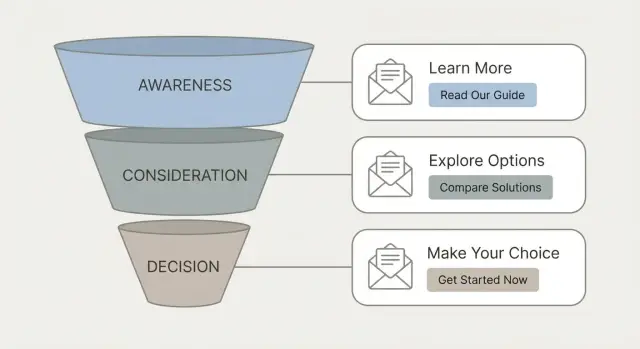
Why CTAs break when they don’t match the stage
A CTA (call to action) is the ask at the end of your email. It’s the next step you want the reader to take, like replying with a quick answer, confirming a detail, or choosing a time.
CTAs fail when the effort you ask for doesn’t match where the reader is in their buying journey. Two people can read the same email and be in completely different places. One has never heard of you and is still figuring out whether you’re relevant. Another is already comparing options. If both get the same “Can you hop on a 30-minute call this week?”, one ignores it because it’s too soon, and the other feels like it’s oddly slow.
Over-asking early does more than hurt replies. It can also hurt your sending health. When you push for meetings in the first touch, people are more likely to delete, mark as spam, or unsubscribe. Those negative signals add up, and future emails start landing in spam more often.
Think of stage-based CTAs like a ladder. Each rung should feel easy enough to step on:
- Awareness: confirm relevance with a tiny reply
- Consideration: help them evaluate with one concrete detail
- Decision: make the next step clear (often scheduling)
A simple rule: if the reader would need to open a calendar, loop in a teammate, or do research to answer, your CTA probably isn’t an awareness-stage ask.
A simple view of buying stages in email
Most cold emails fail because the ask is bigger than the buyer’s moment. A useful way to fix that is to write with three stages in mind:
- Awareness: they feel a problem (or a cost), but they aren’t building a shortlist yet.
- Consideration: they’re comparing options and looking for proof.
- Decision: they’re close to picking something, but need final details, timing, or approval.
Earlier stage equals lower commitment. If your first email asks for a 30-minute demo, you’re acting like they’re in decision mode when they might not even agree the problem is real.
Signals that usually mean awareness
You’ll see broad questions like “What is this?” or “Who is this for?” Replies are short, or they say “Not a priority” or “Maybe later.”
Signals that usually mean consideration or decision
Consideration looks like requests for proof: “Do you have examples?”, “How does it compare to X?”, “What does it cost?”, “Can you send details?” Decision looks like logistics: “Can you do next week?”, “Send the agreement,” “Loop in my boss,” or “We need security info.”
If someone replies, “Interesting, how is this different from what we have now?” that’s consideration, not decision. A smart next ask is a short comparison or a quick question, not a calendar invite.
The core rule: match effort to intent
Your CTA should feel like the next natural step, not a leap.
If someone just learned you exist, a calendar invite is a big ask. If they’ve replied twice and asked for details, a clear meeting time is fair.
Use one clear action per email
People rarely do two things from one message. When you stack requests (book a call, review a deck, answer five questions), they do none. Pick the single action that best fits where they are, and make everything else support it.
Make it specific and low-friction
A good CTA is concrete. It reduces thinking time and makes replying easy. When possible, aim for a yes/no or two-choice response.
A simple way to think about “weight”:
- Low intent: yes/no, or choose A vs B
- Medium intent: answer one question, confirm one fit point
- Higher intent: suggest a time for a short call
Example: if a prospect has shown interest but hasn’t replied yet, don’t jump to 30 minutes. Ask, “Worth sending a 1-page overview, or should I stop here?” If they reply “send it,” your next email can move to, “Do you prefer a 10-minute call Tue or Thu?”
Awareness CTAs: small yeses that start a conversation
Awareness emails aren’t the place to push for a meeting. The goal is to earn permission for the next message and learn whether you’re even pointed at the right problem.
Good awareness CTAs are quick questions or soft closes that can be answered in one line:
- “Is this relevant for you, or should I speak with someone else?”
- “Worth a short summary of how teams usually fix this?”
- “If you’re not the right person, who owns this?”
- “Should I send a 1-page overview?”
These work because they reduce risk. The reader isn’t agreeing to a project. They’re just giving you direction.
Useful phrasing patterns that keep the ask light:
- “Is this relevant?”
- “Worth a short summary?”
- “Should I send X?”
Example: you email an ops manager about improving outbound replies. Instead of “Can we book 15 minutes?”, try: “Is outbound reply handling on your radar this quarter, or should I talk to sales ops?” If they say “sales ops,” you just saved weeks.
Consideration CTAs: help them evaluate, step by step
In consideration, people are curious but cautious. They’re comparing options, checking fit, and looking for proof. This is where many sequences go wrong: you ask for 30 minutes when they still want 30 seconds.
A good consideration CTA feels like, “Here’s something useful. Tell me what applies to you.” Keep it small, but specific.
A few options that tend to work:
- “Want a 3-sentence case example from a team similar to yours?”
- “What are you using today: manual sending, a CRM sequence, or a cold email tool?”
- “If you could fix one thing first, is it deliverability, list quality, or replies?”
- “I can share a simple checklist to spot spam triggers. Want it?”
These invites do two jobs: they earn a reply and they gather context. You’re not forcing a live call, but you are moving the conversation forward.
When you offer options, keep it calm and limited. Two choices is usually enough. Make “no” easy (“If neither, what are you focused on?”), and ask for one detail that helps you tailor the next step.
Decision CTAs: clear next steps and scheduling asks
Decision-stage CTAs work when the ask matches their intent. They already believe the problem is real and your option is plausible. Now they need clarity and a low-friction way to move forward.
Instead of “Want to chat?”, propose something concrete that makes it easy to say yes or no:
- “Are you open Tue 10-11 or Wed 2-3 your time for 15 minutes to confirm requirements and next steps?”
- “Before we book it, should anyone else join (Ops, RevOps, IT)?”
- “To confirm fit: are you mainly solving for deliverability, reply handling, or both?”
Keep the tone matter-of-fact. Assume they’re busy. Give two time windows. Pair scheduling with a clear purpose.
When they reply “send info”
At this stage, “send info” often means they want something specific, or they’re trying to avoid a meeting. Don’t dump a long deck. Reply with a short menu and one question:
- “Happy to. What do you need to decide: pricing, security, or a quick example plan?”
- “Should I send a 1-page summary or a short pilot outline?”
- “If I send the summary today, can we hold 15 minutes Thu/Fri to confirm?”
How to choose the right CTA in 5 steps
A good CTA is less about being clever and more about being specific and easy to answer.
- Name the stage for this one email. Use what you actually know: where the list came from, whether they’ve replied before, and how many touches they’ve seen.
- Choose one main outcome. Know your backup plan, but lead with one ask.
- Write the CTA as one sentence with a clear reply target. “Open to 10 minutes Tue or Wed?” beats “Thoughts?”
- Offer a low-friction response path. Yes/no, or one simple choice.
- Do a final effort check. If they’ve never heard of you, don’t ask for a 30-minute demo. If they asked for pricing yesterday, a calendar ask is reasonable.
Example: you email a webinar attendee who downloaded a guide but never replied. Instead of “Want to book a demo?”, try: “Worth sharing a 5-line overview of how teams like yours use this, or should I close the loop?”
Common CTA mistakes that make people ignore you
Most cold emails fail at the call to action, not the subject line. The ask feels mismatched, like someone proposing a first date before saying hello.
The biggest mistakes:
- Asking for a call with no context. A stranger has no reason to spend 15 minutes with you yet.
- Stacking CTAs. “Book a call, fill out this form, check the deck, and tell me your budget” makes people freeze.
- Being vague. “Let me know your thoughts” sounds polite, but it gives the reader no easy way to respond.
- Creating homework. Long forms, big prep, or five questions in one email.
- Adding pressure too early. Fake urgency works only when there’s already momentum.
A cleaner alternative is almost always: one action, replyable in one line, matched to the stage.
Quick CTA checklist before you hit send
Read your CTA like the recipient is skimming on a phone. If they need to think hard, open a calendar, or write a long reply, the ask is probably too heavy.
Checklist:
- One clear action (not “call or demo or send info”).
- Stage-fit effort: early emails invite a simple reply, later emails can ask for a meeting.
- Tiny reply is possible (yes/no, A/B, or one short detail).
- Next step is obvious (what happens after they answer, and how long it takes).
- The email still makes sense even if they ignore the CTA.
A fast sanity check: rewrite your CTA into a reply-only version. Instead of “Book 30 minutes,” try “Worth a 10-minute chat next week, or should I send 2 examples first?” If you’re still in awareness, go softer: “Open to a quick idea for reducing no-shows?”
Example sequence: one prospect, three stages, three asks
You sell a B2B tool that helps operations teams reduce manual work (reporting, routing, approvals). You email a mid-market Ops Lead who likely has the problem, but may not be thinking about changing tools today. The ask should grow only when their intent grows.
One simple three-email sequence:
- Awareness (Day 1) - CTA: “Worth a quick reply: is reducing manual routing a priority this quarter, or not on your radar?”
- Consideration (Day 4) - CTA: “I can send a 1-page breakdown of how teams like yours cut routing time - want the version for Ops or IT?”
- Decision (Day 9) - CTA: “If the timing is right, should we put 15 minutes on the calendar to see if this fits your current process?”
Now the common real-world moment: they reply, “Not now.” Don’t jump straight to “How about next Tuesday?” Keep it light and make it easy to stay in touch:
- “Totally fair. Is this a ‘later this quarter’ thing, or more like ‘next year’?”
- “What would need to change for this to become a priority?”
- “If I check back, would 4-6 weeks be annoying or helpful?”
Next steps: build a CTA library and test it in sequences
Better replies usually come from fewer, clearer CTAs, not constant rewrites. Build a small library of stage-matched asks, then test them inside real sequences.
Start with a quick audit: pull your last 20 outbound emails and label each CTA as awareness, consideration, or decision. If you can’t confidently label it, the ask is probably too big, too vague, or trying to skip steps.
To build your library, keep categories simple:
- Awareness: permission-based asks (“Worth a quick reply?”)
- Consideration: evaluation-focused asks (“Which of these is closer: A or B?”)
- Decision: scheduling and next-step asks (“Are you free Tue or Wed for 15 minutes?”)
When you test, change one thing at a time (wording, yes/no vs A/B, or where the ask appears in the sequence). Track reply types, not just total replies.
If you’re running outbound in LeadTrain (leadtrain.app), it’s easier to keep each step aligned to a single stage-based ask because sequences, warm-up, and reply classification live in one place. That makes it simpler to see which CTAs drive real “interested” replies vs bounces, unsubscribes, or dead ends.
FAQ
What exactly counts as a CTA in a cold email?
A CTA (call to action) is the single next step you ask the reader to take. In cold email, the best CTA is usually a reply they can write in one line, especially early in the sequence.
How do I know if my CTA is “too much” for a first touch?
Your CTA is too heavy if answering it requires opening a calendar, checking with a teammate, doing research, or writing a long response. In early outreach, default to yes/no or a simple A/B choice so replying feels effortless.
What’s a good awareness-stage CTA that doesn’t feel pushy?
Awareness CTAs aim for a tiny “yes” that confirms relevance or routes you to the right person. Ask something like whether the topic is on their radar, whether you should send a short summary, or who owns the problem.
What should I ask for in the consideration stage?
Consideration CTAs help them evaluate without forcing a meeting. Offer one useful asset or ask one concrete fit question, like what they use today or which pain is bigger, so you can tailor the next step.
When is it okay to ask for a meeting?
Decision CTAs are appropriate once they’ve shown intent through questions about pricing, comparisons, timelines, approval, or implementation details. At that point, propose a short call with a clear purpose and two time windows to make the next step easy.
Why should I use only one CTA per email?
Pick one primary action per email because multiple asks make people stall. If you want a reply, make everything else support that reply, and save secondary requests for the next message after they engage.
What’s wrong with “Let me know your thoughts” as a CTA?
A vague CTA forces the reader to decide what you want, which creates friction. Replace “Thoughts?” with a clear reply target like a yes/no question, an A/B choice, or one specific detail you need to proceed.
Can an overly aggressive CTA hurt deliverability?
Pushing for a meeting too early often leads to deletes, spam reports, and unsubscribes, which can reduce future inbox placement. A lighter, stage-matched CTA typically earns more replies and protects sending performance over time.
How should I respond when a prospect says “send info”?
Treat “send info” as a request for something specific, not an invitation to dump a long deck. Reply with a short clarification question like whether they need pricing, security, or an example plan, and then suggest a brief call only after you send the right item.
How do I apply stage-based CTAs inside a multi-step sequence (and in LeadTrain)?
Use the stage logic to keep each step focused: early emails ask for a quick relevance confirmation, mid-sequence emails ask one evaluation question, and later emails propose scheduling. In LeadTrain, keeping sequences, warm-up, and reply classification in one place makes it easier to see which CTAs create real “interested” replies versus unsubscribes or bounces and adjust the next step accordingly.