Email bounce taxonomy: hard, soft, blocked, invalid
Email bounce taxonomy explained: what hard, soft, blocked, and invalid bounces mean, how to categorize them, and what actions prevent repeats.
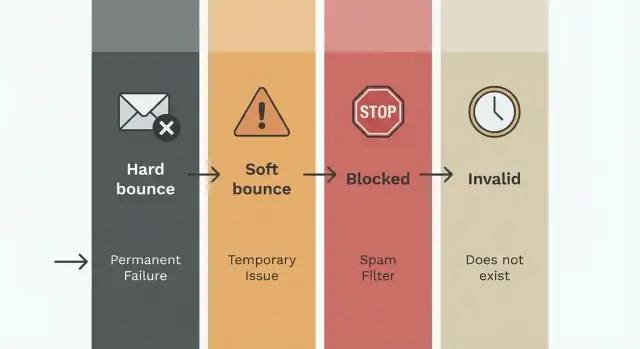
What bounces are and why they matter
A bounce happens when an email can’t be delivered and the receiving mail server sends a failure message back. In plain terms: you tried to send, but the other side couldn’t accept it.
Bounces are normal in cold email and outbound campaigns. What matters is the pattern. A few bounces from a new list are expected. Repeating the same failures, or ignoring them, is what causes trouble.
Bounces vs other “negative” replies
Not every bad-looking response is a bounce. Separating these early helps you take the right next step.
- Bounce: a delivery failure from a mail server (your email didn’t arrive).
- Auto-reply: the email arrived, but the recipient is away or a system replied.
- Spam complaint: the email arrived, and the recipient reported it as spam.
- Unsubscribe: the email arrived, and the recipient asked you to stop.
If you mix these together, your reporting gets misleading. For example, treating out-of-office auto-replies as “bad addresses” can make you delete good leads.
Why repeated bounces hurt you
Deliverability is partly about trust. When mailbox providers see you repeatedly sending to addresses that can’t receive mail, it signals weak list quality or sloppy sending practices. That can reduce inbox placement for emails that could have been delivered.
Repeated bounces also distort campaign metrics. Your open and reply rates look worse because you’re counting emails that never had a chance.
A simple scenario: you import 2,000 prospects and 200 are dead addresses. If you keep retrying them across multiple sequences, you waste daily send capacity and feed providers the same failures again and again.
That’s why a bounce taxonomy is useful. Once you label failures consistently (hard, soft, blocked, invalid), you can automate the right next action: suppress permanently, retry later, pause sending, or flag a list source.
A simple bounce taxonomy you can stick to
Predictable bounce handling requires one shared set of labels. That’s the point of an email bounce taxonomy: everyone on the team (and every tool you use) treats the same failure the same way.
Bounce messages are messy. One provider says “user unknown,” another says “mailbox unavailable,” and a third returns only a numeric SMTP code. Some tools also rename the same issue (for example, “rejected” vs “blocked”). A simple taxonomy turns that noise into a few buckets you can automate.
The four labels (and what they usually mean)
Use these labels consistently across campaigns and mailboxes:
- Hard: a permanent failure. The address doesn’t exist, the domain is dead, or the recipient server says it will never accept mail for that mailbox.
- Soft: a temporary failure. The mailbox might be full, the server is down, or the provider asks you to try again later.
- Blocked: a policy-based refusal. The provider is actively rejecting you (reputation, authentication, rate limits, or content rules), even if the address itself is real.
- Invalid: a data quality problem you could often catch earlier (typos, malformed addresses, missing domain, or a domain that can’t receive email).
The key difference is intent: hard and invalid are “don’t try again,” soft is “try later,” and blocked is “stop and fix the sending conditions.”
Why consistency matters more than perfect wording
Without consistent labels, automation gets risky. One tool might treat “550 5.1.1” as a hard bounce while another calls it “invalid.” If someone manually marks it as “soft” to keep the lead, you end up retrying addresses that will never work, which hurts deliverability.
A practical rule is to standardize on your four labels and keep the raw bounce text and codes as evidence. If you see “message rejected due to policy” across many recipients at the same provider, categorize it as blocked even if the wording varies.
Hard bounces: permanent failures and the right response
Hard bounces are the clearest signal that an email address can’t receive mail. In your taxonomy, they belong in the “permanent failure” bucket, meaning sending again usually wastes volume and can hurt deliverability.
Most hard bounces mean one of two things: the mailbox doesn’t exist (“user unknown”), or the domain isn’t set up to receive email (domain not found, no mail exchanger, or the domain no longer exists). You’ll often see SMTP responses in the 5xx range, which providers use for permanent failures.
How hard bounces typically look
Common patterns include:
- 550 / 551 / 553 type errors
- “user unknown” or “no such user”
- “domain not found” or “host unknown”
- “no MX records”
Once you get a true hard bounce, the response is simple: suppress the address immediately and don’t keep retrying it in future sequences. Repeatedly hitting non-existent mailboxes is a fast way to damage sender reputation.
Example: you email [email protected] and get “550 5.1.1 user unknown.” The address is mistyped, outdated, or never existed. Mark it undeliverable and stop all follow-ups.
Preventing hard bounces
Hard bounces are usually a list quality problem. You can cut them down by verifying emails before sending (especially newly sourced leads), watching for obvious typos or weird patterns (like double dots), and keeping a suppression list shared across campaigns.
One caveat: hard bounces can be misclassified in rare cases. A provider glitch or an aggressive gateway can return a 5xx for something temporary. If the domain is well-known and it happened only once, quarantine it for manual review rather than auto-deleting it.
Soft bounces: temporary failures and smart retries
Soft bounces are temporary delivery failures. The address might be real and the inbox might accept mail later, but something got in the way right now. These are the cases where smart retries can recover otherwise good sends.
Typical causes are mailbox full, short server outages, or a provider telling you to slow down. Many providers use greylisting and rate limiting, which rejects the first attempt with a “try again later” style message.
The most common technical clue is an SMTP 4xx response (temporary failure). You’ll often see “temporarily unavailable,” “resources temporarily exhausted,” “mailbox full,” or “rate limit exceeded.”
A practical retry policy keeps you persistent without being noisy:
- Retry with backoff (for example: 30 minutes, 2 hours, 12 hours, 24 hours).
- Cap retries (3 to 5 attempts is usually enough for cold outreach).
- Spread retries across different times of day to avoid repeat throttling.
If it keeps bouncing after the cap, stop and suppress the address (treat it as effectively undeliverable). And if many soft bounces happen at once, pause the campaign and investigate volume and reputation.
Example: you send 500 emails in a short window and 80 return “4.7.0 rate limited.” That’s rarely a bad list. It’s a sign you’re sending too fast for that provider (or for a new mailbox). Slow down, space out sends, and retry later rather than hammering the same domain.
When should a soft bounce become “permanent”? If the same address soft-bounces across multiple days or after your retry cap, treat it as a hard failure in your system and suppress it.
Blocked bounces: when a provider refuses your mail
A blocked bounce isn’t a normal delivery failure. It’s a rejection by the receiving provider because it doesn’t want to accept your message from your sender right now. Treating this like a soft bounce leads to pointless retries and more damage.
Blocked usually points to one of three issues: provider policy (rate limits or strict filtering), sender reputation (domain or IP history), or a content trigger (spammy wording, risky links, suspicious formatting). You’ll often see phrases like “blocked,” “policy rejection,” “access denied,” or “message refused.”
The practical difference is simple:
- A soft bounce is often temporary on the recipient side (server busy, mailbox full).
- A blocked bounce is a deliberate “no” from the provider side.
What to do next (actions to automate)
Start by stopping the bleeding, then narrow the pattern.
Pause sending to the affected provider (for example, all addresses at one domain) for a cooling period. Look for clustering: is it one recipient domain, one campaign, one new sending domain, or one message variant? Resume gradually, not all at once, and watch the next batch closely.
It also helps to set a clear escalation threshold (for example, when blocks rise above 2-5% of attempts for a provider in a short window), so someone reviews authentication, reputation signals, volume, and recent copy changes.
Example: you send 500 emails and 80 to a single provider come back as “policy rejection.” Retrying every few minutes usually increases blocks. Pausing that provider, checking your latest copy changes, and slowing send rate is typically the fastest path back.
How to prevent blocked bounces
Prevention is mostly boring basics done consistently:
- Keep SPF, DKIM, and DMARC set up correctly.
- Warm up new mailboxes and ramp volume slowly.
- Keep copy simple and specific; avoid heavy formatting.
- Spread volume across properly configured domains and mailboxes instead of hammering one.
Invalid bounces: data quality issues you can catch early
Invalid bounces are the most preventable type. They usually mean the address you tried to send to isn’t a real, deliverable mailbox, or the domain isn’t configured to receive email.
Most invalid cases come from simple data problems: bad formatting, typos, or non-email values copied from forms and spreadsheets. You don’t get “lucky” on a retry. You just create unnecessary failures.
Common patterns include missing structure (like namecompany.com, name@, @company.com), extra characters (spaces, commas, double dots like [email protected]), domain typos (gmal.com, hotmial.com), wrong TLDs (company.cmo, company.con), or domains with no mail records.
What to do next is simple: don’t retry. Suppress the address immediately and fix the data at the source. If it came from a form, tighten validation. If it came from a provider or enrichment API, flag it and request a corrected email.
Prevention works best in two layers: validate on import (so bad addresses never enter your list), and validate right before each send (because lists change and people paste new leads at the last minute). Even basic checks like “exactly one @” and “no spaces” catch a surprising amount.
Role accounts (like info@, sales@, support@) aren’t invalid, but they can behave unpredictably. Handle them with a separate rule: keep them out of your main sequence by default, or send them through a slower, more cautious campaign.
How to categorize bounces step by step
Good bounce handling starts with one rule: keep the original evidence. If you only store a label like “soft bounce,” you can’t improve your rules later.
A practical 5-step flow
-
Save the raw bounce payload: the SMTP status code (4xx/5xx), any enhanced status (like 5.1.1), and the full status text. Store it with the message ID, sending domain, mailbox, and timestamp.
-
Make a first-pass decision using the code family. As a baseline, 5xx usually means permanent failure and 4xx usually means temporary.
-
Detect “blocked” before you decide soft vs hard. Look for signals like “blocked,” “denied,” “policy,” “spam,” “reputation,” “blacklist,” and codes like 5.7.1. If you see these, treat it as blocked even though it’s a 5xx.
-
Normalize provider wording into your four categories (hard, soft, blocked, invalid). Providers say the same thing in different ways, so map variations to one label.
A simple mental model:
- Invalid: address or domain isn’t real (syntax fails, “user unknown,” “domain not found”).
- Hard: format is fine, but delivery will never succeed for this recipient (for example, account disabled).
- Soft: temporary issue you can retry (for example, mailbox full, deferred).
- Blocked: provider refuses due to rules or reputation (for example, “rejected for policy reasons”).
- Log the decision and the rule that made it (for example,
matched_keyword=policyormatched_code=5.1.1). When a rule is wrong, you can fix it and reprocess old events.
Concrete examples: “550 5.7.1 Message rejected for policy reasons” is blocked (not hard). “450 4.2.2 Mailbox full” is soft and should be retried.
Automation actions: suppress, retry, pause, and escalate
Once you have a consistent taxonomy, the best results come from making the next step automatic. The goal is straightforward: stop repeating mistakes, protect deliverability, and keep your team out of inbox cleanup.
Suppress: stop sending to addresses that won’t work
Treat hard bounces and invalid addresses as immediate suppression events. There’s no upside to “trying again later” when the failure is permanent.
A clean suppression approach is:
- Hard bounce or invalid address: suppress immediately (no retries).
- Suppress at the address level, not just the campaign level.
- Keep suppression reasons separate (hard, invalid, complaint, unsubscribe) so reporting stays meaningful.
Retry: give soft bounces a limited, polite second chance
Soft bounces are often temporary, so retries can work, but only with strict limits.
Keep it predictable: use a backoff schedule (for example, 4 hours, then 24 hours, then 72 hours), cap attempts (commonly 2-3), and stop early if the bounce turns into hard/invalid.
Attempt counting matters. Without it, “temporary” bounces quietly become endless retries.
Pause and escalate: blocked bounces need a wider response
Blocked bounces usually mean a provider is refusing your mail due to policy, reputation, or rate limits. That’s not a lead problem. It’s a sending problem.
The safer automation is to pause sending for the affected provider segment, slow volume, and route the case for investigation with the bounce text, provider, and recent send volume. If block rates spike, apply a cooling-off period.
Also keep bounce history per address (first-seen date, last-seen date, attempt count). That small log turns bounce handling from guesswork into a system.
Common bounce handling mistakes (and what to do instead)
Most bounce problems don’t come from one bad email. They come from repeating the same small mistake across thousands of sends. A taxonomy only helps if your actions match the label every time.
Mistake patterns that quietly wreck deliverability
Treating a permanent failure like a temporary one is the classic mistake. If you keep retrying a hard bounce because “maybe it will work,” you turn one bad address into repeated signals that your list is messy. The fix is simple: suppress immediately and push the lead into data cleanup.
Misreading “blocked” as “soft” is another common issue. When a provider refuses your mail, hammering retries makes it worse. The fix is to pause or slow sends to that recipient domain and investigate the block reason.
Changing labels midstream also causes quiet damage. If one week “mailbox full” is soft and the next week it’s blocked, reports stop meaning anything. Keep definitions stable, and only change rules deliberately (then reprocess historical data if needed).
Finally, don’t look only at total bounce rate. A 2% overall rate can hide one sending domain at 8%, or one recipient domain rejecting most messages. Monitor bounce rates by sending domain and recipient domain so you act at the right level.
Quick checklist and next steps
Treat bounce handling like a routine, not a one-time fix. A taxonomy is only useful if it turns into repeatable actions before, during, and after every send.
Before launch, confirm SPF, DKIM, and DMARC are in place, warm-up is active, and your sending volume plan is realistic for the first 7 to 14 days. Do a data check to remove invalid formats, obvious typos (like gamil.com), role addresses you don’t want, and duplicates.
During the send, watch for sudden “blocked” or “policy” spikes, keep daily volume steady, and cap retries so a soft bounce doesn’t turn into repeated noise. After the send, suppress hard bounces and invalid addresses immediately, and stop sending to any address that repeatedly blocks or complains.
Weekly, group bounces by top reasons (provider blocks, mailbox full, user unknown, domain not found), then adjust one thing at a time: copy, list source, volume, or mailbox health.
If you want to centralize these rules so they’re applied consistently across domains and campaigns, a unified platform like LeadTrain (leadtrain.app) can help by combining domains, mailboxes, warm-up, sequences, and automated classification in one place. The win is fewer preventable bounces, cleaner lists, and more stable outreach performance.
FAQ
What exactly is an email bounce, and why should I care?
A bounce is a delivery failure returned by the receiving mail server, which means your message didn’t arrive. It matters because repeated bounces signal poor list quality or bad sending practices, which can hurt inbox placement for your valid recipients.
How is a bounce different from an out-of-office, unsubscribe, or spam complaint?
A bounce means delivery failed and the email didn’t arrive. An auto-reply, unsubscribe, or spam complaint happens after delivery, so the right action is different; mixing them together can make you delete good leads or miss real deliverability problems.
What’s the difference between a hard bounce and a soft bounce?
Hard bounces are permanent failures where sending again is usually pointless and risky. Soft bounces are temporary failures where a limited retry can work, but you should stop after a small number of attempts to avoid repeated failures.
Hard vs invalid: aren’t they basically the same thing?
An invalid bounce is usually a data quality problem you could have caught earlier, like a malformed address or a domain that can’t receive email. A hard bounce is typically a well-formed address that still can’t receive mail permanently, like a non-existent mailbox or a disabled account.
What does “blocked” mean, and why is it not just a soft bounce?
Blocked means the provider is deliberately refusing your mail due to policy, reputation, authentication, rate limits, or sometimes content signals. Treat it as a sending-condition problem, not a lead problem, and avoid rapid retries that can increase rejections.
How many times should I retry a soft bounce?
Retry with backoff and a strict cap so you’re persistent without being noisy. A practical default is a few attempts over a day or two, and if it still fails, suppress the address as effectively undeliverable and move on.
What bounce data should I save so I can categorize accurately?
Store the SMTP code family (4xx vs 5xx), any enhanced status (like 5.1.1 or 5.7.1), and the full bounce text, along with the sending mailbox, domain, and timestamp. Keeping the raw evidence lets you fix misclassifications later instead of guessing.
When should I suppress an address, and how should a suppression list work?
Suppress immediately for hard and invalid bounces, and suppress at the address level so the same bad address can’t re-enter future sequences. Keep the reason (hard vs invalid vs complaint vs unsubscribe) so your reporting stays accurate and you don’t hide real issues.
What should I do when blocked bounces suddenly spike?
If blocks spike for one recipient domain or provider, pause or slow sending to that segment and review recent changes like volume ramp, authentication, or copy edits. Set a clear internal threshold so someone investigates quickly instead of letting repeated rejections pile up.
How do I keep bounce handling consistent across a team and multiple tools?
Use consistent labels across all mailboxes and campaigns, keep retry limits stable, and monitor bounce rates by sending domain and recipient domain rather than only overall totals. If you want those rules applied automatically in one place, LeadTrain can centralize domains, mailboxes, warm-up, sequences, and reply classification so bounce handling stays consistent at scale.