Domain and mailbox rotation for stable long-running campaigns
Domain and mailbox rotation keeps cold email volume steady while protecting deliverability. Learn how to pace senders, warm up, and refresh safely.
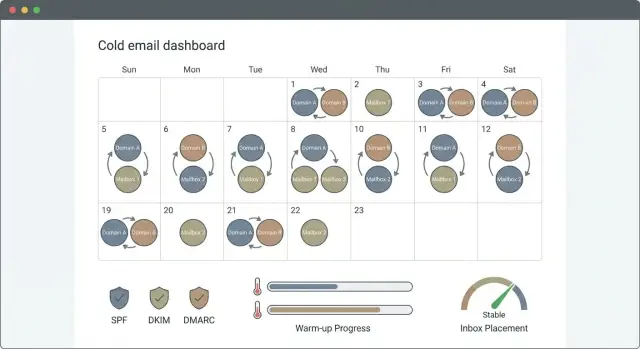
Why long-running campaigns lose performance over time
A performance drop usually shows up in small signals first: open rates slide, replies slow down, and more messages land in spam or promotions. You might also see bounces creep up, more “stop emailing me” replies, or a jump in spam complaints. None of these alone proves something is broken. Together, they often mean inbox providers trust your sending less.
The frustrating part is that the same message can do well in week 1 and struggle in week 6. Early on, a new sender often gets a clean start. Over time, providers collect evidence about your behavior: who engages, who ignores, who marks spam, and whether your list quality holds up. If people get tired of similar outreach, engagement drops, and lower engagement usually leads to stricter filtering.
Volume changes are another common trigger. Even if your copy stays the same, sending more per day looks like a shift in behavior. That shift can cause throttling (slower delivery), more spam placement, or blocks, especially if you ramp too fast or push one mailbox too hard.
That’s where domain and mailbox rotation matters. It’s not about tricking filters. It’s about spreading load so no single sender overheats.
A quick example: an SDR starts at 30 emails/day from one mailbox, then bumps to 120/day to hit a target. Replies don’t change, but opens drop within a week because the sender now looks riskier.
Replacing domains every time this happens gets expensive, slows you down, and can create new problems. New domains need time to earn trust. In many cases, you can stabilize results by managing volume, refreshing senders thoughtfully, and keeping authentication and warm-up consistent.
The basics: domains, mailboxes, and reputation
Domain and mailbox rotation only works when you understand what inbox providers are actually “scoring.”
Domain reputation is the trust tied to your sending domain (like example.com). It’s shaped by patterns across all mailboxes on that domain: bounce rates, complaints, spam placement, and engagement.
Mailbox reputation is the track record of one sender address (like [email protected]) and how its recent behavior looks.
Before you rotate anything, get authentication right. SPF tells receivers which servers may send for your domain. DKIM signs messages so they can’t be easily altered. DMARC tells receivers what to do when checks fail. If these are missing or wrong, rotation just spreads the same problem across more senders.
Warm-up helps build a believable sending history by increasing volume gradually and mixing in positive signals (opens, replies, low complaints). But warm-up can’t fix a bad list, a misleading offer, or spammy copy. If you keep hitting invalid addresses or provoking complaints, reputation will still slide.
The fastest ways to damage reputation are high bounces (especially “user unknown”), spam complaints, low engagement over time, sudden volume spikes, and blasting the same message across many senders.
If one mailbox starts bouncing after a list import, pausing that sender protects the domain.
Pick a rotation model that matches your volume
Rotation works best when the model fits your send volume and your team’s habits. If it’s too complex, people break the rules, and performance drifts.
One domain, many mailboxes vs multiple domains
If you’re sending modest volume, rotating mailboxes under one good domain is often enough. It keeps branding consistent and is easier to manage, but all mailboxes still share the domain’s reputation. If one mailbox starts generating complaints or bounces, the whole domain can feel it.
Multiple domains make sense when you need higher volume, want a safety buffer, or run very different offers. A common middle ground is a small set of domains, each with a few mailboxes, so no single sender carries the whole program.
A few practical models that stay manageable:
- One domain with several mailboxes for steady, lower-volume outbound
- A handful of domains with a few mailboxes each for higher volume and risk control
- Separate sender pools by purpose (prospecting vs follow-ups) to keep signals cleaner
Back-of-napkin math for mailbox count
Start with a daily cap you can actually stick to. Many teams stay conservative (for example, 25-40 new cold emails per mailbox per day), then scale only when metrics look stable.
Use this rough formula:
weekly send goal ÷ sending days per week ÷ per-mailbox daily cap = mailboxes needed
Example: you want 2,000 new cold emails per week, you send 5 days, and you cap at 40 per mailbox per day.
2,000 ÷ 5 ÷ 40 = 10 mailboxes.
When possible, keep prospecting and follow-ups separate. Follow-ups usually get better engagement. Mixing them with brand-new cold sends can hide problems until they get big.
Step-by-step: build your rotation plan
Start by writing down a baseline for the last 7-14 days: daily sends, reply rate, bounce rate, and unsubscribes. That gives you a clear “normal” so you can tell when rotation helps or hurts.
Next, set limits for each mailbox. A simple approach is to cap daily sends per mailbox and ramp up slowly. Also decide what triggers a cooldown, such as a bounce spike, a sudden drop in replies, or higher-than-usual unsubscribes.
Document the plan in one place so it’s easy to follow:
- Per-mailbox daily cap and weekly ramp schedule
- Cooldown rules (what metric, what threshold, how long to pause)
- Suppression rules for unsubscribes and hard bounces (never mail them again)
- How leads get assigned to senders (round robin or segmented)
Naming conventions look boring, but they save time. If you run two offers, label mailboxes so you can see purpose and age at a glance (like “acme-a-01” vs “acme-b-01”).
Finally, choose how you’ll split leads. Round robin is easiest and keeps volume even. Segments can be better when audiences behave differently (for example, founders may reply more than IT managers).
Warm-up and ramping without hurting deliverability
Warm-up is how you teach a new mailbox to behave like a real person, not a brand-new sender blasting strangers. Before a mailbox joins your rotation, it should spend time sending and receiving low-risk emails with steady engagement, so inbox providers learn to trust it.
Start warm-up early, then move into live sending in small steps. A common mistake is going from 0 to 50 emails/day because the list is ready. That jump can trip spam filters and set you back for weeks.
A simple ramp that works
Use a slow, repeatable ramp. Only increase after you check results (bounces, complaints, replies, and opens if you track them):
- Days 1-7: warm-up only, low daily volume, steady schedule
- Days 8-14: add a small live campaign slice, keep warm-up running
- Week 3+: increase daily sends in small increments every few days
Keep a fixed sending window (for example, business hours) and avoid sudden spikes. Leave gaps between sends so it looks human, not like a machine.
If a mailbox starts drifting toward spam
Treat early warning signs like a smoke alarm. If replies drop, bounces rise, or you see more spam-folder placements, pause that mailbox before it damages the domain.
A practical response:
- Stop new sends for 48-72 hours and keep warm-up gentle
- Restart at lower volume (don’t jump back to the old level)
- Review targeting and copy for risky claims or overly salesy lines
- Remove bad addresses and any recent bounce sources right away
Example: if one sender was doing 25/day and performance dips, drop it to 10/day for a week while other mailboxes carry the load.
How to spread volume across senders day to day
Daily volume is easiest to manage when you treat every sender like a small, steady pipe instead of one big faucet. The goal is boring consistency: similar send counts per mailbox, similar send times, and no bursts.
Even distribution matters because reputation is earned (or lost) per sender. If one mailbox carries most of the load, it’s usually the first to see spam placement, throttling, or higher bounces, and that can drag results down for the whole pool.
A simple operating rhythm:
- Set a per-mailbox cap and keep it stable for at least a week
- Send on a consistent schedule (same days, similar hours)
- Spread new prospects across the pool, but keep follow-ups tied to the same sender
- If performance dips, reduce volume first; add mailboxes only after they’re properly warmed
Follow-ups deserve special care. When a prospect gets message 1 from [email protected] and message 2 from [email protected], it can feel off, and replies can scatter across inboxes. Keep the thread on one sender when possible so context stays intact.
Example: if you have 8 mailboxes and want 240 sends/day, plan for about 30 per mailbox, then adjust only if reply quality stays high and bounces stay low.
Refreshing senders without constantly buying new domains
Refreshing a sender doesn’t mean throwing everything away. Usually it means giving a mailbox a short cooldown, re-warming it, then bringing it back with a slower ramp. The goal is to let reputation recover before you push volume again.
A practical refresh cycle looks like this: pause or sharply reduce sending for a few days, keep normal 1:1 replies going, then re-warm (low volume, high-quality interactions), and return gradually.
Often, you can rotate what you send instead of who you send from. Change the sequence, adjust targeting, and refresh the first email and subject lines. If a segment is tired of your message, a new domain won’t fix it. It just hides the problem for a week.
Keep your main brand domain protected. Use dedicated outreach domains for cold email, while your primary domain stays clean for customers, partners, and internal mail.
Common signals a sender needs a break:
- Bounce rate rises for the same list quality
- Positive replies drop across multiple days
- Unsubscribes spike after you increase volume
- Spam complaints show up (even a few is a warning)
Adding a new domain is reasonable when you have clear proof you’ve outgrown your current pool: you need more daily volume than your warmed mailboxes can safely handle, or a sender stays unhealthy after a cooldown and re-warm.
List hygiene and reply handling that supports rotation
If list quality slips, rotation turns into a band-aid. High bounce rates and spam complaints drag down sender reputation fast, and then you feel forced into more aggressive rotation just to keep volume moving.
Start with basic hygiene. Remove obvious risk (role accounts like info@, old scraped lists, contacts with no fit), and keep a hard suppression list that blocks bounces and unsubscribes from being emailed again.
Reply handling matters because it controls wasted follow-ups and negative signals. A simple rule set:
- Interested: stop the sequence and hand off quickly
- Not interested: stop and suppress
- Unsubscribe: stop and suppress immediately
- Bounce: stop and suppress, then review the source list
- Out-of-office: pause and resume later
Auto-replies are a quiet volume killer. If they aren’t detected, your system keeps sending follow-ups to someone who is away. That inflates sends without real engagement and can hurt deliverability.
Finally, keep targeting tight. A smaller, well-matched segment that replies is better for long runs than a huge list that ignores you, even if you have plenty of mailboxes to rotate through.
How to monitor stability and spot trouble early
Rotation only works if you watch each sender, not just the campaign total. Averages hide problems. One mailbox can start getting blocked and quietly pull down the whole pool if you keep sending through it.
Start with a simple view of results per domain and per mailbox. The goal isn’t perfect numbers. It’s steady, repeatable performance that stays inside your limits.
Per-sender signals worth checking weekly:
- Bounce rate (spikes usually mean list quality or a sender problem)
- Spam complaints or strong negative signals
- Unsubscribe rate (watch for a slow climb)
- Reply rate split by type (interested vs not interested vs out-of-office)
- Delivery pattern changes (one sender drops while others stay normal)
If one mailbox looks worse than the others, pause it, reduce volume, or re-warm it before it hurts healthier senders.
To catch message fatigue without changing everything, run small A/B tests. Keep the same audience and sending pattern, and change one thing, like the first line or the call to action. If replies and unsubscribes improve across multiple mailboxes, it’s a content issue, not a sender issue.
A weekly routine that keeps you consistent:
- Confirm volumes per sender match your plan
- Compare bounce and unsubscribe rates to your thresholds
- Pick the worst-performing mailbox and take one clear action
- Log one small test to run next week
Common mistakes and traps to avoid
Most long-running campaigns fail for boring reasons: small changes stack up, and you only notice when reply rates drop. Good rotation is mostly about avoiding self-inflicted spikes and confusion.
Ramping too fast after a good week is the classic trap. If you double daily sends because results look strong, you often outrun your sender reputation and trigger more filtering. Keep increases small, even when things look perfect.
Another common mistake is reusing the same lead list across many senders. That puts duplicate pressure on the same people and can lead to more complaints, more unsubscribes, and more “why are you emailing me again?” replies. A simple rule helps: one prospect, one sender, one active sequence at a time.
Authentication issues are another quiet killer. If SPF/DKIM/DMARC changes, DNS edits, or a domain swap happened recently, pause scaling until you confirm everything still passes.
Avoid making two big changes at once. If you switch domains and rewrite the copy in the same week, you won’t know what caused the drop. Change one variable, watch it for several days, then move to the next.
Also, don’t keep bad addresses in rotation because they’re “only a few.” A few bounces per sender every day adds up.
Quick checklist before you scale volume
Before you turn up sending, make sure your rotation setup is stable. Scaling too early often looks fine for a day or two, then deliverability drops and replies dry up.
A fast check that prevents most breakages:
- SPF, DKIM, and DMARC are passing for every sending domain
- Each mailbox has a steady recent sending history and today’s volume is close to the last week’s volume
- Per-mailbox daily caps are enforced (not just written down)
- Hard bounces and unsubscribes are suppressed quickly and permanently
- You have clear pause rules per sender (for example: bounce spike, complaint, inbox placement drop)
One practical habit: review metrics by sender, not only by campaign. A campaign can look healthy while one mailbox quietly drags down reputation.
Example rotation plan for a 90-day campaign
A small team of 2 SDRs wants a steady outbound push for 90 days: 250 new prospects per weekday, with 3 follow-ups per person. They want consistent output without burning a single sender.
They start with 2 sending domains and 8 mailboxes total (4 per domain). That gives room to spread volume while keeping each mailbox at a comfortable daily pace.
Weeks 1 and 2 are warm-up and gentle ramping: they begin around 15-20 new sends per mailbox per day, then increase every few days if replies and bounces look normal.
By weeks 3 and 4, they settle into a simple pattern: each mailbox handles a fixed slice of new outreach, while follow-ups stay attached to the original mailbox that started the thread. That keeps conversation history clean and avoids confusing recipients.
A reasonable first-month pace:
- Week 1: warm-up, 15-20 new/day/mailbox, follow-ups limited
- Week 2: 25-35 new/day/mailbox, start full follow-up sequence
- Week 3: 35-45 new/day/mailbox, keep steady, no big jumps
- Week 4: 40-55 new/day/mailbox, only increase if metrics stay stable
If one mailbox underperforms (higher bounces, more spam signals, or a sudden drop in opens), they don’t push harder. They cut its new sends to near zero for 7-10 days, keep only necessary follow-ups, and re-warm gradually. New outreach is redistributed across the other mailboxes so weekly volume stays consistent.
After 4-6 weeks, success looks boring: fewer emergencies, stable daily output, and predictable results.
Next steps: make rotation easier to run every week
Weekly success with domain and mailbox rotation comes down to consistency. If the rules live in someone’s head, you’ll get uneven sending, missed warm-up days, and sudden volume spikes.
Write down rotation rules anyone can follow. Keep it short, like a one-page note your team can open before launching or adjusting a sequence:
- Daily send cap per mailbox
- When a mailbox is added (warm-up and first live day)
- When a sender gets paused (bounces, complaints, reply drop)
- How volume is split across active senders
- Who reviews metrics and when
Then automate the boring parts so the plan actually happens. If you want everything in one place, LeadTrain (leadtrain.app) consolidates domains, mailboxes, warm-up, multi-step sequences, and AI-powered reply classification, which helps teams stick to caps and spot risky senders sooner.
Scale slowly. Start with a small baseline, review results weekly, and only increase volume when the numbers stay calm. If anything looks off, pause the weakest sender and hold volume steady for a week before you add more.
FAQ
Why does a campaign perform well at first and then drop after a few weeks?
Long-running campaigns often fade because inbox providers learn from ongoing signals. If more people ignore you over time, or you suddenly send more per day, your mail can start landing in spam or getting throttled even if your copy didn’t change.
How do I figure out how many mailboxes I need for my send volume?
Start with a daily cap you can stick to, then divide your daily send goal by that cap. If you want 400 new cold emails per day and you cap at 40 per mailbox, you’ll need about 10 mailboxes, then scale only after metrics stay steady.
Should I rotate mailboxes on one domain, or use multiple domains?
Use one domain with multiple mailboxes when volume is modest and you want simpler management. Add multiple domains when you need higher volume, want a buffer if one domain has issues, or you’re running very different offers that shouldn’t share the same reputation signals.
Is domain and mailbox rotation just a way to “trick” spam filters?
No, it’s mainly about avoiding overload on a single sender and keeping sending patterns steady. Rotation won’t fix bad targeting, spammy copy, or a dirty list; it just spreads volume so one mailbox doesn’t overheat.
What’s a safe way to warm up and ramp a new mailbox into rotation?
Warm up first, then introduce live sending in small steps and keep the schedule consistent. The safest approach is gradual increases every few days only if bounces, complaints, and replies look stable, because big jumps are one of the easiest ways to trigger filtering.
When should I pause a mailbox, and how do I bring it back?
Pause or sharply reduce new sends as soon as you see warning signs like bounce spikes, a sudden reply drop, or spam-folder placement. Let it cool down for a couple of days, keep warm-up gentle, then restart at a lower volume instead of jumping back to the old level.
Should follow-ups come from the same mailbox as the first email?
Keep follow-ups on the same sender whenever you can. Switching senders mid-thread can feel suspicious to recipients and it also scatters replies across inboxes, which makes it harder to handle responses cleanly and can hurt engagement.
What authentication checks should I confirm before I rotate or scale?
Make sure SPF, DKIM, and DMARC are set up correctly and still passing for every sending domain. If authentication is missing or broken, rotating more senders usually makes the problem bigger because you’re multiplying the same deliverability issue.
What should I do when bounces or unsubscribes start creeping up?
Suppress hard bounces and unsubscribes immediately and permanently, then review where the bad addresses came from. Continuing to mail even a small number of invalid contacts every day adds up and can drag down both mailbox and domain reputation fast.
How do I monitor rotation without missing problems until it’s too late?
Watch performance per mailbox and per domain, not just campaign totals, because averages hide failing senders. Tools like LeadTrain help by keeping domains, mailboxes, warm-up, sequences, and reply classification in one place so you can spot a drifting sender early and enforce caps consistently.