DMARC reporting for outreach domains: read rua reports safely
DMARC reporting for outreach domains: learn to read rua reports, spot spoofing, and move from p=none to quarantine or reject without hurting deliverability.
What DMARC reporting solves for outreach domains
DMARC is a rule your domain publishes to tell inbox providers two things: who is allowed to send mail using your domain name, and what to do when a message looks fake. It builds on SPF and DKIM, but adds one extra idea that matters a lot for outreach: alignment.
Alignment means the visible From address must match the domain that passed SPF or DKIM.
Outreach domains are attractive targets because they send a lot of mail and often look new to filters. That makes them useful for scammers who want to impersonate your brand, send fake invoices, or run phishing. If someone spoofs your outreach domain, your deliverability and reputation can take the hit even if you did nothing wrong.
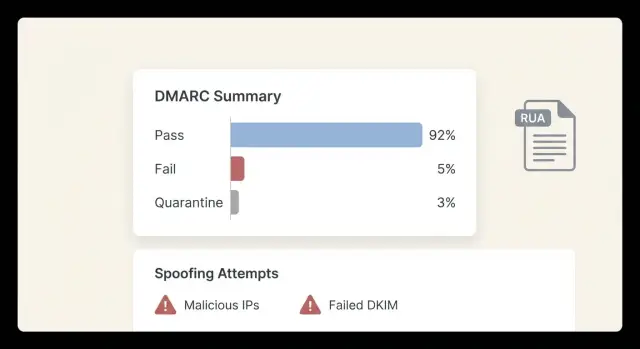
DMARC reporting helps you see this early. When you add a DMARC record with an rua address, major receivers send you aggregate reports. These reports do not include message content. They are summaries showing where mail claiming to be from your domain is coming from, and whether it passed SPF/DKIM and alignment.
RUA reports usually tell you:
- Which sending sources are using your domain (your ESP, your CRM, unknown servers)
- Pass or fail rates for SPF, DKIM, and DMARC alignment
- Volume patterns (for example, a sudden spike from a country or provider you do not use)
- Early warning that your domain is being spoofed
They cannot show the email body, subject line, or the exact person targeted. Think of RUA as traffic cameras, not full security footage.
One common fear is breaking sending later when you tighten policy. That usually looks like legit campaigns landing in spam or being rejected because SPF or DKIM passes but does not align with the From domain, or because messages are forwarded and the SPF check fails along the way. A real-world example: your sequence tool sends correctly, but replies or tracking are routed through a different domain and alignment quietly fails.
If you use a platform like LeadTrain that sets up SPF/DKIM/DMARC behind the scenes, RUA reports still matter. They are the proof that everything is aligned before you move past monitoring.
The minimum you need to know: SPF, DKIM, alignment
To make sense of DMARC reports, you only need three ideas: SPF, DKIM, and alignment. They answer: is this sender allowed, was this message tampered with, and do the identities match?
SPF is a permission list. It says which servers are allowed to send mail for a domain.
DKIM is a tamper check. The sending server adds a cryptographic signature the receiver can verify. If the message is modified in transit, DKIM can fail.
DMARC is the rule and the scoreboard. It tells receivers what to do if checks fail (monitor, quarantine, reject) and where to send reports.
What alignment means (and why it matters)
Alignment means the domain your recipient sees in the From address must match the domain that passed SPF or DKIM. This is what stops simple spoofing. If your From says outreach.example, but SPF passes for a different domain, DMARC can still fail because the identities do not line up.
A simple way to remember it:
- SPF checks the envelope sender and its allowed servers.
- DKIM checks the signature domain that signed the message.
- DMARC checks whether the passing SPF or DKIM domain aligns with the visible From domain.
How you can pass one check and still fail DMARC
You can pass SPF but fail DMARC if SPF passes for a bounce domain owned by your provider, not your From domain. This happens often with forwarding and some tracking setups.
You can pass DKIM but fail DMARC if the DKIM signature uses a different domain, or if a system modifies the message and breaks the signature.
Cold email tools either send through their own infrastructure or connect to yours. In both cases, you want them to sign with DKIM for your outreach domain and send in a way that keeps SPF or DKIM aligned. Platforms like LeadTrain reduce the surprise of it sends but DMARC fails by handling domain setup and authentication in one place.
What a DMARC RUA report is and what you should look for
A DMARC RUA report is an aggregate summary mailbox providers send about mail claiming to be from your domain. It does not show full email content. Instead, it shows what they saw at scale: who sent mail using your domain, how authentication performed, and how much passed or failed.
You may also see DMARC RUF mentioned. RUF is a forensic-style report closer to an individual sample. Many providers no longer send RUF, and it can raise privacy concerns. For most outreach domains, RUA is the practical tool. It is enough to spot spoofing, find misconfigured tools, and decide when you can move from monitoring to enforcement.
Most RUA reports arrive as XML and can look confusing because one file may include multiple sending sources, multiple IPs, and multiple outcomes. If more than one tool sends for your domain (CRM, calendar, helpdesk, outreach platform), the report mixes them together. Even for a single-purpose outreach domain, you may still see several IPs because providers rotate infrastructure.
A typical report includes:
- The source IP, plus the receiving provider and time window
- Message volume (how many messages were seen from that IP)
- SPF result and which domain passed SPF
- DKIM result and which DKIM domain signed the message
- DMARC result (pass or fail) based on alignment
Start with two signals: volume and alignment. For a single-purpose outreach domain, good usually means most volume comes from one expected sending system, and DMARC passes because SPF aligns or DKIM aligns (ideally DKIM).
Example: you set up an outreach-only domain and send through one platform. In RUA, you should recognize the main sending IPs, see consistent DKIM pass with your domain, and see very few (or zero) unexpected IPs. If you use a platform like LeadTrain where sending infrastructure is tenant-isolated, sending sources tend to stay stable, which makes anomalies easier to spot.
How to read RUA reports step by step (without getting lost)
A RUA report is basically a daily receipt from mailbox providers. It shows who sent mail claiming to be from your domain, from which IPs, and whether SPF, DKIM, and DMARC passed.
1) Start with volume
Look for the highest counts first. One source might represent 90% of your mail. Fixing a high-volume issue usually has the biggest impact on deliverability.
In outreach setups, top sources are often your cold email tool, a mailbox provider, and sometimes a support or CRM system.
2) Check SPF and DKIM, then the DMARC result
For each high-volume source, check:
- SPF pass or fail (and which domain authenticated)
- DKIM pass or fail (and which domain signed)
- DMARC pass or fail (the final decision)
Shortcut: if DMARC fails while SPF or DKIM passes, you often have an alignment issue, not a sending outage.
3) Confirm alignment with your From domain
DMARC cares about the From address your recipient sees. Confirm the authenticated identifier (SPF domain or DKIM signing domain) matches, or aligns with, that From domain. Misalignment is common when a tool sends using its own domain or an unexpected subdomain.
4) Flag unknown sources and categorize them
Scan for IPs, vendors, or regions you do not recognize. This is where reporting is most valuable: it surfaces spoofing and forgotten tools.
Keep it simple:
- Legit (expected sender and passes)
- Needs investigation (known tool but failing or misaligned)
- Suspicious (unknown or clearly failing)
After a few reviews, the report becomes predictable. You are no longer reading raw data. You are checking a short list of senders you actually use.
How to spot spoofing and lookalike sending in the reports
DMARC reports are a scoreboard: which servers sent mail claiming to be your domain, and whether SPF/DKIM aligned. Your goal is to separate expected senders from someone pretending to be you.
Start by listing the legit sources you expect to see: your cold email sender, your mailbox provider, and any support or CRM tool that sends on your behalf (tickets, notifications, password resets). If you use LeadTrain plus a mailbox provider, those sources should show up repeatedly, with stable volume and mostly pass results.
Red flags that often mean spoofing (or a lookalike)
- High DMARC fail rate (especially when both SPF and DKIM fail) from the same source
- Hosting networks or regions you never use, sometimes spread across many IPs
- Sudden spikes in volume for a source you do not recognize
- Many different From addresses under your domain in a short window
- Failures that keep happening even though you have not changed DNS
Spoofing vs misconfiguration is mostly about consistency. Misconfiguration usually comes from a known service and fails in a repeatable way (for example, DKIM passes but is not aligned). Spoofing often looks messy: unknown IPs, both checks failing, and no pattern that matches a real tool.
When to treat a sender as suspicious even at low volume
Attackers often test quietly. Treat an IP as suspicious if it is unknown and shows any of these:
- Both SPF and DKIM fail
- Header-from is your domain but the authenticated domains are unrelated
- It appears only once or twice, from a random network, with 100% failures
Example: if you see a new IP sending three messages that all fail SPF and DKIM while claiming to be your outreach domain, that is rarely a small setup mistake. It is often a probe or a small spoofing run.
The most common reasons DMARC fails on legit mail
Most DMARC fails in RUA reports are not attacks. They are normal sending sources missing one detail.
Misalignment: the From address does not match what’s authenticated
This is the most common cause. Your email can pass SPF or DKIM and still fail DMARC if the authenticated domain does not align with the From domain your prospect sees.
Example: you send as [email protected], but the tool signs DKIM for vendor-mail.example or uses an SPF return-path on a different domain. The fix is usually choosing the right sending domain inside the provider and making sure DKIM is set for the same domain shown in From.
DKIM issues: missing selector, wrong key, or inconsistent setup
DKIM fails often come from small setup mistakes: the selector name is wrong, the DNS record is missing, or one mailbox/provider was never finished. If you see a recognized source failing DKIM consistently while SPF results are mixed, that points to a DKIM DNS problem.
SPF problems: too many lookups and hidden senders
SPF can fail because a sender is missing, or because it exceeds the DNS lookup limit (10). Too many lookups usually means the SPF record has too many include statements and redirects, so receivers stop evaluating and treat it as a fail.
Forwarding and mailing lists create false alarms
Forwarding and mailing lists often break SPF because the forwarder becomes the new sender IP. DKIM can survive forwarding, but some mailing lists rewrite messages, which can break DKIM too.
Too many tools and no clear owner
If multiple tools send from one domain, reports get messy fast. Keep a simple inventory and assign an owner for each sender. If your SDRs use LeadTrain for outreach but marketing sends from the same domain in another tool, you may see multiple DKIM domains. That is not always wrong, but it must align with the visible From domain.
Moving from monitoring to enforcement safely
The goal is simple: block spoofing without blocking real sending.
Start with p=none and treat it as a baseline period, not the finish line. Give it enough time to capture normal patterns (weekday vs weekend volume, new sequences, vendor mail). If outreach volume is ramping up quickly, extend the baseline until it stabilizes.
Before tightening policy, fix legitimate sources first. For cold email, that usually means making sure your sending tool signs with DKIM on the same domain used in the From address, and that SPF is not failing because mail is routed through a different service. If either SPF or DKIM passes and aligns, DMARC can pass.
A safe rollout often looks like this:
- Keep
p=noneuntil the only fails are clearly unwanted sources - Set
p=quarantinewith a smallpct(like 10-25) - Increase
pctstep by step while watching bounces, replies, and complaints - Move to
p=rejectonly when you are confident remaining failures are spoofing
Quarantine is a useful middle step for outreach domains because it pressures spoofers but still gives you time to catch surprises.
Keep a rollback plan ready. The first sign of trouble is often quiet: fewer replies, not a loud error message. If volume drops after a policy change, roll back in this order:
- Lower
pctto the previous level - Switch from
p=quarantineback top=nonetemporarily - Re-check DKIM selector and alignment for your outreach sender
- Verify SPF includes the real sending service (and is not failing from too many lookups)
Even if a platform like LeadTrain sets up SPF/DKIM/DMARC and warms up mailboxes, enforcement still benefits from a careful ramp. Use reports to confirm only bad traffic is being affected.
Mistakes that cause deliverability problems during enforcement
Enforcement is where good intentions can break real sending. Reporting is most useful here because it tells you which senders will be hurt before you change policy.
Turning on p=reject too early is the biggest mistake. If even one legitimate sender is failing alignment, you can block password resets, invoices, calendar invites, or outreach sequences overnight.
Another common mistake is assuming SPF alone is enough. SPF can pass while DMARC fails, especially with forwarding or misaligned From domains. For outreach, aligned DKIM is usually the more stable foundation.
Subdomains can also trip you up. You might enforce on the root domain while outreach is coming from a subdomain, or a vendor is using a subdomain you did not notice. Decide policy scope on purpose.
Small sources matter too. A few failing messages per day from a helpdesk tool or form plugin can turn into thousands later. Fix them while they are still small.
If you can avoid it, do not enforce DMARC on your core brand domain as your first move. Separate outreach domains from the main brand domain so a mistake does not impact critical mail.
A quick DMARC RUA checklist before you change policy
Before you move beyond monitoring, use RUA reports to confirm that real sending is clean and predictable. Review the last 7 to 14 days and compare to the prior period so you catch trends, not one-off noise.
- Confirm every legitimate system is DKIM-signing in a way that aligns with your From domain
- For each legit source, verify at least one aligned path: SPF aligns or DKIM aligns
- Scan for unknown IPs or unknown services with meaningful volume
- Look for week-over-week spikes in failures
- Use a safety ramp with
pctbefore you changep
A practical rule: if legitimate sources pass with alignment and failures are mostly tiny and random, you are likely ready to test p=quarantine at a low pct. If a legitimate sender fails repeatedly, fix that first.
If you use an all-in-one platform like LeadTrain to buy domains, set up authentication, warm up mailboxes, and run sequences, the legit sender list is often shorter, which makes this review faster.
Example: an outreach domain that ramps up without breaking sending
A team launches a brand-new outreach domain for cold email. They have two mailboxes (alex@ and sam@) and send through one provider (for example, AWS SES via a platform like LeadTrain). They start with DMARC set to p=none so nothing gets blocked while they watch the data.
In the first week, the reports usually show a few clear buckets:
- Real sender IPs passing SPF and DKIM
- Some forwarded mail (often SPF fails, DKIM still passes)
- Random background noise: sources trying to send as the domain
On day 3, the team notices a small spike: 15 messages from an IP range they do not recognize, claiming to be from their domain. SPF fails, DKIM is missing, and alignment fails. They confirm it is not their tool by matching timestamps against their campaign sends and checking that legitimate traffic comes from only the expected sending sources.
They also find one legitimate issue: DKIM passes, but alignment fails because the d= value is set to a subdomain that does not match the From domain used for outreach. They fix it by signing with the same domain shown in From (or by switching From to match the signing domain), then wait 48 hours for new reports.
Once reports show stable passes, they raise enforcement slowly using pct. They move to p=quarantine with pct=25 for a few days, then 50, then 100. Only after a clean run do they consider p=reject.
Success looks boring: legitimate mail passes via aligned DKIM or aligned SPF, spoofing sources keep failing and get quarantined or rejected, and the unknown IP bucket shrinks toward zero.
Next steps: set a routine, then simplify your domain setup
The fastest way to get value from DMARC reporting is to make it routine. Pick one outreach domain to standardize first and write down every tool allowed to send for it (cold email platform, mailbox provider, CRM, support desk, calendar tool). That keeps reports readable and prevents mystery sources from slipping in.
Set a review rhythm you can actually keep. Weekly is a good start. When you review, you are mainly checking for new senders you do not recognize, sudden spikes in volume, and any legitimate source failing alignment.
Keep an approved senders list, but do not overbuild it. For most teams, three fields are enough: the tool name, what it sends, and whether you expect aligned SPF or aligned DKIM.
If you want fewer moving parts, reduce the number of places that can send as that domain. A unified setup like LeadTrain can help by buying and configuring domains, handling SPF/DKIM/DMARC setup, warming up mailboxes, and running multi-step sequences in one place, so your reports reflect a smaller set of legitimate sources.
The goal stays the same: fewer senders, fewer surprises, and a policy you can tighten without breaking real sending.
FAQ
What problem does DMARC reporting actually solve for an outreach domain?
DMARC reporting shows you who is sending mail that claims to be from your domain and whether it passed SPF, DKIM, and alignment. It’s mainly used to catch spoofing early and to find legitimate tools that are misconfigured before you move to stricter DMARC policies.
What is a DMARC RUA report, and does it include email content?
RUA (aggregate) reports are summary data from mailbox providers about authentication results for your domain over a time window. They don’t include the email body, subject line, or the exact recipient, so you can use them for diagnostics without exposing message content.
What does “alignment” mean, and why does it matter so much for cold email?
Alignment means the domain in the visible From: address matches the domain that passed SPF or DKIM. Outreach setups often fail here because a tool can pass SPF or DKIM using its own domain while you show your domain in From, which makes DMARC fail even though “sending works.”
How do I read a RUA report without getting overwhelmed?
Start with volume so you focus on the sender responsible for most of your mail. Then check whether DMARC passes and, if it fails, whether SPF or DKIM passed but didn’t align with your From domain, which usually points to a configuration issue rather than an outage.
Can SPF pass but DMARC still fail—how is that possible?
Yes, it’s common. SPF can pass for a provider-controlled return-path domain or a different envelope sender, while your From domain is something else; DMARC then fails due to misalignment. This is why aligned DKIM is often the safest path for outreach domains.
What are the clearest signs of spoofing in DMARC reports?
Look for unknown IPs or sources with high DMARC fail rates, especially when both SPF and DKIM fail. Sudden volume spikes from places you don’t use are also a strong signal; misconfigurations usually come from a known service and fail in a consistent pattern.
Why would legitimate outreach emails fail DMARC?
The most common cause is misalignment: the tool signs with DKIM for a different domain or uses an SPF domain that doesn’t match your From. Other frequent issues are missing or wrong DKIM DNS records, SPF lookup limits, and forwarding or mailing lists that break SPF (and sometimes DKIM).
When should I move from `p=none` to quarantine or reject?
Keep p=none until your reports show all legitimate senders consistently passing with alignment. Then move to p=quarantine using a low pct and increase gradually while monitoring replies, bounces, and complaints; only go to p=reject when remaining failures are clearly unwanted.
What should I do if deliverability drops after tightening DMARC?
The first signs are often subtle, like fewer replies or unexpected rejections after a policy change. Roll back by lowering pct or returning to p=none, then fix alignment for your real sender (usually DKIM domain vs From domain) and re-check SPF complexity and missing senders.
If LeadTrain sets up SPF/DKIM/DMARC for me, do I still need to watch RUA reports?
You still want to verify that the platform’s authenticated identifiers align with the From domain you’re using and that no extra tools are sending as the same domain. RUA reports act as proof that SPF/DKIM/DMARC are behaving as expected before you enforce stricter policies.