Dedicated IP for outbound email: decide by volume and risk
Dedicated IP for outbound email can improve deliverability only when volume and warm-up capacity support it. Use this framework to decide and roll out safely.
Why this decision matters for outbound email
Outbound email only works when your messages land in the inbox. The tricky part is that deliverability often looks fine at low volume, then drops fast as you scale. The same copy and targeting can suddenly underperform, not because your offer changed, but because mailbox providers start watching your sender reputation more closely.
Your IP address is one of the signals that shapes that reputation. A strong reputation helps you reach the inbox. A damaged one can push normal emails into spam, or get you throttled so messages arrive hours later.
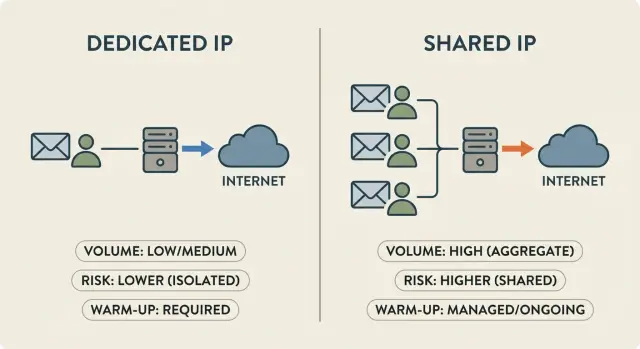
With a shared IP, your reputation is partly tied to what other senders do. With a dedicated IP, you own the upside and the downside. That’s why this choice isn’t a tiny technical detail. It affects how much risk you carry, how carefully you need to ramp sending, and how quickly you can recover from mistakes.
A common pattern: a setup that worked at 30 to 50 emails per day starts to wobble at 300. Replies dip, bounces rise, and you feel pressure to send even more to hit targets. That feedback loop is where teams get burned.
A realistic example: an SDR team moves from 2 mailboxes sending 40 emails/day each to 10 mailboxes at 80/day each. Nothing else changes, but complaints and bounces creep up. Providers notice the sudden jump, and inbox placement drops across the program.
What follows is a practical way to decide:
- When shared infrastructure is enough
- When a dedicated IP starts to make sense
- What warm-up and rollout should look like
There’s no magic number that fits everyone. Industry, list quality, and how you handle bounces and replies matter just as much as volume.
Dedicated IP vs shared IP, explained simply
An IP address is like the return address for your email sending. Mail providers watch how mail from that address behaves over time: do people reply, ignore, mark spam, or bounce? That history becomes a reputation signal that affects whether your messages land in the inbox or get filtered.
With a shared IP, your emails go out from an address used by many senders. The upside is that the reputation is already seasoned, and low to moderate volume senders can often get solid results without extra work. The downside is that you’re riding with strangers. If other senders on the same IP blast low-quality lists or trigger spam complaints, the shared reputation can dip and you may feel it even if you did nothing wrong.
A dedicated IP means only your organization uses that sending address. You own the reputation. If you have a good list, steady sending, and consistent engagement, you can build a strong, predictable baseline. But if you spike volume too fast or make a targeting mistake, there’s no shared cushion to absorb the hit.
A dedicated IP also doesn’t fix the fundamentals. It won’t rescue bad targeting, weak copy, messy list hygiene, sudden volume jumps, or missing authentication (SPF, DKIM, DMARC).
A simple way to think about it: shared IP is like renting a seat on a bus route that runs every day. Dedicated IP is buying your own vehicle. You get control, and you take full responsibility.
Volume: the first filter for choosing an IP strategy
Start with volume because it sets the ceiling on everything else: how many mailboxes you need, how long warm-up takes, and how much “shock” your sending pattern creates for inbox providers.
Look at total emails sent per day across your whole outbound program (not just one rep).
- Low volume (up to ~500/day total): Dedicated IP usually adds work without much benefit. Results depend more on list quality, copy, and consistent sending.
- Medium volume (~500 to 5,000/day): The gray zone. Dedicated can make sense if you can keep sending steady and warm up patiently. If not, shared is often safer.
- High volume (5,000+/day): Neighbors on a shared IP matter more, and dedicated often becomes worth considering, but only with a controlled ramp.
Consistency matters as much as the raw number. Providers like predictable patterns. Sending 2,000 emails on Monday and then nothing for a week can look riskier than sending 300 every weekday.
Volume also ties directly to how many mailboxes and domains you run. Spreading volume across multiple mailboxes keeps each mailbox in a normal human range and lowers the chance any single identity gets throttled or flagged. Multiple sending domains can reduce single-point failure, but they also add operational overhead.
Be honest about ramp speed. If you need to go from zero to full volume in a few days because of a deadline, a dedicated IP is more likely to hurt than help. The safer plan is to ramp gradually and expand capacity over time.
A quick self-check:
- What’s our average daily volume (not peak)?
- Can we send steadily 5 days a week for the next 4 to 8 weeks?
- Do we have enough mailboxes so no single one gets pushed too hard?
- How fast do we truly need to ramp, and what happens if we ramp slower?
Risk: how much damage can one mistake cause?
Risk is the second filter after volume. A dedicated IP gives you control, but it also means there’s no group reputation to soften a bad week. If something goes wrong, the damage sticks to your IP and can take time to undo.
Your outbound is higher risk when the inputs are uncertain or brand trust is still forming. Red flags include:
- A cold list you didn’t build yourself
- Brand-new domains or mailboxes
- Constant changes to offers, copy, or targeting
- Categories that trigger stronger filtering (finance, crypto, adult, gambling, medical claims)
- Limited control over lead quality (lots of unknown or scraped addresses)
Some industries are judged harder by inbox providers. Even with good intent, more recipients click “spam” when a message feels unexpected. Complaint rate becomes the quickest way to lose deliverability.
Also watch the softer warning signs: high unsubscribe rates, lots of negative replies (“stop emailing me”), and repeated bounces. These often show up before formal spam complaints.
On a dedicated IP, one campaign can poison the well. A single bad list upload can spike bounces and complaints in 24 to 48 hours. After that, even your best sequence can start landing in spam. With shared IP, you might be partly protected or harmed by other senders. With dedicated, the blast radius is smaller in one way (only you) and bigger in another (it hits everything you send).
To reduce the chance of a blowup, add guardrails before you ramp:
- Start with your most relevant segment first
- Cap daily volume increases, even when results look great
- Pause quickly if complaints or bounces jump
- Keep offers and copy stable during warm-up
- Make unsubscribing easy and treat it as a clean exit, not a failure
Warm-up capacity: people, process, and patience
Warm-up isn’t a magic switch. It’s a controlled ramp where you prove, day after day, that your sending behaves like a normal human sender: steady volume, real replies, low bounces, and almost no complaints. If you’re moving to a dedicated IP, warm-up capacity often matters more than which tool you pick.
A realistic warm-up looks boring on purpose.
Week 1 stays small and safe: send to your best-fit leads, verify addresses, and keep copy simple. Week 2 increases slowly if the numbers stay clean. Weeks 3 and 4 step up again, but only if you can keep list quality high and handle the extra replies. If you spike volume or switch to risky lists mid-warm-up, you can reset trust fast.
How many mailboxes can you warm at once? Fewer is usually better. If you can’t monitor them daily, you’ll miss problems until damage is done. Many teams start with 2 to 5 mailboxes, warm them evenly, then add more once the routine is stable.
Daily monitoring is non-negotiable. Someone needs to check a tight set of signals and act the same day:
- Reply mix (interested, not interested, out-of-office)
- Bounces and repeated bounce patterns
- Spam complaints and unsubscribe spikes
- Sudden drops in opens or replies
- List changes (new source, new segment, new offer)
Know when to pause, slow down, or split sending. Pause if complaints appear or bounces jump. Slow down if replies drop suddenly or deliverability feels shaky. Split sending across more mailboxes or domains if you need higher volume but want to limit risk.
A practical decision framework you can apply quickly
You can usually decide on a dedicated IP with four inputs: daily send volume, how risky your list and messaging are, whether you can warm up slowly, and how expensive a deliverability mistake would be.
A simple decision path
- Stay on shared IP if you send under ~500 emails/day total and spikes are rare.
- Consider dedicated IP if you consistently send ~1,500+ emails/day and you can commit to a 3 to 6 week warm-up.
- Split traffic if you have mixed risk (for example, keep follow-ups and meeting logistics separate from cold prospecting).
- Delay the move if you can’t ramp gradually (for example, you must jump from 0 to 10,000/day).
- Use multiple IPs only if you have high volume plus clear separation (brand, region, or use case) and the team to manage it.
Dedicated tends to pay off when your volume is steady, your targeting is clean, and you care more about predictable inboxing than quick spikes. Shared can be fine for early testing, low volume, or periods when you’re changing copy and lists every week.
Signs you’re not ready (fix these first)
If these are true, solve them before switching:
- No consistent daily sending plan for the next month
- Lists include scraped or unverified emails, or bounce rates are already high
- Replies aren’t handled quickly (slow responses can hurt engagement signals)
- Authentication and tracking are messy or changing often
- No clear owner for monitoring and adjustments
Step-by-step rollout plan for moving to a dedicated IP
Treat a dedicated IP migration like a controlled rollout, with clear limits and a slow ramp that protects reputation.
The rollout plan
-
Set goals and guardrails. Decide what “good” looks like (meetings booked, replies per day) and what “stop” looks like. Guardrails usually include keeping hard bounces very low, keeping spam complaints near zero, and pausing if negative replies spike because targeting is off.
-
Prepare the foundations. Use a sending domain you control and keep it consistent. Confirm SPF, DKIM, and DMARC are correct. Make unsubscribing easy. Keep lists clean: recent, relevant, and verified.
-
Warm up with a conservative ramp. Start small, then increase in steps. A schedule many teams can handle:
- Week 1: 20 to 40 emails/day
- Week 2: 50 to 100/day
- Week 3: 150 to 300/day
Increase only if metrics stay stable. Keep sending patterns normal (business hours, reasonable gaps) and aim for real replies.
-
Roll out by segment, not all at once. Move one campaign or persona first. Use your highest-quality segment early because it usually earns the best engagement. Add new segments only after the first one looks healthy.
-
Stabilize, then scale again. Hold volume steady for 5 to 10 business days after each increase. Watch bounce and complaint rates, reply quality (interest vs irritation), and internal handling speed. If any metric worsens, don’t push through. Drop back to the last safe volume, fix the cause (list, copy, targeting), then resume.
What to monitor during warm-up and ramp-up
Warm-up isn’t just “send more each day.” It’s catching small signs that inboxes are starting to distrust you and reacting before your reputation slides.
You can spot early trouble without fancy tooling. Send a few tests to personal addresses (Gmail, Outlook, and one company mailbox) and look for sudden changes: messages landing in spam, a “via” label, warnings like “be careful with this message,” or other trust signals that appear out of nowhere.
In your normal reporting, keep the metric set tight:
- Hard bounce rate (spikes are a red flag)
- Spam complaints (even tiny numbers matter)
- Unsubscribe rate (a fast rise usually means targeting or copy is wrong)
- Reply rate (a drop can signal inboxing problems or weaker offers)
- Out-of-office rate (helps confirm you’re reaching real work inboxes)
Act quickly when you see patterns:
- Bounce spikes: pause new sends, verify the list, remove risky domains
- Complaint or unsubscribe spikes: stop the sequence, tighten targeting, rewrite the first email
- Reply rate falls while volume rises: hold volume steady for 48 hours, slow the ramp
- Spam placement in test inboxes: reduce daily sends and re-check SPF/DKIM/DMARC
A practical habit for the first 60 days: do a 15-minute weekly review. Compare week-over-week bounces, complaints, unsubscribes, and replies, and note any volume increase you made. If one metric worsens, don’t ramp. Stability is the goal.
Common mistakes that ruin a dedicated IP launch
Most dedicated IP failures aren’t technical. They’re timing and behavior problems. The IP is new, mailbox providers are watching closely, and small mistakes get amplified.
A classic error is switching because of one rough week on a shared IP. If your list, offer, or copy is the real issue, moving to a new IP just resets the clock and adds warm-up risk. Fix the basics first, then change infrastructure when you have a steady sending pattern.
The mistakes that trigger the fastest deliverability drop:
- Moving to dedicated before you have consistent volume and clean targeting
- Ramping faster than your list quality can handle
- Mixing very different risk profiles on the same IP (cold outbound + affiliate-style offers + newsletters)
- Sending from half-configured domains (SPF, DKIM, DMARC not aligned)
- Changing too many things at once (IP, domain, templates, lead source all in one week)
A realistic scenario: you start a new IP on Monday, double volume every day, and test a brand-new lead source at the same time. By Friday, bounces jump and replies turn hostile. Was it the IP, the list, or the copy? You can’t tell, so you can’t fix it.
The safest approach is boring: keep one variable stable while you change another, and earn trust slowly.
Example scenario: a realistic rollout with numbers
A 4-person SDR team sends 200 cold emails/day from 8 mailboxes (about 25 per mailbox). Reply quality is decent, but they plan to scale to 2,000 emails/day for a new market.
They choose “shared now, dedicated later.” At 200/day, a shared pool with good mailbox hygiene is usually fine, and they don’t yet have the volume or operational time to warm a new IP safely. They set a trigger: move to a dedicated IP once they can sustain 1,200+ emails/day, have clean targeting, and have someone watching metrics daily.
Week-by-week ramp (after the move)
They keep the old setup running at a steady baseline and shift only a portion of traffic to the new IP.
- Week 1: 50/day on the new IP (highest-intent leads only)
- Week 2: 120/day, add a second segment, keep copy unchanged
- Week 3: 250/day, introduce a small subject line test
- Week 4: 450/day, expand to the full ICP
- Week 5: 700/day, move more sequences over
- Week 6: 1,000/day, then step up only if metrics hold
Every morning they check bounce rate, spam complaints, and the share of negative replies. If any jump, they pause the next ramp step for 3 to 5 days, remove risky leads, and tighten targeting. They reduce follow-ups first and keep only the best-performing segment running until things recover.
Quick checklist and next steps
Before you choose:
- Volume and consistency: can you send steadily (not in bursts) for the next 4 to 8 weeks?
- Risk: would a deliverability dip immediately hurt revenue, brand, or a key account list?
- List quality: do you have a clear way to suppress bad leads and prevent repeat bounces?
- Warm-up time: do you have enough runway to ramp slowly without pressure to hit big numbers?
- Team capacity: does someone own daily checks and quick fixes (bounces, unsubscribes, complaints)?
Before you ramp, make sure the basics are boring and correct: SPF, DKIM, and DMARC are set up, bounce handling works, and replies reach the right person fast. If interested replies sit for two days, your sender reputation work gets wasted.
If results drop, don’t change ten things at once. Pause new lists first, keep sending only to your best segment, reduce daily volume (often 30% to 50%), and turn off the riskiest sequence step. Then check whether the dip lines up with a recent domain, mailbox, or copy change.
If you want fewer moving parts while you build a steady process, LeadTrain (leadtrain.app) puts domains, mailboxes, warm-up, multi-step sequences, and reply classification in one place, which can make it easier to monitor changes and keep your rollout disciplined.
FAQ
What’s the simplest rule for when to choose a dedicated IP?
A dedicated IP usually starts to make sense when you send consistently at higher volume and you can ramp slowly. If you’re under about 500 emails/day total, shared is often simpler and just as effective. If you’re consistently around 1,500+ emails/day and can commit to a 3–6 week warm-up, dedicated becomes a reasonable option.
Is a shared IP bad for cold outbound?
A shared IP can work well at low to moderate volume because it’s already “seasoned,” so you don’t start from zero. It becomes riskier when volume grows or when other senders on the same IP behave badly, because their complaints and bounces can affect overall inbox placement. If you need more predictability and you’re ready to manage warm-up, dedicated can reduce the “neighbor risk.”
Will a dedicated IP automatically improve deliverability?
No. A dedicated IP gives you control, but it also means you own every mistake. If you upload a bad list, ramp too fast, or trigger complaints, your IP reputation can drop quickly and affect all campaigns. Dedicated IP helps when your fundamentals are already strong; it doesn’t rescue weak targeting or poor list hygiene.
How do I know if my volume is “high” enough to care about IP strategy?
Track your total daily volume across the whole program, not per rep. If you’re seeing a setup work at 30–50 emails/day per mailbox but wobble as you approach a few hundred per day across the team, that’s a signal to slow down and review infrastructure. Volume spikes and inconsistency often cause more issues than the absolute number.
How long does dedicated IP warm-up really take, and what does “safe” look like?
A safe warm-up is intentionally boring: start small and increase only if bounces and complaints stay low and you’re getting normal replies. A practical ramp is Week 1: 20–40/day, Week 2: 50–100/day, Week 3: 150–300/day, then hold steady before increasing again. If you can’t monitor daily and pause fast when metrics jump, you’re not ready to warm up a dedicated IP.
Why not just add more mailboxes instead of getting a dedicated IP?
Multiple mailboxes help keep each sender identity in a normal human range, which reduces throttling and trust issues. It also spreads risk so one mailbox doesn’t carry the entire load. The tradeoff is more operations: more inboxes to monitor, more replies to handle, and more places for configuration mistakes.
What should I monitor during warm-up to avoid getting burned?
The fastest warning signs are hard bounces, spam complaints, and sudden jumps in unsubscribes or negative replies. A drop in replies while volume rises can also signal inboxing trouble. When you see spikes, pause new sends, slow the ramp, and fix list quality or targeting before sending more.
What are the biggest mistakes when launching on a dedicated IP?
The most common mistake is ramping too fast or changing too many variables at once (new IP, new domain, new templates, new lead source in the same week). Another frequent issue is switching to dedicated because of one rough week, when the real problem is list quality or offer fit. The safest approach is to keep things stable, change one variable at a time, and scale only after metrics hold steady.
Should I split traffic between shared and dedicated IPs?
Yes, splitting can reduce risk when you have mixed use cases. Keep higher-risk cold prospecting separate from lower-risk traffic like replies, meeting logistics, or warmer follow-ups, so one mistake doesn’t poison everything. The key is clear separation and consistent sending patterns on each stream.
How can LeadTrain help with a dedicated IP rollout?
LeadTrain helps by consolidating domains, mailboxes, warm-up, sequences, and reply classification so you can control changes and monitor signals in one place. That matters most during warm-up, where small mistakes can snowball if you don’t catch them quickly. It can also reduce setup errors by handling domain/DNS and authentication steps behind the scenes.