Convert 'send info' replies into real conversations fast
Learn how to convert 'send info' replies with a short answer, one qualifying question, and two time options that move prospects toward a meeting.
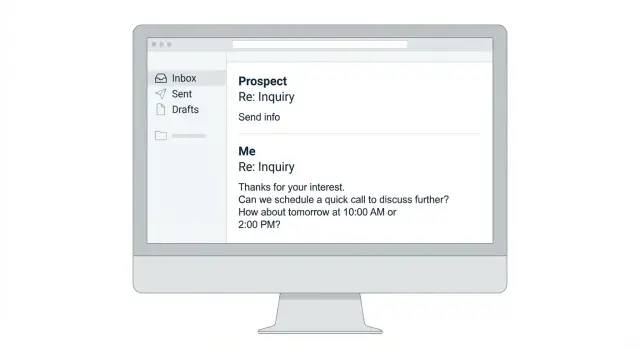
What "send info" really means (and why it stalls)
Most people who reply “send info” aren’t asking for a brochure. They’re buying time.
It can mean “I’m curious, but I don’t want a call yet,” “I don’t understand what you do,” or “I’m busy, remind me later.” It’s also a safe move: they don’t have to say yes, and they don’t have to say no.
If you respond with a wall of text, you make it even easier for them to do nothing. Long explanations lower reply rates for two simple reasons:
- They create work (read, compare, decide).
- They force a big decision (“Should we do this?”) when they’re still deciding if it’s relevant.
Your goal isn’t a big yes. It’s a small next step that’s easy to accept: one quick detail, one question, one simple choice.
When it’s real interest vs a polite brush-off
You can usually tell by the level of signal in the reply.
Real interest often includes a problem (“we struggle with reply sorting”), timing (“next month”), or a specific question. You may also see fast responses or earlier engagement.
A brush-off is usually one or two words, no detail, and sometimes arrives days later. If they never answer even a simple follow-up question, they were probably trying to end the thread without saying “no.”
Either way, stay polite and keep your next message short.
Why it stalls when you “send info” the wrong way
If you reply with three paragraphs, a feature list, and pricing, the prospect has to think, “Do I want to deal with this right now?” Most will park it.
A better move: give a compact answer focused on the outcome, ask one easy question to confirm fit, then offer two concrete times. Even if they’re not ready, you’ve given them something simple to respond to.
The simple 3-part reply that turns it into a conversation
A good “send info” reply fits in 3 to 5 lines. It has three parts:
- Concise answer: One or two details they likely care about (who it’s for, what it helps with, the outcome).
- One qualification question: A single question they can answer in seconds.
- Two time options: Two specific times close together (same day or next day).
This works because it reduces effort, makes it about them, and removes scheduling friction.
Copy-ready structure (3 to 5 lines)
Use this skeleton and swap in your details:
Sure - quick overview: we help [who] with [problem] so they get [outcome].
Quick question: are you mainly focused on [option A] or [option B]?
If it’s easier, happy to walk through it - would Tue 10:30am or Wed 2:00pm work?
Step-by-step: write your response in under 60 seconds
When someone says “send info,” they’re usually asking for the smallest possible next step. Keep it small, then guide them toward a real conversation.
A fast way to write the reply:
- Acknowledge the ask in one line so they feel heard.
- Give a 1-sentence value summary in their language (not your feature list).
- Ask one specific question they can answer fast.
- Offer two time options and include your time zone.
- Add a low-friction fallback so they stay in control.
Keep each line short. If a sentence needs a comma to survive, it’s probably too long.
A copy-and-send template
Use this and swap the brackets:
Sure - happy to.
In one sentence: we help [who] get [result] by [how], without [common headache].
Quick question: are you mainly trying to improve [A] or [B] right now?
If it’s worth a quick chat, does Tue 11:00am ET or Wed 2:30pm ET work?
If not, just reply with a time that’s better.
If you’re tempted to attach a deck, pause. A short summary plus one question usually gets you further than “here’s a PDF.”
How to write the concise answer (without overexplaining)
The real question behind “send info” is: “What is this, and is it worth another 30 seconds?” Your “info” should be 1 to 2 sentences they can read on a phone.
A simple formula:
- What it is, in everyday words
- One specific outcome they get
- Optional: one short proof point (only if it’s genuinely true)
Avoid long feature lists. They don’t help someone who hasn’t decided whether this is relevant yet.
If you include a proof point, keep it grounded and brief (one line). Don’t stack claims.
Here are example lines you can copy and adapt:
- Product (cold email tool): “We help teams run cold email outreach from one place and spend less time on deliverability and reply handling. The outcome is more productive outreach with less tool-hopping.”
- Service (agency/consulting): “We help B2B teams book more qualified meetings by improving targeting, messaging, and follow-up. The goal is fewer dead-end threads and clearer next steps.”
- Hiring (recruiter/role): “This role owns outbound prospecting to mid-market accounts and books meetings for the AE team. The goal is consistent pipeline creation, not just activity.”
Write it, then cut it in half.
Ask one qualification question they can answer in 5 seconds
One tight question turns “send info” into momentum. Pick something that actually changes what you do next. If the answer wouldn’t affect your follow-up, it’s the wrong question.
Good questions are one sentence, one decision, and easy to answer without looking anything up.
A few copy-ready options:
- “What are you using today for [category]?”
- “Is this for you, or someone else on the team?”
- “What’s the main goal right now: more leads, faster follow-up, or better conversion?”
- “Do you need this for one rep or a whole team?”
- “When do you want this solved: this month, this quarter, or later?”
If you already know the likely answer (role, team, stack), confirm instead of asking blind: “Looks like you’re leading SDRs - is the bigger issue deliverability, or handling replies?”
Offer two time options that make booking the default
“Whenever works for you” sounds polite, but it pushes work back on them. Two clear options make the next step simple: pick A, pick B, or suggest C.
Keep it readable:
- Two options only
- Include time zone
- Say the meeting length (10 to 15 minutes is usually enough)
- Add an escape hatch (“If neither works, what’s better?”)
Copy-ready line:
“Happy to. Want to do a quick 12-min chat to see if it fits? I can do Tue 23 Jan at 10:30am ET or Thu 25 Jan at 3:00pm ET.”
If they’re in a different time zone, don’t make them do the math. Either ask their time zone once, or include both (for example, “10:30am ET (7:30am PT)”).
Realistic examples you can copy and adapt
Each reply does the same job: concise answer, one qualification question, and two time options.
Scenario 1: Prospect asks for info after a cold email about a SaaS tool
Totally. We help teams [main outcome in 1 line], usually in [timeframe].
Quick question: what are you using today for [category]?
If it’s worth a look, are you open to Tue 10:30am or Wed 2:00pm?
Scenario 2: Agency lead says “send pricing”
Sure. Pricing depends on scope, but most clients land between $X and $Y/month.
Quick question: is this for one-off projects or ongoing monthly work?
If helpful, can we talk Tue 11:00am or Thu 3:30pm?
Scenario 3: Recruiter or candidate replies “send details”
Happy to. It’s a [role/type] focused on [1-2 key responsibilities] with [key constraint like location/level].
Quick question: what’s your target [location/level/comp] right now?
If you want, I can share the full brief on a quick call: Wed 9:30am or Fri 1:00pm?
Once they answer your one question, keep the follow-up tight (2 to 4 sentences). If it’s a fit, confirm what you understood and restate one of the proposed times.
Common mistakes that keep “send info” stuck
Most “send info” replies are a low-effort test: “Can you be clear, fast, and relevant?” If your reply adds work, the thread dies.
Mistake 1: Sending a big deck and hoping they read it
A PDF feels safe, but it asks them to do homework. Put the takeaway in the email first (2 to 4 lines). Save deeper detail for after they answer your question.
Mistake 2: Turning one request into an interrogation
Asking 3 to 5 questions at once is the fastest way to get ignored. One question only.
Mistake 3: Forgetting the order: answer first, then ask
If they asked for info, give a short answer first. Then ask your one question.
Example: “Yes - we help teams book meetings by running targeted outreach and filtering replies so you focus on the interested ones. Quick question: are you reaching out to SMBs, mid-market, or enterprise?”
Mistake 4: Making scheduling harder than it needs to be
“Sometime next week” creates planning work. Offer two specific options. If they decline both, reply with: “No problem - what day is best, and mornings or afternoons?”
Quick checklist before you hit send
Read their message again and assume they’re busy, not rude.
Before you reply:
- Answer the request in 1 to 2 sentences.
- Include only one easy question.
- Offer two specific times with a time zone.
- Keep it phone-friendly (short lines, no big blocks).
- Keep the tone neutral and helpful.
If a sentence doesn’t help them decide or schedule, cut it.
Next steps: turn this into a repeatable follow-up process
Treat your “send info” response like a small system: a reusable template, a default meeting length, and a consistent way to follow up.
Save one short 3-part reply (answer + one question + two times) and only swap what changes: their name, the value line, and the question.
If you want to make this easier across multiple campaigns, LeadTrain (leadtrain.app) bundles domains, mailboxes, warm-up, sequences, and reply classification in one place, so “send info” replies don’t get lost and you can respond consistently.
FAQ
What does “send info” usually mean in a cold email reply?
Usually it means they’re interested enough to keep the door open, but not ready to commit to a call or a decision. Treat it as a request for a small next step, not a request for a full brochure.
Why do “send info” threads stall when I send a long explanation?
Because it creates homework and forces a big decision too early. A short reply lowers effort and makes it easy for them to answer one quick question or pick a time.
What should I include in my “send info” reply?
Send 3 to 5 lines: one sentence on who you help and the outcome, one simple question to confirm fit, and two specific times for a quick chat. Keep it readable on a phone and avoid cramming in features.
What’s the best qualification question to ask after “send info”?
Aim for one sentence that changes what you do next, like what they use today, who owns the decision, or their timing. If the answer won’t affect your follow-up, it’s not a good question.
How do I offer times without sounding pushy?
Offer two options close together and include your time zone and a short duration like 10–15 minutes. This makes “pick A or B” the default instead of pushing planning work back onto them.
Should I attach a PDF or deck when someone says “send info”?
Default to sending a short summary in the email and only share a deck after they answer your one question or agree to a call. If you do attach anything, still put the takeaway in the message so they don’t have to open files to respond.
What if they say “send info” and then don’t respond?
Follow up once with a brief bump that re-states the one-line value and repeats the single question. If there’s still no reply, stop chasing; they were likely trying to end the thread politely.
How do I handle “send info” when they’re really asking for pricing?
Give a simple range and immediately ask one scope question so you can narrow it. For example, share a typical monthly range, then ask whether it’s for one rep or a full team, and offer two times to confirm fit.
How do I avoid time zone confusion when proposing meeting times?
Either ask their time zone once, or include both your time zone and theirs if you know it. The goal is to remove math and make it easy to reply with “Tuesday works.”
How can I make this process repeatable across campaigns and teammates?
Use a saved template so every rep replies the same way: one-line value, one question, two times. A platform like LeadTrain can also help by keeping sequences and replies in one place and classifying responses, so “send info” messages don’t get missed and you can respond quickly and consistently.