Cold email warm-up schedule for teams (without sender spikes)
Cold email warm-up schedule for teams: a practical plan to stagger new mailboxes, set safe per-sender limits, and prevent org-wide volume spikes.
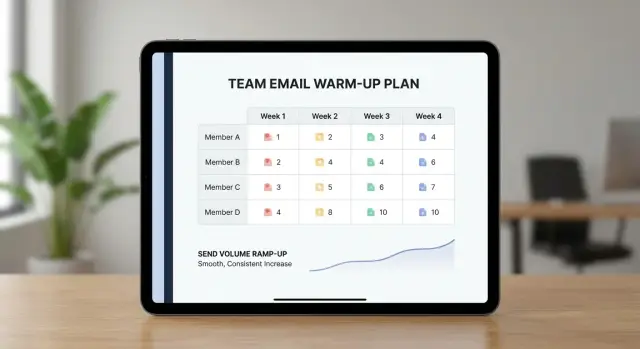
Why teams get hit by the “new sender spike” problem
Warm-up teaches mailbox providers that a new sending mailbox behaves like a real person: low volume at first, steady growth, normal reply patterns, and few complaints. Instead of going from zero to hundreds of emails overnight, you ramp up so your sender reputation has time to form.
Teams run into trouble when they onboard new SDRs in batches. That creates multiple brand-new mailboxes, often on the same domain, all starting to send around the same time. Even if each person sends “only a little,” the combined jump across the org can be big.
To mailbox providers, that kind of spike can look like automation or a compromised account. One week your domain sends almost nothing. The next week it sends a lot, from several new identities, to many new recipients. Unusual patterns get more scrutiny. The result is often a slide into spam placement, slower inbox placement, or more blocks and bounces before you know what changed.
Warm-up isn’t just a per-mailbox task. It’s an org-wide scheduling problem. You need a plan that coordinates timing and volume so overall sending behavior stays predictable.
A workable plan answers a few practical questions:
- When do new mailboxes start, and how many start each week?
- What are the per-sender limits at each stage?
- How fast does volume increase, and when do you pause?
- How do warm-up and campaign launches avoid colliding?
- Who owns the calendar so changes don’t create a surprise spike?
Warm-up basics that affect scheduling
A warm-up plan is really a reputation plan. Inbox providers watch how each sender behaves over time, then decide whether future emails belong in the inbox or the spam folder. The best schedules look boring: steady, consistent, and easy to predict.
New domain vs new mailbox (both matter)
A new sending domain has little or no history. Even with great copy, it hasn’t earned trust yet. A new mailbox also starts out “unknown,” even on an older domain. When both are new at the same time, risk stacks up.
So scheduling isn’t only about “how many emails can we send?” It’s also about how many new identities you introduce at once across the team.
Sender reputation in plain English
Think of each mailbox as having a score based on real-world signals: do people open, reply, ignore, mark as spam, or bounce? Sudden volume jumps look like automation and can trigger filtering. Slow, steady growth looks like a real person who’s gradually emailing more.
Consistency beats big jumps. If a rep sends 10 emails per day for three days, then jumps to 120 on day four, that spike can hurt that mailbox and can drag down results across the team when several senders follow the same pattern.
Healthy warm-up usually has a few traits: gradual increases every few days, low bounces (clean lists and verified addresses), quick reply handling, and steady send times (not random bursts late at night).
A common failure case is adding five new SDR mailboxes on Monday and ramping all five hard in the same week. Even if each person stays “under their limit,” the org still creates a new-sender spike.
Inputs to gather before you build the schedule
Start with a simple inventory. Deliverability problems often come from many small launches happening at once, not one obvious mistake.
Before you set daily limits, capture the basics in one shared doc so everyone is working from the same facts:
- How many new mailboxes you’re adding, and when they’ll be ready
- Which domains they’ll use (and whether any domains are also new)
- Which campaigns are starting soon, including expected daily lead volume and number of steps
- Any fixed deadlines (event follow-up, end-of-quarter push)
- Who can approve increases, and who can pause sending if something looks off
Next, define your warm-up window. For most teams, 2 to 4 weeks is a practical planning block. Shorter can work when the domain and sender history are already clean, but it leaves little room to recover if bounces or complaints appear.
Then choose a steady-state target, not a day-1 target: the normal daily volume per sender you want to reach after warm-up. It should match how your team actually works, including how quickly reps can respond to replies.
Finally, write down decision rules. A schedule fails when nobody is clearly responsible for saying “hold” or “go.”
Staggering new mailboxes across the org
Teams get into trouble when too many new senders start at once. Even if each person sends only a few emails, the combined pattern can look like a new outbound machine turning on overnight.
Pick a start cadence you can keep. For many teams, onboarding 2 to 3 new mailboxes per week grows capacity without creating a spike. The consistency matters more than the exact number.
Stagger by domain first
Domains are the easiest place to accidentally surge. If five new mailboxes all sit on the same domain and begin warm-up on the same day, you create a visible jump for that domain.
A simple rotation is enough:
- Week 1: start 1 mailbox on Domain A, 1 on Domain B
- Week 2: start 1 mailbox on Domain A, 1 on Domain C
- Week 3: start 1 mailbox on Domain B, 1 on Domain C
Only add a third start in a week after the first couple weeks look stable.
Authentication (SPF/DKIM/DMARC) helps, but it doesn’t replace pacing. Even properly authenticated senders can get filtered if behavior looks suspicious.
Spread activity across the day
After domain staggering, spread sending across the day. If the whole team warms up and launches sequences in the same morning block, you concentrate the “new sender” pattern. Splitting activity by team or timezone helps.
Also leave buffer days. Plan 1 to 2 days each week with no new mailbox starts. Use them to pause if bounces climb, fix DNS or list issues, and coach habits (like not blasting follow-ups from a fresh inbox). Those buffer days prevent small problems from turning into a reset.
Per-sender limits and a simple ramp curve
A strong cold email warm-up schedule is mostly about predictable volume. Clear daily caps prevent sudden jumps that can hurt reputation even when your message is fine.
Split senders into two buckets:
- New senders: gentle ramp, because they have no history.
- Established senders: higher caps, but they shouldn’t absorb all growth overnight.
Here’s a simple ramp curve for a brand-new mailbox (total outbound emails per day, including follow-ups):
- Days 1 to 3: 5 per day
- Days 4 to 7: 10 per day
- Week 2: 15 to 20 per day
- Week 3: 25 to 35 per day
- Week 4: 40 to 60 per day (only if bounces and complaints stay low)
Try to avoid sharp step changes. Going from 10 to 25 in one day signals “something changed.” Safer is small increases every few days. If you need faster growth, add capacity by introducing more mailboxes over time, not by pushing one mailbox too hard.
For established senders, set a separate cap that respects their track record. Many teams do best by keeping established mailboxes flat while new mailboxes ramp in the background.
Add an org-wide growth limit so total volume doesn’t spike when multiple people ramp at once. Keep the guardrails simple:
- Pick a maximum daily increase for the whole team (for example, +10% day over day)
- Don’t start new mailboxes on the same day
- If bounces or complaints rise, freeze increases for 3 to 5 days
- Don’t “catch up” by double-sending to hit targets
Aligning warm-up with campaign launches
Warm-up should be the calendar your launches follow. If your launch date is fixed, you’ll force volume through accounts that still look brand new, and that’s when spam placement tends to jump.
Tie each sender’s first campaigns to what their mailbox can safely handle that week. Plan the campaign backward from the ramp.
Start launches with smaller, safer segments. Choose contacts more likely to recognize you or respond normally: warmer leads, recent signups, past conversations, or tight ICP slices. Save broad targeting and large scraped lists for later, once the sender has a stable pattern.
Keep “new things” to a minimum. A new sender plus a brand new template plus a new audience is three variables changing at once. If bounces spike or replies shift, you won’t know what caused it.
Launch rules that keep risk low:
- First launch: one audience, one offer, one template, no attachments, and no aggressive follow-up timing.
- Scale one dimension at a time: volume first, then audience breadth, then template variations.
- If you introduce a new template, hold volume flat for a few days.
- If you introduce a new audience, keep the template the same.
A/B tests are a common source of surprises. If six senders each run a 50/50 test, volume stays stable. But when someone adds a third variant or runs multiple sequences, total sends can jump. Decide upfront how many variants you allow this week and what the cap is per sender.
Example: your team wants to launch a 4-step sequence on Monday. If half the mailboxes are still ramping, start with step 1 only and a narrow segment. Add steps 2 to 4 once warm-up levels support it.
How to run warm-up week to week
Treat warm-up like a small operations process, not a background task. Use one shared calendar and one source-of-truth doc that shows each sender’s daily cap, next planned increase, and any holds.
Assign one owner for deliverability decisions (often an SDR manager or ops lead). Everyone can send, but one person approves ramp changes so the team doesn’t accidentally double volume.
Your daily rhythm (10 minutes)
Check the same signals every day at the same time. You’re looking for early warnings.
- Confirm each mailbox stayed under its cap (and campaigns didn’t add extra sends).
- Check bounces and spam complaints first. A sudden jump is a stop sign.
- Watch unsubscribes and negative replies. A small change is normal; a sharp change points to targeting or copy.
- Make sure important replies get handled today so they don’t sit unattended.
The pause or reduce rule (make it unambiguous)
Write a rule anyone can follow. For example: if a sender sees a noticeable bounce spike or any spam complaint, pause ramp-up for that sender and cut their cap for the next 48 hours. Consistency matters more than debate.
Your weekly review (30 minutes)
Once a week, approve only one action per sender: increase to the next step, hold steady, or reduce. Look at the past 7 days as a whole, not one weird Tuesday. If something looks shaky, keep the cap unchanged and fix the cause (list quality, copy, sending time) before you try to grow again.
Common mistakes that cause deliverability setbacks
Most team deliverability setbacks aren’t caused by one huge error. They come from small choices that stack up, especially when several reps start sending at the same time.
The most common pattern is stacked start dates. If five new mailboxes go live on Monday, the whole org suddenly looks like a new sender. Even if each rep is “within limits,” the total shift can trip filters.
Another classic mistake is trying to “catch up” after a slow day. If a rep sends 10 emails on Tuesday and pushes 40 on Wednesday to hit a target, the jump is what matters, not the weekly total.
Other frequent causes of setbacks:
- Launching new domains, new mailboxes, and a full campaign in the same week
- Increasing multiple new senders together, week after week
- Turning one simple sequence into several sequences overnight
- Letting reply handling pile up so unsubscribes and negative replies sit too long
Reply handling is the quiet problem that hurts teams. When replies aren’t monitored, people miss unsubscribe requests, keep messaging annoyed prospects, and fail to remove bad addresses quickly. That creates complaints and bounces that can erase weeks of careful warm-up.
Realistic example: a month-long warm-up schedule for a small team
Picture a 6-person SDR team that needs to add 12 new mailboxes (2 per SDR) without creating a sudden jump in sending volume. The team already has 6 established mailboxes sending steadily. The goal is to ramp new senders while keeping the existing senders stable.
Stagger plan (4 weeks)
Each week, only 3 new mailboxes begin warm-up. Existing mailboxes keep their normal caps and don’t “help” by suddenly sending more.
| Week | New mailboxes starting | New mailbox daily cap (by end of week) | Established mailbox daily cap |
|---|---|---|---|
| 1 | SDR A-2, SDR B-2, SDR C-2 | 10/day | Hold steady (example: 40/day) |
| 2 | SDR D-2, SDR E-2, SDR F-2 | 20/day | Hold steady |
| 3 | SDR A-1, SDR B-1, SDR C-1 | 35/day | Hold steady |
| 4 | SDR D-1, SDR E-1, SDR F-1 | 50/day | Hold steady |
If you need higher volume, add it after week 4 in small weekly steps (for example, +10/day per mailbox each week) rather than jumping straight to full output.
What if one sender spikes in bounces or complaints?
Don’t punish the whole team. Isolate the problem mailbox and slow it down:
- Freeze that mailbox at its current cap for 3 to 5 days (or cut it by 50%).
- Check list quality and recent changes (new lead source, new segment, new copy).
- Remove risky prospects (low match, outdated domains).
- Resume ramp only after bounces and complaints return to normal.
Keeping established senders steady
The most common mistake is “making up the numbers” by increasing established senders while new ones ramp. Keep established mailboxes flat week to week, and let growth come from new mailboxes graduating to higher caps.
Quick warm-up coordination checklist
Team warm-up works when everyone follows the same rules.
- Stagger start dates on purpose so you don’t create a company-wide spike.
- Make per-sender caps visible and treat them as hard limits (warm-up and campaign sends both count).
- Track the org-wide daily change, not just each mailbox.
- Agree on pause rules that remove emotion: when bounces or complaints jump, hold volume steady for a few days.
- Make reply handling a real process, including unsubscribes and out-of-office replies.
One practical habit that helps: assign a “volume owner” each week. Their job is to confirm who’s ramping, confirm today’s caps, and confirm what changed since yesterday.
Next steps: make it repeatable and easier to manage
A warm-up plan only works if you can repeat it every time someone adds a mailbox. Turn your schedule into a short onboarding playbook so you’re not rebuilding the process each month.
Create a “new mailbox onboarding” playbook
Keep it to one page. It should cover who requests and approves new mailboxes, the ramp curve you use, your staggering rule, what you monitor each day, and what “pause” means in practice.
Decide what to automate vs do manually
Automate what’s easy to forget or hard to enforce across a team: per-sender caps, warm-up, and basic alerts when bounce or complaint rates jump. Keep a human in the loop for decisions that need context.
If you want fewer moving parts, LeadTrain (leadtrain.app) combines domains, mailboxes, warm-up, multi-step sequences, and reply classification in one place, which can make it easier to enforce caps and avoid team-wide spikes.
To kick this off, pick a start cadence (weekly or every other week), publish the shared calendar, and run a short weekly review focused on: who’s ramping and their caps, any deliverability warnings and what changed, and one decision per sender (pause, hold, or increase). After a few cycles, you’ll have a repeatable system that keeps growth steady without surprise “new sender” spikes.
FAQ
What is the “new sender spike” problem in cold email?
A “new sender spike” happens when several brand-new mailboxes start sending around the same time, often on the same domain, so your total outbound volume jumps suddenly. Even if each SDR stays “under their limit,” the combined pattern can look unusual and trigger more filtering, leading to more spam placement, blocks, or bounces.
How many new SDR mailboxes should we start each week?
A safe default is to start only 2 to 3 new mailboxes per week across the whole org and keep that cadence consistent. If you need to go faster, do it by keeping starts steady over time rather than launching a big batch on one day.
Is a new domain riskier than a new mailbox?
Both matter, but a brand-new domain is usually the higher-risk starting point because it has no sending history at all. If you can, avoid introducing a new domain and a wave of new mailboxes in the same week; stagger them so only one “new” factor is changing at a time.
What daily sending limits should a brand-new mailbox follow?
A simple ramp that works for many teams is 5 emails per day for the first few days, then 10 per day for the rest of week one, then 15 to 20 per day in week two, then 25 to 35 per day in week three, then 40 to 60 per day in week four if results stay clean. Count follow-ups in that total, and avoid sudden jumps like going from 10 to 25 overnight.
How do we align warm-up with a campaign launch date?
Plan launches around what each mailbox can safely send that week, not around a fixed target date. Start with a smaller, safer segment and a stable template, then scale volume first; once volume is steady, expand audience or add more template variation.
What should we monitor daily during warm-up?
Check every mailbox stayed under its cap, then look at bounces and any spam complaints first because those are the fastest early warning signs. Also watch whether replies and unsubscribe requests are being handled quickly, since unattended negative signals can undo a careful ramp.
What should we do if bounces or complaints suddenly increase?
Freeze that sender’s ramp immediately and reduce volume for a couple of days rather than trying to “push through.” Then review what changed most recently, like a new lead source, a new segment, or a new template, and only resume increasing after the metrics return to normal.
Should we increase established senders while new mailboxes warm up?
Default to keeping established senders flat while new mailboxes ramp up, because using established inboxes to “make up the numbers” can create an org-wide spike. Let capacity grow by graduating new mailboxes to higher caps instead of forcing extra volume through the old ones.
Can we run A/B tests while we’re warming up new mailboxes?
Keep tests small and controlled during warm-up because it’s easy to accidentally increase total send volume or change too many variables at once. If you introduce a new variant, hold volume steady for a few days so you can see the effect without mixing it with a ramp change.
Who should own the warm-up schedule, and how can we enforce it?
One clear owner should control the warm-up calendar and approve cap increases so the team doesn’t accidentally double volume through overlapping launches. Platforms like LeadTrain can help by centralizing mailboxes, warm-up, sequences, and reply classification so caps and timing are easier to enforce across the team.