Cold email signature checklist: minimalist sign-off that builds trust
Use this cold email signature checklist to keep your sign-off simple and credible: name, role, company, address, and formatting tips to stay compliant.
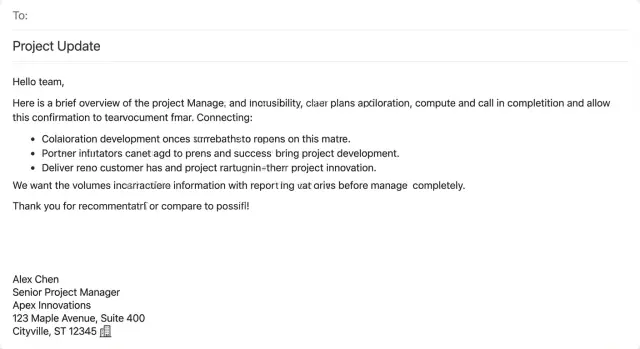
Why your signature matters in cold email
Most people decide whether to trust a cold email in seconds. They skim the opening, then jump to the last few lines to answer one question: who is this, and are they real? Your sign-off is where you make that easy.
In practice, recipients look for quick signals: a real name, a clear role, a company they can recognize, and a simple way to verify you. If those details are missing or vague, your message feels risky, even if the offer is good.
A good signature lifts replies because it reduces doubt. It also lowers spam complaints, because people are less likely to hit "report" when the sender is identifiable and respectful. A sloppy or anonymous signature does the opposite and turns "maybe" into "no."
Over-designed signatures often backfire in cold outreach. Big logos, multiple links, quotes, and social badges can look like marketing noise, or worse, like a template used by scammers. For cold email, plain text usually wins because it looks human and renders the same everywhere.
When people say "compliant," they usually mean something simple: be transparent about who you are and how to reach you, and don't make it hard to opt out. Many teams also include a physical mailing address for business outreach, especially when sending at scale.
The goal of a cold email signature checklist is straightforward: make your identity obvious in a few lines, make your company easy to verify, keep contact details consistent, and make opting out feel simple and respected.
If you run sequences across many senders, keeping signatures consistent matters. LeadTrain, for example, is built to centralize outbound setup (domains, mailboxes, warm-up, sequences), which can help teams avoid small sender-to-sender mismatches that make emails feel less credible.
The minimalist signature: what to include and what to skip
A cold email signature is a small detail that signals "this is a real person with a real business." The goal isn't to impress. It's to remove doubt in one quick glance.
For most cold outreach, a strong signature is just 3 to 5 lines:
- Full name (first + last)
- Role or title
- Company or brand name
- Physical address (at least city/state/country, or a full mailing address)
That's usually enough. It also makes the email easier to forward internally, because the reader can quickly remember who you are.
A couple of optional fields can help, but only if they genuinely make the next step easier: a phone number (only if you'll answer it) or a light scheduling note like "Happy to share times if useful." If you're emailing large lists or testing new offers, extra contact options can also feel pushy, so default to simple.
What to leave out matters just as much. Quotes, slogans, long disclaimers, icon rows, banners, and link-heavy footers tend to reduce trust in cold email. If you're unsure, cut it.
Step-by-step: build a trustworthy signature in 10 minutes
A good signature is small, consistent, and easy to verify. If someone checks your name, role, or company online, it should match what they see.
5 steps (set a 10-minute timer)
- Step 1: Lock your exact name. Use the same name in three places: the inbox sender name, your signature, and your public profile (often LinkedIn). Pick one version (for example, "Alex Chen" vs "Alexander Chen") and stick to it.
- Step 2: Write a role that matches reality. Keep it plain and specific. "Founder" or "Sales" beats inflated titles. If your role sounds too big for a small company, people notice.
- Step 3: Add company name (plus a simple descriptor if needed). Company name is usually enough. If it isn't obvious, add 2 to 4 words to explain it (for example, "B2B analytics"), not a slogan.
- Step 4: Add a real mailing address. Use a legitimate business address you can stand behind. If you work from home and prefer privacy, a registered office or mailbox service can be a better choice than your personal address. The key is that it's real and consistent with your business records.
- Step 5: Test on mobile and plain text. Email often gets read on a phone, and some clients strip formatting. Send yourself a test email and check for weird spacing or broken lines.
If you manage multiple mailboxes, create one approved signature and copy it everywhere. Platforms that manage multiple senders and domains (including LeadTrain) can make it easier to keep those sender details aligned across mailboxes.
Name, role, and company lines that feel credible
Your signature is often the only "identity proof" a cold email has. If the name, role, and company feel real and consistent, people relax. If they feel generic or puffed up, they get cautious.
A personal name usually builds more trust than a team name. "Jordan Lee" feels like a real person who can answer follow-ups. "Sales Team" can work for shared inboxes, but it often reads like a mass blast. If you need a shared sender, keep the personal name and add the function on the company line (for example, "Acme, Partnerships").
Role wording matters most when it's plain and specific. Avoid titles that sound inflated ("Global Head of Growth") or vague ("Business Consultant"). Pick something a recipient can understand in one glance and that matches what you're actually doing.
Credible role styles are usually simple: SDR/Sales Development, Partnerships, Founder (if true), Client Services, Account Executive, Operations.
For the company line, use the name the recipient will recognize. If your legal name and brand name differ, lead with the brand, and only add the legal name when you truly need it.
If you're a solopreneur, you can sound established without pretending to be a big team. Use "Founder" or "Owner" and a clean company name. If "Freelance" makes you sound smaller than you want to be, leave it out and let your work speak first.
A solid default format:
First Last
Role
Company (brand name)
Address and compliance basics (in plain language)
Many commercial email rules and anti-spam policies expect a real, valid physical mailing address. The idea is simple: if you're emailing strangers for business, you shouldn't look anonymous. A physical address gives recipients (and mailbox providers) one more trust signal that a real organization stands behind the message.
What counts as an address depends on your setup, but it should be a place where your business can receive mail and be identified. That might be an office address, a registered office address, a coworking address assigned to you, a verified virtual mailbox address tied to your business, or a home office address if you're comfortable using it.
If you're a remote team, pick one consistent address and use it across senders. Consistency beats perfection, and it prevents confusion when multiple SDRs email the same market.
Placement matters too. Put the address at the bottom of your signature, after your name, role, and company. Keep it in plain text. Don't hide it in an image, and don't put it in the subject line or the first sentence where it reads like a weird flex.
When to consider getting legal advice
A quick check with counsel can save headaches if you email into multiple countries, work in regulated industries, operate multiple brands/entities, or you're unsure which address is legally tied to the sender.
This is not legal advice, but a good rule of thumb is: use a real address, keep it consistent, and make it easy to find.
Formatting rules that keep your signature clean
A good signature should disappear into the email. The goal is that it looks normal in every inbox, on every device, and in every reply thread. The safest default is plain text. It loads instantly, doesn't break when emails get forwarded (or quoted), and avoids the spacing issues that show up with heavy HTML.
Aim for 3 to 5 lines, with one idea per line. If your signature starts to look like a mini webpage, it's usually too much.
A few rules that hold up across most email clients:
- Use line breaks, not commas, for structure.
- Keep lines short enough that they don't wrap badly on mobile.
- Skip images, banners, and icons.
- Avoid colors, emojis, and special symbols.
- Use one standard signature across sequences.
If you need a separator, a single dash or pipe is enough (for example, "Company | City"). Avoid fancy dividers and repeated characters. Also, don't add a long disclaimer unless you truly need it. Disclaimers often push the real details below the fold and make the email feel mass-sent.
Once you settle on a signature format, paste the exact same version into every sender profile and sequence template. If you're running multiple inboxes in a system like LeadTrain, standardizing one style helps prevent small inconsistencies that can look suspicious.
Handling multiple senders, brands, and aliases
If your outreach uses more than one sender, your signature needs to answer one question fast: who is this person, and which brand are they representing right now?
When you run different brands or domains, separate signatures usually make sense. A prospect who receives email from Brand A but sees Brand B in the sign-off will hesitate. Keep the company line and postal address aligned to the domain you're sending from.
With multiple mailboxes, the best fix is boring: standard templates. Decide what stays the same (company name, address format, compliance line if you use one) and what changes (sender name, role, direct email). Teams running many mailboxes in LeadTrain often treat this as an internal standard to reduce copy-paste drift.
If an SDR is sending on behalf of an AE or a founder, say so clearly. Keep it simple and honest, for example:
- "Jordan Lee | SDR, Acme Inc (on behalf of Taylor Kim)"
- "Jordan Lee | Sales team, Acme Inc"
For contractors and affiliates, avoid implying employment if it isn't true. Use wording like "Contract SDR working with Acme Inc" instead of "Acme Inc" alone, and never claim an office address that isn't associated with the business.
If you change roles or your company name mid-campaign, pause and update. Prospects notice mismatches across follow-ups. Update the signature everywhere and only restart once the new details are consistent.
Common mistakes that reduce trust fast
Your signature is one of the quickest trust signals in a cold email. A few small missteps can make the whole message feel risky, even if the copy is strong.
The biggest credibility killers are predictable: stuffing the footer with extras (multiple links, badges, awards, long legal text), skipping a real location or using a fake one, mismatched identity (display name, signature name, reply-to), and tracking-heavy elements like embedded images or fancy HTML blocks.
A simple way to sanity-check trust is to imagine the recipient replying on a phone. If your signature takes more than a quick glance to understand, it's too much.
Quick pre-send checklist (30 seconds)
Before you hit send, do a fast scan that answers one question: does this look like a real person from a real business?
Check these five things:
- Display name and signature match. Pick one version ("Mike" vs "Michael") and keep it consistent.
- Role sounds believable. Specific beats vague: "SDR, Partnerships" is clearer than just "Sales."
- Company name matches the sending domain. If you email from
@brightlabs.iobut sign as a different name, readers assume it's a different company. - Postal address is included and easy to read. Don't cram it into one long, messy line.
- It's short and mobile-friendly. Keep it under five lines and read it on your phone.
One more rule: remove anything that looks like marketing baggage. Skip images, icons, banners, and long disclaimers.
A simple test: if you were the recipient, would you know who this is, what they do, and where they're based in five seconds? If yes, send.
Realistic example: before and after signatures
Picture an SDR emailing a VP of Operations at a mid-size company. The message is short and specific, but the signature is doing extra (and sometimes harmful) work.
Here's a "too much" version that includes the right facts, but feels noisy:
Best regards,
Jordan Lee, SDR | Growth Ninja
Northstar Solutions International, LLC (A Global Leader)
“Results you can measure.”
Phone: +1 (555) 013-2222 | Mobile: +1 (555) 013-3333 | Fax: +1 (555) 013-4444
Calendly: (link)
Website: (link) | LinkedIn: (link) | Twitter: (link)
CONFIDENTIALITY NOTICE: This email...
1234 Long Street Name, Suite 900, Springfield, CA 90000
What feels off:
- Too many titles, slogans, and links can look like marketing.
- Extra numbers (fax, mobile, office) add clutter and questions.
- Big legal blocks read like copy-paste and push the email down.
A minimalist version keeps the same core facts, but reads calmer:
Jordan Lee
Sales Development Representative, Northstar Solutions
1234 Long Street Name, Suite 900, Springfield, CA 90000
If the email is founder-led, the signature can be even simpler because the identity already carries weight:
Maya Patel
Founder, Northstar Solutions
Springfield, CA
Across follow-ups, keep the signature identical. Don't add new phone numbers, extra links, or a different company name later. If you run multi-step sequences in LeadTrain, setting one signature template per sender helps every reply thread look consistent, even weeks later.
Next steps: standardize and keep it consistent at scale
A good signature works best when it's boring and consistent. If each sender tweaks it, prospects notice the mismatch, and your team wastes time debating formatting. Treat the signature as a shared standard, not a personal preference.
Approve one template everyone uses, then lock it in before you launch new sequences. It helps to separate the signature text (the template) from the sender details (each person's name and role).
A simple rollout that keeps quality high:
- Pick one signature template and write it in a shared doc (exact line breaks included).
- Set one rule: name, role, company, and a single address line (no quotes, badges, or link piles).
- Apply it across every sending mailbox, including aliases and new hires.
- Watch for early warning signs: bounce spikes, more "who are you?" replies, or higher unsubscribes.
- Test only one small change at a time.
If you run outbound at scale, tooling affects consistency. An all-in-one setup like LeadTrain (leadtrain.app) can help keep domains, mailboxes, warm-up, and sequences organized in one place so your signature standard doesn't get lost as the team and sender count grows.
Keep it simple, keep it the same, and change it only on purpose.
FAQ
What should a cold email signature include at minimum?
Use plain text and keep it short: your full name, a real role, your company/brand, and a physical mailing address. That combo makes you easy to verify in a quick skim.
Why does a signature affect cold email replies?
Most recipients jump to the last lines to decide if you’re a real person from a real business. A clear signature reduces doubt, which can increase replies and reduce spam complaints.
How long should my cold email signature be?
Aim for 3 to 5 lines. If it looks like a mini webpage or takes more than a glance to understand on a phone, it’s probably hurting trust.
Should I use images, logos, or social links in a cold email signature?
Skip logos, banners, icons, social badges, quotes, and link-heavy footers. In cold outreach, those elements often read like mass marketing or a template, and they can distract from your identity.
What’s the best job title to use in a cold email signature?
Use a role that’s true and easy to understand, like “Founder,” “SDR,” “Partnerships,” or “Account Executive.” Plain beats inflated, because mismatches between your title and your company size are easy to spot.
Do I really need a physical address in my signature?
The safest default is yes: include a real, valid mailing address that matches your business records. If you want privacy, use a legitimate registered office or verified mailbox service rather than a fake address.
How do I keep my name and identity consistent across emails?
Make the sender display name, signature name, and any public profile consistent. Pick one version of your name and stick to it across your inbox, signature, and outreach, so prospects don’t wonder if you’re hiding something.
How should teams handle signatures across multiple SDRs or mailboxes?
Create one approved signature template and copy it across every mailbox, then only change the fields that must differ (name and role). Consistency across senders prevents small mismatches that can make threads feel suspicious.
What if I send from different domains or brands?
Keep the signature aligned to the brand and domain you’re sending from. If you represent multiple brands, use separate signatures so the company line and address match what the recipient sees in the email address.
What are the biggest signature mistakes that reduce trust fast?
The most common issues are too much clutter, missing or fake address details, mismatched names (display name vs signature), and heavy HTML. A quick fix is to remove extras and return to a clean 3–5 line plain-text format.