Cold email negative replies: use labels to improve targeting
Use cold email negative replies to improve targeting and offers. Label responses, spot patterns, and test small changes that increase positive replies.
Why negative replies are worth paying attention to
Negative replies are easy to dismiss because they feel like rejection. But in cold email, they’re often the fastest feedback loop you’ll get from the market. They tell you who you reached, what they thought you were offering, and what made them say no.
A negative reply isn’t only “not interested” or “wrong fit.” Short, rude responses still carry signals (“stop emailing me,” “we already have a vendor”). Unsubscribe requests matter too. They usually mean you crossed a relevance or tone boundary.
The shift is to treat these messages as data, not drama.
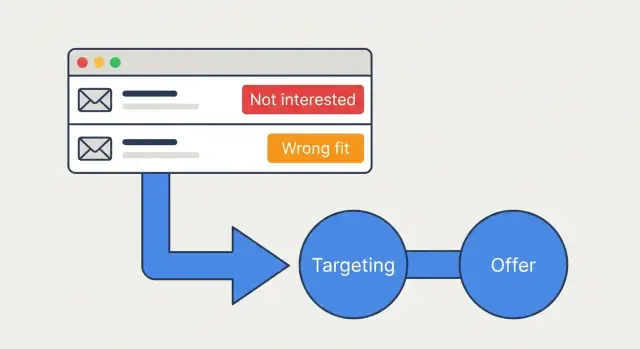
- “Wrong fit” is usually about targeting: role, company size, industry, region, timing, or the problem they actually have.
- “Not interested” is more often about your offer and message: unclear value, weak reason to care now, or a promise that doesn’t match their priorities.
One reply rarely proves anything. People respond when they’re busy, annoyed, or protective of their inbox. Use single messages as clues, not decisions. The value comes from patterns across a week or two, where similar replies cluster around the same segment, subject line, or offer.
That’s why consistent labeling matters. If your team uses different words for the same thing, you end up changing campaigns based on vibes. A small, stable set of reply labels makes trends easier to spot and easier to act on.
Set up reply labels that stay consistent
If your labels change based on mood, you’ll learn the wrong lessons. The goal is simple: the same reply should get the same label every time, no matter who reads it.
Start with a small, clear set
Begin with three core labels that cover most negative replies. Write them down and keep them visible to the whole team.
- Not interested: they’re the right type of person or company, but they don’t want this offer.
- Wrong fit: they’re not your target buyer (industry, role, size, region, use case), even if they reply politely.
- Bad timing: they might be a fit, but timing is off (contract renewal later, hiring freeze, project already finished).
This starter set keeps your data clean. It also forces the right question: is this a targeting issue, an offer issue, or a timing issue?
Add optional labels only when they drive action
Extra labels help when they point to a specific change you can make. If “already have a vendor” keeps showing up, that’s useful. If you create 15 categories you never act on, it’s noise.
A practical way to keep things tidy is to use optional “tags” under your core label (for example: core label “Not interested,” tag “already have a vendor”). That keeps your main reporting stable while still capturing detail.
Pick one place where labels live and commit to it. A CRM works if the team updates it daily. A shared spreadsheet is fine if you’re solo. If your email platform supports reply classification, keep labels there so they’re captured the same way every time.
Do a quick calibration once, then repeat it occasionally: have two people label the same 20 replies and compare. If you disagree often, tighten the one-line definitions until it feels boringly consistent.
A simple weekly workflow to learn from labels
Treat cold email negative replies like a weekly research session, not a pile of bad news. A light daily glance helps you catch urgent issues, but most learning happens when you look at patterns over a full week.
Pick two review windows: a 2-minute daily check (to spot spikes) and a 30-45 minute weekly deep dive (to decide what changes).
A weekly workflow you can repeat
Use the same steps every week so you don’t chase random one-off comments.
- Choose the window. Review the last 7 days for your deep dive. Keep the daily check focused on volume changes and any unusual labels.
- Group replies by label and cluster the wording. Look for repeated phrasing (“we already have a vendor” vs “under contract until Q4”).
- Add 1-2 notes per cluster. Who said it (role, company type) and the likely reason. Keep it short.
- Turn clusters into 3-5 testable changes. Decide what you’ll change next week: targeting filters, a different angle in the first line, or an offer tweak.
- Track before and after. Compare last week vs next week using the same labels and rates so you can tell if the change helped.
To keep it measurable, maintain one simple scoreboard: volume per label, percent of replies that are negative, and booked meetings. If “wrong fit” drops after a targeting change, you’re seeing a real improvement, not luck.
Read "Wrong fit" replies as targeting feedback
A “Wrong fit” reply is usually not about your writing. It’s a quick, real-world test of your ICP. Treat these messages as data points that show where your targeting rules are too broad, too vague, or based on the wrong assumptions.
Listen for mismatches that point to targeting, not persuasion. The same signals show up again and again: a job title that would never own the problem, a company that’s too small or too large, an industry that doesn’t operate the same way, or a geography you can’t serve.
A simple way to diagnose “wrong fit” is to ask:
- Do they clearly have the problem you solve today, or would they never feel it?
- Do they likely have budget for it, or is it unrealistic at their stage?
- Would this person have authority, or are you one level away from the decision?
- Does their context block you (regulated industry, timezone, region, language)?
Then get specific with the words people used. If several replies say “We only do this in-house,” “We’re an agency,” or “We don’t sell to SMB,” turn those phrases into ICP rules: exclude agencies, exclude companies under a certain size, or require a specific business model. Keep a running note of the top repeated phrases and map each one to a filter you can apply when building lists.
One caution: sometimes “Wrong fit” is a list source problem, not your strategy. If titles and industries look random, or you see obvious errors (students, freelancers, unrelated roles), fix the data source first and then re-check your targeting rules.
Read "Not interested" replies as offer and message feedback
A “not interested” reply is easy to dismiss, but it often contains the clearest clue about what your email is really selling, and whether it matches what the reader cares about.
Most “not interested” replies fall into a few buckets:
- They don’t feel the pain (the problem isn’t urgent).
- They don’t understand the value fast enough (your email is vague).
- It’s timing (already picked a vendor, budget frozen, busy quarter).
- It’s tone (too pushy or too “pitchy,” so they shut it down).
Separate an offer problem from a copy problem
A practical way to tell the difference is to compare who is replying “not interested” and what else is happening.
If the same type of person replies “not interested” across different subject lines and angles, your offer probably isn’t compelling for that audience, or you’re aiming at the wrong role. If replies improve when you adjust only the wording (clearer outcome, fewer claims, more specific examples), the offer may be fine and the copy is the issue.
Even short replies often carry a theme: “already have a tool/agency,” “no budget,” “not a priority,” “we don’t do that,” “stop emailing me.” Don’t argue with them. Use the themes to decide what to test next.
Polite no vs blunt no
Polite “no thanks” replies are great for testing. They usually mean you earned a few seconds of attention, but the offer didn’t land. Blunt replies tend to be about trust, relevance, or frequency: wrong person, wrong company type, or an email that feels generic.
A useful next action is one small A/B test next week. Keep the same list, but change only one thing (the promise, the proof, or the ask). That way, if “not interested” drops, you’ll know why.
Convert patterns into targeting rules you can actually apply
Labels are only useful when they change who you email next. The goal is to turn repeated themes into simple rules you can run every week, not a pile of notes.
Start by grouping “wrong fit” reasons into buckets you can filter on. If you keep seeing “We don’t do outbound,” that’s not a copy problem. It’s a targeting problem.
Write your rules as filters you’ll actually use. For example:
- Include titles like “SDR Manager,” “Head of Sales Development,” or “Revenue Operations.”
- Exclude titles that repeatedly respond with “not my area.”
- Set a size range that matches your product and sales motion.
- Add negative filters based on repeated “wrong fit” phrases (agency-only, government-only, no outbound team).
- Add workflow qualifiers when they matter (uses a CRM, has dedicated SDRs, runs sequences).
Next, stop forcing one broad persona. Create 2-3 ICP variants based on what your labels are telling you. Keep them distinct and easy to explain, so you can tailor one thing (offer, proof point, or call to action) without rewriting everything.
Turn feedback into offer tweaks and copy tests
Negative labels only help if they change what you send next. Treat cold email negative replies as clues about what your offer sounds like in the reader’s head, not as a personal rejection.
Start with the offer, not the wording
When you see a cluster of “not interested,” test the offer first. Often the message is clear enough. The value is just not strong enough, or not specific enough.
Most offer tweaks fall into three moves:
- Tighten the promise. Make the outcome concrete (what improves, by how much, and for whom).
- Strengthen the proof. Add one believable detail (a result, a short case, a named process) instead of piling on claims.
- Lower the commitment. Use a smaller ask (a quick yes/no, a single question, or “should I send details?”).
After the offer is clearer, edit the copy so it reads like a human wrote it. Shorten the ask, say who it’s for in plain words, and remove jargon that makes people suspicious.
Turn label patterns into simple A/B tests
Pick 2-3 hypotheses based on your biggest negative clusters. Then test one change at a time.
A simple plan:
- Choose one change (offer, CTA, or first line).
- Write Variant B in one sentence before drafting the full email.
- Define success upfront (reply rate, positive replies, booked calls) and run until you have enough volume to trust the result.
- Keep the audience slice consistent so results are comparable.
Example: if “not interested” often includes “already have a vendor,” test a wedge that starts with their reality: “If you already use X, we help you get Y without switching.” Then A/B test only the CTA.
Example: using 18 "Wrong fit" replies to fix your targeting
Here’s a real-world style example of turning cold email negative replies into a clear targeting fix.
A small SDR team sent 200 emails in one campaign and got 35 replies. They saw 18 replies tagged as “Wrong fit.” That’s enough volume to treat it as a pattern, not noise.
The “Wrong fit” messages were specific:
- “We’re a franchise, so we don’t control marketing tech at the local level. You need corporate.”
- “We already have an agency. If you’re selling services, we’re not the buyer.”
- “We’re only 6 people. This sounds built for larger teams with SDRs.”
Two themes stood out: they were hitting the wrong entity (local branches vs corporate) and mixing company sizes in one list.
They made one targeting change that was easy to apply: filter out franchise locations and create a new segment for corporate operators only. They also split the remaining audience by team size (1-10 vs 11-100) so the message could match the buyer’s reality.
Then they tweaked the offer for the 11-100 segment. Instead of pitching a broad “outbound system,” they offered a specific outcome: “set up 2 sending domains, warm them up, and launch a 4-step sequence in 7 days,” with a clear ask for a short call.
After the change, results moved in a useful way: total reply rate stayed close (35 replies became 33 on the next 200 sends), but “Wrong fit” dropped from 18 to 7. “Interested” replies rose slightly, and the team spent less time chasing leads who could never buy.
Don’t mix deliverability signals with true negative feedback
Not every “no” is feedback on your targeting or offer. Some replies tell you your email setup, list quality, or sending behavior is the problem. If you treat those as “not interested,” you’ll change the wrong thing.
A simple rule: anything that would’ve happened even with a perfect pitch is a deliverability or list hygiene signal.
What each signal really means (and what to do)
- Bounces: list hygiene and setup alerts. Remove the address, note the bounce type, and look for patterns (one company domain, one data source, or one sending domain). If bounces spike, review email authentication (SPF/DKIM/DMARC) and whether the domain is new.
- Out-of-office: not a rejection. Label it “OOO” and follow up after the return date if provided. If there’s no date, retry once 7-14 days later, then stop.
- Unsubscribes: treat as “stop immediately.” Suppress the contact and look for what triggered it: too many follow-ups, unclear identity, or a broad list.
- Spam complaints: high priority warning. They often point to sending too much too soon, weak domain reputation, or copy that feels misleading. Slow down, tighten targeting, and simplify the first email.
If you see 12 “not interested” and 12 bounces in the same campaign, don’t rewrite the pitch yet. Fix the list and sending setup first, then re-read the true negatives for targeting and offer changes.
Common mistakes when acting on negative replies
The fastest way to waste cold email negative replies is to “fix the copy” every time someone pushes back. Many negatives are really a targeting problem. If the person is clearly outside your buyer role, company size, or situation, no subject line will change that.
Another common trap is changing too much at once. If you edit your audience, offer, CTA, and follow-ups in the same week, you can’t tell what actually moved the numbers.
These mistakes show up most often when teams start using reply labels:
- Treating every “not interested” as a messaging failure, when “wrong fit” is telling you the list is off.
- Making a sweep of changes instead of one clear test.
- Letting a few spicy replies drive decisions instead of checking for patterns.
- Averaging everyone together and missing segment differences.
- Using messy labels so the patterns look real but aren’t.
Segment blindness is expensive. A message can be fine for one group and totally wrong for another. If you only look at totals, you might “fix” what’s working and keep what’s failing.
Checklist and next steps
If you want cold email negative replies to improve results, the biggest win is consistency.
Run this quick checklist before you change anything:
- Are labels applied the same way every time, including edge cases?
- Do you have one clear hypothesis per change?
- Did you update targeting rules, not just copy?
- Are you tracking results by segment and A/B variant?
- Did you define “success” before you launch (fewer wrong fits, more interested, fewer unsubscribes)?
Next steps (keep it simple)
Pick one pattern from the last 1-2 weeks and act on it with a single change.
If you saw lots of “wrong fit,” tighten one list rule (role, seniority, industry, team size) and rerun the same message. If you saw lots of “not interested,” keep the same list and test one offer tweak (smaller ask, clearer outcome, or a different reason to care).
If you’re trying to keep labeling consistent across inboxes, sequences, and warm-up domains, it helps to have one system of record. LeadTrain (leadtrain.app) combines sending domains, mailbox warm-up, multi-step sequences, A/B tests, and AI-powered reply classification, so you can review patterns in one place and make cleaner, trackable changes week to week.
FAQ
Why should I pay attention to negative replies instead of ignoring them?
Start by treating them as feedback, not a verdict. Negative replies tell you whether you hit the right person, whether your offer was understood, and what boundary you crossed on relevance or tone.
What are the most useful negative reply labels to start with?
Use a small core set that forces a clear decision: Not interested means they look like your buyer but don’t want the offer, Wrong fit means you targeted the wrong role or company type, and Bad timing means they might fit later but not now. Write one-line definitions so everyone labels the same way.
When should I add more labels beyond the basics?
Only add a label if it triggers a specific action you’ll take. If it won’t change your targeting, offer, or follow-up behavior, keep it as a note or a tag under a core label instead of a new category.
How do I tell if a negative reply is a real pattern or just one-off noise?
Don’t decide based on a single message. Review a full week at a time, group replies by label, and look for repeated wording tied to the same segment, subject line, or offer. The pattern is what you act on, not the hottest individual reply.
What should I change when I see a lot of “Wrong fit” replies?
Treat Wrong fit as targeting feedback first. Turn repeated phrases into filters you can apply, like excluding certain industries, company sizes, business models, or roles that never own the problem you solve.
What should I change when I see a lot of “Not interested” replies?
Assume your offer or clarity is the issue before you rewrite everything. Make the outcome more specific, add one believable proof detail, or reduce the ask so it feels easy to answer. Then test one change at a time so you know what actually helped.
How do I separate deliverability problems from true negative feedback?
Separate campaign feedback from setup issues. Bounces point to list quality and domain/authentication health, out-of-office is not a rejection, unsubscribes mean stop immediately, and spam complaints are a high-priority signal to slow down and tighten relevance.
What’s the right way to handle unsubscribe requests or angry replies?
Honor the request right away and suppress the contact so they aren’t emailed again. Then look for what likely triggered it, like too-broad targeting, unclear identity, or too many follow-ups, and adjust the campaign rather than trying to “win them back.”
How can a team keep labeling consistent across multiple people and inboxes?
Do a short calibration: have two people label the same set of replies and compare. Where you disagree, tighten the definitions until the same reply consistently gets the same label, then repeat the check occasionally as your team grows.
Can software automate reply labeling, and is it worth it?
A tool with built-in reply classification and one place to review labels reduces drift and missed data. LeadTrain can centralize sequences, A/B tests, warm-up, and AI-based reply classification so you can spot weekly patterns and make cleaner targeting or offer changes without juggling separate systems.