Cold email vs LinkedIn touchpoints: a two-channel cadence
Cold email vs LinkedIn touchpoints: learn how to map a two-channel cadence that reduces repeated asks, uses each channel well, and keeps replies moving.
Why two channels often feel awkward (and how to fix it)
Two-channel outreach usually gets weird for one reason: you ask for the same thing twice. You send an email like “Can we hop on a quick call?”, then you send a LinkedIn message with the exact same line. To the prospect, it reads like you’re just pushing buttons in two apps.
The point isn’t “more touches.” It’s more replies without sounding pushy. A good cadence uses each channel for what it’s good at, and gives the prospect a new (small) reason to respond each time.
If you’re comparing cold email and LinkedIn touchpoints, the simplest answer is: stop treating them like duplicates.
A cadence map is a short plan you make before you send anything. It answers three questions:
- What you’ll send
- Where you’ll send it
- Why that touchpoint exists
Think of it as a tiny script for your week so you don’t improvise (or repeat yourself) when you follow up.
What usually fixes the awkwardness fast:
First, make only one clear “meeting ask” in the whole sequence. After that, switch to smaller asks, simple questions, or useful information.
Second, split the roles:
- Email is for detail: context, proof, options, and the main ask.
- LinkedIn is for light contact: recognition, quick nudges, and trust.
Third, change the purpose of each touch. One touch can confirm you have the right person. Another can ask a single question. Another can share a relevant observation.
And keep messages short enough that they look written for a person, not pasted from a template.
Example: your first email can carry the full context and one specific question. The LinkedIn touch the next day shouldn’t repeat the pitch. It can be a one-liner like: “Just sent a note. If I missed the right person, who owns X?”
For small teams, this needs to be repeatable, not complicated. You want a cadence you can run consistently, adjust based on replies, and hand to a new SDR without a long training doc.
What cold email is best at vs what LinkedIn is best at
Two-channel outreach feels awkward when you use both channels the same way. They’re different rooms with different rules.
Cold email is best when you need clarity. You have space to explain why you reached out, add one concrete detail, and make one clear ask. Email also makes clean follow-ups easier because the thread keeps context in one place.
LinkedIn is best when you need trust. A real profile, shared connections, job history, and public activity reduce the “who are you?” reaction. It’s also great for touches that don’t demand a reply, like reacting to a post or leaving a short comment.
A simple split that works for most teams:
- Use cold email for the main pitch and the direct next step.
- Use LinkedIn for proof and presence, plus gentle nudges.
When to avoid a channel matters, too. If a prospect has no LinkedIn activity (empty profile, never posts, rarely logs in), LinkedIn touches often become busywork. On the other hand, if you’re in a regulated industry or your company has strict compliance rules, keep LinkedIn messaging minimal (or skip it) and rely on email that can be logged and reviewed.
Your persona also changes the mix. A founder often responds to an outcome-based email with a fast ask, and may ignore connection requests. A manager may want LinkedIn context first. A quick note that shows you understand their team can lower their guard before they read a longer email.
The basic rules that keep a two-channel cadence human
A two-channel cadence works when each message has a single job. The fastest way to sound spammy is to stack asks: “connect, book time, watch a demo, refer me” all at once.
Progress matters more than volume. A healthy arc looks like this:
- Context (why you picked them)
- Curiosity (one specific question)
- A small yes (a low-effort next step)
If you jump straight to “15 minutes this week?” in every message, it feels like you’re not listening.
Rules you can reuse:
- One goal per touchpoint.
- One new detail per touchpoint (an observation, proof point, or relevant trigger).
- One clear exit so it’s easy to say “not a fit.”
- Keep the channel honest: email for detail, LinkedIn for light contact.
- Stop on real signals: a “no,” an unsubscribe, or repeated silence after your final touch.
Permission-based language keeps frequency respectful. Instead of “Following up again,” try:
- “Worth a quick note, or should I close the loop?”
- “If now isn’t the right time, I can check back next month.”
The “human” part is mostly memory. Keep a simple log so you don’t contradict yourself:
- What you last asked (so you don’t repeat the same meeting request)
- Any personal detail you referenced (role change, recent post, event)
- Their reply category (interested, not interested, out-of-office, bounce)
- Your next planned step and date
Step by step: build your two-channel cadence map
Start by getting specific about who you’re writing to and what you’re offering. A good cadence map begins with one audience slice (role + industry + trigger) and one clear offer that answers: who is this for, what do they get, and why now.
Next, pick one primary call to action (CTA) you want most touches to support. Then choose two backup CTAs for people who aren’t ready. For example:
- Primary CTA: “15-minute intro call”
- Backup #1: “Should I send a 2-sentence summary?”
- Backup #2: “Is this relevant for you or someone else?”
Now decide how many total touches you’ll run before you stop. Many teams do well with 6 to 8 touches across 10 to 18 days. Fewer can be forgettable; more can turn into nagging.
Before you write any copy, map the sequence:
- Define your audience and offer in one sentence.
- Choose 1 primary CTA and 2 backups.
- Set a touch count and an end rule (example: stop after touch 7 unless they engage).
- Assign each touch a channel and a single purpose (connect, share, ask, confirm).
- Write a one-line summary for each touch before drafting.
Hold off on writing the messages until the map makes sense. Read the one-line summaries in order. If two steps sound the same, change the purpose, not just the wording.
Touchpoint ideas that match the channel (without copy-pasting)
If your messages feel repetitive, it’s usually because you’re asking for the same thing in the same way. Give each channel a different job: email carries details; LinkedIn carries human context.
Email touchpoints (clear, specific, easy to reply to)
Start with relevance and one simple question. Keep it short enough that someone can answer from their phone.
Example opener:
“Hi Maya - noticed you’re hiring 3 SDRs this quarter. Are you already using a dedicated warm-up setup for new inboxes, or doing it manually?”
On the follow-up, don’t restate the pitch. Add one new detail that reduces risk or proves you’re not guessing.
Example follow-up:
“Quick add: teams usually see replies drop when new mailboxes ramp too fast. Want a 2-minute outline of a safer ramp plan?”
For the final email, be polite and give an easy out.
Example close:
“If this isn’t a priority, no worries. Should I close the loop, or is there someone else who owns outbound deliverability?”
LinkedIn touchpoints (light, social, no pitch)
Your connection request should read like something you’d say at an event: why you’re reaching out, nothing else.
Example connect note:
“Hi Maya - I work with sales teams on outbound email deliverability. Saw your SDR hiring and wanted to connect.”
After they accept, don’t paste an email. React to a post, leave a thoughtful comment, or send a short note that references something specific.
A simple message:
“Your post about ramping new reps was spot on. Curious, do you standardize the inbox warm-up process too?”
Timing and spacing: a simple schedule you can adjust
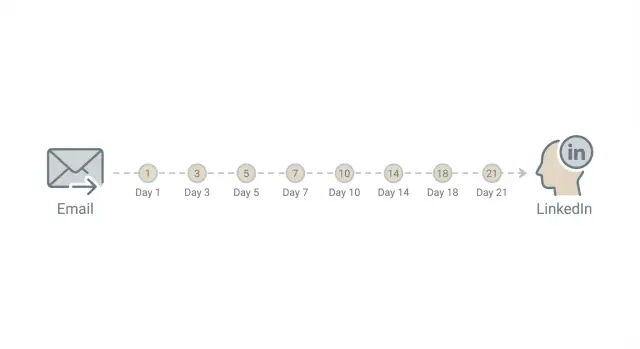
A two-channel cadence works best when it feels like normal follow-up, not a sprint. A useful default is 2 to 4 days between touches. That gives people time to read and respond, and it keeps you from stacking email and LinkedIn messages on the same day.
A simple starting rhythm:
- Day 1: Email (clear reason for reaching out, one easy question)
- Day 3 or 4: LinkedIn profile view + connection request (no pitch)
- Day 6 or 7: Email follow-up (one new detail, not “just checking in”)
- Day 9 to 11: LinkedIn message (short, polite, one line of context)
- Day 13 to 15: Final email (easy way to say no)
Adjust the gaps based on your market. If you sell into busy roles, widen them. If your market moves fast, tighten slightly. The goal is to be present without being loud.
Don’t pile on after a signal
Signals like an email open or a profile view are tempting, but they aren’t permission to send more.
A simple rule: if they open your email or view your profile, delay your next touch by 1 to 2 days. If they click or accept your connection request, make the next message lighter and more specific. Instead of repeating the ask, add one sentence that helps them decide whether it’s relevant.
When to pause (and when to stop)
Stop the sequence if you get an unsubscribe or a clear “not interested.” Pause if you get an out-of-office and resume when they’re back (or a few days after the return date). If you see bounces, fix deliverability before sending more.
For time zones and weekends, keep it simple: send during their work hours when you can, and avoid weekend outreach unless your audience clearly works weekends. If you can’t localize perfectly, pick a consistent window (like late morning in your time zone) and stick with it.
How to reduce repeated asks while still staying consistent
Repetition is what makes a two-channel cadence feel pushy. The fix is simple: keep one clear goal, but change the size of the next step based on what you’ve already asked.
If your last email asked for a 15-minute chat, your next LinkedIn touch shouldn’t ask for the same meeting again. Use LinkedIn to build familiarity and lower friction: a quick comment on their post, a short note that you sent something, or a small question that proves you looked.
To stay consistent without sounding like a broken record, rotate the CTA:
- A simple question (“Is this a priority this quarter?”)
- Permission to send something (“Want a 3-line overview?”)
- A light meeting ask (“Open to a quick 15-minute chat next week?”)
- A referral ask (“Who owns this, you or someone else?”)
- A close-the-loop message (“Should I stop reaching out?”)
Notice how the “second ask” becomes a smaller yes. “Want a 3-line overview?” is easier than “Can we meet?”, and it gives you a reason to follow up with real content instead of another nudge.
Make the next message react to the last one
Accidental repeats usually happen because you lose track of what you asked last. Keep one note per prospect with: last channel, last CTA, and their last signal (reply, view, like, nothing).
Example: You email on Monday asking a question. On Wednesday you view their LinkedIn profile and like a post, no pitch. On Friday you send a short LinkedIn note: “I sent a quick email Monday about X. If it’s easier here, should I send a 3-line overview?” Now you’re consistent, but not repetitive.
Example: a realistic two-channel cadence for one prospect
Imagine you sell an operations service (like process cleanup or reporting help) to a busy Head of Ops at a 200-person company. They’re in meetings all day, so the goal is straightforward: make it easy to understand why you reached out, and give them low-effort ways to respond.
Here’s a realistic 7-touch cadence. Each touch has one job, and the ask stays small so it doesn’t feel like the same request repeated.
- Day 1 (Email): Short intro + one specific problem you see (example: “manual weekly KPI updates”). Ask a yes/no question: “Worth a quick note on how other teams cut this down?”
- Day 2 (LinkedIn): Connection request with context (no pitch). Intent: put a face to the name.
- Day 4 (Email): Tiny proof + soft CTA. Intent: credibility. Example: “We helped an ops team reduce report prep time by 30%.” Ask: “Open to a 10-min chat, or should I send 2 options by email?”
- Day 6 (LinkedIn): Helpful message, not a copy. Intent: value. Example: “Do you track KPIs in one place, or does it live across sheets/tools?”
- Day 8 (Email): Practical takeaway. Intent: be useful. Share a quick checklist (“3 signs your ops reporting is costing hours”). Ask: “Want me to tailor this to your setup?”
- Day 11 (Email): Clear break-up with choice. Intent: reduce pressure. “Should I close the loop, or is next month better?”
- Day 14 (LinkedIn): Light final touch. Intent: stay human. “No worries if timing is off. Want me to check back after your quarter-end?”
Branch 1: They accept LinkedIn but don’t reply to email
Wait 2 to 3 days, then send one LinkedIn message that changes the question (not the channel). Example: “Quick one: who owns ops reporting for your team, you or someone in RevOps/Finance?” If they answer, send a short email the same day that references their reply and makes one direct ask.
Branch 2: They reply “not now”
Reply with one line that locks in the next step: “Totally fair. When would be better, and what should I send in the meantime (example, pricing range, or a 3-bullet plan)?” Then pause outreach until the date they give. When you follow up, reference the timing they chose and bring one new insight, not the same pitch.
Common mistakes that make the cadence feel spammy
A two-channel cadence feels wrong when it sounds like a robot with one goal: “book a meeting.” People can tell when every touchpoint is a copy of the last one.
1) Asking for a meeting in every message
If every email and LinkedIn note ends with “Got 15 minutes?”, you train the prospect to ignore you. It also feels like pressure.
Rotate intent instead: one message asks a simple question, the next shares a small proof point, the next offers something useful, and only some touches ask for time.
2) Copy-pasting the same text into both channels
When someone sees the same paragraph in their inbox and on LinkedIn, it screams mass blasting. Keep the core idea consistent, but package it differently: email for a complete, skimmable pitch; LinkedIn for lighter context and recognition.
3) Over-touching after a connection request or after a “no”
Two common slip-ups:
- After a connection request: sending follow-ups every day because “they must not have seen it.”
- After a clear “not interested”: continuing the cadence as if nothing happened.
If you get a “no,” respond once with a polite close and a single option to re-open later (for example, “OK, should I check back next quarter?”). Then stop.
4) Ignoring deliverability basics
A great cadence still fails if your emails land in spam. New domains, cold mailboxes, and missing authentication are classic causes. Warm up new inboxes, pace your sending, and make sure SPF, DKIM, and DMARC are set.
5) No system for handling replies
Spammy isn’t only what you send, but how you behave after someone replies. If replies sit for days, or you keep messaging after an out-of-office, your cadence feels careless.
Set basic rules for routing replies (interested, not interested, out-of-office, bounce, unsubscribe) so the next step happens quickly and you don’t keep pushing when you should pause.
Quick checklist and next steps (so you can launch this week)
Before you send anything, make sure the cadence works on paper. Two channels only help when each touch has a clear job and you stop when you should.
Launch checklist
Keep it simple:
- Audience: one tight group (same role, same problem, same reason to care)
- Offer: one specific outcome (not a list of services)
- CTA rotation: one small next step, then switch the ask (reply, quick call, point me to the right person)
- Touch count + spacing: decide the maximum touches and the gaps between them
- Stop rules: stop on unsubscribe, hard bounce, clear “not interested,” or no fit
Then do a fast sanity check: read the cadence map from the prospect’s point of view. If it sounds like “please meet” five times in a row, rewrite the middle touches so they add context or a useful detail.
Quick checks before you launch
Deliverability is the foundation. If email doesn’t land, your “two-channel” plan turns into “LinkedIn only” by accident.
Keep these checks practical:
- Your sending domain is authenticated (SPF/DKIM/DMARC) and mailboxes are warmed up
- You have a plan for interested, not interested, out-of-office, bounces, and unsubscribes
- You track which touchpoint happened, on what date, and what the next step is
What to measure in week 1
Don’t overthink dashboards. Track only what helps you decide what to change next week:
- Replies by channel (email vs LinkedIn)
- Positive reply rate (interested or “send info”) vs total sent
- Unsubscribes and spam complaints (a sign targeting or message is off)
- Bounces (a list quality or deliverability issue)
Next steps (one change at a time)
Write your cadence map in a doc so everyone follows the same steps. Then run one controlled A/B test for a week: change only one thing (subject line, first line, or CTA), keep timing and audience the same, and pick a winner based on positive replies, not just reply volume.
If you want fewer moving parts while you do this, LeadTrain (leadtrain.app) combines sending domains, mailbox warm-up, multi-step sequences, and AI reply classification in one place, so it’s easier to keep your cadence organized and stop when someone signals “no” or “not now.”
FAQ
Why does a two-channel sequence feel awkward so often?
Use email for the full context and your one clear next step, and use LinkedIn for light presence and trust. If the LinkedIn message sounds like your email pasted into a DM, rewrite it so it has a different job, like confirming the right owner or referencing something specific from their profile.
How many times should I ask for a meeting in one cadence?
Make the meeting ask once, early, in the channel where you can explain yourself (usually the first email). After that, switch to smaller asks like a yes/no question, permission to send a short summary, or a “who owns this?” referral check.
What is a “cadence map,” and how do I make one?
A cadence map is a quick plan for what you’ll send, where you’ll send it, and why each touch exists. Write one-line summaries for each touch before drafting; if two steps sound the same, change the purpose, not just the wording.
What’s a simple schedule for email + LinkedIn that doesn’t feel spammy?
Start with 6 to 8 touches across about 10 to 18 days and avoid hitting both channels on the same day. If your buyers are slow-moving and busy, widen the gaps; if the market moves fast, tighten slightly while keeping it respectful.
What should I use cold email for vs what should I use LinkedIn for?
Email works best for detail: the reason you reached out, one proof point, and one clear ask that’s easy to reply to. LinkedIn works best for familiarity and trust, so keep it short, specific, and low-pressure rather than pitchy.
Should I follow up faster when I see an email open or a LinkedIn profile view?
Don’t treat opens and profile views as permission to pile on. If you see interest signals, wait 1–2 days, then send a lighter, more specific touch that helps them decide relevance instead of repeating your pitch.
When should I pause or stop a two-channel cadence?
Stop on an unsubscribe or a clear “not interested,” and don’t restart the sequence as if nothing happened. Pause on out-of-office and resume shortly after they’re back, and fix bounces and deliverability before sending more.
What deliverability basics matter before I run a cold email + LinkedIn cadence?
Warm up new mailboxes, pace sending, and make sure SPF, DKIM, and DMARC are set so your emails land in inboxes. If deliverability is weak, your cadence turns into “LinkedIn only” by accident and your results get harder to interpret.
How do I handle replies so I don’t keep pushing after someone answers?
Create simple categories like interested, not interested, out-of-office, bounce, and unsubscribe, and tie each one to a next action and timing. Tools like LeadTrain can automate reply classification so you don’t miss signals or keep messaging someone who already said no.
What should I measure in week 1, and how do I A/B test this cadence?
Track replies by channel, positive replies (not just total replies), unsubscribes/spam complaints, and bounces. When you test improvements, change one thing at a time, like the first line or CTA, and judge the winner by positive replies rather than open rates.