Cold email copy review rubric: a team scoring sheet
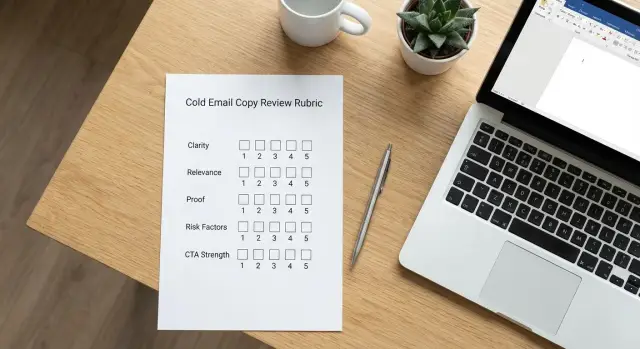
Use this cold email copy review rubric to score clarity, relevance, proof, risk factors, and CTA strength so teams give consistent feedback.
Why teams need a copy review rubric
Cold email feedback often turns into opinions: “I like this line,” “Feels too long,” “I’d never write that.” That happens when people react to taste instead of checking the email against shared standards.
A copy review rubric gives the team a quick, repeatable way to judge a draft. Instead of debating wording for 15 minutes, reviewers score the same few things every time: is it clear, is it relevant, does it include proof, does it create deliverability or reputation risk, and is the next step easy?
When a team uses a rubric, three things usually improve fast: speed (people know what to look for), consistency (new SDRs and experienced reps give similar feedback), and mood (less arguing, more fixing). Coaching gets easier too. You can say, “Your relevance score keeps landing at 1/2. Let’s tighten targeting,” instead of vague notes like “make it better.”
This helps:
- SDR teams who need one standard across many senders
- Sales leads who approve sequences and want fewer rewrites
- Solopreneurs using freelancers or contractors for copy
- Anyone running A/B tests and needing clean comparisons
What it is not: a magic test for product-market fit. An email can score well and still fail if the offer is wrong or the list is bad. The rubric is about copy quality and avoidable mistakes, so your team can improve the message without guessing.
If two reviewers disagree on a subject line, the rubric shifts the question from “Do you like it?” to “Does it clearly say who this is for and what they get?”
How to use the rubric without slowing everyone down
A rubric only works if it fits into a normal workday. The goal is fast, consistent feedback that improves the next draft, not a long meeting that turns into opinions.
Time-box reviews to 5 to 10 minutes per email. If it needs longer, the draft probably isn’t ready, or the reviewer group is too big.
Review one version at a time (subject + body + CTA). Don’t compare three drafts in the same round. Score the current best version, fix the biggest issues, then do a second pass if needed.
Keep comments in plain language and aimed at the reader experience. Skip style debates like “make it punchier.” Better feedback sounds like: “I don’t understand what you sell,” “this sounds generic,” or “the ask is unclear.”
A fast flow that works:
- One person reads the email out loud.
- Everyone scores silently and writes one note per category.
- Each reviewer shares two things: the biggest strength and the biggest risk.
- The owner picks the top two edits and rewrites on the spot.
Name the biggest risk first, especially deliverability or compliance issues (spammy phrasing, heavy claims, missing opt-out language). Keep it about the email, not the writer: “This line feels risky” beats “You wrote this badly.”
Scoring scale and simple rules for reviewers
A rubric only works if everyone scores the same way. Pick one scale, define it in plain language, and keep the rules tight. The goal is consistency, not perfect math.
A simple scale that stays honest
A 0-2 scale is usually enough:
- 0 = Redo: unclear, risky, or off-target. Needs a rewrite, not tweaks.
- 1 = Fix: the idea is fine, but one or two issues block sending.
- 2 = Pass: ready to send as-is.
If the email has a hard blocker, skip detailed scoring and mark Redo. Common blockers include: unclear ask, missing who it’s for, or deliverability risks (too many links, heavy formatting, spammy words).
To keep feedback useful, write one sentence per category. Make it specific and actionable. Example: “The first sentence has three ideas. Split it into two and lead with the reason for emailing.”
When reviewers disagree, use a fast rule. If it’s close, take a quick vote and move on. If it’s a big split, assign one extra reviewer and decide in two minutes. If the same argument keeps happening, turn it into a team rule (for example, “always include one concrete proof point”).
That way your team copy review process stays fast, consistent, and easy to apply in whatever tool you use to send campaigns.
Category 1: Clarity (is it easy to understand?)
Clarity is the fastest win. If the reader has to work to understand what you mean, they’ll skip, delete, or mark it as spam.
Start with the first five seconds. The subject line should signal what the email is about without being clever. If a teammate can’t summarize the subject in one short sentence, it’s probably vague.
Then check the opening line. A strong first sentence answers: “Why should I care?” It doesn’t need to be salesy. It just needs a plain reason the message is worth their attention (a problem you noticed, a goal they likely have, or a simple observation).
Most clarity problems come from extra words. Cut filler that doesn’t change meaning. Replace vague phrases like “touching base” or “wanted to reach out” with what you actually want.
Quick clarity checks:
- After one read, can you explain the point in 10 words?
- Does the subject match the first line, or do they feel unrelated?
- Does the core message fit on a phone screen without endless scrolling?
- Are there acronyms or insider terms a stranger wouldn’t know?
- Are there sentences that should be split?
Do a read-aloud test. Read the email at normal speed. Wherever you stumble, the reader will hesitate too.
Example: If your first line is “We help teams unlock efficient pipeline outcomes,” rewrite it as “We help SDR teams book more meetings from cold email.” Same meaning, easier to understand.
Category 2: Relevance (does it feel meant for them?)
Relevance earns attention. A message can be clear and still get ignored if it sounds like it could be sent to anyone. This category answers one question: would the recipient recognize themselves in the first few lines?
Start with target fit. The email should make the role and company type obvious without overexplaining. “Head of RevOps at a 50-200 person SaaS” is specific. “Hi there, I help businesses grow” isn’t.
Then look for a real reason for outreach: why them, why now. A good reason can be timely (new funding, hiring, a product launch) or situational (a common workflow pain for that role). If there’s no trigger, the email feels random.
Personalization should feel normal, not creepy. Use one work-relevant detail that supports your reason for writing. Avoid personal facts, over-precise tracking, or a long list of observations.
How to score relevance:
- 2 (Pass): Role + context are clear quickly, and the reason for reaching out makes sense.
- 1 (Fix): Targeting is mostly right, but it still sounds a bit template-y.
- 0 (Redo): Could be sent to almost anyone, or the “why you” is missing.
Example: “Saw you’re hiring 3 SDRs this month. Reply handling usually gets messy fast. We help categorize replies so reps focus on interested leads. Worth a 10-minute look?” That’s specific, timely, and professional.
Category 3: Proof (why should they believe you?)
Cold emails are full of promises. Proof is what makes your claim feel safe to test. Score this by asking: did we give a real reason to believe us, in one short line?
Good proof can be small: a number (“cut reply time by 30%”), a quick result, a recognizable customer type, or a credible process (“we run a 2-step audit, then send 3 personalized angles”). The key is that it’s specific and easy to check.
Keep it humble. Swap braggy claims for plain facts. “We’re the best” and “#1” usually score low unless you can back them up with a source you can name in one sentence.
Place proof right after the main value line, before the CTA. If it’s at the end, many readers won’t see it. If you lead with it, it can feel like you’re showing off before you’ve earned attention.
If you don’t have case studies yet, use micro-proof: a small pilot (“testing this with 5 SaaS teams”), a short trial with clear boundaries (“we’ll stop after two emails if it’s not useful”), or a concrete method (“we classify replies into interested/not now/bounce so you don’t sort manually”).
Example: Instead of “We improve deliverability,” say “We warm up mailboxes and monitor bounces before scaling sends.”
Category 4: Risk factors (deliverability and reputation)
This category covers two things: whether your email lands in the inbox, and whether it makes your company look trustworthy once it gets opened. A great offer can still fail if the copy feels spammy or pushy.
Start with obvious spam signals: multiple links, heavy tracking vibes, “click here” everywhere, shouty punctuation (!!!), or ALL CAPS. Keep formatting plain. Save links for later in the thread when someone replies.
Watch deliverability-sensitive content too. Big images, fancy HTML, or loaded phrases like “guaranteed,” “risk-free,” “act now,” and “urgent” can hurt. The safest emails read like something a normal person wrote quickly.
Respect matters. If you’re emailing cold, include a simple opt-out line, avoid sensitive or regulated claims (especially finance, health, legal), and never imply a relationship that doesn’t exist. If you mention results, keep them honest and specific.
Pressure tactics also damage reputation. “Just bumping this” is fine. “Did you even see my last email?” isn’t.
How to score risk:
- 2 (Pass): Plain text, minimal links, respectful tone, clear opt-out, no risky claims.
- 1 (Fix): Minor issues (a bit hypey, one extra link, vague results).
- 0 (Redo): Pushy language, heavy links/trackers, questionable claims, or anything you wouldn’t want shared publicly.
If a rep adds three links plus “LAST CHANCE!!!”, you’re not just scoring the copy. You’re protecting your domain reputation and your brand.
Category 5: CTA strength (what happens next?)
A strong CTA tells the reader exactly what to do next, with the smallest possible commitment. This category answers: if the prospect is interested, is it obvious and easy to reply?
The best CTAs are single-ask. One action, not three options. If you ask for a call, a demo, and a referral in the same email, you make the decision harder and replies drop.
Score the CTA higher when it’s specific, easy to answer, and matches the stage of the sequence. A good CTA is low friction (under 10 seconds to respond), uses concrete wording (what, when, how long), and gives permission to say no.
Early touches often do better with a reply CTA (a quick question or yes/no). After the prospect has context or proof, asking for a short meeting is more reasonable.
Example: First email ends with, “Worth a quick look? Reply ‘yes’ and I’ll send 2 lines on how it works for teams like yours.” A later follow-up can be, “If it’s relevant, open to a 12-minute call Tue or Thu?”
Close politely and match the ask: “If not, no worries. Reply ‘no’ and I’ll close the loop.”
Step-by-step: run a 10-minute team copy review process
A short, repeatable meeting beats a long, messy thread. The goal is a clear decision: ship, or fix specific lines.
Use the cold email copy review rubric as a scoring sheet everyone can see (a shared doc works). One person facilitates, one person takes notes, and the writer mostly listens.
A 10-minute agenda that stays tight:
- Minutes 0-2: One reviewer reads the email out loud. Everyone gives quick scores for each category.
- Minutes 2-5: For each category, pick one sentence to keep as-is or mark as the problem line.
- Minutes 5-7: Everyone writes 1-2 rewrite options for the single highest-impact line (often the opener, proof line, or CTA). Pick one.
- Minutes 7-9: Agree on a minimum pass score and a short must-fix list (1-3 items). If it fails, it doesn’t go out.
- Minutes 9-10: Decide the A/B test. Change one variable and define what you’ll measure.
After the meeting, the writer updates the draft once using the must-fix list. Avoid rounds of micro-edits.
For the A/B plan, keep it simple: test one variable. For example, Version A keeps the same body and proof but changes only the CTA from “Worth a quick chat?” to “Can I send 2 ideas for your pipeline this week?” Everything else stays identical so you learn something.
Example: scoring one cold email as a team
Scenario: an SDR team is launching a new sequence aimed at Operations leaders at 200-1,000 person companies.
Here’s the draft they review:
Subject: Quick question about SOPs

Hi Maya - I noticed your team is scaling.
We help ops teams reduce process chaos and improve efficiency.
Our platform uses AI to map workflows and automate handoffs.
Most teams see results fast.
Open to a quick call next week?

- Sam
They score it (0-2) and add one note each:
- Clarity: 1/2 - “What do you actually do in plain words?”
- Relevance: 0/2 - “Nothing shows you know her world (tickets, handoffs, SLA, onboarding).”
- Proof: 0/2 - “No concrete example, metric, or recognizable customer type.”
- Risk factors: 2/2 - “Safe language, but ‘AI’ is vague and can trigger skepticism.”
- CTA strength: 1/2 - “Ask is clear, but generic. Offer two time options.”
They rewrite based on the notes:
Subject: Reducing handoff gaps in ops

Hi Maya - quick question.
When teams grow, handoffs between support, ops, and onboarding often break.
We help ops leaders spot where work gets stuck (and fix it) using a simple workflow review.
Example: teams often cut days off onboarding by removing 1-2 handoff steps.
Would a 12-minute call Tue or Thu work to see if this fits your setup?

- Sam
Next test: keep the body fixed and A/B test either (1) the subject line or (2) the proof line to see which lifts replies.
Common mistakes that make feedback noisy or unhelpful
A rubric only helps if reviewers aim at the same target: clear, relevant, believable, safe to send, and easy to act on.
A common trap is arguing about a single adjective while the email still feels generic. If the message could be sent to 100 different roles unchanged, wordsmithing won’t fix it. The rubric should push reviewers to ask: does the reader immediately see why this is for them?
Personalization can backfire when it sounds fabricated or invasive. If you can’t verify a detail, use lighter personalization like role, industry, or a public trigger.
Proof overload is another issue. Teams try to add every logo, stat, and feature. The result is a long email with no main point. Pick one proof point that supports the single promise.
Unhelpful feedback patterns:
- Nitpicking wording while the email still lacks a clear reason to care
- “Personalization” that sounds guessed, invasive, or overly flattering
- Stacking multiple proof points until the core message gets buried
- Pushing for a bold CTA before the value is earned
- Editing copy but ignoring deliverability risk factors (link-heavy emails, aggressive tone, missing opt-out language)
Example: If someone suggests “Book a demo this week?” as the CTA, the right response is: “What’s the one concrete outcome they get that makes that ask fair?” Fix the reason first, then the ask.
Quick checklist (30-second pass/fail)
Before you score anything, do a fast pass. It keeps reviews consistent and stops the team from debating style when the basics are missing. If you get fewer than 4 yeses, fix the draft first, then run the full rubric.
Five pass/fail checks:
- Purpose is obvious in the first line.
- One sentence carries a clear benefit (no buzzwords).
- There is at least one proof point (a specific result, a recognizable customer type, or a concrete credential).
- No obvious deliverability risk flags (spammy wording, too many links, all-caps, excessive punctuation, shady-sounding claims). Opt-out language and identity details match your team’s standard.
- The CTA is one easy question (yes/no or a choice between two options).
If the opener starts with a generic compliment, the benefit is vague, and the CTA asks for a 30-minute call, it’s usually an automatic fail. Tighten the first line, add one real detail, and switch to a smaller ask.
Next steps: make the rubric part of your sending workflow
A rubric only helps if it shows up where work happens. Treat it like a standard pre-send check, not a document people remember when things go wrong.
Save it as a shared template your team can copy and fill out in minutes. Keep a small “good examples” folder next to it: 3 to 5 emails that scored well and got real replies. When someone writes a new first-touch email, they can compare it to a known winner before asking for feedback.
Make the scores visible next to outcomes. Even a simple log teaches fast: did higher relevance scores correlate with more positive replies? Did risk flags predict bounces or spam complaints? Over a few sends, you’ll learn what matters most for your audience.
A simple way to bake it into your workflow:
- Require a quick score before any new sequence goes live (especially Email 1).
- Review the highest-impact parts: subject line, first two lines, and CTA.
- Record the final score and one change you made because of the review.
- Re-score after edits, then lock the version you send.
If your process is spread across domain setup, warm-up, sequences, and reply sorting, reviews can get lost. A unified cold email platform like LeadTrain (leadtrain.app) can help by keeping sending infrastructure, warm-up, multi-step sequences, A/B tests, and reply classification in one place, so copy fixes turn into shipped campaigns.
Pick one email to review today. This week, run a small A/B test: keep one version as-is, and make one change based on the rubric’s lowest-scoring category. Track replies, positive replies, bounces, and unsubscribes, then add the winner to your “good examples.”
FAQ
What is a cold email copy review rubric, and why use one?
A rubric turns feedback into a quick check against shared standards. Instead of debating preferences, reviewers score the same categories every time, which makes edits faster and results more consistent.
What scoring scale should we use for the rubric?
Use a simple 0–2 scale: 0 = Redo (not sendable), 1 = Fix (sendable after a couple edits), 2 = Pass (ready now). Keep the definitions strict so everyone scores the same way.
How do we run a review without it turning into a long meeting?
Time-box it to 5–10 minutes per email. Review only one version at a time, score silently first, then share the biggest strength and biggest risk so the writer can make the top two edits immediately.
What should count as an automatic “Redo”?
If there’s a hard blocker, mark Redo and stop. Common blockers are an unclear ask, unclear who it’s for, or deliverability risks like spammy wording, too many links, or aggressive claims.
How do we score “Clarity” quickly?
Clarity means the reader instantly understands what this is about and why they should care. Check the subject and first line, cut filler, avoid buzzwords, and do a read-aloud test to catch awkward or overloaded sentences.
What makes an email feel relevant instead of template-y?
Relevance means it feels written for this person, not anyone. Make the role and context obvious, include a credible “why you, why now,” and use one work-relevant detail without getting creepy or overly personal.
What counts as good “Proof” in a cold email?
Add one specific, easy-to-believe reason: a number, a concrete result, a recognizable customer type, or a clear method. Keep it humble and factual, and place it right after the main value line so it doesn’t get missed.
What are the biggest deliverability and reputation risks in copy?
Keep it plain text, respectful, and light on links. Avoid hype words like “guaranteed” or “urgent,” skip heavy formatting, include a simple opt-out line, and never imply a relationship that doesn’t exist.
How do we write a strong CTA that gets replies?
Make the next step a single, low-friction action that’s easy to answer. Early in a sequence, a reply CTA (yes/no or a quick question) often works better than a big meeting ask, and it should give an easy way to say no.
How should we A/B test after using the rubric?
Test one variable at a time, like the subject line, proof line, or CTA. Keep everything else identical so you can learn what changed outcomes, then compare results using replies, positive replies, bounces, and unsubscribes.