Cold email cadence by seniority: exec vs IC schedules
Learn how to set a cold email cadence by seniority with slower executive touchpoints and faster IC follow-ups, plus sample schedules you can copy.
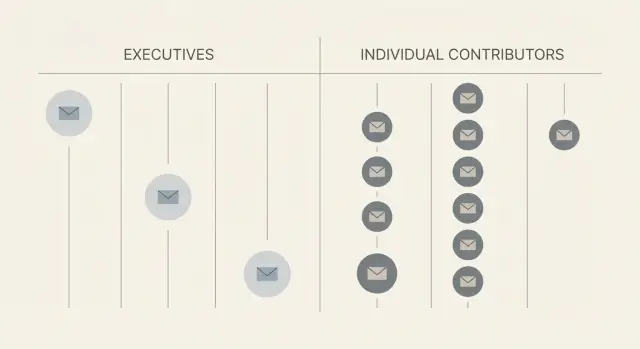
Why cadence pacing should change by seniority
One follow-up rhythm rarely works for everyone. The same email can feel helpful to one person and pushy to another, mostly because their day, priorities, and decision-making style are different.
Seniority changes three timing drivers:
- Attention: Executives skim for relevance to a top priority. Individual contributors (ICs) often read more closely when it touches their day-to-day work.
- Urgency: ICs may be trying to fix something this week. Execs are balancing competing priorities and may need time to route you to the right owner.
- Response style: Exec replies tend to be short or forwarded. IC replies often include details and questions.
Pacing is more than “wait longer” or “follow up faster.” It’s the spacing between touches, the total number of touches, the channel mix your team actually uses, and the size of the ask.
The goal is respectful persistence without turning into noise. If your touches are too tight for execs, you look needy. If they’re too slow for ICs, you miss the moment when they’re ready to act.
A quick sanity-check: if you received your own sequence in that role, would it feel like a useful nudge or an interruption?
How executives, managers, and ICs read email differently
The same message lands differently depending on seniority. If you use one pace for everyone, you’ll either annoy executives or lose momentum with ICs.
Executives
Executives read in short bursts between meetings. They scan for one thing: “Is this clearly tied to a priority right now?” They want a crisp outcome and minimal back-and-forth.
Silence from an exec usually means “not important enough to reopen,” not “I’m evaluating.” It can also mean they forwarded it internally without replying.
Managers and directors
Managers and directors are practical owners. They care about impact, but also effort, risk, and timing. They’re more likely to respond with a question like “How would this work in our process?” or “What would we have to change?”
Silence here often means “interesting, but I’m swamped,” or “I’m not sure it’s my call.” A well-timed follow-up can bring it back.
ICs (individual contributors)
ICs are closest to the work. They decide faster, ask more tactical questions, and are more open to trying a small step. They’ll also call out vague claims.
Silence from an IC usually means they missed it, don’t see a clear next step, or they’re not the right person but could redirect you if you ask.
Step-by-step: choose the right pace before you write
A good cadence starts with one decision: who the email is really for. If you try to use one schedule for everyone, you’ll end up too aggressive for execs and too slow for ICs.
5 steps to set the right pace
- Name the target role (not the company). Are you writing to an executive sponsor who cares about outcomes, or a daily user who feels the pain every week?
- Match the ask to their scope. Executives respond to strategic asks. ICs respond to workflow-specific asks. Big ask? Slow down. Small, practical ask? Follow up sooner.
- Set a touch budget before you draft anything. Decide the maximum touches and total days you’ll spend on one person. Higher seniority usually means fewer touches over more days.
- Pick one primary channel and one backup. Keep email as the main path. Add a light backup only if your team truly uses it. Too many channels too early feels pushy.
- Lock the spacing, then write to fit it. Every follow-up needs a reason to exist: a tighter question, a new proof point, or a smaller next step. If you can’t explain why a touch helps, cut it.
Example: If you sell a tool that reduces manual reply sorting, an exec email might ask about pipeline efficiency and meeting volume with a slower cadence. An IC email might ask how they tag “interested” vs “not interested” replies today, with tighter follow-ups.
Cadence rules for executives (slower, fewer touches)
Executives are time-poor and pattern-match fast. A strong executive cadence uses fewer touches, more space between emails, and a higher bar for relevance in every message.
A good starting point is 3 to 5 total touches over 2 to 3 weeks. Leave room for travel, quarter-end, and inbox cycles.
Keep each email short: one idea, one proof point, one small ask. The ask should be answerable in under 10 seconds, like “Worth a 10-min chat?” or “Should I speak with your VP of Sales Ops instead?” Avoid long context dumps, attachments, and multiple questions.
Practical rules that usually work:
- Spacing: 3 to 5 touches, spaced 3 to 6 business days apart.
- Personalization: Tie one business trigger to one outcome.
- Ask: Confirm priority or confirm the right owner, not a big meeting request.
- Stop sooner without signal: Opens alone aren’t a signal. Keep going only when you get a reply, a forward, or a clear “yes, later.”
- Change one thing per follow-up: Either a gentle bump or a fresh angle.
Use a gentle bump when the original email is still timely and you’re making it easy to reply. Use a fresh angle when you have new information or the first message didn’t land.
Example: If you emailed a CFO about reducing month-end close time, a bump can be a one-line “Worth exploring this quarter?” A fresh angle could focus on audit readiness or control gaps if that’s more urgent for their role.
Sample schedule: 4-touch executive cadence
The goal isn’t to “wear them down.” Each touch should add a clear reason to respond.
- Touch 1 (Day 1): 1:1 opener + why them. Show you picked them on purpose (role, initiative, hiring, product shift), then ask one small question.
- Touch 2 (Day 6): specific outcome + one proof point. Name a practical result and add a grounded proof point (no giant claims).
- Touch 3 (Day 13): “wrong person?” + sponsor check. Ask if they own this area. If not, who should you include, and can they sponsor a brief intro?
- Touch 4 (Day 21): polite close. Close the loop with an easy out and a clean door-open for later.
Example: If you’re writing a VP of Sales, Touch 2 might focus on fewer hours spent sorting replies and clearer next steps for SDRs, backed by a believable detail (like fewer manual triage steps), not a headline metric.
Cadence rules for ICs (tighter follow-ups)
ICs often work from a task list. If your note is relevant, they can respond quickly, but their day gets interrupted, so short gaps help you catch a good window.
A solid IC cadence uses more touches with less time between them, while keeping each message small and easy to answer:
- Use tighter gaps early (1 to 2 business days), then widen slightly.
- Ask direct, practical questions. Skip big “vision” claims.
- Keep each follow-up to one point: one question or one next step.
- Expect hands-on objections (time, tools, permissions) and respond fast.
Give them options so they can reply in seconds. For example:
- “Is this on your plate, or is there someone else who owns it?”
- “Are you using anything for this today, or doing it manually?”
- “Worth a quick look this week, yes/no?”
Example: You email an SDR about improving outbound reply handling. On day 2, they reply: “We already tag replies in our CRM, and I’m swamped.” Don’t restate the pitch. Ask one focused question: “Got it - is the bigger pain tagging, or making sure nothing slips when you’re busy?”
Sample schedule: 5-touch IC cadence
For ICs, a good cadence often fits in a 10 to 14-day window. Faster follow-ups can work, as long as each message is short and useful.
- Touch 1 (Day 1): Name the problem in one line, then ask one simple question.
- Touch 2 (Day 3): Add a concrete example of how others handle it (no big claims).
- Touch 3 (Day 6): If they might not own it, ask who does.
- Touch 4 (Day 9): Make it easy to respond with a simple yes/no, two time options, or one direct question.
- Touch 5 (Day 12-14): Close the loop politely: “Should I close this out?”
Keep each email under 100 to 120 words, with one clear action. If they reply with “not me,” treat it as progress and ask for the handoff.
A middle path: schedules for managers and directors
Managers and directors sit in the middle. They often have more calendar control than ICs, but less time (and less patience) than executives. They’ll skim for relevance, risks, and effort, then decide whether to own the project or pass it up the chain.
Keep the rhythm steady, not aggressive. Use fewer touches than an IC sequence, but don’t space it as wide as an exec cadence.
A practical 5-touch schedule:
- Day 1: Problem, impact, one proof point
- Day 3: One-line question to confirm priority
- Day 6: Concrete example (similar team, simple outcome)
- Day 10: A short “forwardable” note they can share internally
- Day 14: Final check-in with a clear next step (10-minute call or reply with the owner)
The forwardable note works well here. Include a neutral block they can paste to their VP: “We’re evaluating X because it reduces Y. If you’re open, I can set up a quick intro with the vendor next week.” Keep it safe to forward.
If they reply with interest but mention budget, security, or a larger initiative, ask directly: “Who would you want looped in to approve this?”
Common cadence mistakes and traps
Most cadence problems aren’t about the number of emails. They’re about how the sequence feels to the person reading it. A good cadence should feel intentional, not automatic.
Mistakes that tend to hurt results:
- Too many touches to execs: Dense sequences look like blasting.
- Long essays instead of a crisp ask: If the action isn’t clear, follow-ups become noise.
- Following up too fast after an out-of-office: Wait until they’re back, then restart gently.
- Changing the offer every touch: Keep one main promise and vary proof, not the pitch.
- Ignoring replies that aren’t a clear yes: “Not now,” questions, and “next quarter” are progress. Treat them like a next step.
Example: You email a VP and they reply, “Back next Tuesday.” Don’t send the next touch on Monday because the schedule says so. Pause, then send a short note on Wednesday morning with one sentence of context, one question, and an easy out.
Quick checklist before you launch
Most cadence failures come from two things: targeting the wrong person, or changing the pace mid-sequence because you didn’t decide it up front.
Target and cadence setup
- Confirm the person’s seniority and whether they’re the decision maker, an influencer, or the day-to-day owner.
- Decide the total touches and the full timeline before writing. Put the dates on a calendar so you don’t speed up under pressure.
- Match the gaps to seniority: executives get more breathing room, while ICs usually respond better to tighter follow-ups.
Message and operating rules
- Make sure each email has one clear ask (one action, one choice). If you’re asking for two things, rewrite.
- Set a stop rule now: end after the last planned touch, or stop earlier after a clear “not now,” a bounce, or an unsubscribe.
Finally, check your ability to handle replies. A fast cadence only works if you can respond quickly when someone answers.
- Be ready to reply within 1 business day, ideally the same day for “interested” replies.
Example: If you plan a 5-touch IC sequence with follow-ups every 1 to 2 business days, but you can’t respond until next week, slow the cadence or reduce volume.
Realistic example: one product, three seniority levels
Imagine you sell a simple workflow tool that replaces messy handoffs between sales and onboarding. The same value can land very differently with a VP, a team lead, and an IC, so the pace should change too.
Here are three realistic timelines and what each touch is about (topics only, not full copy).
Three timelines (same offer, different pace)
| Role | Touches and spacing | What each touch covers |
|---|---|---|
| VP of Revenue (exec) | Day 1, Day 6, Day 13, Day 21 (4 touches) | 1) Outcome + credibility, 2) Short case snapshot, 3) Risk and rollout simplicity, 4) Close the loop with a clear yes/no |
| Team Lead (manager) | Day 1, Day 4, Day 8, Day 12 (4 touches) | 1) Pain you see in their workflow, 2) How it fits current process, 3) Quick example + expected time saved, 4) Ask for the right owner if not them |
| SDR/Coordinator (IC) | Day 1, Day 3, Day 5, Day 8, Day 12 (5 touches) | 1) Specific day-to-day problem, 2) One clear win, 3) “Can I show you?” with times, 4) Handle common objection, 5) Final nudge with a small takeaway |
A faster IC follow-up often gets a reply before the problem slips off their radar. With execs, fewer touches and more space can prevent you from looking noisy.
How to handle key replies
If a VP says “Not now,” reply once with a simple reset: ask what quarter to revisit and offer one line of value you can send in the meantime (for example, a 2-sentence rollout plan). Then pause until that date.
If an IC says “Not now,” tighten the loop: ask what’s blocking (timing, tool change, workload) and offer a smaller next step, like a 10-minute walkthrough.
If the IC says yes but needs approval, switch your goal: ask who signs off, what they care about (risk, cost, IT), and whether you can draft a 3-bullet summary they can forward. Then start a slower exec-style thread to the approver while keeping the IC updated.
Next steps: build role-based sequences and keep them consistent
Stop using one sequence for everyone. Build separate tracks by role: executive, manager/director, and IC. Even if the core story stays similar, the pacing and number of touches should match how that person works.
Start small and keep it repeatable. Pick one offer and create three schedules, then reuse them across campaigns instead of reinventing each time.
A practical way to roll this out
- Create separate sequences by role (different timing, same core value proposition).
- Send your first 20 to 30 prospects per role and watch what happens.
- If you see quick interest from ICs, tighten follow-ups by a day. If execs are silent, slow down instead of adding touches.
- Pause or remove steps that mainly generate bounces, unsubscribes, or annoyed replies.
- Keep send times consistent so you can compare results week to week.
After the first batch, adjust only one thing at a time (timing or touch count). Otherwise you won’t know what caused the change.
Build a small library you can reuse
Keep a one-page note with your proven schedules, such as “Exec 4-touch slow,” “IC 5-touch tight,” and “Manager middle,” plus a short note on when to use each.
If you want to reduce ops work, LeadTrain (leadtrain.app) combines domains, mailboxes, warm-up, multi-step sequences, and AI-powered reply classification in one place, which makes it easier to run different role-based cadences without losing track of replies.
FAQ
How do I decide the right cadence for someone’s seniority?
Start with the role you’re emailing, then set the “touch budget” before you write. Executives usually need fewer touches spaced further apart, while ICs often respond better to tighter early follow-ups because their priorities move quickly.
What’s a good default cadence for executives?
A practical default is 3 to 5 touches over about 2 to 3 weeks. Keep each message extremely short, tie it to one clear business priority, and make the ask answerable in a few seconds.
What’s a good default cadence for ICs (individual contributors)?
A practical default is 5 touches over about 10 to 14 days. Follow up sooner early on, keep the question tactical, and make it easy for them to reply quickly without a meeting if they don’t want one yet.
What cadence works best for managers and directors?
Use a steady middle pace that doesn’t feel urgent or endless. A simple approach is around 4 to 5 touches across roughly two weeks, with each follow-up adding one new reason to reply, like a clarifying question or a concrete example.
Should I use multiple channels (email, LinkedIn, calls) in the same sequence?
Keep email as the primary channel and add only one backup channel that your team truly uses. If you stack multiple channels too early, it can feel like pressure instead of help, especially for executives.
How should I handle out-of-office replies in a cadence?
Treat it as a pause, not a trigger to keep sending. Wait until they’re back, then restart with a short note that acknowledges timing and repeats one clear question so they can respond fast.
When should I stop following up?
Stop after your planned last touch unless you get real signal like a reply, a clear “revisit later,” or a referral to the right owner. Opens alone aren’t a good reason to extend a sequence, because they don’t tell you intent.
Should my follow-ups be gentle bumps or new angles?
A bump is best when the first email is still timely and you’re simply making it easier to answer. A new angle is better when your original framing didn’t land or you now have a more relevant proof point for that role.
How do I avoid sounding spammy across multiple touches?
Keep the promise the same and vary only one element per step, like proof, framing, or the size of the next step. If you change the offer every time, it reads like you’re unsure what you’re selling and it creates extra work for the reader.
How can I manage role-based cadences at scale without missing replies?
Track replies by category and adjust timing based on what you see, not on gut feel. A platform like LeadTrain can help by running separate role-based sequences and automatically classifying replies (interested, not interested, out-of-office, bounce, unsubscribe) so you can tighten or slow pacing without losing important responses.