Branching cold email sequences for bounces, OOO, unsubscribes
Branching cold email sequences help you route bounces, out-of-office, and unsubscribes automatically so campaigns stay clean and reps focus on real replies.
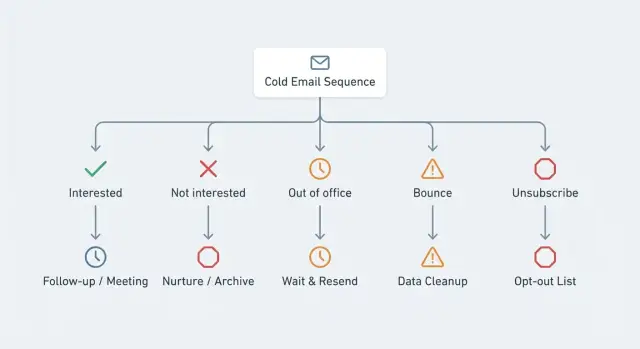
Why branching matters for reply categories
A single, linear cold email sequence treats everyone the same. It’s simple, but real inboxes aren’t. Some emails bounce, some people are out of office, and some clearly want you to stop.
When bounces get treated like silence, the sequence keeps sending to an address that can’t receive mail. That wastes sends, hides list quality problems (wrong domain, bad formatting, outdated data), and can drag down deliverability.
Out-of-office replies create a different failure. If you treat OOO like “no reply,” you often keep following up while the person is away. You miss the best moment (when they’re back) and you risk sounding careless, because their inbox already told you what’s happening.
Unsubscribes are the most sensitive. If someone opts out and your system keeps messaging them, you invite complaints, damage trust, and put your sender reputation at risk. Even if they never report you, those extra messages pollute your results because the replies aren’t about your offer.
A conditional path is a simple idea: what happens next depends on what happened, not just on time. In branching cold email sequences, the system watches for signals (like a bounce, an out-of-office message, or an unsubscribe) and moves the lead onto the right track.
Branching usually pays off in four ways: fewer unnecessary sends, fewer deliverability issues, better timing for OOO follow-ups, and cleaner reporting because each outcome is handled on purpose.
The reply categories you should separate
Branching only works if replies that need different actions don’t get lumped together. Most “messy inbox” problems happen when bounces, auto-replies, and human replies are treated as the same thing.
Bounce vs auto-reply vs human reply
A bounce is a delivery failure. An auto-reply is a machine response (like out-of-office). A human reply is everything else, whether it’s positive, negative, or a question.
When these get mixed, you waste time and create risk. You might keep sending follow-ups to an address that doesn’t exist (bounce), or you might reply to an out-of-office message and look like you didn’t read it.
Start with three buckets that trigger different behavior:
- Bounce: delivery failed. Stop the sequence for that address and fix the data.
- Out-of-office (OOO): delivery succeeded, person is away. Pause and resume later.
- Unsubscribe: the person asked not to be contacted (or the email client/provider signaled it). Stop immediately.
Hard bounce vs soft bounce (simple definitions)
Keep bounce types simple.
A hard bounce usually means the address is invalid or the domain rejects mail permanently. It won’t fix itself.
A soft bounce is usually temporary, like a full inbox or a short-term server issue. It might deliver later, but it still needs a cautious rule set.
Out-of-office vs other auto-responses
Treat OOO differently from generic auto-responses like “we received your message” or “support ticket created.” Out-of-office messages often include a return date, which is a clear cue for when to follow up.
Unsubscribe signals: explicit request vs system unsubscribe
Unsubscribes can show up as:
- Explicit text: “Please unsubscribe me” or “remove me from your list.”
- System signals: actions triggered via List-Unsubscribe from the email client or provider.
What you’re optimizing for (and what not to break)
Branching isn’t just about “handling replies.” It protects your deliverability, your recipients’ trust, and your team’s time.
Deliverability comes first. The fastest way to hurt it is to keep sending after the system already told you something is wrong: hard bounces, repeated soft bounces, angry replies, or unsubscribe signals. Good branching stops risky sends early so a bad list or broken address doesn’t poison the whole domain.
Respect and compliance are non-negotiable. If someone opts out, that’s the end. No reminders, no “just checking in,” no different sender, no new thread. Your automation should make it difficult to break this by accident.
Clean reporting keeps you honest. If out-of-office replies inflate your “reply rate,” you might think a message is working when it isn’t. If bounces stay in the sequence, your meeting rate looks worse than it should. Branching keeps your metrics tied to real intent.
Less noise for reps. Reps should spend time on conversations, not on sorting bounces, auto-replies, and opt-outs.
A simple rule set covers most teams:
- Stop sending immediately on a hard bounce or an unsubscribe.
- Pause and reschedule on out-of-office, then resume at the right time.
- Log auto-replies, but keep them out of the main “needs attention” view.
- Tag each path so reporting stays meaningful.
Example: if someone replies “I’m away until Feb 2,” the best outcome isn’t another follow-up tomorrow. It’s a pause, a single restart on Feb 3, and a note for the rep.
Simple rules for safe conditional paths
Branching works when every path is predictable. A good test: if a teammate takes over tomorrow, they should understand why a lead moved and what happens next.
Keep branches short and purpose-driven. Don’t try to “save” every reply with five extra steps. The more messages you send after a risky signal, the more you raise complaints and hurt deliverability.
A few guardrails keep branching cold email sequences safe:
- Default to stopping on high-risk categories (unsubscribe, spam complaint, repeated bounces). If you’re unsure, pause and review.
- Limit what each branch is allowed to do. Some branches should send nothing at all.
- Put a time limit on any waiting branch, especially out-of-office.
- Make each branch end with one clear owner action (verify address, update CRM), not extra follow-ups.
Out-of-office is the category that most often creates loops. Use a single re-try date based on the stated return date, but cap it (for example, don’t wait more than 14 days). If there’s no date, treat it as “unknown” and either wait a short fixed period or stop.
Finally, log the decision. You want an audit trail: what was detected, when, and what action fired. Weekly review helps you spot patterns, like one list source causing bounces or one message triggering more unsubscribes.
Step-by-step: design a branching sequence
Start by naming the few reply categories that actually change what you should do next. For most teams, it’s bounce, out-of-office, unsubscribe, and a normal human reply.
Define triggers in plain language so they’re consistent: “any bounce notice from the mail server,” “OOO with a return date,” or “explicit unsubscribe language.” If you use reply classification, decide what confidence level is high enough to act automatically and what should go to manual review.
Decide the action per category before you write any copy. The goal is less manual cleanup without creating risky automation.
A safe default:
- Bounce: stop immediately, mark the address as bad, and don’t retry from the same mailbox.
- Out-of-office: pause future steps, then resume on a specific date.
- Unsubscribe: stop all outreach to that person and record the opt-out.
- Not interested: stop and tag for later research, not another follow-up.
Only after those actions are set should you write messages for the OOO path. Keep them short and polite, and often don’t send anything at all.
Before launch, test with sample replies. You’re checking that each trigger fires once and doesn’t leak into other paths. A small test set is enough: a hard bounce, a soft bounce, an OOO with a date, an OOO without a date, and an unsubscribe with informal wording. If any case feels unclear, tighten the trigger or route it to review.
Branch design for bounces
Bounces aren’t “just a bad lead.” They’re a delivery signal that affects everything you send next. The bounce path should be the strictest: stop fast, retry carefully, and surface problems early.
Hard bounces: stop immediately
A hard bounce usually means the address doesn’t exist or the domain rejects mail permanently. End the sequence for that contact right away and never retry the same address.
Record the reason and keep the contact out of future campaigns. Repeatedly sending to invalid addresses can drop your reputation quickly.
Soft bounces: pause, then retry with limits
Soft bounces are often temporary (mailbox full, server busy, rate limiting). Treat them as a cautious “wait and see” branch.
A simple rule set works for most teams: pause 24 to 48 hours after a soft bounce, retry once or twice max, and if it bounces again, stop the sequence. Don’t automatically shift them to a different mailbox, since that can look like evasive behavior.
If you can, tag the contact as “soft bounce - needs review” so you can revisit later without clogging active campaigns.
When bounce rate spikes: escalate to mailbox or domain
One bounce is normal. A cluster is a warning. If bounce rate jumps after uploading a new list or switching domains, pause and investigate list quality, recent DNS/auth changes, and provider throttling.
Example: you launch a 200-contact campaign and see 12 hard bounces in the first hour. Don’t keep the schedule running. Pause the campaign and review the list source.
Branch design for out-of-office replies
Out-of-office replies aren’t a “no.” They’re a timing signal. Treating them like silence is how you end up sending follow-ups to someone who already told you they’re away.
The safest OOO path is simple: pause, then re-enter at the right moment.
When the reply includes a return date
If the message says “Back on Jan 22,” stop the sequence and schedule the next touch for shortly after that date. A good default is the next business day in the recipient’s timezone.
You can send one short check-in after they return, but don’t stack extra nudges on top of it.
When there is no date
Some auto-replies don’t include a return date (or it’s unclear). Use a conservative wait window (for example, 7 to 14 days), then send one “still a good time?” message. After that, go back to your normal cadence, not an accelerated one.
A practical OOO branch looks like this:
- Mark the contact as “OOO” for filtering and reporting.
- Pause all scheduled steps.
- If a return date exists, resume 1 business day after it.
- If no date exists, wait 10 days, then send one short check-in.
The key rule: don’t stack follow-ups while they’re away.
Example: an SDR emails a VP on Monday and gets “out until Feb 2.” The sequence pauses right away, then sends a single note on Feb 3: “Welcome back - should I reach out next week or later this month?”
Branch design for unsubscribe signals
Unsubscribe is the one category where speed matters more than cleverness. The moment you detect it, the safest branch is a hard stop. Treat it as terminal: no more steps, no “one last message,” no handoff to another sequence.
Make the stop global, not just local. If the same person is in two campaigns (or gets added again later), they should still stay suppressed. That means every sequence should read and write to one suppression list.
If they add context like “Not my role” or “Wrong company,” capture it as a reason. It helps future list building. But don’t force a reason - “unsubscribe” is enough.
A practical unsubscribe branch:
- Mark the contact as unsubscribed immediately and cancel all scheduled sends.
- Add them to a shared suppression list used by every campaign.
- Save any stated reason as a note or tag (optional).
Be careful with confirmation emails. Many teams send “You have been unsubscribed” out of habit, but it’s often unnecessary and can annoy people. Only send it if your process requires it, and keep it one plain message with no marketing.
Common mistakes and traps
Most problems with branching happen when rules get emotional (reacting to every signal) or too complex (no one remembers why a branch exists). The goal is fewer mistakes, not more automation for its own sake.
A classic trap is treating hard bounces like a temporary hiccup. If you keep retrying the same invalid address across steps, you hurt deliverability and waste sends that could go to real prospects.
Out-of-office mistakes are usually tone problems. If your branch escalates as if they ignored you (“just checking in,” “final attempt”), you look careless. Pause, then follow up once after their return date with a calm message.
Unsubscribes are where teams get burned. If someone opts out in one sequence but keeps getting emails from another, they complain. That’s a compliance and reputation issue, not just courtesy.
Common traps:
- Retrying hard bounces multiple times (or moving them into a branch that still sends).
- Treating OOO as a positive signal and increasing urgency.
- Continuing to email after an unsubscribe because it happened in a different sequence.
- Creating dozens of branches that no one reviews.
- Misreading “auto replies” that are actually security gateways or delivery failures.
A practical check: pick 20 recent replies and walk through what your rules would do. If you can’t explain the next step in one sentence, the branch is probably too complicated.
Quick checklist before you turn it on
Before you enable branching cold email sequences, do a safety pass. The goal is straightforward: stop sending when you should, pause when it makes sense, and keep your list clean without babysitting it.
Use this per-campaign check:
- Hard bounce: stop future sends immediately and mark the address undeliverable.
- Soft bounce: pause, retry only a limited number of times (for example, two total). If it keeps bouncing, stop.
- Out-of-office: pause and schedule one resume based on the return date. If there’s no date, resume once after a short delay and don’t wait forever.
- Unsubscribe: stop sends globally across all sequences and log the event.
- Test run: run a tiny internal test with seeded addresses that generate each signal.
A practical test: create three seed inboxes and deliberately trigger outcomes. Use a non-existent address for a hard bounce, an inbox with an auto-reply for out-of-office, and an address where you send an unsubscribe request. Then confirm the contact states changed once and no further steps are queued.
If you rely on automation, prefer branch conditions based on classified outcomes (bounce, out-of-office, unsubscribe), not keyword matches in the email body. That single choice prevents most false triggers.
Example: a small outbound campaign with branching
Picture a week-one outbound run: 200 prospects get a 3-step sequence (day 1, day 3, day 7). After the first send, you see 8 out-of-office replies, 6 bounces, and 3 unsubscribes.
If you do nothing, those 17 contacts keep getting follow-ups. That wastes sends, annoys people, and creates cleanup work for the rep.
With branching cold email sequences, you set a few rules and let the system route each contact:
- Bounce: stop immediately and mark the address as bad so it doesn’t get emailed again.
- Out-of-office: pause follow-ups and schedule one check-in after the return date (or a safe default like 14 days).
- Unsubscribe: stop everything right away and add the contact to your suppression list.
By week two, the rep inbox looks different. Instead of scanning for bounces and OOO messages, most noise is already handled. The rep mainly sees real conversations: interested replies, questions, and a smaller number of edge cases that actually need a human.
After the first send, review four things before you scale:
- Are bounces being captured correctly (hard vs soft), and are follow-ups truly stopped?
- Are OOO pauses long enough, and do return-date triggers work for common auto-reply formats?
- Are unsubscribe signals treated as final?
- Do any templates accidentally re-contact paused or unsubscribed leads through a different step?
Next steps: make it routine and reduce manual work
Keep branching simple at first. If you try to model every edge case, you’ll end up managing the system instead of selling. Start with three branches that remove the most cleanup: bounce, out-of-office, and unsubscribe.
Make it a weekly habit to review what landed in each bucket. You’re not chasing perfection. You’re looking for patterns: real replies misread as OOO, bounces clustered around one list source, or unsubscribes spiking after a specific step.
Write your rules down in plain language so every rep follows the same logic. A short internal note is enough: bounce stops, OOO pauses and resumes once, unsubscribe stops globally.
If you want the categorization to happen automatically, LeadTrain (leadtrain.app) includes AI-powered reply classification for outcomes like interested, not interested, out-of-office, bounce, and unsubscribe, and it can run multi-step sequences with these branches built in. It also bundles essentials like domains, mailboxes, and warm-up in one place, which helps teams avoid juggling several separate outbound tools.
Add new branches only when you can name the exact problem they solve. If a new path doesn’t clearly reduce work or risk, keep it out.
FAQ
What does “branching” mean in a cold email sequence?
Branching stops your sequence from treating every contact the same. It prevents needless follow-ups to bad addresses, people who are away, and anyone who has opted out, which protects deliverability and keeps your results cleaner.
Why are bounces such a big deal for deliverability?
If you keep sending after a bounce, you waste sends and signal poor list hygiene to email providers. A strict bounce branch helps you stop fast, surface data problems early, and avoid dragging down the sending domain’s reputation.
How should I handle hard bounces vs soft bounces?
A hard bounce is usually permanent, like an invalid mailbox or a domain that rejects mail, so the safest move is to stop immediately. A soft bounce is often temporary, so you can pause and retry once or twice, then stop if it repeats.
What’s the safest way to branch on out-of-office replies?
An out-of-office reply is a timing signal, not silence. Pause the sequence and resume shortly after the return date if it’s provided, or after a conservative fixed wait if there’s no date.
What should happen the moment someone unsubscribes?
Stop all outreach as soon as you detect an unsubscribe, and make it global across every campaign. Don’t send “one last message” or move them to a different sender; that’s how complaints and reputation damage happen.
Why separate bounce, auto-reply, and human replies instead of one “reply” bucket?
Mixed categories create bad automation decisions, like retrying dead addresses or replying to auto-replies as if they were real interest. Separating bounce, auto-reply, and human replies keeps actions predictable and reporting honest.
How does branching improve reporting and metrics?
OOO and auto-replies can inflate reply rate without showing real intent, and bounces can make your meeting rate look worse than it is. Branching keeps metrics tied to meaningful outcomes so you can judge copy and targeting accurately.
How do I keep branching rules from getting too complicated?
Keep the rules short, deterministic, and biased toward stopping on risk. Each branch should have one clear outcome, like “stop and mark bad address” or “pause until date,” rather than extra follow-ups that create confusion.
How can I test my branching sequence before sending at scale?
Seed a small test with cases that trigger each path, then confirm each trigger fires once and no future steps are queued incorrectly. You’re testing behavior, not copy, so a handful of controlled replies is enough.
When should I rely on AI reply classification vs manual review?
Use automation for clear signals like bounce, out-of-office, and unsubscribe, but route uncertain cases to review. If you use a tool like LeadTrain, AI reply classification can tag outcomes (interested, not interested, OOO, bounce, unsubscribe) so branches can run without reps manually sorting inbox noise.