Bounce and complaint feedback loops: read metrics and act fast
Bounce and complaint feedback loops can quietly sink deliverability. Learn what the numbers mean, why spikes happen, and what to fix first.
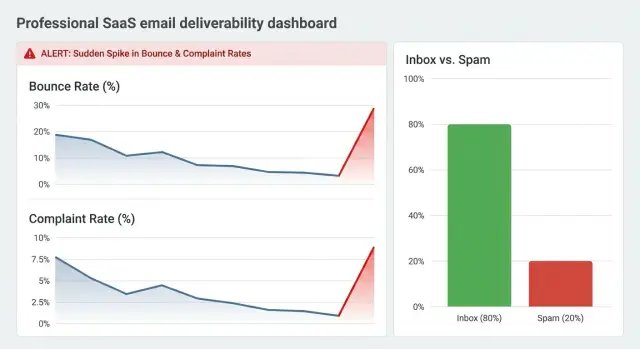
Why bounces and complaints matter for deliverability
Bounces and spam complaints are some of the fastest signals inbox providers get about whether your emails deserve the inbox.
- A bounce means the message couldn’t be delivered.
- A complaint means the recipient actively marked it as spam.
Those signals feed the systems that decide where your next emails land: inbox, promotions, or spam.
Small spikes matter because reputation is built on patterns, not intentions. If you usually send 500 emails and get 2 bounces, that’s background noise. If you suddenly send 5,000 and get 200 bounces, providers read it as a shift in list quality or sending behavior. Complaints behave the same way: a few can be enough to trigger filtering when volume is low, or when they appear right after a ramp-up.
When reputation drops, you rarely see one obvious “error.” You feel it:
- opens fall because more mail is filtered or routed to spam
- replies slow down, even from people who used to respond
- prospects say they never saw the email
- unsubscribes and complaints rise as recipients get frustrated
- recovery takes longer than expected, even after you fix the root cause
Bounce and complaint feedback loops aren’t just “bad news” metrics. They’re early warning lights. If you treat them as operational signals, you can act while the problem is still small and reversible.
Example: you import a new prospect list and launch a sequence the same day. The copy is fine, but the list includes old roles and closed domains. Hard bounces jump, then a few recipients mark you as spam because the message feels out of the blue. Two days later, your normally solid campaign has half the opens. The issue wasn’t the subject line. It was trust.
Key terms: bounce types, complaints, and feedback loops
When people talk about bounce and complaint feedback loops, they’re usually trying to answer one question: are inbox providers starting to distrust your sending?
A bounce means an email couldn’t be delivered. There are two main types, and the fix depends on which one you’re seeing.
Bounce types
A hard bounce is a permanent failure. Common causes include a mailbox that no longer exists, an invalid domain, or a recipient server rejecting the address as unknown.
A soft bounce is usually temporary, like a full mailbox, a brief outage, or “try again later” responses. If soft bounces repeat for the same addresses over multiple sends, they often turn into “effectively hard” problems. Even if the address is real, the provider may keep rejecting you.
A complaint is different. It happens when a recipient marks your email as spam (or uses a similar “this is junk” action). That’s a strong negative signal because it comes from a person, not a server.
Feedback loops (FBLs)
A feedback loop is a reporting system some inbox providers offer to senders. When a user complains, the provider sends a notice back so you can identify the message and stop emailing that person.
Not every provider offers FBLs, and the ones that do don’t all report the same way. Some include detailed event data, others send a minimal notice. Some report only complaints (not bounces). Timing can lag, so “complaint time” may not match send time.
Because of that, one dashboard can look calm while another looks noisy. The important part is understanding what each signal represents and watching for changes from your baseline.
What the main metrics mean (and how to read them)
These numbers tell mailbox providers whether your emails look wanted, safe, and technically valid. The key is context: rate, volume, and trend.
Bounce rate is the share of emails that couldn’t be delivered. As a directional guide, under 1% is usually healthy, 1% to 2% is a yellow flag worth checking, and over 2% is often risky (especially if it’s mostly hard bounces). Sudden jumps matter even more than the absolute number.
Complaint rate is the share of recipients who clicked “Mark as spam.” You want this to stay very low, often below 0.1%. Even 0.2% can hurt, depending on the provider and your history.
Volume context keeps you honest. Two complaints on 200 emails is 1% (serious). Two complaints on 20,000 is 0.01% (possibly acceptable), but still worth checking if it’s unusual for you.
Trend (baseline) is the real signal. If you typically see 0 to 1 complaints a day and you get 8 today, that matters even if the rate looks “small.”
A simple way to read your dashboard is to ask:
- Is the number high?
- Is it higher than my baseline?
Patterns can also point you toward the right diagnosis. If bounces rise while complaints stay flat, it often points to list hygiene (bad addresses, old data, a new source). If complaints rise while bounces stay normal, it often points to audience mismatch or message fatigue. If both rise together, treat it as urgent.
Why metrics change suddenly: the common triggers
Deliverability is sensitive to change. A small shift in who you email, what you send, or how you send can move your numbers in a single day.
Audience and segmentation shifts
The most common trigger is a list change. A campaign that worked for one segment can get more complaints when you switch geography, industry, or list source. Even if the copy is the same, the audience may be less familiar with you, and their tolerance can be lower.
Sender, content, and infrastructure changes
Spikes often come from a change you made on purpose, then forgot about:
- adding a new domain or mailbox (no history, reputation starts at zero)
- jumping volume too quickly or compressing the send window
- copy changes (more links, heavier sales language, riskier phrases)
- authentication or DNS issues (SPF/DKIM/DMARC misalignment after edits)
- provider throttling, new caps, or temporary blocks
A common pattern is launching a fresh domain at the same volume as an older one. Providers treat you like an unknown sender and may reject or filter more aggressively.
Quick clues to narrow the cause:
- bounces jump: suspect list freshness or a volume increase
- complaints jump: suspect segment change or copy edits
- both jump: check sender and authentication first
- only one mailbox is affected: suspect that mailbox, domain, or provider
Step by step: investigate a bounce or complaint spike
When you see a sudden jump, your goal is to confirm it’s real, find where it started, and reduce risk quickly.
First, confirm the spike. Reporting can lag, and small volumes are easy to distort. Check the time window, remove internal test addresses, and make sure you’re not double-counting retries.
Next, locate it. Don’t treat your account as one big number. Narrow to a specific sending domain, mailbox, campaign, and segment (like one imported list). A spike isolated to one mailbox is easier to contain than a spike across everything.
Then separate bounce causes from complaint causes. Bounces are often data quality or setup problems. Complaints are usually relevance and expectation problems. Mixing them leads to the wrong fix.
A practical order of operations:
- Verify timing and volume (did you send more than usual?)
- Split by source (which list or segment is worst?)
- Review bounce patterns (invalid address, blocked, mailbox full, policy)
- Inspect complaint context (which step, subject line, or offer triggers it?)
- Identify what changed (targeting, data source, copy, volume, sender)
Then stop the bleeding. If complaints rise, pause the step that triggers them. If bounces rise, isolate the worst segment and stop sending to it until you clean the data. If possible, throttle the affected mailbox rather than pushing through at full speed.
Example: your bounce rate jumps from 2% to 12% within an hour. Filtering by segment shows one list at 28% bounces, mostly “user unknown.” That points to bad addresses, not bad copy. Pause that segment, validate or re-pull the data, and keep sending only to segments that stayed normal.
What to do first: actions that reduce risk quickly
When bounces or complaints jump, speed matters. Stop the damage first, then diagnose.
The first 60 minutes: stop the bleeding
Reduce how much new mail you send from the mailbox or domain showing the spike. If you must keep sending, spread it across the day and avoid big one-time bursts.
Do these in order:
- Pause the campaign that changed most recently (new list, new copy, new offer).
- Cut daily volume for the affected sender and widen the send window.
- Temporarily stop follow-ups to non-openers.
- Keep only your most qualified segment active.
Triage bounces and complaints separately
For bounces, immediately suppress hard bounces and obvious typos. Confirm your suppression list is working so you don’t keep retrying dead addresses. If the spike is mostly soft bounces, slow down and check whether the mailbox is new, still warming, or suddenly sending too much.
For complaints, the first rule is simple: never email complainers again. Tighten targeting and rewrite your first lines so the recipient understands why you contacted them.
A quick copy test: if your opener could be sent to anyone, it will annoy more people.
Protect reputation while you investigate
If one campaign is risky, isolate it so it can’t drag down everything else. Keep experimental targeting and new lists separate from your most proven sequences and safest sender identity.
Common mistakes that make bounces and complaints worse
When the warning lights come on, the biggest damage often comes from what you do next.
Common mistakes:
- Treating authentication as “set it and forget it.” SPF, DKIM, and DMARC can break after domain changes or DNS edits.
- Relying on purchased or scraped lists because they look “verified.” High match rates don’t guarantee the mailbox exists or that the recipient expects you.
- Changing too many variables at once. If you switch domain, volume, copy, and offer in the same week, you can’t tell what caused the spike.
- Ignoring negative replies. “Not interested” and “stop emailing me” often turn into “Report spam” if you keep pushing.
- Being sloppy with unsubscribes and suppression. If someone opts out and still gets messages from another mailbox or campaign, complaints jump.
A simple rule: when metrics get worse, reduce risk before you try to “optimize.” Pause the highest-risk segment (new lists, new domains, coldest audiences) and verify basics first.
The habit that prevents repeat spikes
Make one change at a time, then watch results for a day or two. Clean inputs (domains, lists, suppression) beat clever tweaks when deliverability is on the line.
Example scenario: diagnosing a real-world spike
Monday morning, a new SDR launches a fresh sequence to 2,000 prospects. By lunch, you see a bounce spike and a few spam complaints. Replies are mostly negative.
This usually points to something new: new data, new copy, new volume, or a new sending identity. In this scenario, the lead list may have outdated or guessed emails, the targeting may be too broad, or the SDR may have sent too much volume too quickly from a mailbox that hadn’t earned trust.
The decisions to make in the first hour
Don’t push through it. Make a few clean moves:
- Pause the sequence producing the worst bounces or complaints.
- Compare against a stable campaign (same domain, mailbox, list source, and cadence?).
- Remove the riskiest contacts first (role accounts like info@, obviously scraped addresses, highest-bounce segments).
- Reduce sending volume for 24 to 48 hours while you fix the inputs.
- Rewrite the opener so it clearly matches the audience, and make opting out easy.
What “fixed” looks like
After you clean the list and relaunch slowly, you want a boring chart:
- bounces return to baseline and stay steady day to day
- spam complaints drop to near-zero and don’t rise with volume
- positive replies return gradually
- unsubscribes are consistent and predictable
Quick checklist: daily and weekly deliverability checks
Deliverability problems usually start as small shifts you can miss if you only look occasionally.
Daily checks (5 minutes)
Confirm authentication still works (SPF, DKIM, DMARC), mailboxes are connected, and sending behavior looks normal. Then compare today vs the last 3 to 7 days for bounce and complaint rates. If rates rise, pause the risky campaign, cut volume, and send only to your best segment until you know why.
Keep a simple change log: new list source, copy edits, volume changes, new domain or mailbox.
Weekly checks (30 minutes)
Review your worst segments and decide whether to improve targeting or suppress them. Update suppression lists with hard bounces, unsubscribes, and complainers. Audit list sources that produced higher invalid rates, and review whether any ramp-ups were too fast.
Next steps: build a monitoring routine that scales
Bounce and complaint feedback loops work best when they trigger action early. Keep your routine simple enough to run every day, and tighten it when you launch new lists, domains, or sequences.
Start with thresholds based on change, not perfection:
- alert if bounce rate doubles day over day, or hard bounces rise above 1% on a send
- alert immediately if complaints jump, or cross 0.1% on a campaign
- alert if unsubscribes spike vs baseline
As you scale, design your outbound so mistakes stay local by separating risk across domains, mailboxes, and audiences.
If you want fewer moving parts, LeadTrain (leadtrain.app) keeps domains, mailboxes, warm-up, multi-step sequences, and reply classification in one place, which makes it easier to pinpoint which sender or campaign changed when the numbers start to tilt.