B2B lead generation with community posts and comments
Learn B2B lead generation with community posts by spotting pain signals in threads, collecting prospects ethically, and emailing with clear context and follow-ups.
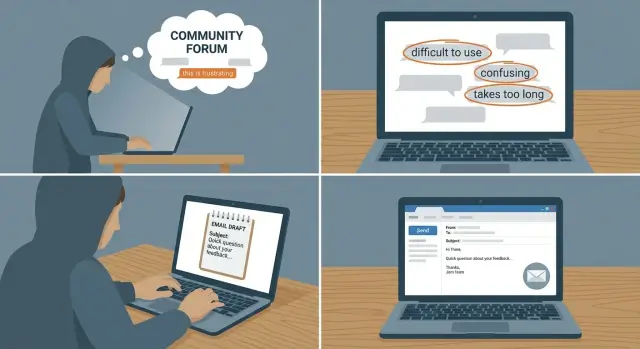
Why community threads can beat random cold lists
Most cold outreach fails for a simple reason: it sounds like it was written for “someone like you,” not you.
Random lists rarely tell you what a person cares about right now. So the email defaults to vague claims and a generic pitch. People spot that instantly and ignore it.
Community threads work differently. When someone posts “How do I fix low reply rates?” or “Deliverability tanked after we added new inboxes,” they’re not browsing. They’re trying to solve something today. That urgency is hard to pull from a scraped database.
Real context means you use one specific detail from what they said publicly and connect it to a practical next step. Not flattery. Not “saw your post.” More like: name the pain, name the constraint, suggest one small move that fits.
This approach tends to work best when your product is focused, the problem is easy to recognize in writing (missed targets, tool chaos, low conversions), and you’re fine with lower volume but higher intent. Fresh threads matter more than old ones.
Example: someone comments that they “juggle domains, warm-up, and sequences across five tools.” That’s a clear workflow pain you can reference, then offer a quick compare of setups (and, if it’s relevant, mention how LeadTrain puts domains, mailboxes, warm-up, and sequences in one place).
What a “pain signal” looks like in posts and comments
A pain signal is any line that shows someone has a real problem right now, not just curiosity.
The clearest signals are direct: “we can’t get replies,” “we’re stuck,” “does anyone have a fix for…” Often they add constraints without meaning to - time, team size, budget, compliance. Those details matter because they tell you what kind of solution they can accept.
Another strong signal is a workaround. If someone is sharing a hack, the problem is usually big enough that they’re spending time (and risk) to patch it.
Common patterns that usually indicate real intent:
- A failing metric (low reply rate, pipeline drying up, churn rising)
- Switching costs (“thinking of moving off X,” “migration advice?”)
- Vendor comparisons tied to requirements (“X vs Y for our use case”)
- Complaints about a tool (deliverability issues, bad support, missing basics)
- Recommendation requests with constraints (team size, timeline, budget range)
Not every question is a buying signal. Curiosity sounds broad (“what’s the best CRM?”). Buying intent sounds specific (“we need A and B, and we have to decide this month”). A quick rule: if you can restate their problem in one sentence with a clear downside, you probably found a pain signal.
Example: “Our outbound started landing in spam after we added two new SDRs. Any way to fix this fast?” That’s a fire. Treat it that way.
Where to look for high-signal conversations
You’re not hunting for “anyone in the industry.” You’re looking for moments of friction: missed targets, broken tools, messy handoffs, and “we tried X and it didn’t work.”
High-signal places usually include:
- Industry forums and Q&A sites where people ask for help choosing tools or fixing workflows
- LinkedIn posts where operators share results or struggles (comments often reveal the real story)
- Reddit-style communities and niche groups where people admit what’s not working
- Product communities, changelog comments, and “alternatives to [tool]” threads
Not every community is worth your time. Pick 2-3 places you can check weekly where your buyers actually show up and where people share specifics (numbers, tools, timelines) instead of only opinions.
A simple filter:
- Relevance: are your target roles posting?
- Freshness: are there new threads every week?
- Signal depth: do people mention tools, constraints, or urgency?
- Norms: is outreach tolerated, or strongly anti-sales?
Example: a VP Sales comments, “Reply rates dropped after adding two new domains - not sure if warm-up is the issue.” That one line gives you pain, context, and an angle for a helpful email.
Collect prospects without being creepy or spammy
The fastest way to ruin this method is to treat people like rows in a spreadsheet.
Save enough context to be helpful later, and nothing you wouldn’t feel comfortable saying out loud.
Start by capturing only what’s already public in the thread:
- The exact quote that shows the pain (one or two sentences)
- Where you saw it (community name + thread title)
- Any company hint they shared themselves (“at X,” product name, team info)
- The date you saw it
- A one-line note on why it might fit
Then infer role and fit carefully. Use the language in their comment. “We’re evaluating vendors” often signals a buyer. “I’m implementing” often signals an operator. If you can’t tell, don’t guess in the email. Ask a simple question.
Know when to move on: no clear problem, no plausible role connection, no urgency (old thread), or the person explicitly asks not to be contacted.
Keep tracking light. A simple sheet or a few CRM fields (Source Thread, Pain Quote, Role Confidence, Company, Date, Status) is plenty.
Also respect rules: don’t scrape private groups, don’t pull emails from places where people didn’t share them for contact, and don’t message someone on five channels at once.
Step-by-step: from a thread to a targeted email
This works best when you start narrow. Pick one problem your product solves extremely well and ignore everything else for now.
Create a small set of trigger phrases to scan for while reading:
- “we tried X but it didn’t work”
- “any alternatives to [tool]?”
- “deliverability is killing us”
- “we’re stuck on [step]”
- “how do you handle [process] at scale?”
When you find a relevant thread, do quick triage:
- Do they have the problem now?
- Do they look like your ideal customer?
- Are they asking for help, or just venting?
Mentally sort it as hot (clear need + clear fit), warm (need but unclear fit/timing), or cold (interesting but not a match).
Only after it’s hot or warm, look for a work email. The safest path is company name from the profile, then a quick check of public contact patterns. If you can’t find it fast, don’t force it. Replying in-thread first is often better.
Try to send a simple 1:1 email within 24 to 72 hours while the context is still fresh. Save one “context snippet” (a sentence, not the whole post) in your notes so follow-ups stay anchored.
How to write the first email with real context
The goal is to sound like a real person who noticed something specific.
Start with a subject line that nods to the situation, not your product name. “Quick idea on onboarding drop-offs” beats “Checking in.” They should understand why you wrote in under a second.
Your first sentence should show you actually read the post. Keep it short and factual: “Saw your comment about reps forgetting to log follow-ups after demos.” Avoid pasting a full paragraph. And be careful about naming the exact community if that might feel invasive.
Then make one clear assumption about their setup, without pretending you know everything: “Guessing this is a mix of manual reminders plus CRM tasks?”
Before you ask for time, give one small suggestion they can use today. A tiny, practical idea builds trust faster than a feature list.
End with a low-pressure question that’s easy to answer:
- “Is this still a problem, or did you solve it?”
- “Are you focused on one ICP or a few?”
- “Want a 3-email example that fits your use case?”
If you mention your tool, keep it optional: “If helpful, I can also show how teams run that sequence in LeadTrain, but the idea works either way.”
Follow-ups that stay relevant and polite
A good follow-up should feel like you’re continuing the same conversation from the thread, not restarting a generic sequence.
For follow-up #1, offer a small drop-in asset they can use quickly: a checklist, a short template, or a mini example.
For follow-up #2, get narrower instead of louder. Ask one question that reduces the chance you give the wrong advice: “Is the main issue deliverability (spam), targeting (wrong people), or offer (no clear next step)?” One-word replies are fine.
A simple stopping rule keeps you respectful:
- Stop after 2 follow-ups if there’s no reply.
- Stop immediately after “not interested.”
- Pause and retry after an out-of-office date.
- Treat bounces as a data problem, not a lead problem.
If they say “not interested,” reply once: thank them, confirm you won’t follow up, and (if appropriate) ask if it’s okay to check back in a few months.
If you’re running enough volume, reply classification can help you stay consistent. LeadTrain, for example, automatically categorizes replies like interested, not interested, out-of-office, bounce, or unsubscribe so you don’t keep poking people who already said no.
Organize and measure what you find
Community prospecting gets messy if you don’t capture the same basics every time.
Start by separating prospects by source (forum, LinkedIn, private group, Q&A site). Source changes how you reference the conversation, and it quickly shows where your best leads come from.
Keep a simple tracker. You don’t need a perfect database. A few consistent tags beat a long notes section:
- Source and thread topic
- Name, role, company
- Pain tag (what they mentioned)
- Urgency tag (now, soon, someday)
- Outcome (replied, booked, not interested, no response)
Measure sources by replies and meetings, not by how many profiles you collect. Ten leads with four thoughtful replies can beat a bigger group where nobody answers.
When you test messaging, change one variable at a time (subject or call to action). If you change both, you won’t know what worked.
A simple weekly review (30 minutes) keeps it sustainable: note your top sources by reply rate, the pain tags that led to meetings, and one small test for next week.
Common mistakes that ruin this approach
This method works because it feels like a genuine, human follow-up. It fails when the outreach stops feeling honest, or when emails don’t reach the inbox.
The quickest way to burn trust is “context” that’s vague or wrong. If you say “saw your post” but can’t name the actual struggle, it reads like copy-paste. On the other side, quoting long paragraphs can feel invasive.
Another trap is pitching features before confirming the problem. A thread is a clue, not a sales call. Check whether the pain is still real, then offer a small next step.
Common errors:
- Too little context (sounds made up)
- Too much context (feels creepy)
- Premature pitch (features before problem)
- Deliverability neglect (fresh domain, no warm-up, ramping too fast)
- Mixed signals (publicly friendly, privately aggressive)
Deliverability deserves extra attention. Even a thoughtful email fails if it lands in spam. Use a separate sending domain, set up SPF/DKIM/DMARC, warm up new mailboxes, and ramp volume slowly. If you want fewer moving parts, LeadTrain can buy and configure sending domains inside the platform, handle authentication behind the scenes, and run automated warm-up.
A good gut-check: write the email so you’d be comfortable if they posted it back into the thread.
Quick checklist before you hit send
Do a 30-second check so your message stays helpful (not creepy) and actually arrives.
Message check
Build the email around one exact line from the thread. Don’t paraphrase the whole post. Reference a single sentence that clearly shows the pain, then connect it to one practical idea.
Make sure the email still makes sense if your role guess is slightly off. If you’re not sure who they are, ask a question instead of pretending.
Keep it skimmable. If you need more than 120-150 words, you probably added fluff.
Deliverability check
Use an authenticated domain (SPF/DKIM/DMARC) and send from a warmed mailbox, especially if you’re starting outreach or adding new domains. Platforms like LeadTrain keep domain setup and warm-up in one place, which helps avoid last-minute technical mistakes.
Example: one comment thread that turns into meetings
A founder posts on a B2B SaaS forum: “We switched CRMs and now our outbound is a mess. Emails are going to spam, reps are scared to send, and we can’t tell who’s actually interested vs just out-of-office.”
Two people comment with similar issues. An SDR manager adds: “We’re using three tools just to run sequences, and replies are still manual triage.”
That combo (deliverability pain + tool sprawl + manual sorting) is a strong signal.
Your private notes can be short, but specific:
- Likely role: SDR manager
- Stage guess: small team
- Pain summary: inbox placement + too many tools + time wasted on reply sorting
- What to offer: a safer sending setup and a simpler way to handle replies
Here’s an email that matches their words:
“Hey Maya - saw your comment about outbound being a mess after the CRM switch.
When teams juggle multiple tools, deliverability and reply triage usually break first.
Quick question: are you tracking bounces and spam issues per mailbox, or is it mostly guesswork right now?
If helpful, I can share a simple setup that keeps domains/mailboxes warmed and auto-labels replies (interested, out-of-office, bounce) so reps focus on real conversations.
No pitch - if it’s not a fit, I’ll still send the checklist. Still working on this?”
Follow-ups should stay tied to the same thread:
- Follow-up 1 (2-3 days): “Quick one - did you ever find the root cause of spam after the switch? Happy to compare notes.”
- Follow-up 2 (4-5 days): “If you want, tell me sending volume per rep and how many domains you’re using - I’ll suggest a safe ramp.”
If they’re open to a call, keep it simple: confirm their current stack, where bounces/spam started, and what “good” looks like (meetings per week). Then suggest one small next step.
Next steps: scale the workflow without losing quality
Quality stays high when you scale slowly on purpose.
Pick one community where your buyers already ask for help and set a small weekly goal. Ten good prospects per week beats 200 names with no context.
Standardize what you already know works. Most pain signals repeat, so you can build a couple of templates and personalize one line: the exact sentence they wrote and why it matters.
A simple, repeatable system:
- 10 prospects per week from one community
- 2 templates tied to the pain categories you see most
- 1 manual note added to each email (the pain line)
- 1 clear skip rule (wrong role, no urgency, already solved)
As you grow, protect deliverability: clean sending domain, authentication in place, warmed mailboxes, gradual ramp.
If your audience keeps mentioning “too many tools,” it may be worth consolidating. LeadTrain is built as an all-in-one cold email platform that combines domains, mailboxes, warm-up, multi-step sequences, and AI-powered reply classification, so you spend less time on setup and sorting replies and more time having the right conversations.
FAQ
What’s the fastest way to find high-intent prospects in community threads?
Start with communities where your buyers ask for help in public and give specifics like metrics, tools, and timelines. Skip places where people only share opinions or where outreach is clearly unwelcome.
What exactly counts as a “pain signal”?
A pain signal is a line that shows an active problem with a downside, like "reply rates dropped" or "we’re going to spam." The best ones include constraints such as team size, deadline, or current tools, because they tell you what kind of fix is realistic.
How do I tell curiosity from real buying intent in a thread?
Use a simple test: can you restate their problem in one sentence with a clear cost if it stays unfixed. If it’s broad like "best CRM?," treat it as curiosity; if it’s specific like "we must decide this month," treat it as intent.
How do I collect prospects from threads without being creepy?
Capture only what’s already public and necessary to be helpful later: the exact pain quote, where you saw it, and the date. Avoid pulling personal details, guessing private info, or saving anything you wouldn’t be comfortable repeating back to them.
Should I reply in the thread or send a private email?
Reply in-thread first when it’s welcomed and your advice benefits others, or when you can’t confidently identify the right contact. Email works better when the topic is sensitive, the thread norms are anti-promo, or you can offer a specific next step that’s easier 1:1.
What should I include in the first email so it doesn’t feel generic?
Anchor the email to one specific sentence they wrote, then offer one small, practical suggestion they can use today. Keep the ask low-pressure with a yes/no question like whether the issue is still happening.
What are the biggest mistakes people make with “context-based” outreach?
Don’t copy long quotes, don’t pretend you know their whole setup, and don’t lead with a feature pitch. Too little context looks automated, too much context feels invasive, so aim for one short reference plus one helpful idea.
How soon should I email someone after I see a relevant thread?
Send within 24–72 hours while the thread is still fresh, then do up to two follow-ups if there’s no reply. Each follow-up should add something useful, like a quick checklist or a clarifying question, not just “bumping this.”
How do I avoid landing in spam when I start reaching out?
Treat deliverability like a prerequisite: use a separate sending domain, set up SPF/DKIM/DMARC, warm up new mailboxes, and ramp volume slowly. If you want fewer moving parts, LeadTrain can handle domain purchase and authentication, run automated warm-up, and keep sequences in one place so you don’t miss setup steps.
How do I measure whether community-based prospecting is working?
Track outcomes by source and intent, not by how many profiles you saved. Measure reply rate and meetings, tag the pain category, and change only one thing at a time when testing messaging so you know what actually improved results.