AWS SES sandbox to production for outbound email: a plan
AWS SES sandbox to production steps for outbound email, plus a practical plan for limits, ramp-up, and monitoring so you do not get blocked mid-scale.
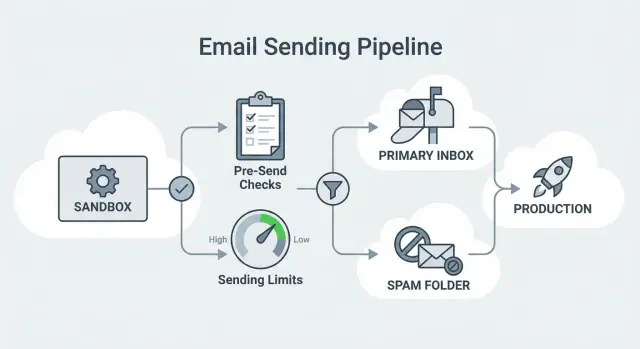
Why the SES sandbox blocks outbound scale-ups
When you create (or newly enable) Amazon Simple Email Service (SES), your account usually starts in the SES sandbox. It’s a safety mode: AWS lets you test sending, but it puts tight guardrails in place until you prove you can send responsibly.
Those guardrails are a real problem for cold outreach. In the sandbox, you’re limited by low daily volume, low per-second sending speed, and (most importantly) verified recipients only. That last rule blocks outbound entirely: you can’t email real prospects unless you verify each address or domain first.
That’s why teams often hit friction during an “AWS SES sandbox to production” move. You can have your sequence ready, your list imported, and a ramp planned, and still discover your first batch won’t send - or sends so slowly that follow-ups drift and the campaign loses momentum.
A common failure pattern looks like this:
- Tests to a few internal addresses work, so everything seems ready.
- You launch to prospects and sends fail because recipients aren’t verified.
- After approval, your sending rate is still low enough that steps spread out and results dip.
- As you increase volume, throttling errors force pauses while you request higher limits.
This hits SDR teams and founders especially hard because they need steady daily throughput. If your plan depends on consistent sending (for example, 200 new prospects per day across multi-step sequences), the sandbox turns outreach into stop-and-go work.
One more gotcha: the sandbox isn’t a realistic deliverability test. Real deliverability depends on authentication, warm-up, list quality, bounce/complaint control, and a gradual ramp. The sandbox mainly exists to slow you down until AWS is confident you won’t create abuse or poor recipient experiences.
Sandbox vs production: what actually changes
Sandbox and production differ in the ways that matter most for outbound.
In the sandbox, you can only send to verified identities (specific email addresses or entire domains you’ve verified). In production, you can email real recipients without verifying each one.
Your limits also change. Sandbox quotas are small. Production quotas are higher, but still enforced. You can still hit daily limits and per-second throttles, and AWS can adjust limits based on your sending history.
The other big shift is reputation. In the sandbox you don’t build meaningful history. In production, bounce and complaint rates start shaping your long-term ability to scale.
In practice, outbound teams feel three immediate differences:
- Who you can email: verified-only vs open sending
- How fast you can send: low caps vs higher (but still limited) quotas
- How much mistakes matter: production metrics quickly affect reputation and throughput
What AWS actually evaluates
When you request production access (and after you’re approved), AWS looks for signals that you won’t harm recipients or networks. Two metrics matter most:
- Bounce rate: high bounces usually mean poor list hygiene.
- Complaint rate: complaints suggest unwanted mail, unclear targeting, or misleading content.
AWS also cares about your use case and how you handle opt-outs. For outbound, that generally means: are you emailing people who could reasonably expect to hear from you, and can they stop receiving messages easily.
Production access isn’t the finish line. It’s permission to operate at real scale. If you ramp too fast, ignore unsubscribes, or send to weak lists, you can still get throttled or forced to slow down.
Pre-flight setup before you apply
Before you ask AWS to move you from sandbox to production, set up your sending foundation. SES approvals (and long-term stability) are much easier when your identity and handling processes look intentional.
Start with a dedicated sending domain that’s separate from your main corporate domain. Many teams use a closely related domain so outbound experiments don’t put their primary inbox reputation at risk.
Then set up authentication: SPF, DKIM, and DMARC. You don’t need an aggressive DMARC policy on day one, but you do need alignment. A simple goal is:
- SES DKIM signing matches the domain in your From address
- SPF is published
- DMARC is published so providers can verify legitimacy
Also decide your identity and reply handling upfront:
- Use a From name that looks like a real person or team.
- Use an address that can receive replies.
- Keep From details stable (don’t rotate names and addresses every week).
Finally, commit to a clear unsubscribe rule. Even in cold outbound, “stop” must mean stop - immediately and consistently across lists and sequences.
If you want an easier ops setup, LeadTrain (leadtrain.app) is built to keep domains, mailboxes, warm-up, sequences, and reply classification in one place, so fewer details slip through the cracks during setup.
Step-by-step: requesting production access in SES
Moving to production is a support request. Your answers matter as much as the technical setup.
1) Find the request in the AWS console
Open Amazon SES in the AWS region you’ll send from. In the account status area (where it shows you’re in the sandbox), choose the option to request production access or a sending limit increase. That opens a support case form.
2) Describe your use case in plain language
Be specific and easy to understand. Explain who you email, why you email them, how you got the addresses, and how recipients can opt out.
The strongest requests usually cover:
- Audience: who you email (for example, B2B prospects that match your ICP)
- Source: how addresses are obtained (manual research, vetted provider, your own signups)
- Opt-out: how people stop messages (link or “reply stop”), and how fast you honor it
- Ramp: how you’ll start small and increase gradually
- Hygiene: what you do with bounces and complaints
3) Provide what AWS typically asks for
Expect questions like sample subject lines and content, your company identity, your website, and how you avoid deceptive messaging. They often ask exactly how you handle hard bounces, complaints, and unsubscribe requests.
4) If you get rejected or follow-up questions
Don’t resubmit the same text. Address the specific concern (usually list quality, opt-out clarity, or an unclear use case). If needed, request a smaller limit first, then increase later once you have stable metrics.
Plan your sending limits so you don’t hit a ceiling
Getting from AWS SES sandbox to production is only half the job. The other half is making sure your outreach plan fits your SES quotas.
Outbound volume isn’t “leads x 1 email.” It’s new prospects plus follow-ups across a sequence, across active senders.
A simple way to estimate daily volume:
- Count active sending mailboxes.
- Multiply by new prospects per mailbox per day.
- Multiply by the average number of emails a prospect actually receives (initial plus follow-ups).
- Add a buffer (20-30%) for uneven days and retries.
Example: 6 SDRs start 40 new prospects each per day. Each prospect receives about 3 emails total over time. That’s 6 x 40 x 3 = 720 emails/day. With buffer, plan for roughly 900.
Also account for list quality. Bounces still count as sends. If a list source creates higher bounces, you’ll burn quota faster and damage reputation at the same time.
For ramping, start slower than your target even if SES gives you headroom. A conservative weekly ramp is often enough to protect reputation:
- Days 1-2: 10-20% of target volume
- Days 3-4: 30-50%
- Days 5-7: 60-80%
- Week 2: move toward 100% if metrics stay stable
Request higher limits early if you expect to hit your quota within the next 2-4 weeks (for example, you’re adding seats soon or your sequence is about to reach steady-state follow-up volume).
Monitoring that keeps you in production access
Once you’re in production, staying there is mostly about keeping your signals clean and predictable.
A simple weekly dashboard
Review a small set of metrics weekly (and daily during ramp):
- Delivery rate
- Hard bounce rate
- Soft bounce rate
- Complaint rate
- Unsubscribe rate
If delivery drops while bounces rise, suspect list quality or authentication issues. If complaints rise, suspect targeting, frequency, or copy.
Early-warning signs and what to do
Throttling usually shows up after repeatable metric shifts, not a single bad day. Watch for patterns like bounce rate rising after a new list upload, or complaints spiking after a copy change.
Keep simple rules so you don’t debate in the moment:
- If complaints rise, pause the newest segment and review targeting and messaging.
- If hard bounces rise, stop that list source and clean data before resuming.
- If soft bounces stay elevated for several days, slow the ramp until it settles.
A short change log helps a lot. Track major changes (new domain, new list source, new subject line set, volume increase). When metrics move, you’ll know what likely caused it.
Bounce, complaint, and unsubscribe handling for outbound
Once you move from sandbox to production, the fastest way to lose momentum is to ignore bounces, complaints, and unsubscribes. SES watches these rates closely, and mailbox providers do too.
Bounces: hard vs soft
Hard bounces are permanent failures (mailbox doesn’t exist, domain is invalid). Suppress these immediately and never retry.
Soft bounces are usually temporary (mailbox full, temporary error, rate limiting). Retry cautiously. If the same address soft bounces repeatedly, suppress it.
A safe rule:
- Hard bounce: suppress permanently.
- Repeated soft bounce: suppress after a few failed attempts.
- Sudden bounce spike: pause and diagnose before continuing.
Complaints and unsubscribes
Complaints (“Report spam”) are a strong negative signal. The best prevention is tight targeting and clear expectations, not clever phrasing.
Unsubscribes are normal in outbound. Treat them as mandatory. If someone opts out, suppress them immediately across all sequences and lists.
Common mistakes that trigger throttling or blocks
Many teams get approved and then run into trouble because their first week doesn’t match what they described to AWS.
The patterns that most often cause throttling:
- Jumping volume too fast right after approval
- Using weak list sources (old, scraped, unverified)
- Changing too many variables during ramp (domain, offer, audience, and volume all at once)
- Letting negative signals pile up (slow opt-outs, repeated bounces)
- Mixing cold outbound with important transactional mail on the same domain or identity
To stay safe, change one thing at a time, ramp predictably, and keep outbound separate from transactional mail.
Example: moving a small outbound team to SES production
Consider a team of 3 SDRs running a 14-day sequence. Each SDR adds 25 new prospects per day. If the sequence averages about 4 total emails per prospect, steady-state math looks like this:
- New prospects per day: 3 x 25 = 75
- Average emails per prospect: 4
- Expected daily sends at steady state: 75 x 4 = 300 emails/day
It won’t start at 300 on day one. Follow-ups stack over time, so volume rises as the sequence “loads.” That’s why your production plan should include a ramp, not just a switch.
A realistic ramp might be:
- Days 1-2: cap at 60-80/day total
- Days 3-4: cap at 120-160/day
- Days 5-7: cap at 200-250/day
- Week 2: approach steady state (around 300/day)
If complaints rise mid-ramp (for example, 2 complaints out of 150 sends), don’t push through. Freeze growth for 48 hours, cut volume by 30-50%, tighten targeting and copy, and confirm opt-out handling is working.
Quick checklist and next steps
Most “AWS SES sandbox to production” issues come from missing fundamentals that show up later as bounces, complaints, or throttling.
Quick 5-minute scan:
- Production access is approved, and the From domain identity is verified.
- SPF, DKIM, and DMARC are published and aligned with the From domain.
- A ramp plan exists (daily caps and gradual increases) that fits your SES limits.
- Monitoring is in place, with a named owner.
- Bounces, complaints, and unsubscribes are suppressed immediately.
If you want faster answers when AWS asks follow-ups (or when metrics dip), document three things internally: your list source, your ramp plan, and your exact opt-out rule.
A practical next step is a one-week production rehearsal: one domain, a small mailbox pool, a tight segment of recent leads, and conservative caps. If signals stay clean, ramp up. If not, pause, fix the cause, and resume slower.
FAQ
Why does Amazon SES start in the sandbox, and why is it a problem for outbound?
The SES sandbox is a safety mode. It limits daily volume and sending speed, and it requires you to send only to verified recipients, which makes real cold outreach impossible until you get production access.
What does “verified recipients only” actually mean in SES sandbox?
In the sandbox, SES only delivers to identities you’ve verified, like a specific email address or a whole domain you control. Prospects aren’t verified, so your sends fail even if your templates and sequences look fine in internal tests.
What changes when SES moves from sandbox to production?
You can send to anyone without verifying each recipient, and your quotas are higher than sandbox limits. You’re still subject to daily caps and per-second throttling, and your bounce and complaint rates start affecting your ability to scale.
What should I set up before I apply for SES production access?
Set up a dedicated sending domain and publish SPF, DKIM, and DMARC so your From domain aligns with your authentication. Make sure your From address can receive replies, your identity stays consistent, and your unsubscribe process is clear and immediate.
What should I write in the AWS SES production access request for cold outreach?
Explain who you email, why they should reasonably expect your message, how you got the addresses, and how opt-outs work. Add a realistic ramp plan and describe how you handle bounces, complaints, and unsubscribes, because AWS evaluates whether you can send responsibly.
What metrics does AWS care about most after I’m approved?
They commonly look at bounce rate and complaint rate as the clearest signals of list quality and recipient experience. They also want to see straightforward opt-out handling and non-deceptive messaging so recipients can easily stop future emails.
How do I calculate the sending limits I’ll actually need?
Estimate total sends, not just new leads, because follow-ups stack across a multi-step sequence. Multiply active mailboxes by new prospects per mailbox per day and by the average number of emails each prospect receives over the sequence, then add a buffer so you don’t hit a quota wall mid-week.
How fast should I ramp volume after moving to production?
Start below your target volume even if SES gives you more room, then increase gradually as long as bounces and complaints stay stable. If you ramp too fast, you can trigger throttling, cause follow-ups to drift, and damage early reputation signals.
What’s the safest way to handle bounces, complaints, and unsubscribes in SES?
Immediately suppress hard bounces and do not retry them, because repeated failures waste quota and hurt metrics. Honor unsubscribes right away across all sequences and lists, and treat spam complaints as a stop-and-investigate signal for targeting, copy, and frequency.
How do I avoid throttling or blocks after I get production access?
Use one clear change at a time and keep a simple log of what you changed, such as list source, copy, domain, or volume. If operations are scattered across multiple tools, a unified system like LeadTrain can help keep domains, warm-up, sequences, and reply classification consistent so fewer details get missed during ramp-up.