Auto-routing email replies: rule ideas that prevent drops
Auto-routing email replies keeps conversations from being missed by assigning each reply to the right owner using territory, account, and sequence rules.
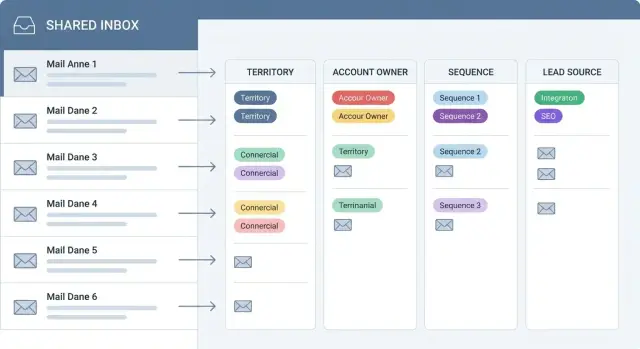
Why replies get dropped in shared outbound inboxes
Dropped conversations are the replies your team should have handled, but didn’t. A prospect answers, time passes, and nothing happens. A day later the message is buried under new replies, someone assumes “another person has it,” and the lead cools off.
This is common in shared outbound inboxes because responsibility is fuzzy. Multiple people can see the same reply, so everyone waits. Or the opposite happens: two people respond, the prospect gets mixed messages, and trust drops. Either way, momentum is lost.
Reply routing matters more than sending volume because replies are the scarce part. You can send 1,000 emails, but the few people who respond are the ones closest to a meeting. If you miss them, the extra sending just creates more noise and makes it harder to notice what matters.
Common signs you’re losing replies include:
- Responses sitting unread for hours while teammates assume someone else is working them
- Prospects following up with “Just checking if you saw my last email”
- Two reps replying to the same thread with different next steps
- Replies forwarded around with no clear next owner
- Interested replies getting handled slower than out-of-office messages
A quick example: an SDR books time to review replies after lunch. Meanwhile, a hot reply arrives at 9:12 AM. Three people see it in the shared view, nobody claims it, and by 2 PM the prospect has already chosen another vendor.
The goal is simple: one clear owner per reply, every time. Whether you use automated reply routing in a platform like LeadTrain or do it manually at first, your rules should answer one question instantly: “Who owns this conversation right now?”
Start with clear ownership and response rules
Dropped conversations usually happen for one simple reason: nobody is sure who owns the reply.
Start by defining what “owner” means on your team. In some teams, it’s the SDR who sent the outbound email. In others, it’s the account owner (AE). Some use pods (SDR + AE + CS) where the pod owns the account, but one person still needs to be responsible for the first reply.
Next, decide when ownership starts. For automated reply routing, a clean default is: the first human reply sets the owner, and every future reply in that thread goes to the same owner. If you only assign “positive” replies, neutral questions and objections can sit unanswered.
Write down a small set of response rules and treat them like rules, not goals:
- First response time (for any non-bounce, non-unsubscribe reply)
- Handoff time (when a reply should move from SDR to AE)
- Coverage hours (what happens after hours)
- Backup owner (who gets it if the owner is out)
- Escalation trigger (when a manager gets looped in)
Make ownership visible where people actually work. If your team lives in an inbox, show the owner right next to the thread. If they live in a CRM, push the owner there too. If they live in tasks, create a task automatically.
Example: an inbound reply comes in at 4:55 PM with “Can you send pricing?” If the rule says the SDR owns the first reply and must respond in 2 hours, the SDR answers now, tags the AE, and the AE becomes owner only after a meeting is booked (or after a defined handoff window). Tools like LeadTrain can help by classifying the reply and keeping the owner consistent across the thread, so it doesn’t bounce between people.
The four routing signals: territory, account, sequence, source
Good auto-routing email replies is less about clever logic and more about picking a few signals you can trust. These four usually cover most teams without turning routing into a project.
How each signal helps
Territory is the simplest starting point because it matches how many teams already sell. You can route by region, country, state, or even language. For example, any reply from Quebec (or any French-language reply) goes to the French-speaking rep, while US West goes to the West owner.
Account-based routing is next because it protects relationships. If a reply matches a named account list, an existing customer, or a record with an open opportunity, route it to the current owner, not the person who sent the last outbound email. This prevents awkward handoffs like a prospect replying to an SDR when an AE is already in active talks.
Sequence-based routing uses the campaign that triggered the reply. This is helpful when different sequences have different owners (SDR vs AE), goals (booking a meeting vs renewal), or promises (event follow-up vs cold outbound). If someone replies to an event follow-up sequence, it should go to the person assigned to that event list, even if the lead is in a default territory.
Lead source routing uses where the lead came from: an Apollo import, an events list, an inbound form, or a referral. Source matters because it often implies urgency and context. A referral reply should usually go to the rep who owns the relationship, not a generic inbound queue.
Tie-breakers when multiple rules match
Conflicts happen. Decide the order once, then stick to it. A practical priority order is:
- Existing account or open opportunity
- Referral or inbound form
- Sequence owner
- Territory
- Default owner (fallback)
If you use LeadTrain, keep the tie-breaker logic readable so a teammate can explain why a reply was assigned in one sentence. That alone prevents “someone else will handle it” moments.
Simple rule patterns that work for small teams
Small teams win with rules that are easy to remember. If a rep has to guess who owns a reply, it will sit. The point of auto-routing email replies isn’t perfection. It’s making sure every reply lands with one clear person fast.
A good starting point is to pick a few rules and keep them in a simple order. These patterns work well when you have 2 to 10 people handling outbound.
Five patterns you can copy
Most teams only need a mix of these:
- Round robin within a territory: if the lead is in West, rotate between the West reps to keep workload fair.
- Static owner by account list: assign a single owner for key accounts (top 50, strategic partners, renewals) so the relationship stays consistent.
- Owner by sequence: each outbound sequence has a default rep (or pod). Replies from that sequence go back to the person who launched it.
- Owner by lead source: route event leads to the events rep, inbound referrals to an AE, and partner leads to the partner manager.
- Fallback owner: anything that doesn’t match goes to one inbox owner (often an SDR manager) who reassigns quickly.
After you set the rules, write one sentence that explains the order, such as: account exceptions first, then sequence, then territory, then source, then fallback. The exact order is less important than having one order everyone follows.
Example: a 4-person team splits by region, but they also run a webinar once a month. They set round robin inside East and West, then add one exception: any lead with source = Webinar goes to the rep hosting the webinar follow-up. Everything else uses sequence owner. If a reply is missing data (no region, no source), it goes to the fallback owner.
Platforms like LeadTrain can make this easier because replies are classified and assigned automatically, so the fallback owner mostly handles edge cases instead of sorting every message by hand.
Advanced rule ideas for larger teams
When you have multiple SDRs, AEs, regions, and segments, reply routing needs to do two things at once: get the reply to the right person fast, and keep that ownership consistent for the rest of the thread.
Use a routing hierarchy (and keep it boring)
A good pattern is “account owner first, then territory.” If the company already exists in your CRM and has an owner, that person (or their team queue) should win, even if the lead came from a different region list. Territory becomes the fallback for net new accounts.
For bigger orgs, add segment gates early. An enterprise reply shouldn’t land with the same owners as SMB, even if they share a geography. Segment can come from your lead list, company size, or the sequence you used to reach them.
Rules that tend to hold up:
- Known account owner wins, otherwise route by territory.
- Segment splits first (SMB, mid-market, enterprise), then apply the owner or territory rule.
- “VIP or high intent” overrides: words like pricing, demo, security review, integration, or contract can route to an AE pod or a priority queue.
- Alias handling: if the reply came to a shared address (like sales@), route by the original sender or the sequence owner, not the alias mailbox.
- Thread stability: once an owner is set for an account, keep all future replies on that thread with the same owner unless a manager changes it.
Example: a prospect replies “Can you share pricing and a SOC2 report?” to a message that was forwarded from sales@. Even if the lead was tagged SMB, your override can move it to the enterprise security pod, while still keeping ownership pinned there for follow-ups.
If you use auto-routing email replies in LeadTrain, pair routing with reply classification so “interested” and “out-of-office” don’t compete for attention. That keeps priority queues small and your real conversations harder to miss.
How to set up reply routing step by step
Automated reply routing works best when you treat it like a small set of rules you can explain on a whiteboard. If someone new joins the team, they should understand who owns what in five minutes.
A practical setup sequence
Start by writing down your coverage. This is your “who owns which leads” map, based on territory (US West, DACH), segment (SMB, enterprise), or account type (partners, existing customers). Keep it simple enough that two people rarely overlap.
Next, connect your outbound sequences to a clear purpose and a default owner. A “Book a demo” sequence might route to SDRs, while a “Renewal reminder” sequence routes to account managers. If a reply arrives and nothing else matches, the sequence owner becomes your safe default.
Then define how you recognize an account. Most teams begin with a few matching methods:
- Company domain match (reply from @acme.com goes to the Acme owner)
- Company name match (useful when domains vary)
- CRM account ID (best when available)
- Parent-child account logic (subsidiaries roll up to a parent owner)
- A manual override list for VIP accounts
After that, decide which lead source labels you will actually use. “Webinar,” “Paid ads,” and “Outbound list” are usually enough. Too many categories means no one trusts the data.
Finally, set tie-breakers and fallbacks. For example: account match beats territory, territory beats lead source, and sequence owner catches the rest. Make unmatched replies go to a shared triage inbox, not into a void.
Before rolling it out, test with a handful of sample leads and real reply types: interested, not interested, out-of-office, bounces, and unsubscribes. In LeadTrain, the AI reply classification helps you verify the flow, because routing “interested” to an owner matters much more than routing an out-of-office perfectly.
Routing by reply type: what to automate and what not to
Not every reply deserves human attention. Good routing starts by separating signal from noise, then deciding what happens next: close it, assign it, create a task, or escalate.
Replies that shouldn’t create work are the easiest win. Out-of-office messages and bounces are usually informational. Route them to automation, not a person: mark the prospect as out-of-office or bounced, pause follow-ups if needed, and move on. That alone reduces inbox clutter and prevents reps from chasing dead threads.
Unsubscribes are different. Someone should own the process, but not as a sales conversation. Treat unsubscribe replies as compliance first: stop future sends, confirm the status, and log it. Assigning unsubscribes to the sender often creates busywork and inconsistency, so many teams route them to one inbox admin owner, even if the original rep started the sequence.
When a reply is “interested,” speed matters more than perfect attribution. Reply routing should prioritize immediate ownership: assign to the right rep and create a task (or notification) with a short SLA. For “not interested,” you usually only need ownership, not a task. Route it to the rep for a quick tag and close, or auto-close with a note if your team is comfortable.
A simple pattern that works in most teams:
- Interested: assign owner + create a follow-up task due today
- Not interested: assign owner only, no task
- Out-of-office: no owner, auto-tag and reschedule
- Bounce: no owner, mark invalid and stop
- Unsubscribe: assign to compliance owner, auto-suppress
Escalation is for urgent or angry replies. Define a clear path so nothing sits:
- Threatening language or legal risk: route to a manager
- Complaints about brand misuse: route to ops or founder
- “Stop emailing me” but not a clear unsubscribe: route to compliance owner
Example: a prospect replies “Not interested, stop spamming me.” Even if the classifier tags it as not interested, your rule should treat “stop” as an unsubscribe trigger and route it for suppression, not for debate.
Platforms like LeadTrain can classify replies (interested, not interested, out-of-office, bounce, unsubscribe) so these rules stay consistent and fast, even when the team is busy.
Common mistakes that break reply routing
Most routing problems aren’t caused by “bad logic.” They happen because rules were added one-by-one until nobody can explain who owns what. If you want auto-routing email replies to actually prevent drops, the rules need to be predictable.
One common failure is conflicting rules that fight each other. A reply can get assigned to Rep A because of territory, then reassigned to Rep B because of the sequence, then reassigned again when someone edits the account record. That owner flapping wastes time and makes follow-up feel sloppy.
Another big one is having no clear fallback owner. When a reply doesn’t match any rule (new country, missing company field, unknown source), it should still land with someone who will act. Otherwise it sits unassigned until the lead goes cold.
Mistakes that show up often:
- Routing too many replies to managers “just in case,” so reps never build the habit of owning conversations.
- Tracking lots of lead sources but not defining them, so “Partner,” “Referral,” and “Other” mean different things to different people.
- Ignoring time zones and coverage hours, so replies arrive at 8am local time and wait half a day for the right owner to come online.
- Forgetting to update rules when territories change, which quietly breaks assignment for weeks.
Example: an inbound reply from a US prospect comes from a list that used to belong to East, but the account was moved to Mid-Market and the sequence still points to the old owner. If your system picks “last rule wins,” ownership becomes random.
Keep one source of truth per signal, add a fallback, and review rules every time territories or sequences change. In platforms like LeadTrain, where replies can already be classified (interested, out-of-office, bounce), you can pair clean routing with fast handling instead of endless reassignments.
Quick checklist to prevent dropped conversations
Dropped replies usually happen for one simple reason: nobody is clearly responsible in the moment the message lands. Your job is to make sure every reply gets exactly one owner, even when multiple rules could apply.
Start by writing down your rule order and sticking to it. A common (and practical) default is: account match beats territory match, then sequence, then lead source. If you pick a different order, make it explicit so people stop debating it in Slack while a prospect waits.
A short checklist to keep auto-routing email replies reliable:
- One owner per reply, always. If two reps match, your system must pick one winner (and log why).
- Clear rule priority. Decide the order once (for example, account then territory) and apply it everywhere.
- Every sequence has a default owner and a backup. If the owner is out, on leave, or removed from the team, the backup catches replies.
- Auto-categorize low-signal replies. Out-of-office and bounces should be tagged automatically so they don’t sit in the main queue.
- Handle unsubscribes the same way every time. One consistent action (tag, suppress, notify) prevents accidents and compliance issues.
Then add one habit that saves you from silent failures: a weekly audit. Spend 15 minutes looking for unassigned replies, replies older than your SLA (for example, 4 business hours), and sequences that still point to former team members.
Example: a prospect replies to a sequence sent by Rep A, but the email matches an existing account owned by Rep B. With a clear priority (account beats territory and sequence), it goes to Rep B immediately, with Rep A automatically removed as an owner so the conversation can’t split.
Example: routing a reply when rules collide
Two SDRs, Maya and Jon, share the same sending domain. They’re running two outbound sequences at the same time: one for mid-market demos and one for event follow-ups. Both sequences send from the same set of mailboxes, so replies land in a shared place.
A lead named Chris was imported from a conference list. Chris replies while traveling and signs off with a hotel address in a different region than the company headquarters. The reply looks urgent: “Back from the event - can we talk this week?”
Here’s the catch: the CRM already has an account for Chris’s company, and it has an assigned account owner (Maya). But your territory rule would normally send Chris to Jon because the email mentions a location in Jon’s region. If you only route by territory, Maya never sees it. If you only route by sequence, it might go to the wrong SDR when the lead touched both sequences.
A clean tie-breaker prevents the drop. One simple pattern is:
- If an account exists and has an owner, assign the reply to the account owner.
- Else if the lead is already owned, assign to that lead owner.
- Else assign based on the sequence default owner.
- Else fall back to territory routing.
- If still unknown, send to a named “unassigned replies” queue.
With those rules, Chris’s reply goes to Maya instantly because the account owner is the strongest signal. Maya replies within your SLA, and the sequence is paused so Chris doesn’t get an awkward “just checking in” email later.
That’s what good auto-routing email replies looks like in practice: the system picks one clear owner, stops duplicate follow-ups, and makes sure the lead gets a human response fast. Platforms like LeadTrain can help by keeping sequences, mailboxes, and reply handling in one place, so tie-breakers stay consistent across campaigns.
Next steps: roll out rules gradually and keep them clean
The fastest way to break routing is to launch too many rules at once. Start small, watch what happens for a week, then add complexity only where you see real drops. The goal stays the same: every reply gets a clear owner the first time.
Begin with 2 to 3 rules that cover most of your volume, then expand. Pick the sequences that generate the most replies and tune those first. If your top sequence creates confusion, fixing it usually cuts most of the “who owns this?” messages.
A simple rollout plan:
- Turn on your first rules for your highest-reply sequence only
- Check unassigned replies daily for the first week
- Add one new rule at a time, then wait a few days before changing more
- Lock down naming for lead sources so rules don’t drift
- Write a short “when in doubt” policy (for example, default to the sender or account owner)
Keep score, even if it’s just a weekly note. Two numbers tell you whether reply routing is actually helping: how many replies were unassigned, and how often you had to reassign after the first owner was picked.
Standardizing lead source names sounds boring, but it saves you later. “Apollo,” “apollo.io,” and “APOLLO export” become three different rule inputs. Decide on one label per source and stick to it.
If you want routing to stay clean, keep everything in one place. LeadTrain is built for this style of workflow: it combines domains, mailboxes, warm-up, multi-step sequences, and AI-powered reply classification (interested, not interested, out-of-office, bounce, unsubscribe) so your ownership rules have consistent inputs and your best replies don’t get lost in a shared inbox. If you’re curious, LeadTrain runs at leadtrain.app.