API rate limit playbook for stable prospect list pulls
API rate limit playbook for prospecting: pagination, retries, caching, and logging patterns that keep list pulls stable, repeatable, and auditable.
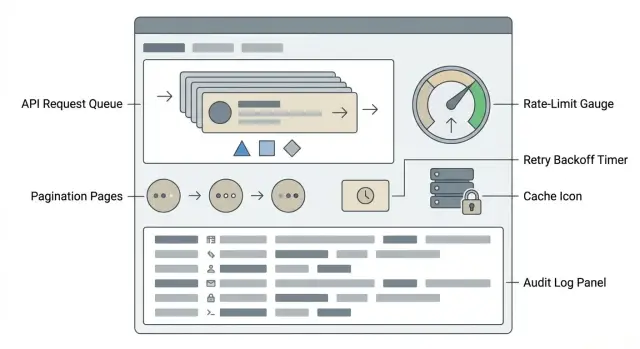
Why prospect list pulls fail under rate limits
Prospect pulls usually fail in boring, predictable ways: an integration hits an API limit, the job slows down, and someone reruns it without knowing what already happened. It looks like “the API was flaky,” but the real problem is that the pull wasn’t built to behave well under pressure.
When a pull runs into rate limits, a few failure modes show up again and again:
- Missing records because the job times out mid-page and never resumes cleanly
- Duplicates because pages are retried without an idempotent strategy
- Partial updates where some prospects are enriched and others are left blank
- Silent gaps when errors are swallowed and the pull “finishes” anyway
- Credit waste when the same endpoints get called repeatedly
That instability is expensive. You pay twice (or more) for the same data, sequences get messy (the same lead imported twice or messaged twice), and reporting becomes hard to trust. At scale, small list inconsistencies snowball into deliverability problems and confused follow-ups.
The goal is simple: pulls that are stable, repeatable, and auditable.
- Stable: large pulls complete without babysitting.
- Repeatable: reruns don’t change results unless the source data changed.
- Auditable: later, you can answer which calls happened, what was imported, and why.
The practical pieces are pagination that doesn’t skip or double-count, retries that recover safely, caching and incremental pulls that cut API load, and logging that makes every run explainable. If you pull prospects from providers like Apollo into an outbound system (for example, to feed sequences in LeadTrain), these safeguards keep growth from turning into chaos.
Know the limits before you pull
Before you start a large prospect pull, get clear on what the API will allow. This one “boring” step prevents half-finished lists, missing pages, and duplicate imports later.
Rate limits are about speed. Quotas are about total volume. Concurrency limits are about how many requests you run at the same time.
- Rate limit: max requests per second or per minute (example: 60 requests/min)
- Quota: max requests per day or per month (example: 10,000/day)
- Concurrency limit: max in-flight requests (example: 5 parallel requests)
Most APIs expose limit signals through response headers and a few common status codes. When you integrate with a provider, capture these signals early during a small test pull.
Typical patterns:
- HTTP 429 (Too Many Requests) and sometimes 403 for limit enforcement
Retry-Aftertelling you how long to waitX-RateLimit-Limit,X-RateLimit-Remaining,X-RateLimit-Reset(names vary)- Vendor-specific headers like
RateLimit-*orX-Quota-*
Also watch for burst limits. You might be allowed 60 requests/min, but still get blocked if you send 20 in one second. Bursts happen easily with parallel workers, retries, or a tight pagination loop.
For throughput planning, start conservative. Take the published limit and target 60% to 80% of it. If the limit is 60/min and each request returns 100 prospects, aim for roughly 40 to 45 requests/min (about 4,000 to 4,500 prospects/min) and keep parallel requests low (often 1 to 3) to avoid spikes.
Pagination that doesn’t miss or duplicate prospects
Pagination is where most “random” gaps and duplicates come from. The goal is deterministic page pulls, even if new prospects are being added while you read.
Offset-based pagination (page=7, limit=100) is simple, but risky when the dataset changes. If records are added or edited mid-run, the “7th page” can shift, causing skipped items or repeats. Cursor-based pagination (a next_cursor token) is usually safer because it tells you exactly where to continue, but it still depends on the API returning a stable order.
To keep pages consistent, request a stable sort and keep filters fixed for the entire run. A common approach is sorting by a monotonic field like created_at, with a tie-breaker like id so two records created at the same time don’t swap positions between calls.
If the data can change during your pull, freeze the universe. Record a cutoff timestamp at the start (for example, created_at <= 2026-01-17T10:00Z) and apply it to every page. New records can arrive, but they won’t reshuffle the pages you’re reading.
Stop rules and sanity checks help you know when to end and when to investigate:
- Stop only when the API returns no items, or there’s no
next_cursor. - Track unique IDs seen and alert if duplicates exceed a small threshold.
- Flag sudden drops in page size.
- Keep a running total and compare it to the API’s reported total when available.
- Persist the cursor (or last sort key) after every page so you can resume safely.
Retries that recover without making it worse
Retries help when the problem is temporary. They make things worse when the request is wrong or you’re already pushing the API too hard. Make retries predictable, limited, and polite.
Separate errors you should retry from errors you should fix:
- Retry: 429 (rate limited), 408 (timeout), most 5xx (server errors), and network issues (connection reset, DNS hiccups).
- Don’t retry: 400 (bad request), 401/403 (auth/permission), 404 (wrong endpoint or missing resource), and validation errors.
For 429s, respect the server’s instructions. If you receive Retry-After, pause for that long (plus a little randomness) and then continue. Ignoring Retry-After turns a slowdown into an outage, or worse, a temporary ban.
Exponential backoff with jitter means you wait longer after each failure and add a small random delay so many workers don’t retry at the same instant.
- Backoff rule: 1s, 2s, 4s, 8s, up to a cap (for example, 30 to 60s)
- Add jitter: randomize waits by about 20% to 50%
- Cooldown: after repeated 429s, pause the whole job longer (for example, 2 to 5 minutes)
Put a hard stop on retries. A rule like max 5 attempts per request, or max 10 minutes total retry time, prevents infinite loops.
Example: you’re pulling 50,000 prospects and page 37 returns 429 with Retry-After: 15. Sleep 15 to 20 seconds, retry that same page once, then continue. If you hit three 429s in a row, pause briefly instead of flooding the API.
Make pulls restartable and safe to repeat
A stable pull is one you can stop, restart, and rerun without changing the outcome. That matters when you hit rate limits, get a timeout, or deploy a fix halfway through.
Start with idempotent writes. Instead of “insert every row,” use an upsert with a clear de-dup key, then record what happened. Common keys include the provider’s person ID, normalized email, or a fallback like domain + full name.
A conflict rule set that stays predictable:
- If provider ID matches, treat it as the same prospect and update fields.
- Else if normalized email matches, merge and keep the most recently updated fields.
- Else create a new prospect record, and tag it with the pull job ID for traceability.
- Never overwrite an unsubscribe or “do not contact” flag during merges.
Make the pull restartable with checkpoints. Store the last confirmed cursor/page token and a count of records saved for that page. Only advance the checkpoint after you fully process and commit the page, so a crash replays at most one page.
Provider data can change under you: IDs get merged, deleted, or recycled. Keep a mapping table from “seen provider IDs” to your internal ID. If an ID suddenly points to a different email, quarantine it for review instead of silently updating.
Example: you pull 50,000 leads nightly into your outbound stack (or into a platform like LeadTrain). If the job dies at page 380, you restart from the last checkpoint, replay page 380 safely, and still end up with the same 50,000 records, not 50,800 with duplicates.
Caching and incremental pulls to reduce API load
Caching cuts API calls without changing what you get back. It helps most when you rerun a pull after a failure, repeat the same lookups (company domains, titles, locations), or enrich the same people multiple times. Treat caching as a safety feature, not just a speed trick.
A simple approach is caching by a stable key, like provider prospect ID or email, and storing only the fields you actually use for outreach. Then skip API calls for records you already have unless they’re likely to have changed.
TTL basics: how long to trust cached data
TTL (time to live) should match how fast the source data changes and how risky stale data is. Contact basics change slowly, while title and company can change faster.
- Hard identifiers (provider ID, email, company domain): long TTL (days to weeks)
- Profile details (title, seniority, location): medium TTL (hours to a few days)
- Status fields (unsubscribed, bounced, do-not-contact): short TTL (minutes to hours)
Incremental pulls: only new or updated
Instead of re-pulling everything, store a checkpoint like updated_at or a cursor token from the last successful run. Next time, request only records updated since that point. This cuts load, reduces rate limit pressure, and makes reruns predictable.
The common trap is stale data leaking into outreach. Protect against it by validating critical fields at send time (for example, do-not-contact flags) and refreshing records before they enter a new campaign.
If you’re feeding prospects into an outbound system like LeadTrain, incremental sync plus short TTLs on opt-out-related fields helps keep lists fresh while avoiding unnecessary provider calls.
Logging that makes pulls auditable
When a prospect pull fails or looks “off,” logs are how you prove what happened. Good logs answer simple questions quickly: what did we request, what did the API return, and which page did things change on?
Log a consistent set of fields for every API call. Keep it structured (JSON is common) so you can search and group by job.
- Timestamp (start and end), plus latency
- Endpoint and method, and key request params (page/cursor, filters, sort)
- Response status code and any rate-limit headers
- Result counts (records returned, next cursor,
has_more) - Error details (message, retryable or not, retry number)
Add correlation IDs so you can trace one pull across hundreds or thousands of calls. A simple pattern is one job_id for the whole pull and one request_id per API call. If you also store the last successful cursor with the job_id, you can line logs up with restart points.
Decide how much of the response to store. Raw responses make audits easier, but they can be expensive and risky. Prospect data may include personal info, so keep privacy in mind.
A practical compromise is storing a summary for every call (counts, cursors, hashes) and storing raw bodies only when something goes wrong, or only for a short retention window. If you store raw data, redact sensitive fields and encrypt at rest.
“Auditable” in practice: a sales ops lead asks why 2,000 prospects are missing from last Tuesday’s pull. With logs, you can show the exact filter params, the page where rate limiting started, the retries that ran, and the final cursor that was saved.
Monitoring and alerts for stable operations
Rate limits aren’t just a coding problem. If you don’t watch pulls while they run, a small API hiccup can quietly turn into missing prospects, duplicates, or a pull that never finishes. Monitoring should answer one question quickly: is this pull healthy right now?
Use a handful of metrics that make sense to non-technical teams:
- Requests per minute (and how close you are to the limit)
- Error rate (4xx vs 5xx)
- Retry rate (how often you’re backing off)
- Lag (how far behind the expected completion time you are)
- Progress (pages or records pulled per minute)
Alerts should focus on patterns, not single events. One 429 is normal. Twenty 429s in a row means you’re blocked and wasting time. The same goes for repeated 5xx errors, which often indicate an outage.
Useful triggers include a spike in 429 responses, repeated 5xx errors for more than a few minutes, and pagination that stops advancing (cursor unchanged, or record count not increasing).
Dashboards don’t need to be fancy. A simple view with a green/yellow/red status, current pull speed, last error type, and estimated time remaining is enough for an SDR manager to make a call.
Decide ahead of time when to pause automatically vs notify a person:
- Auto-pause on sustained 429s or when progress is flat for a set window
- Notify a person when the pull is paused or errors persist after cooldown
- Auto-resume only when error rates drop and progress returns safely
Example: you’re pulling 50,000 prospects from a provider API. If 429s jump from 1% to 40%, auto-pause prevents partial data from feeding your outreach system and reduces the risk of inconsistent list imports.
Step-by-step: running a stable prospect pull
A stable pull is a runbook you can repeat. The same inputs should produce the same output, even if the API slows down or fails mid-run.
A basic flow:
- Plan: write down the exact query filters, fields to request, sort order, and time window (for example, “created after 2026-01-01”). Decide your unique key (usually a prospect ID).
- Dry run: pull 1 to 2 pages. Confirm response shape, required fields, and that your key is always present.
- Full run: start from page 1 with a saved cursor/offset. Store each page and record the last successful cursor so you can resume.
- Verify: compare expected counts (from the API, if available) to what you saved. Check for duplicates and missing fields.
- Export/import: export a final, de-duplicated file plus a small run manifest so someone else can rerun it later.
Batch size and concurrency should come from signals, not guesswork. Start with a page size of 50 to 100 and one worker. If you see no rate-limit responses and latency stays stable, increase to 2 to 4 workers. Stop increasing when 429s become frequent or average response time climbs.
For validation, do a quick sample review (20 to 50 records) and then simple totals: total rows, unique prospect IDs, percent missing email/name/company, and whether any page was saved twice.
Document each pull in plain text: who ran it, when, which API account was used, exact parameters, page size, concurrency, and the final output hash or row count.
Example: a realistic large list pull that stays consistent
You need to pull 50,000 prospects from a provider API in about 2 hours so your outbound team can start tomorrow. You set a page size of 500, which means roughly 100 pages. The provider enforces a rate limit, so you pace requests and plan for occasional 429s and random 5xx errors.
The pull looks like this: request page 1, store the returned cursor (or next page token), and write a checkpoint that says “last_cursor=abc, pulled=500.” Then move on. If a request fails, don’t skip ahead. Retry the same cursor with exponential backoff (for example, 2s, 4s, 8s), add jitter, and cap retries so you don’t hammer the API.
Halfway through, page 37 returns a 429. Your audit log for that moment is simple and specific:
{"run_id":"2026-01-17T10:00Z","cursor":"p37","status":"retry","error":"429","backoff_seconds":8,"attempt":3}
After backoff, page 37 succeeds. The checkpoint updates only after that page is fully written to storage.
Later, someone reruns the same pull because they suspect a bug. The rerun reads the last checkpoint, resumes from page 38, and uses idempotent writes (for example, keying by prospect_id + source). The final list matches across reruns: no missing prospects, no duplicates, and a clear trail showing exactly where retries happened.
Common mistakes and traps to avoid
Most rate-limit failures are self-inflicted. The fix is rarely clever code. It’s avoiding a few predictable traps.
One mistake is treating every error as retryable. Retrying bad requests (wrong parameters, invalid auth, missing permissions) can hammer the API and make you look abusive. Retries should focus on temporary problems like 429 and many 5xx responses, and they should stop quickly when the error is clearly permanent.
Another trap is too much concurrency. Even with exponential backoff, firing 50 parallel requests can keep you above the limit forever. You want steady pacing, not bursts. A shared limiter (one queue for all workers) often beats independent backoff in each thread.
Pagination is also where silent data issues hide. Offset-based pagination on a changing dataset can skip or duplicate prospects without any error. Prefer stable ordering plus cursor pagination, or use a snapshot filter (for example, pull only records created before a fixed timestamp).
Finally, many pulls aren’t restartable. A small failure at 80% forces a full rerun, which increases load and raises the chance of duplicates.
Red flags to watch for:
- Retrying 400/401/403 errors instead of failing fast
- Unlimited parallelism that ignores global rate limits
- Offset pagination without a stable sort key
- No checkpoints (last cursor, last ID, or last timestamp)
- No idempotency rules for writing results
Example: if you pull prospects from Apollo and the job crashes, a saved cursor plus a “seen IDs” rule lets you resume cleanly. Without that, you rerun everything, double-import contacts, and trigger more limits.
Quick checklist before your next API pull
Five checks that prevent most failures
Before you hit run, confirm:
- Limits are written down: requests per minute, daily caps, burst rules, and which endpoints count the most.
- Pagination is deterministic: one method (cursor is best when available), stable sort, fixed filter window.
- Retry rules are safe: exponential backoff on, max retries set, and a pause-and-resume rule for sustained 429s and temporary 5xx errors.
- The pull is restartable: a checkpoint is stored (cursor or last seen timestamp/ID) and you de-duplicate by a unique prospect key.
- Logging is usable: run ID, time window, request counts, page/cursor values, and a simple end-of-run summary.
One quick repeatability test
Do a small pull (for example, 200 prospects) and rerun it with the same parameters. The total count should match, duplicates should be zero, and any differences should be explainable (like newly created prospects that fall outside a fixed window).
If you’re pushing prospects into an outbound system, verify write behavior too: when the same prospect appears again, update the existing record instead of creating a new one.
Next steps: from stable pulls to consistent outbound execution
A stable pull only matters if it turns into a controlled workflow. The question to end on is always the same: how do you move from a verified list to outreach without changing the data, hurting deliverability, or losing track of what happened?
Freeze the list you intend to contact. Save the pull timestamp, filters used, and final record count. If you need to enrich or dedupe, do it once, record the rules, and produce a clean send-ready version. That becomes the source of truth for the campaign.
Deliverability is the next gate. Even a perfect list can fail if sending setup is shaky. Use authenticated domains (SPF/DKIM/DMARC), avoid sending from brand-new domains at full speed, and warm mailboxes before you scale.
A practical handoff from “data is ready” to “outreach is running”:
- Assign one owner for the pull and one owner for the campaign (it can be the same person).
- Store a short runbook: where the list lives, how it was pulled, and how to rerun it safely.
- Import only the frozen send-ready file into your outreach tool.
- Start with a small batch, then ramp volume as replies and bounces look healthy.
- Track outcomes back to the pull: bounces, unsubscribes, and reply rates by segment.
If you want fewer tools involved, platforms like LeadTrain bundle common outbound pieces (domains, mailboxes, warm-up, multi-step sequences, and reply classification) so the handoff from list building to sending stays consistent. The main point is the same either way: repeat the same pull rules, the same validation, and the same launch steps, with a clear owner who can rerun the process without guessing.
FAQ
Why do prospect pulls fail so often when rate limits kick in?
Rate limiting usually breaks pulls in ways that don’t look like a hard failure: the job times out mid-page, retries the same page without de-duplication, or silently finishes after swallowing errors. The result is missing records, duplicates, partial enrichment, and wasted API credits.
What’s the difference between rate limits, quotas, and concurrency limits?
A rate limit is how fast you can make requests, a quota is how many you can make over a longer window, and a concurrency limit is how many requests you can have in flight at once. You can be under your daily quota and still fail if you spike concurrency and hit per-minute or burst limits.
How do I know I’m hitting the API limit versus a normal outage?
Start by logging status codes and any limit headers on every call, especially Retry-After and remaining/reset signals. Do a small test pull first so you can see the provider’s real behavior under load, since documented limits and burst enforcement often differ.
How do I paginate without skipping or duplicating prospects?
Prefer cursor-based pagination when the API supports it, and always request a stable sort so the order doesn’t reshuffle between calls. If the dataset can change during the pull, use a fixed cutoff timestamp so new records don’t shift pages and cause skips or repeats.
What’s a safe retry strategy for 429 errors and timeouts?
Retry only clearly temporary failures like 429s, timeouts, and most 5xx errors, and stop retrying permanent errors like 400 or auth problems. When you get a 429, follow Retry-After, add a little randomness, and cap total retry time so you don’t get stuck in loops.
How can I rerun a failed pull without creating duplicates?
Make your writes idempotent by upserting on a stable key such as the provider’s prospect ID, and keep consistent merge rules so reruns don’t change outcomes. Save a checkpoint after each fully processed page so a crash replays at most one page and doesn’t create duplicates.
When should I use caching and incremental pulls instead of re-pulling everything?
Use caching for lookups you repeat and for enrichment data you don’t need to refresh on every run, and keep a TTL that matches how fast fields change. For ongoing syncs, incremental pulls based on updated_at or a stored cursor reduce load and make rate limits less likely to trigger.
What should I log to make a prospect pull auditable?
At minimum, capture job ID, request params, cursor or page token, counts returned, latency, status codes, and any rate-limit headers. This lets you answer what happened on the exact page where things changed and proves whether missing data came from the source, the pull, or the write step.
What metrics and alerts actually catch pull problems early?
Watch progress rate, error rate split by 4xx/5xx, and how often you’re backing off, because those show whether you’re advancing or stuck. Alert on patterns like sustained 429s, repeated 5xx errors over several minutes, or a cursor that stops changing, since those are the signals that produce partial lists.
How does this affect my outreach workflow once prospects are imported into LeadTrain?
A steady, low-concurrency pace usually beats bursts, especially once retries begin stacking. If you’re pushing prospects into an outbound workflow like LeadTrain, stable pulls matter because duplicates can lead to double messaging and messy reporting, and gaps can create inconsistent sequencing and follow-ups.